


 software
Similar presentations:


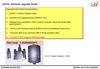





M1-S Pro Firmware Upgrade Instructions
1.
• Attention: This firmware can only be used for upgrading M1-SPro V2.0, V2.1 and above.
• Please check the label on back of your M1-S Pro, make sure
the version is right.
• For older M1-S Pro, this firmware is inusable.
2.
1、Install the upgrade tool: BlueSuite.WIN.3.3 Installer_3.3.9.11372、Connect the M1-S Pro host to the computer through an USB cable. Then, an USB drive of approximately
15MB will appear on the computer, indicating that the upgrade tool has been successfully installed, as shown
in the following image on the right; Look at what the red arrow indicates:
(If the device does not show on the computer, plus replug the USB cable again.)
3.
3、Open the HidDfu Tools software underQualcomm BlueSuite 3.3.9; Look at what the
red arrow indicates:
4.
4、Specify the File path as the DFU upgradefile in the HidDfu Tools software interface.
5.
5、Set the relevant 5 settings in the HidDfu Toolssoftware interface to be the same as the one shown
on the right; Look at what the red arrow indicates:
6.
6、Click the Run button onthe HidDfu Tools software
interface to perform the
upgrade; The upgrade will
start in a few seconds.
7.
7、After 13-14 minutes, the progress bar on thesoftware interface of HidDfu Tools is full, and the
prompt at the arrow indicates that the PASS is
upgraded.
8.
8、Attention After the host upgrade is completed, please restore the factory settingsbefore use, otherwise the prompt sound, volume, etc. will be very low.