
 programming
Similar presentations:



Upgrade Guide Router/Switch
1.
Upgrade GuideRouter/Switch
MAIPU, MAKE IT INTELLIGENT
2.
Upgrade OverviewWhen the software is upgraded, it is usually necessary to upgrade all types of software. If the version of a
certain type of software is not updated during the upgrade process, there is no need to repeatedly upgrade
the software. Generally, the device can be restarted after all corresponding versions have been upgraded.
There are several types of software:
image program:
The main control board program package with the suffix .pck, which contains a collection of programs (operating system
and application programs, etc.) for the normal operation of the system.
bootloader program:
The program with the suffix of bin or pck, the boatloader program of the main control board, is solidified in the ROM of the
main control board and the main board of the business board, and is executed first after the device is powered on. This
program initializes the basic system, and its main function is to guide the operating system to load.
devinfo:
OEM program, which contains information such as the model ID and function ID of various devices and boards. It is mainly
used for upgrading when equipment is remodeled.
webrom:
Control the http/https service of device.
MAIPU, MAKE IT INTELLIGENT
3.
Upgrade Overviewpackage program:
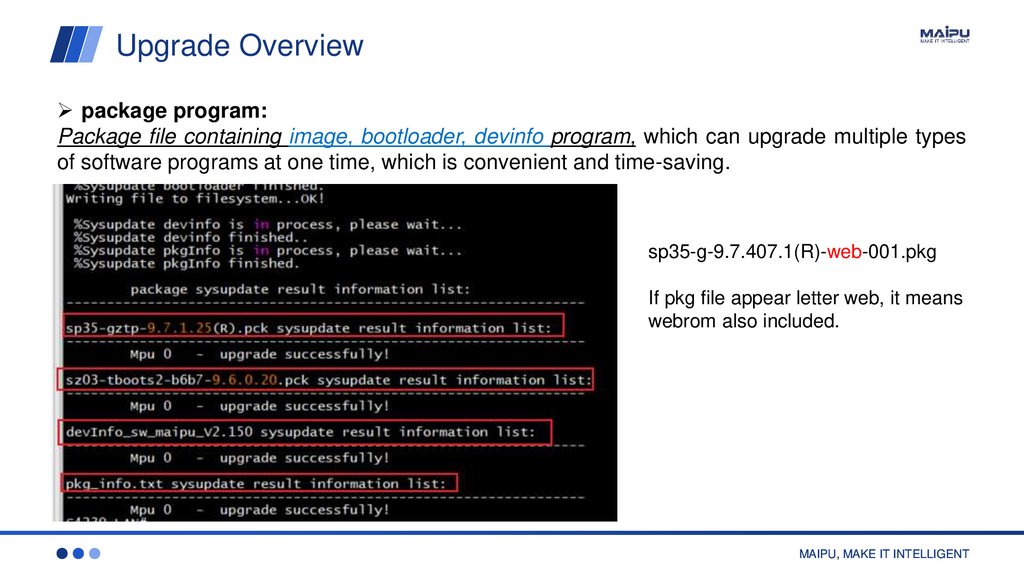
Package file containing image, bootloader, devinfo program, which can upgrade multiple types
of software programs at one time, which is convenient and time-saving.
sp35-g-9.7.407.1(R)-web-001.pkg
If pkg file appear letter web, it means
webrom also included.
MAIPU, MAKE IT INTELLIGENT
4.
Upgrade Firmware Option1Only switch supports this currently.
Step 1: Upgrade package (image, bootloader, devinfo, web):
switch# sysupdate package 10.11.12.215 sp35-g-9.7.100.18(R)-web-001.pkg
Step 2 Reload
switch# reload
Step 3 Delete previous image and webrom file
switch# filesystem
switch(config-fs)# dir
switch(config-fs)# delete sp35-g-9.7.20.1(R).pck
switch(config-fs)# delete webrom-sp35-V009R007C04B012.rom
% WARNING: File /flash/webrom-sp35-V009R007C04B012.rom will be deleted!
% Please confirm to continue?(Yes|No)yes
MAIPU, MAKE IT INTELLIGENT
5.
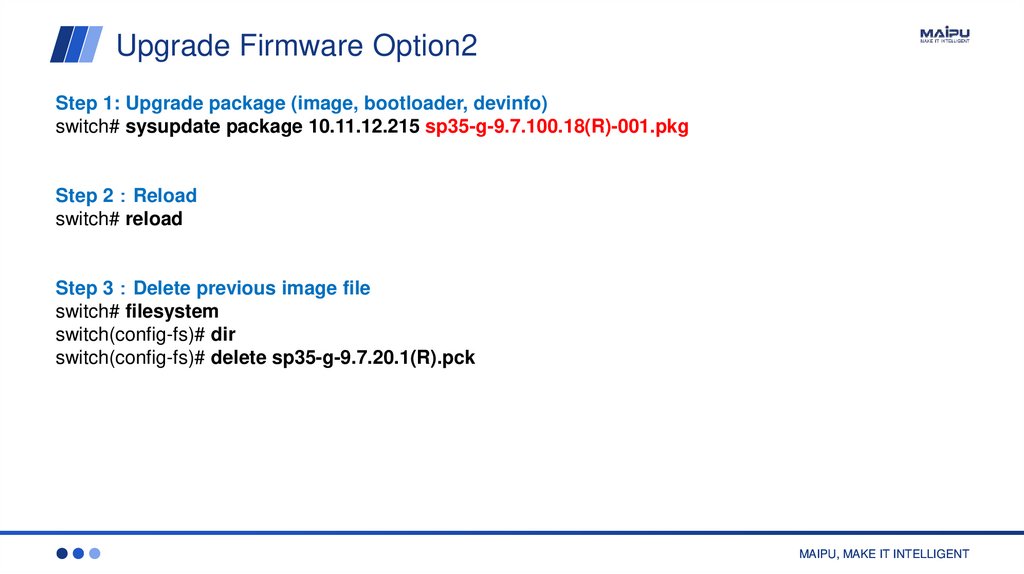
Upgrade Firmware Option2Step 1: Upgrade package (image, bootloader, devinfo)
switch# sysupdate package 10.11.12.215 sp35-g-9.7.100.18(R)-001.pkg
Step 2 Reload
switch# reload
Step 3 Delete previous image file
switch# filesystem
switch(config-fs)# dir
switch(config-fs)# delete sp35-g-9.7.20.1(R).pck
MAIPU, MAKE IT INTELLIGENT
6.
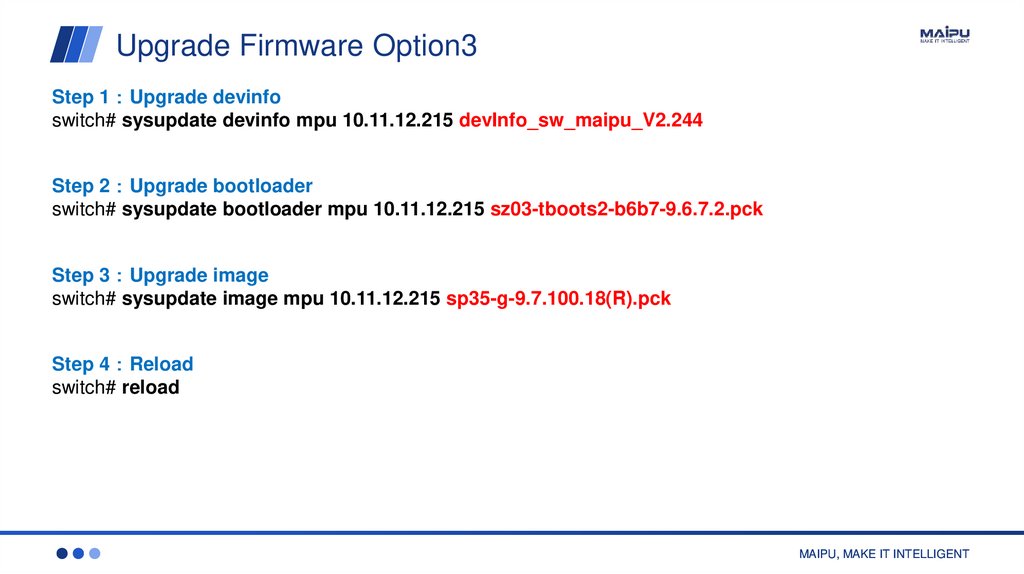
Upgrade Firmware Option3Step 1 Upgrade devinfo
switch# sysupdate devinfo mpu 10.11.12.215 devInfo_sw_maipu_V2.244
Step 2 Upgrade bootloader
switch# sysupdate bootloader mpu 10.11.12.215 sz03-tboots2-b6b7-9.6.7.2.pck
Step 3 Upgrade image
switch# sysupdate image mpu 10.11.12.215 sp35-g-9.7.100.18(R).pck
Step 4 Reload
switch# reload
MAIPU, MAKE IT INTELLIGENT
7.
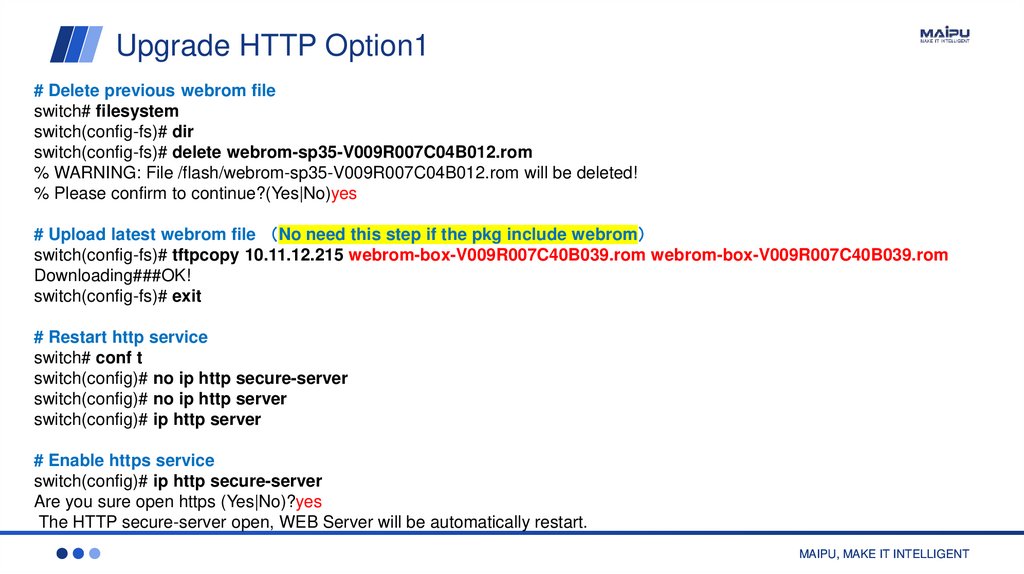
Upgrade HTTP Option1# Delete previous webrom file
switch# filesystem
switch(config-fs)# dir
switch(config-fs)# delete webrom-sp35-V009R007C04B012.rom
% WARNING: File /flash/webrom-sp35-V009R007C04B012.rom will be deleted!
% Please confirm to continue?(Yes|No)yes
# Upload latest webrom file No need this step if the pkg include webrom
switch(config-fs)# tftpcopy 10.11.12.215 webrom-box-V009R007C40B039.rom webrom-box-V009R007C40B039.rom
Downloading###OK!
switch(config-fs)# exit
# Restart http service
switch# conf t
switch(config)# no ip http secure-server
switch(config)# no ip http server
switch(config)# ip http server
# Enable https service
switch(config)# ip http secure-server
Are you sure open https (Yes|No)?yes
The HTTP secure-server open, WEB Server will be automatically restart.
MAIPU, MAKE IT INTELLIGENT
8.
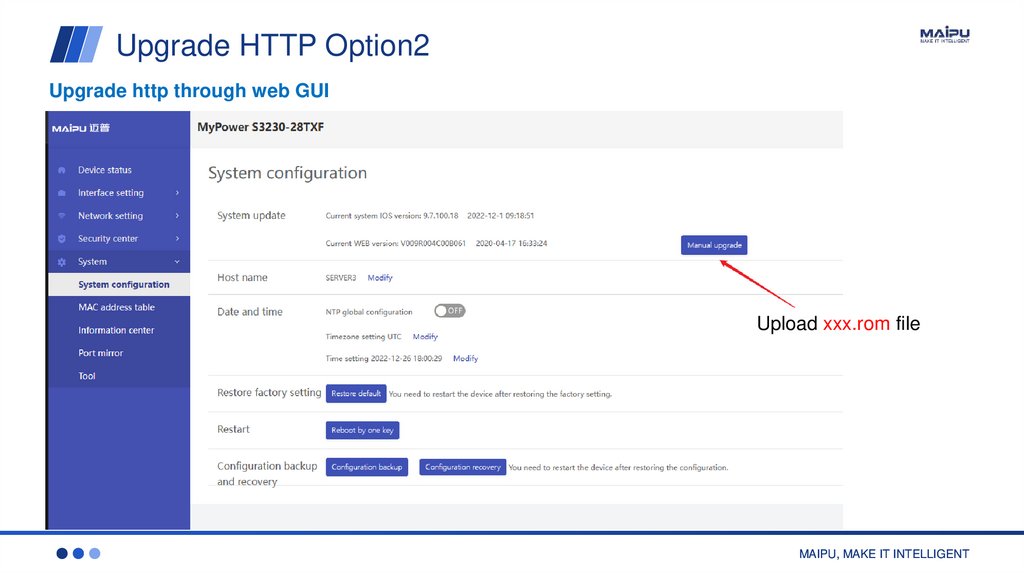
Upgrade HTTP Option2Upgrade http through web GUI
Upload xxx.rom file
MAIPU, MAKE IT INTELLIGENT
9.
THANKSMAIPU, MAKE IT INTELLIGENT
overseas@maipu.com I www.maipu.com I +86-28-65544850