

 electronics
Similar presentations:









SOF108 - Computer Architecture Week 12: Memory Hierarchy - II
1. SOF108 - Computer Architecture Week 12: Memory Hierarchy - II
MALAYSIASOF108 - Computer Architecture
Week 12: Memory Hierarchy - II
1
2. Agenda
• Cache Memory• Number of Cache
• Which block should be replaced on a cache miss?
• What happens on a write?
• Cache Performance Metrics
2
3. Cache Levels
• The cache levels are often numbered, with lower numbers being closer to theCPU. (L1 < L2 < L3)
• L1 cache is often located directly on the CPU chip itself and runs at the same speed as the
CPU
• L2 cache is often part of the CPU module, runs at CPU speeds (or nearly so), and is usually a
bit larger and slower than L1 cache
• L3 cache is the largest among the all the cache, even though it is slower, its still faster than
the RAM, shared among all the cores (in multi-core)
3
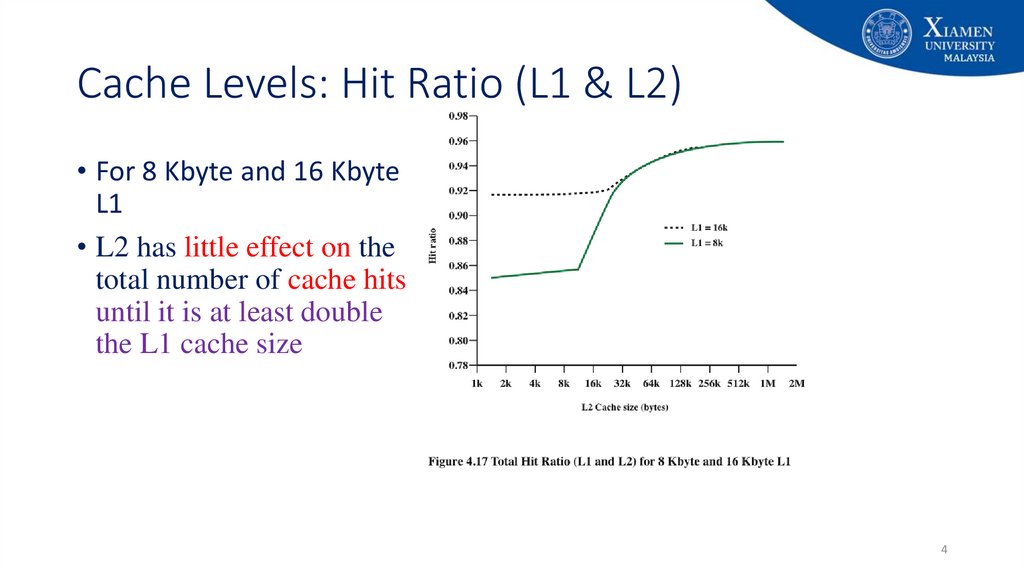
4. Cache Levels: Hit Ratio (L1 & L2)
Cache Levels: Hit Ratio (L1 & L2)• For 8 Kbyte and 16 Kbyte
L1
• L2 has little effect on the
total number of cache hits
until it is at least double
the L1 cache size
4
5. Unified v Split Caches
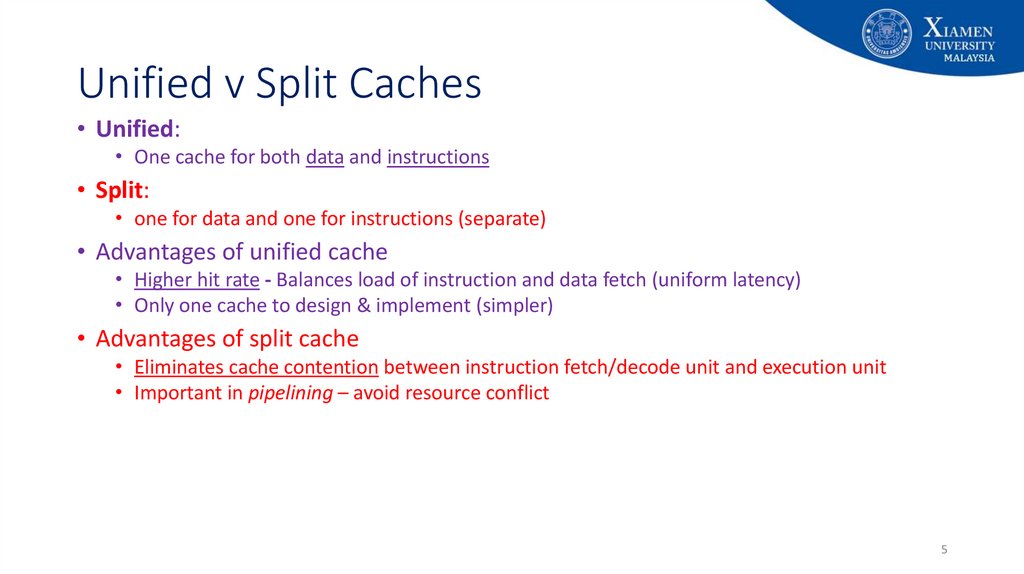
• Unified:• One cache for both data and instructions
• Split:
• one for data and one for instructions (separate)
• Advantages of unified cache
• Higher hit rate - Balances load of instruction and data fetch (uniform latency)
• Only one cache to design & implement (simpler)
• Advantages of split cache
• Eliminates cache contention between instruction fetch/decode unit and execution unit
• Important in pipelining – avoid resource conflict
5
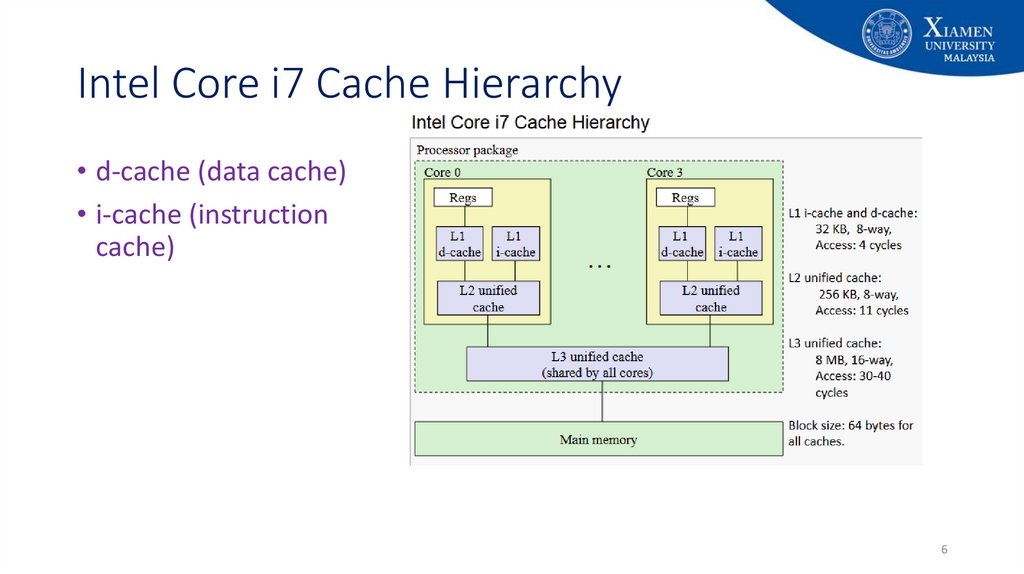
6. Intel Core i7 Cache Hierarchy
• d-cache (data cache)• i-cache (instruction
cache)
6
7. Caching Concepts – Review from Last Week
CPU14
12
0
Level
k:
Level
k+1:
Request
12
14
1
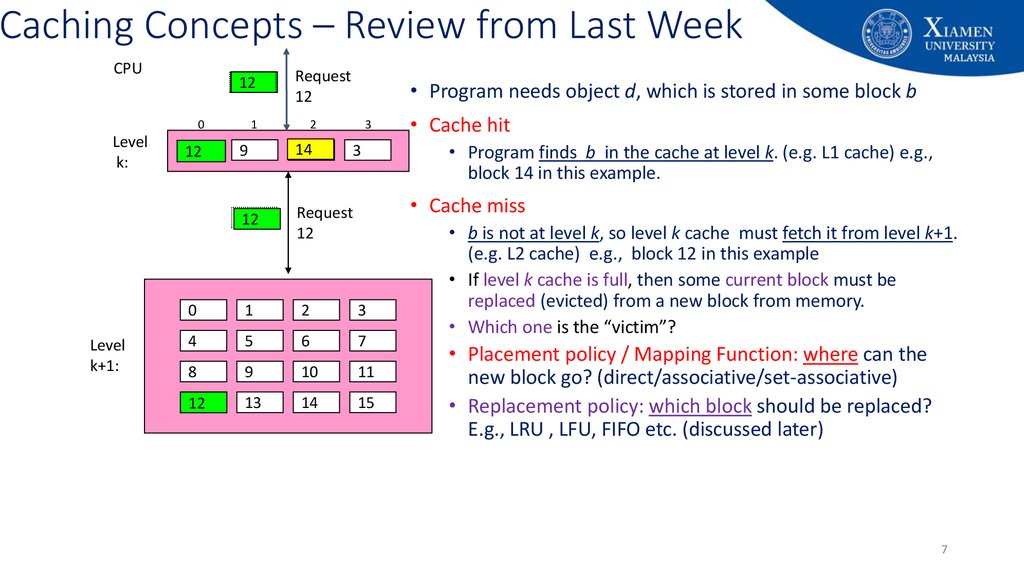
• Program needs object d, which is stored in some block b
2
3
9
14
12
Request
12
0
1
2
3
4
5
6
7
8
9
10
11
12
13
14
15
142
3
• Cache hit
• Program finds b in the cache at level k. (e.g. L1 cache) e.g.,
block 14 in this example.
• Cache miss
• b is not at level k, so level k cache must fetch it from level k+1.
(e.g. L2 cache) e.g., block 12 in this example
• If level k cache is full, then some current block must be
replaced (evicted) from a new block from memory.
• Which one is the “victim”?
• Placement policy / Mapping Function: where can the
new block go? (direct/associative/set-associative)
• Replacement policy: which block should be replaced?
E.g., LRU , LFU, FIFO etc. (discussed later)
7
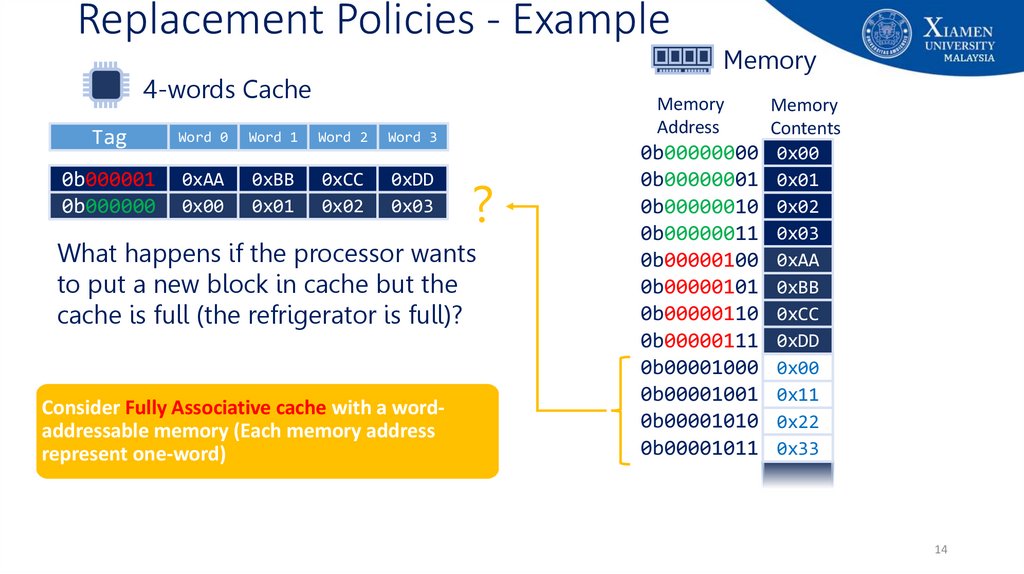
8. Replacement Policy
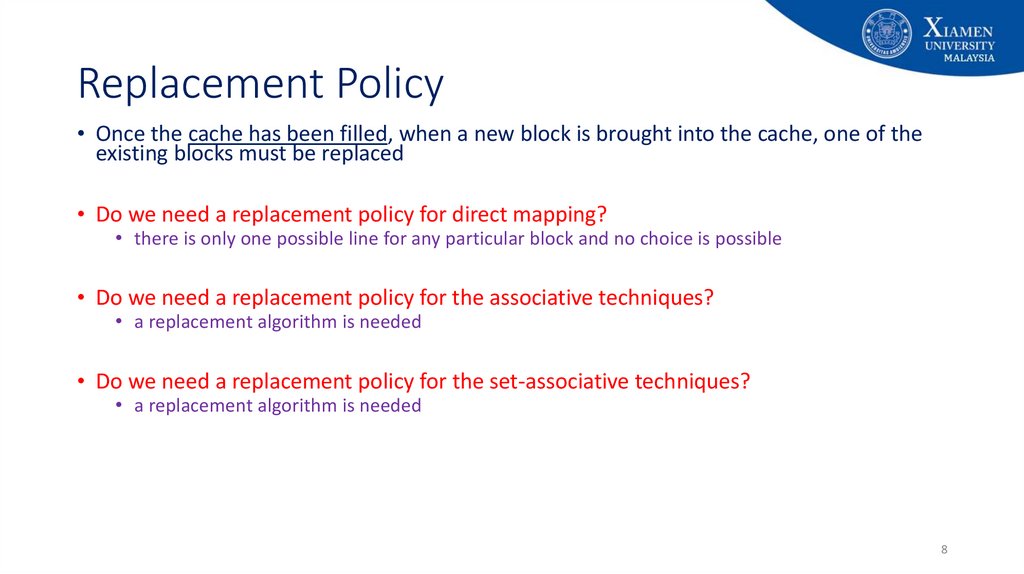
• Once the cache has been filled, when a new block is brought into the cache, one of theexisting blocks must be replaced
• Do we need a replacement policy for direct mapping?
• there is only one possible line for any particular block and no choice is possible
• Do we need a replacement policy for the associative techniques?
• a replacement algorithm is needed
• Do we need a replacement policy for the set-associative techniques?
• a replacement algorithm is needed
8
9. Replacement Policy
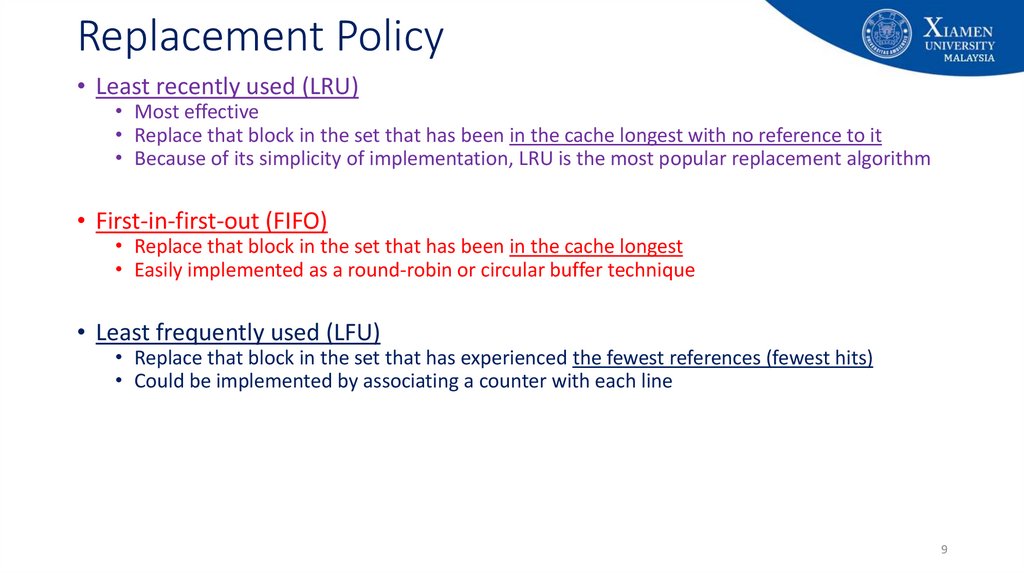
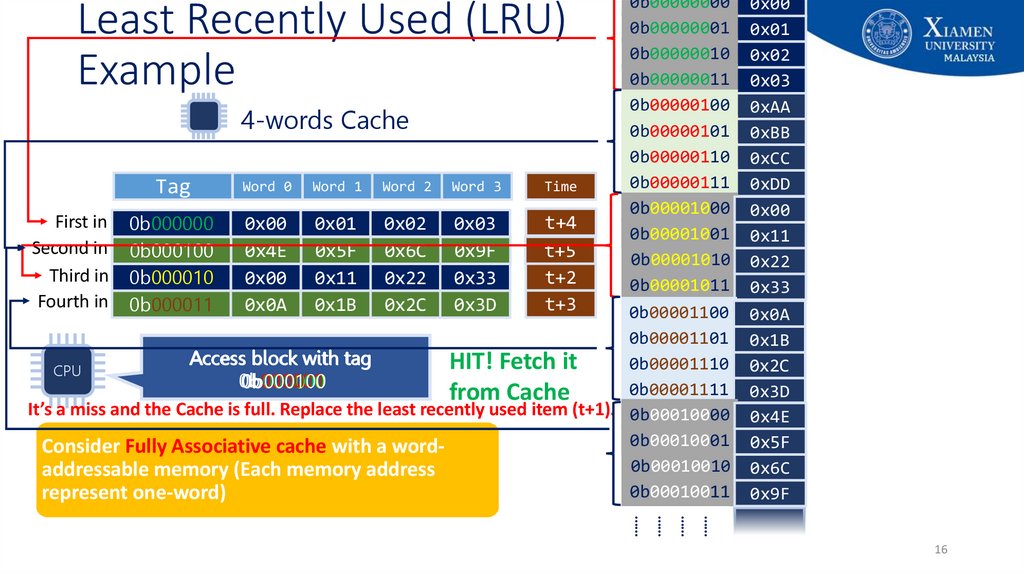
• Least recently used (LRU)• Most effective
• Replace that block in the set that has been in the cache longest with no reference to it
• Because of its simplicity of implementation, LRU is the most popular replacement algorithm
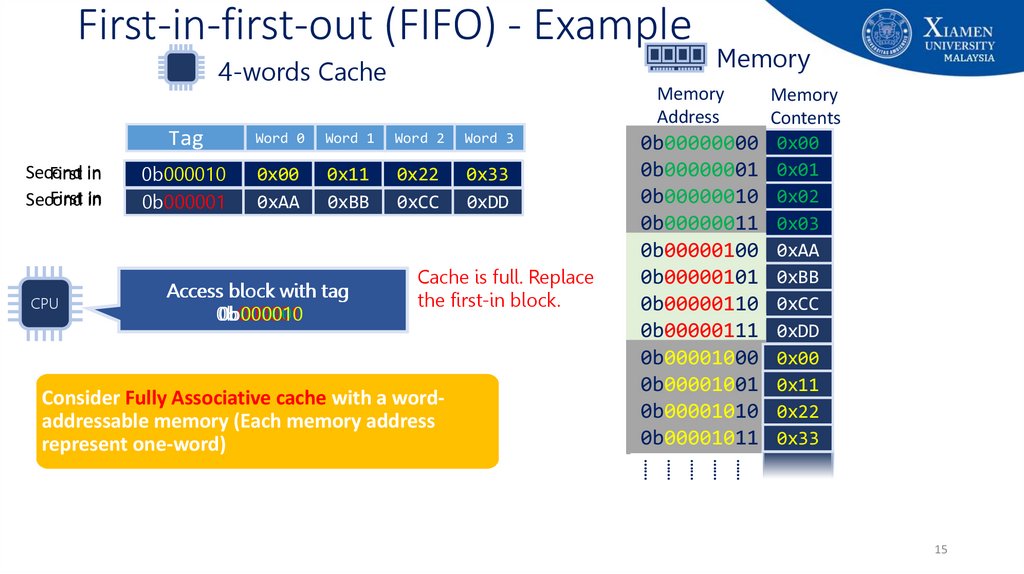
• First-in-first-out (FIFO)
• Replace that block in the set that has been in the cache longest
• Easily implemented as a round-robin or circular buffer technique
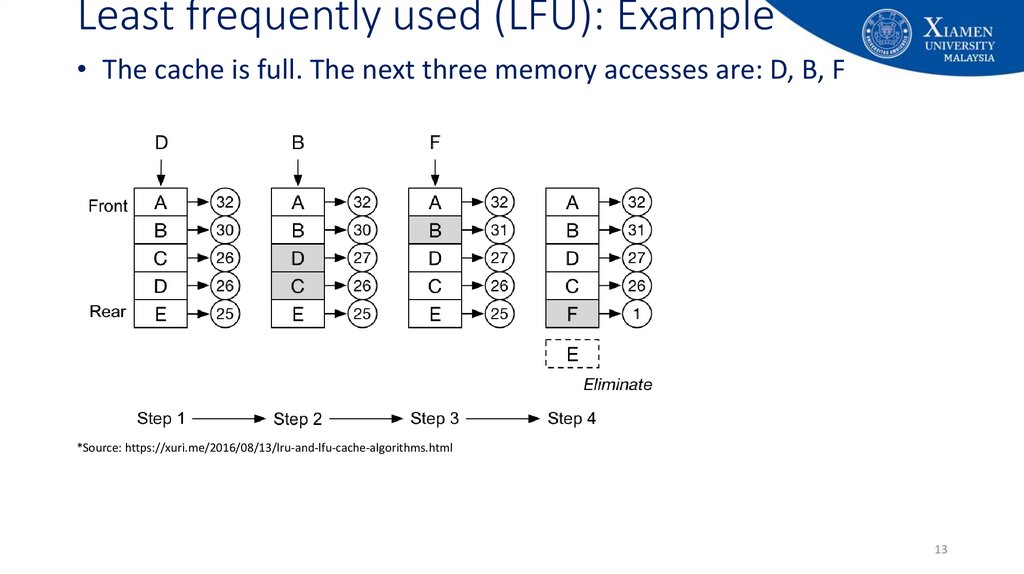
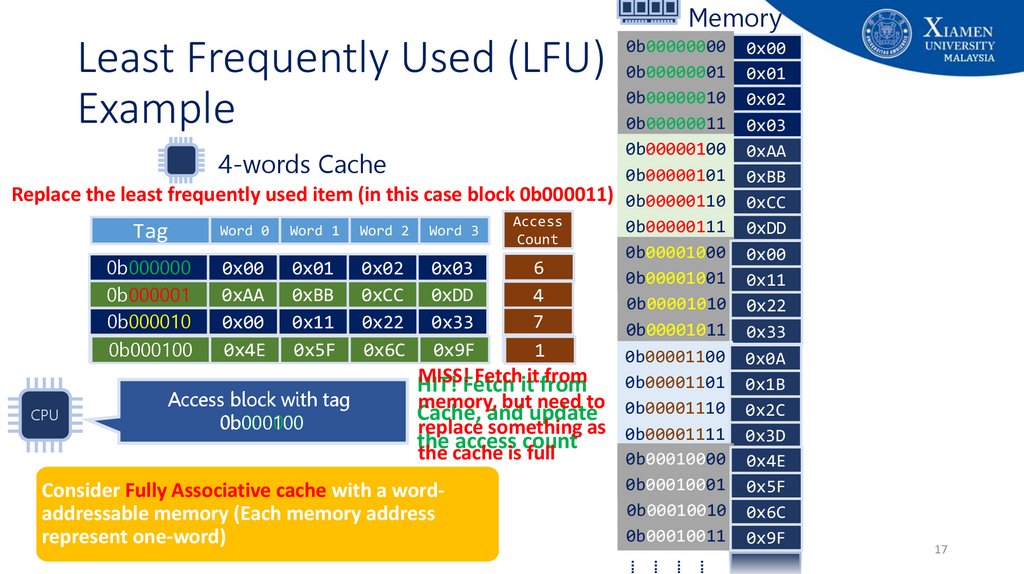
• Least frequently used (LFU)
• Replace that block in the set that has experienced the fewest references (fewest hits)
• Could be implemented by associating a counter with each line
9
10. Least Recently Used (LRU): Example
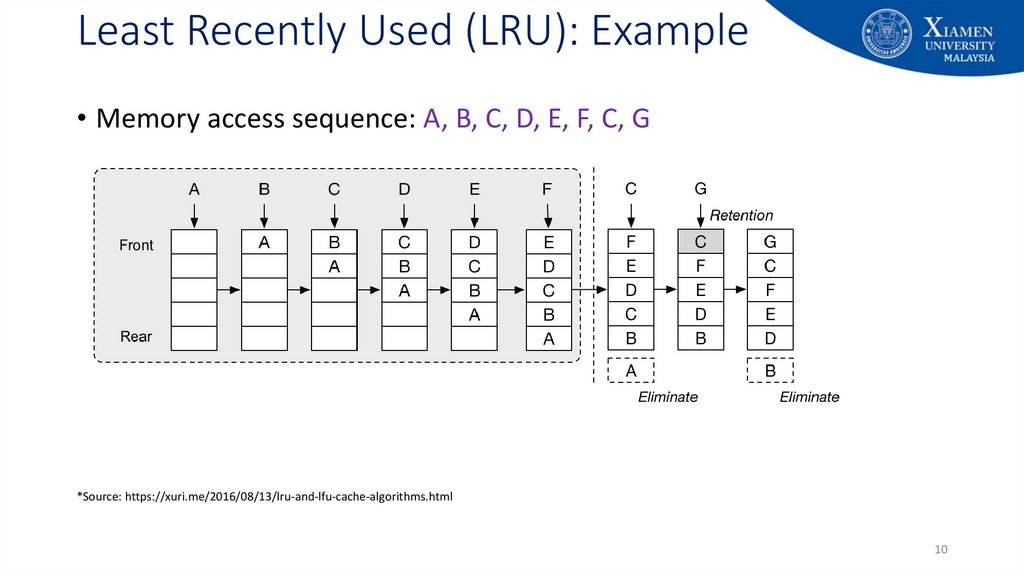
• Memory access sequence: A, B, C, D, E, F, C, G*Source: https://xuri.me/2016/08/13/lru-and-lfu-cache-algorithms.html
10
11. Least Recently Used (LRU): Example
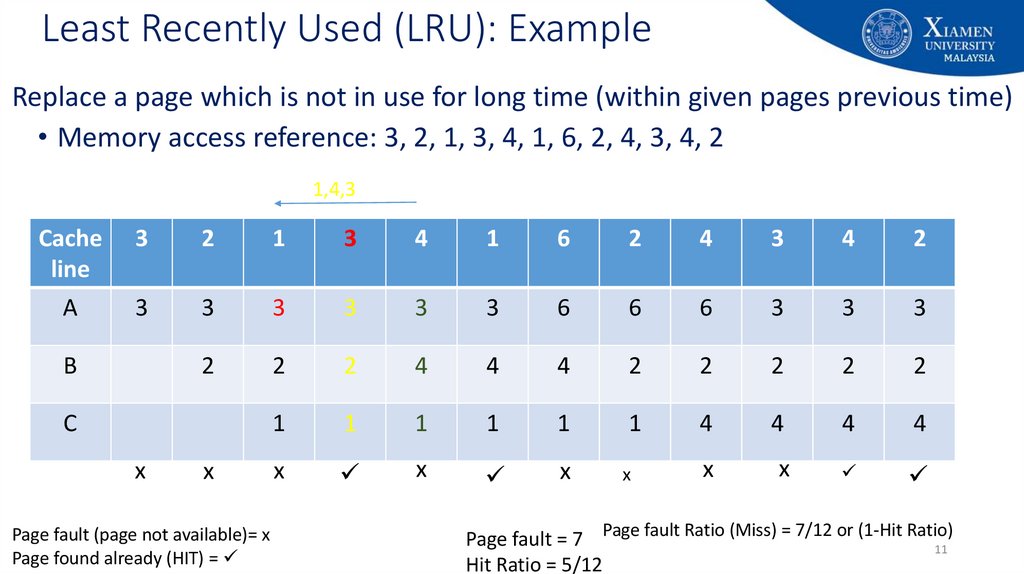
Replace a page which is not in use for long time (within given pages previous time)• Memory access reference: 3, 2, 1, 3, 4, 1, 6, 2, 4, 3, 4, 2
1,4,3
Cache
line
3
2
1
3
4
1
6
2
4
3
4
2
A
3
3
3
3
3
3
6
6
6
3
3
3
2
2
2
4
4
4
2
2
2
2
2
1
1
1
1
1
1
4
4
4
4
x
x
x
x
x
x
B
C
x
x
Page fault (page not available)= x
Page found already (HIT) =
Page fault = 7 Page fault Ratio (Miss) = 7/12 or (1-Hit Ratio)
11
Hit Ratio = 5/12
12. First-in-first-out (FIFO): Example
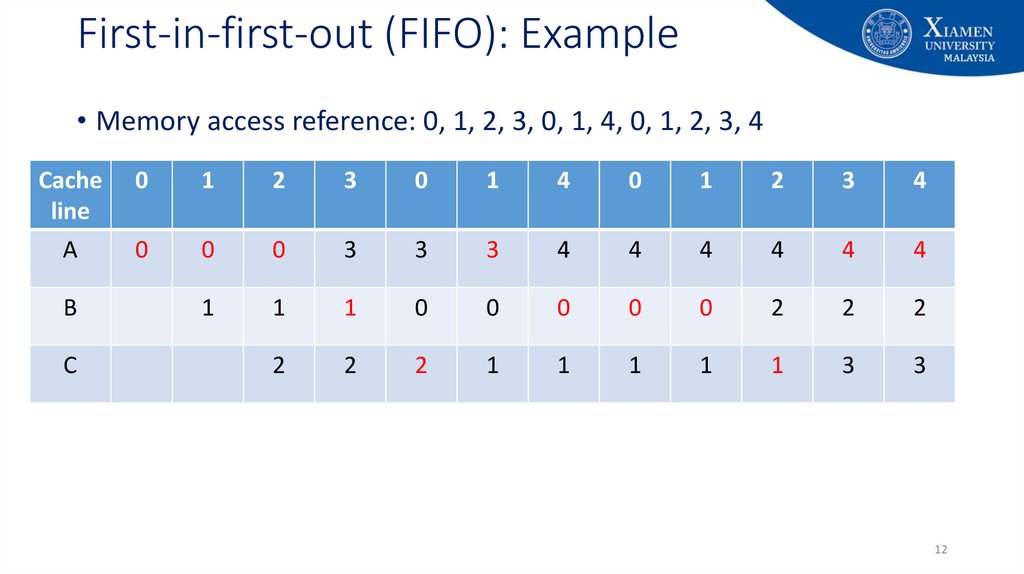
• Memory access reference: 0, 1, 2, 3, 0, 1, 4, 0, 1, 2, 3, 4Cache
line
0
1
2
3
0
1
4
0
1
2
3
4
A
0
0
0
3
3
3
4
4
4
4
4
4
1
1
1
0
0
0
0
0
2
2
2
2
2
2
1
1
1
1
1
3
3
B
C
12
13. Least frequently used (LFU): Example
• The cache is full. The next three memory accesses are: D, B, F*Source: https://xuri.me/2016/08/13/lru-and-lfu-cache-algorithms.html
13
14. Replacement Policies - Example
4-words CacheTag
Word 0
Word 1
Word 2
Word 3
0b000001
0b000000
0xAA
0x00
0xBB
0x01
0xCC
0x02
0xDD
0x03
Memory
Address
?
What happens if the processor wants
to put a new block in cache but the
cache is full (the refrigerator is full)?
Consider Fully Associative cache with a wordaddressable memory (Each memory address
represent one-word)
Memory
Memory
Contents
0b00000000 0x00
0b00000001 0x01
0b00000010 0x02
0b00000011 0x03
0b00000100 0xAA
0b00000101 0xBB
0b00000110 0xCC
0b00000111 0xDD
0b00001000 0x00
0b00001001 0x11
0b00001010 0x22
0b00001011 0x33
14
15. First-in-first-out (FIFO) - Example
4-words CacheSecond
First in
First in
Second
CPU
Memory
Address
Tag
Word 0
Word 1
Word 2
Word 3
0b000010
0b000000
0b000001
0x00
0xAA
0x11
0x01
0xBB
0x22
0x02
0xCC
0x33
0x03
0xDD
Access block with tag
0b000001
0b000010
0b000000
Memory
Cache is full. Replace
the first-in block.
Consider Fully Associative cache with a wordaddressable memory (Each memory address
represent one-word)
Memory
Contents
0b00000000 0x00
0b00000001 0x01
0b00000010 0x02
0b00000011 0x03
0b00000100 0xAA
0b00000101 0xBB
0b00000110 0xCC
0b00000111 0xDD
0b00001000 0x00
0b00001001 0x11
0b00001010 0x22
0b00001011 0x33
……
……
……
……
……
15
16. Least Recently Used (LRU) Example
0b00000000 0x000b00000001 0x01
0b00000010 0x02
0b00000011 0x03
0b00000100 0xAA
4-words Cache
0b00000101 0xBB
0b00000110 0xCC
0b00000111 0xDD
Word 0 Word 1 Word 2 Word 3
Time
Tag
0b00001000 0x00
First in 0b000000
t+4
0x00 0x01 0x02 0x03
t
0b00001001 0x11
Second in 0b000001
0xAA
t+5
0x4E 0xBB
0x5F 0xCC
0x6C 0xDD
0x9F
t+1
0b000100
0b00001010 0x22
Third in 0b000010
t+2
0x00 0x11 0x22 0x33
0b00001011 0x33
Fourth in 0b000011
t+3
0x0A 0x1B 0x2C 0x3D
0b00001100 0x0A
0x00
0b00001101 0x1B
0x11
Access block with tag
HIT! Fetch it
0b00001110 0x2C
0x22
CPU
0b000001
0b000000
0b000011
0b000100
0b000010
0b00001111 0x3D
0x33
from Cache
It’s a miss and the Cache is full. Replace the least recently used item (t+1). 0b00010000 0x4E
0x00
0b00010001 0x5F
0x11
Consider Fully Associative cache with a word0b00010010 0x6C
0x22
addressable memory (Each memory address
0b00010011 0x33
represent one-word)
0x9F
Least Recently Used (LRU)
Example
……
……
……
……
16
17. Least Frequently Used (LFU) Example
MemoryLeast Frequently Used (LFU)
Example
0b00000000 0x00
0b00000001 0x01
0b00000010 0x02
0b00000011 0x03
0b00000100 0xAA
4-words Cache
0b00000101 0xBB
Replace the least frequently used item (in this case block 0b000011) 0b00000110 0xCC
Access
0b00000111 0xDD
Word 0 Word 1 Word 2 Word 3
Tag
Count
0b00001000 0x00
6
0x00 0x01 0x02 0x03
5
0b000000
0b00001001 0x11
0xAA 0xBB 0xCC 0xDD
0b000001
4
0b00001010 0x22
7
0x00 0x11 0x22 0x33
0b000010
0b00001011 0x33
21
0x0A
0b000011
0x4E 0x1B
0x5F 0x2C
0x6C 0x3D
0x9F
0b000100
0b00001100 0x0A
0x00
MISS!Fetch
Fetchititfrom
from
0b00001101 0x1B
0x11
HIT!
Access block with tag
memory, but need to 0b00001110 0x2C
0x22
Cache,
and update
CPU
0b000000
0b000100
replace something as 0b00001111 0x3D
0x33
the
access
count
the cache is full
0b00010000 0x4E
0x00
0b00010001 0x5F
0x11
Consider Fully Associative cache with a word0b00010010 0x6C
0x22
addressable memory (Each memory address
0b00010011 0x33
represent one-word)
0x9F
17
……
……
……
……
18. Write Policy
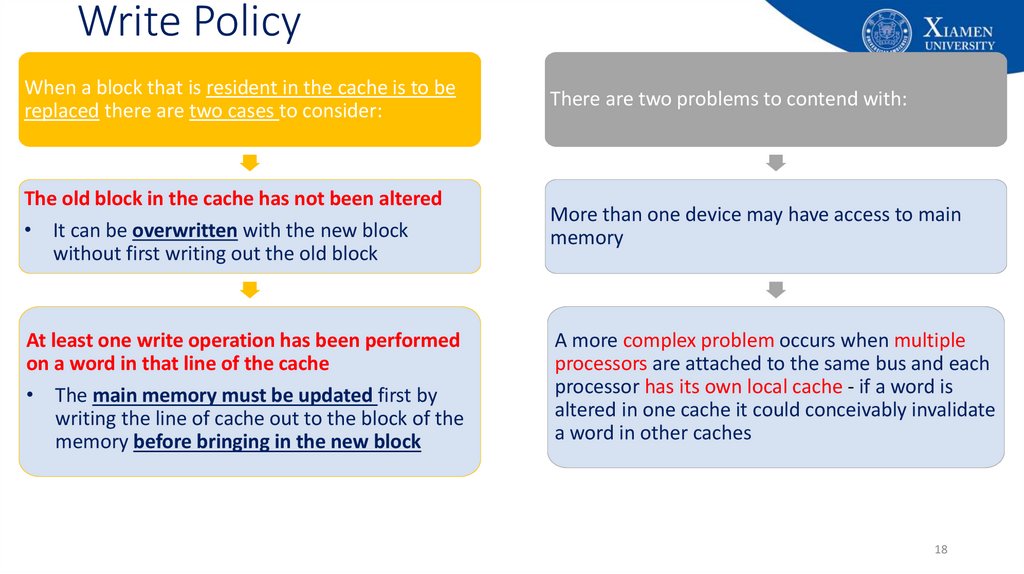
When a block that is resident in the cache is to bereplaced there are two cases to consider:
There are two problems to contend with:
The old block in the cache has not been altered
• It can be overwritten with the new block
without first writing out the old block
More than one device may have access to main
memory
At least one write operation has been performed
on a word in that line of the cache
• The main memory must be updated first by
writing the line of cache out to the block of the
memory before bringing in the new block
A more complex problem occurs when multiple
processors are attached to the same bus and each
processor has its own local cache - if a word is
altered in one cache it could conceivably invalidate
a word in other caches
18
19. Example: Writing to a Cache
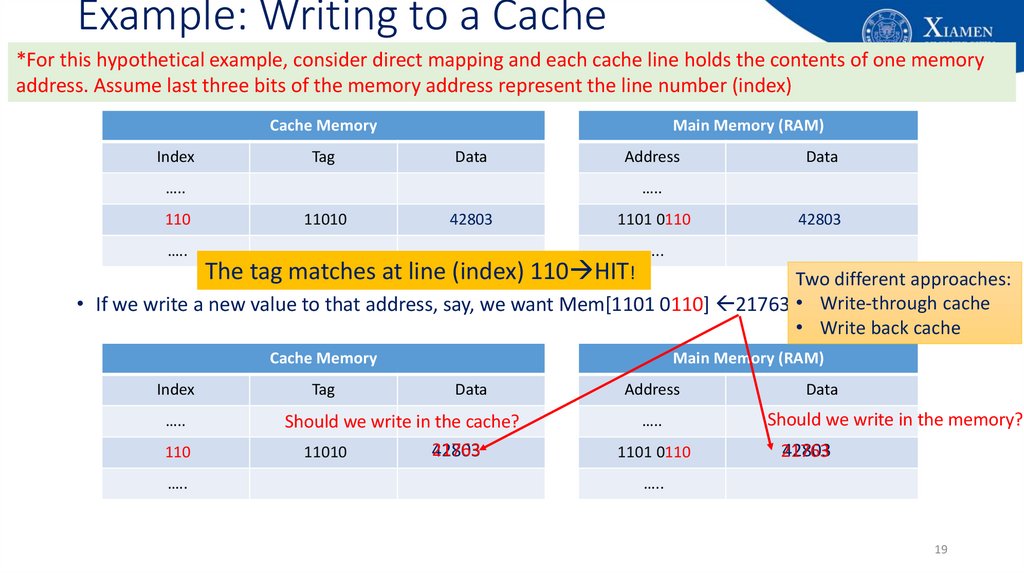
*For this hypothetical example, consider direct mapping and each cache line holds the contents of one memoryaddress. Assume last three bits of the memory address represent the line number (index)
Cache Memory
Index
Tag
Main Memory (RAM)
Data
Address
…..
110
…..
Data
…..
11010
42803
1101 0110
The tag matches at line (index) 110 HIT!
42803
…..
Two different approaches:
• If we write a new value to that address, say, we want Mem[1101 0110] 21763 • Write-through cache
• Write back cache
Cache Memory
Index
…..
110
…..
Tag
Main Memory (RAM)
Data
Should we write in the cache?
21763
42803
11010
Address
…..
1101 0110
Data
Should we write in the memory?
42803
21763
…..
19
20. Write-through Caches
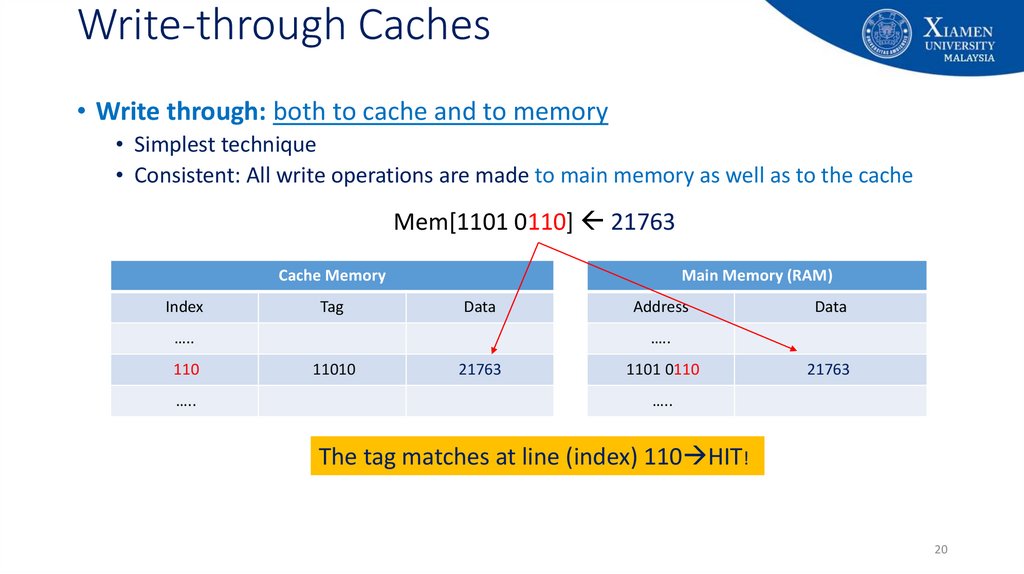
• Write through: both to cache and to memory• Simplest technique
• Consistent: All write operations are made to main memory as well as to the cache
Mem[1101 0110] 21763
Cache Memory
Index
Tag
Main Memory (RAM)
Data
…..
110
…..
Address
Data
…..
11010
42803
21763
1101 0110
42803
21763
…..
The tag matches at line (index) 110 HIT!
20
21. Write-through Caches
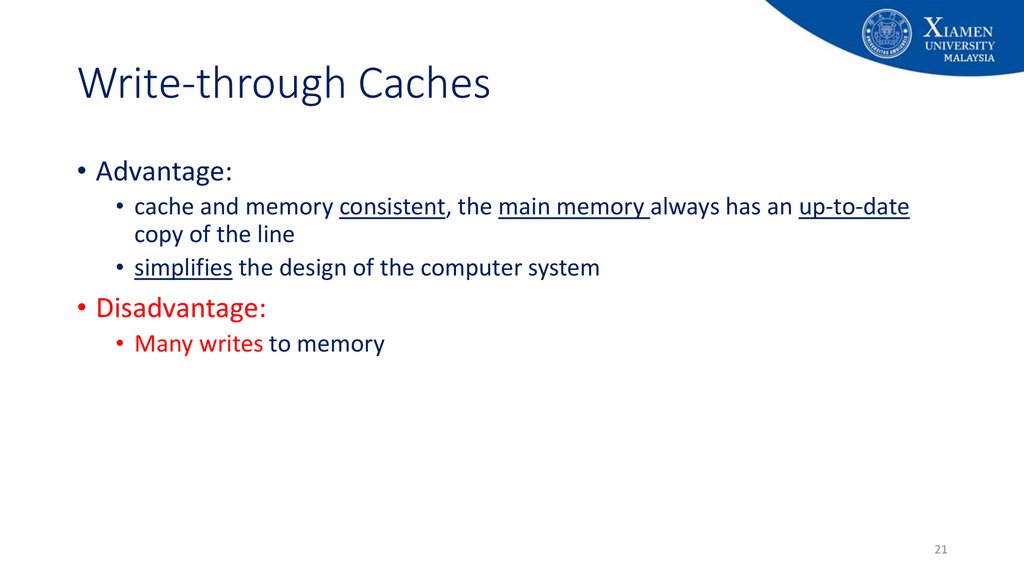
• Advantage:• cache and memory consistent, the main memory always has an up-to-date
copy of the line
• simplifies the design of the computer system
• Disadvantage:
• Many writes to memory
21
22. Write-back Caches
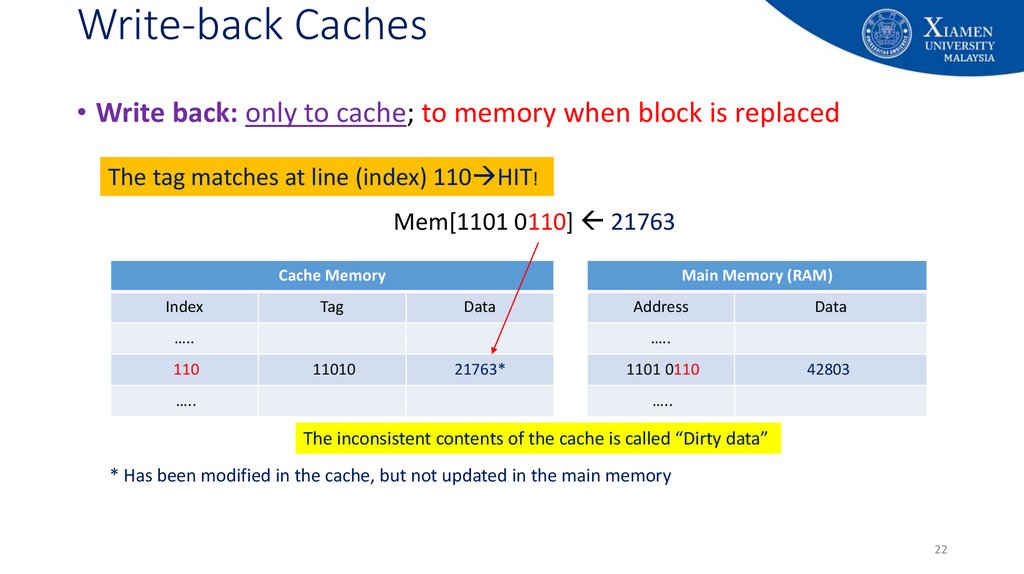
• Write back: only to cache; to memory when block is replacedThe tag matches at line (index) 110 HIT!
Mem[1101 0110] 21763
Cache Memory
Index
Tag
Main Memory (RAM)
Data
…..
110
…..
Address
Data
…..
11010
42803
21763*
1101 0110
42803
…..
The inconsistent contents of the cache is called “Dirty data”
* Has been modified in the cache, but not updated in the main memory
22
23. Write-back Caches
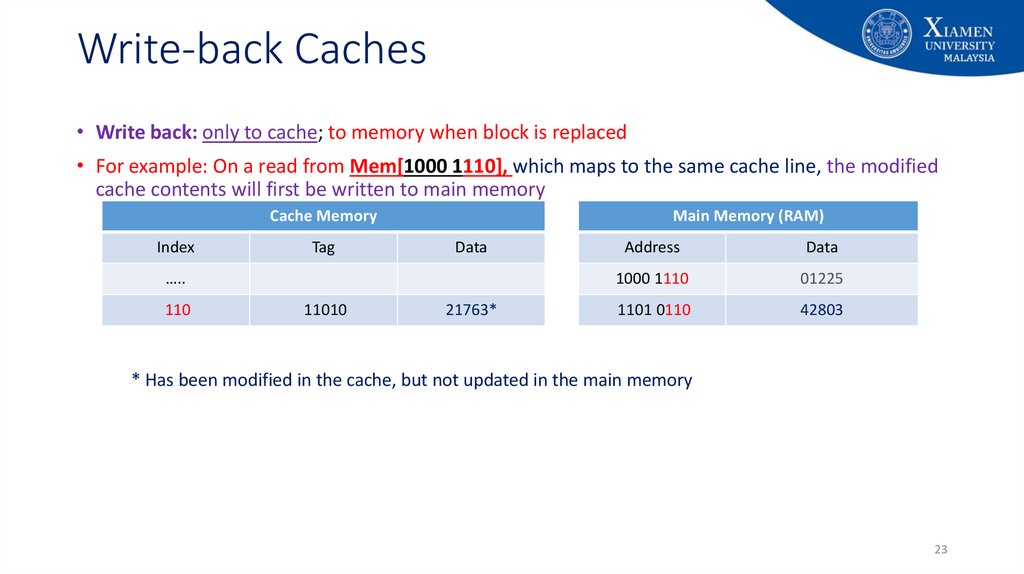
• Write back: only to cache; to memory when block is replaced• For example: On a read from Mem[1000 1110], which maps to the same cache line, the modified
cache contents will first be written to main memory
Cache Memory
Index
Tag
Main Memory (RAM)
Data
…..
110
11010
21763*
Address
Data
1000 1110
01225
1101 0110
42803
* Has been modified in the cache, but not updated in the main memory
23
24. Write-back Caches
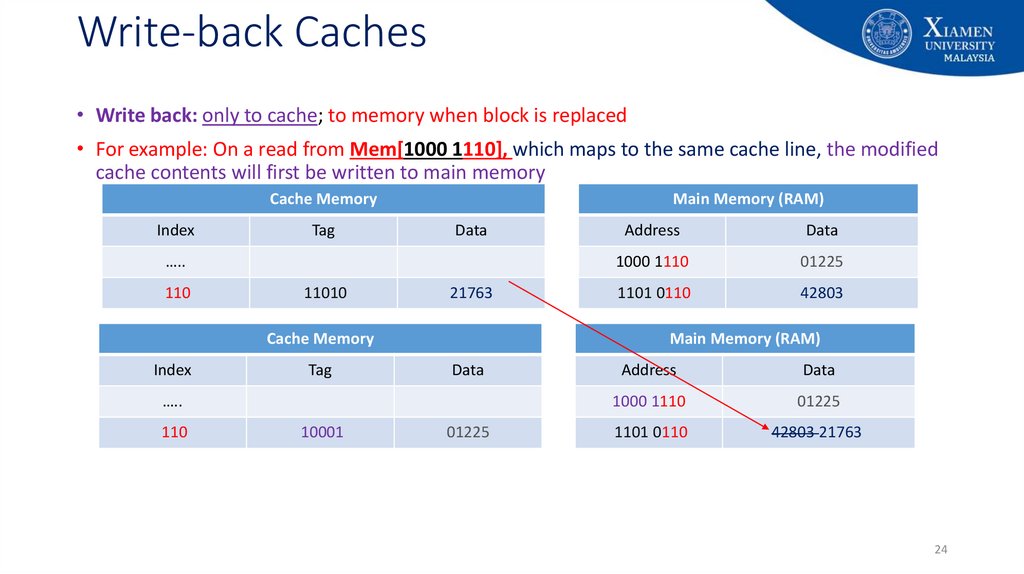
• Write back: only to cache; to memory when block is replaced• For example: On a read from Mem[1000 1110], which maps to the same cache line, the modified
cache contents will first be written to main memory
Cache Memory
Index
Tag
Main Memory (RAM)
Data
…..
110
11010
21763
Cache Memory
Index
Tag
10001
Data
1000 1110
01225
1101 0110
42803
Main Memory (RAM)
Data
…..
110
Address
01225
Address
Data
1000 1110
01225
1101 0110
42803 21763
24
25. Write-back Caches
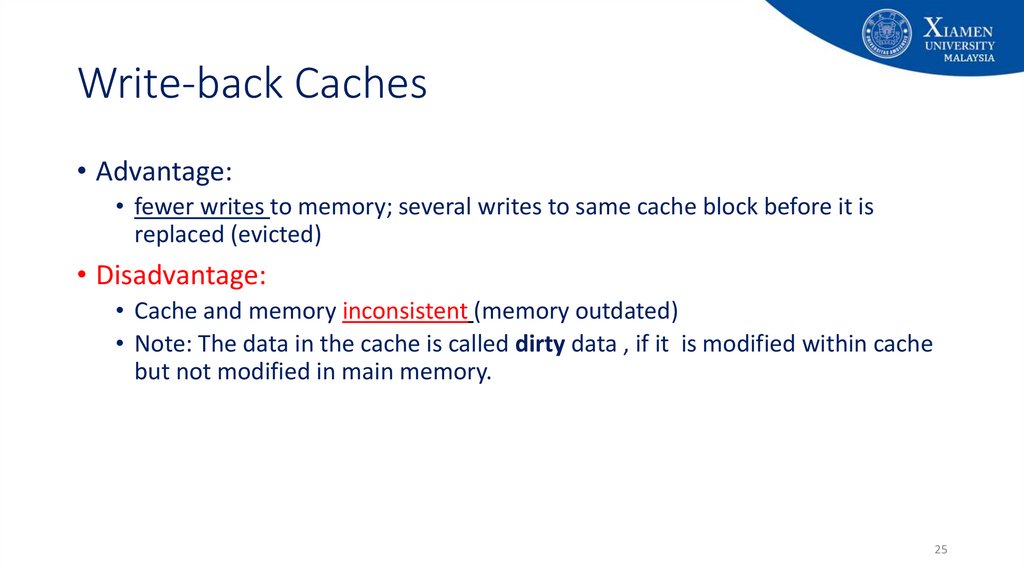
• Advantage:• fewer writes to memory; several writes to same cache block before it is
replaced (evicted)
• Disadvantage:
• Cache and memory inconsistent (memory outdated)
• Note: The data in the cache is called dirty data , if it is modified within cache
but not modified in main memory.
25
26. Write Misses
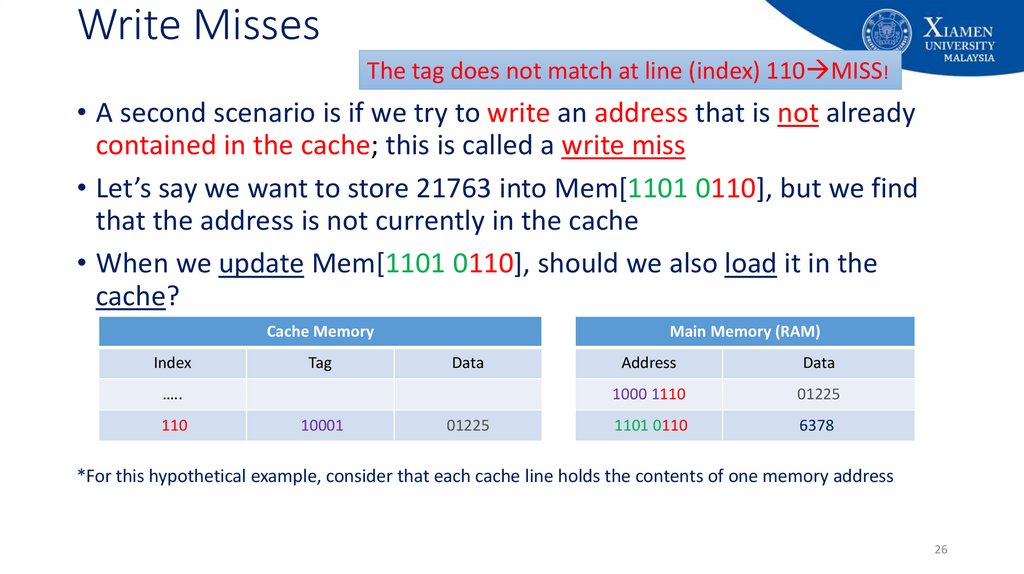
The tag does not match at line (index) 110 MISS!• A second scenario is if we try to write an address that is not already
contained in the cache; this is called a write miss
• Let’s say we want to store 21763 into Mem[1101 0110], but we find
that the address is not currently in the cache
• When we update Mem[1101 0110], should we also load it in the
cache?
Cache Memory
Index
Tag
Main Memory (RAM)
Data
…..
110
10001
01225
Address
Data
1000 1110
01225
1101 0110
6378
*For this hypothetical example, consider that each cache line holds the contents of one memory address
26
27. Allocate on Write
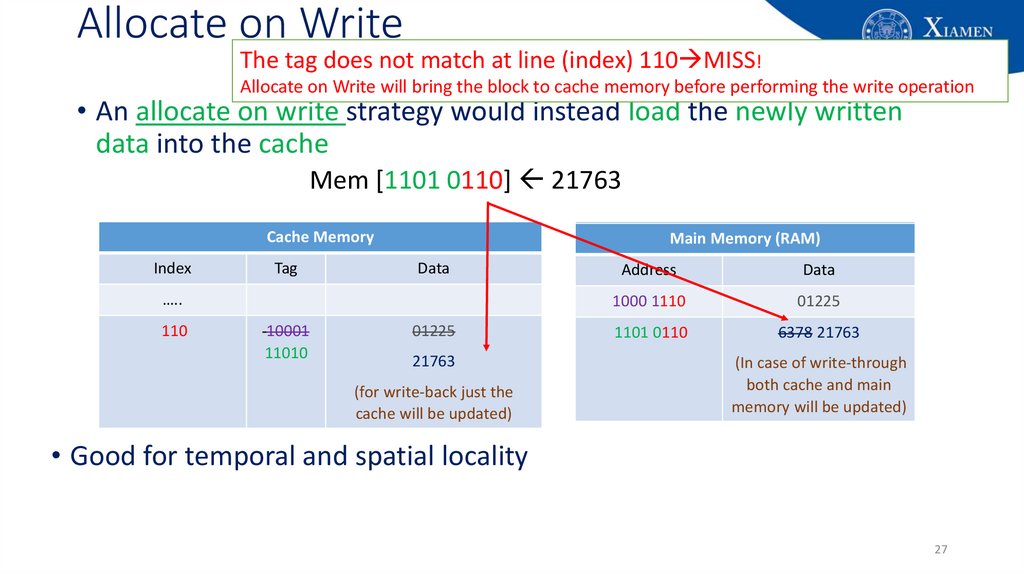
The tag does not match at line (index) 110 MISS!Allocate on Write will bring the block to cache memory before performing the write operation
• An allocate on write strategy would instead load the newly written
data into the cache
Mem [1101 0110] 21763
Cache Memory
Index
Tag
Main Memory (RAM)
Data
…..
110
10001
11010
01225
21763
(for write-back just the
cache will be updated)
Address
Data
1000 1110
01225
1101 0110
6378
6378
21763
(In case of write-through
both cache and main
memory will be updated)
• Good for temporal and spatial locality
27
28. Allocate on Write - What About This?
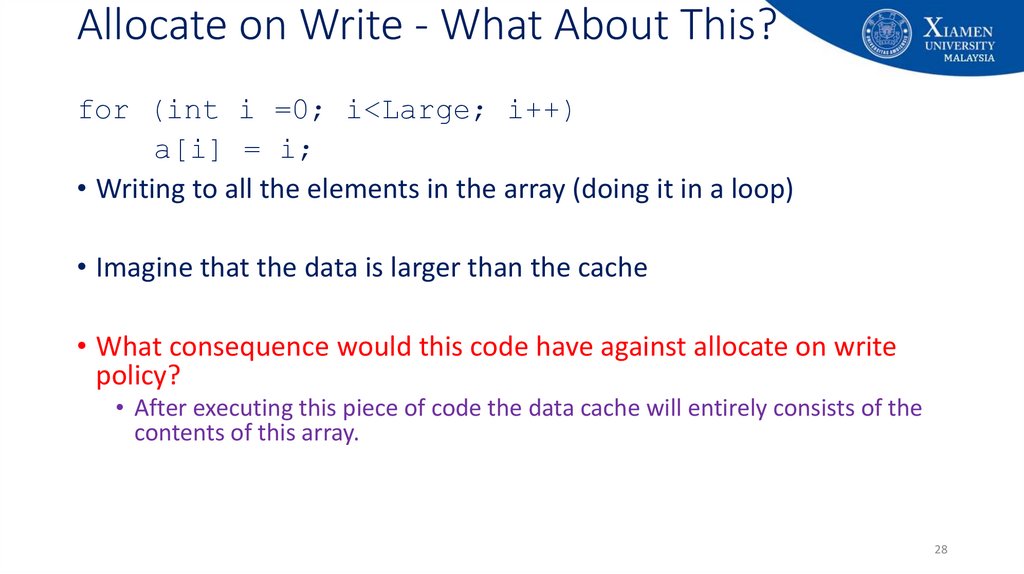
for (int i =0; i<Large; i++)a[i] = i;
• Writing to all the elements in the array (doing it in a loop)
• Imagine that the data is larger than the cache
• What consequence would this code have against allocate on write
policy?
• After executing this piece of code the data cache will entirely consists of the
contents of this array.
28
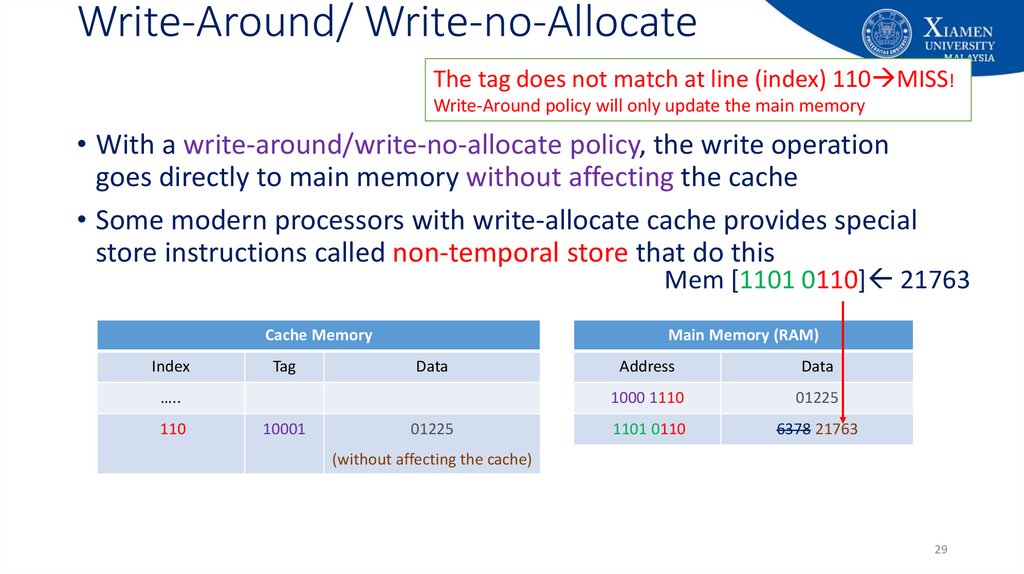
29. Write-Around/ Write-no-Allocate
The tag does not match at line (index) 110 MISS!Write-Around policy will only update the main memory
• With a write-around/write-no-allocate policy, the write operation
goes directly to main memory without affecting the cache
• Some modern processors with write-allocate cache provides special
store instructions called non-temporal store that do this
Mem [1101 0110] 21763
Cache Memory
Index
Tag
Main Memory (RAM)
Data
…..
110
10001
01225
Address
Data
1000 1110
01225
1101 0110
6378
6378
21763
(without affecting the cache)
29
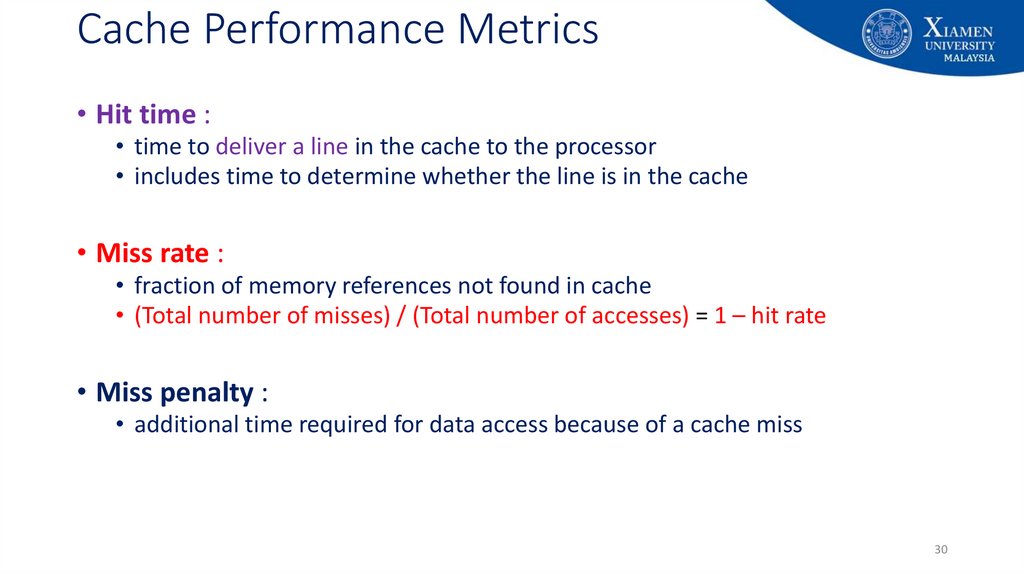
30. Cache Performance Metrics
• Hit time :• time to deliver a line in the cache to the processor
• includes time to determine whether the line is in the cache
• Miss rate :
• fraction of memory references not found in cache
• (Total number of misses) / (Total number of accesses) = 1 – hit rate
• Miss penalty :
• additional time required for data access because of a cache miss
30
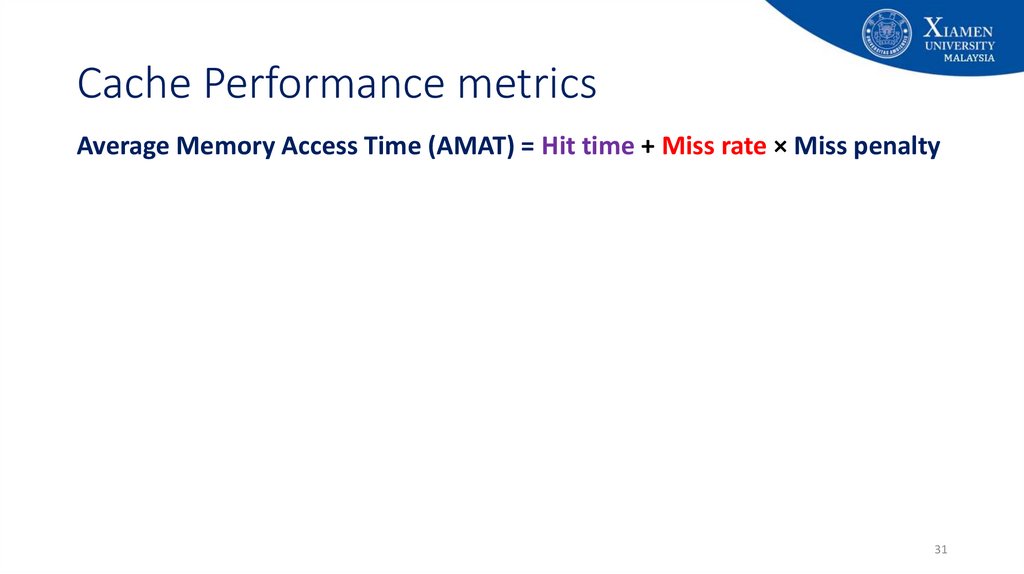
31. Cache Performance metrics
Average Memory Access Time (AMAT) = Hit time + Miss rate × Miss penalty31
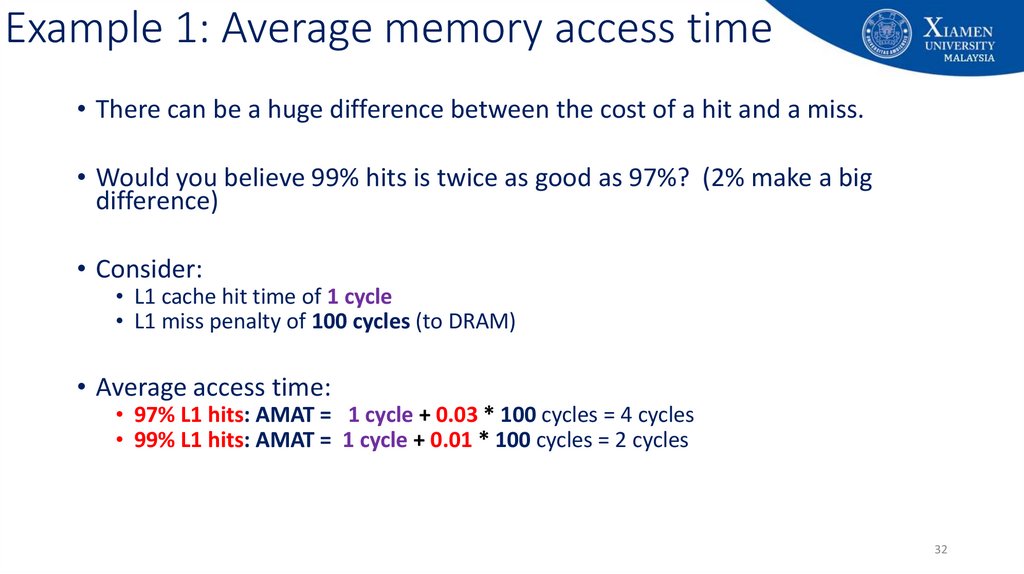
32. Example 1: Average memory access time
• There can be a huge difference between the cost of a hit and a miss.• Would you believe 99% hits is twice as good as 97%? (2% make a big
difference)
• Consider:
• L1 cache hit time of 1 cycle
• L1 miss penalty of 100 cycles (to DRAM)
• Average access time:
• 97% L1 hits: AMAT = 1 cycle + 0.03 * 100 cycles = 4 cycles
• 99% L1 hits: AMAT = 1 cycle + 0.01 * 100 cycles = 2 cycles
32
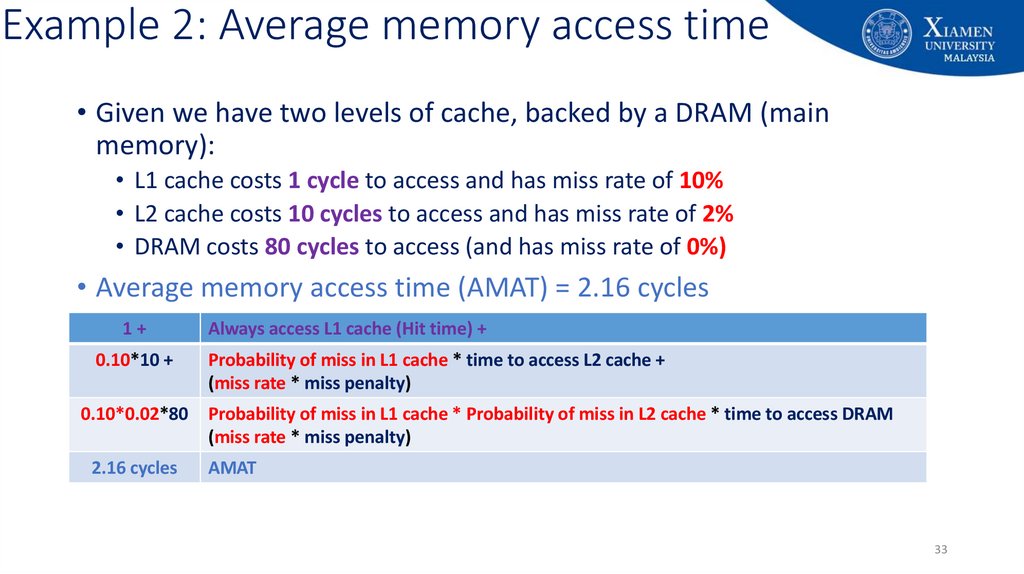
33. Example 2: Average memory access time
• Given we have two levels of cache, backed by a DRAM (mainmemory):
• L1 cache costs 1 cycle to access and has miss rate of 10%
• L2 cache costs 10 cycles to access and has miss rate of 2%
• DRAM costs 80 cycles to access (and has miss rate of 0%)
• Average memory access time (AMAT) = 2.16 cycles
1+
0.10*10 +
Always access L1 cache (Hit time) +
Probability of miss in L1 cache * time to access L2 cache +
(miss rate * miss penalty)
0.10*0.02*80
Probability of miss in L1 cache * Probability of miss in L2 cache * time to access DRAM
(miss rate * miss penalty)
2.16 cycles
AMAT
33
34. Line size
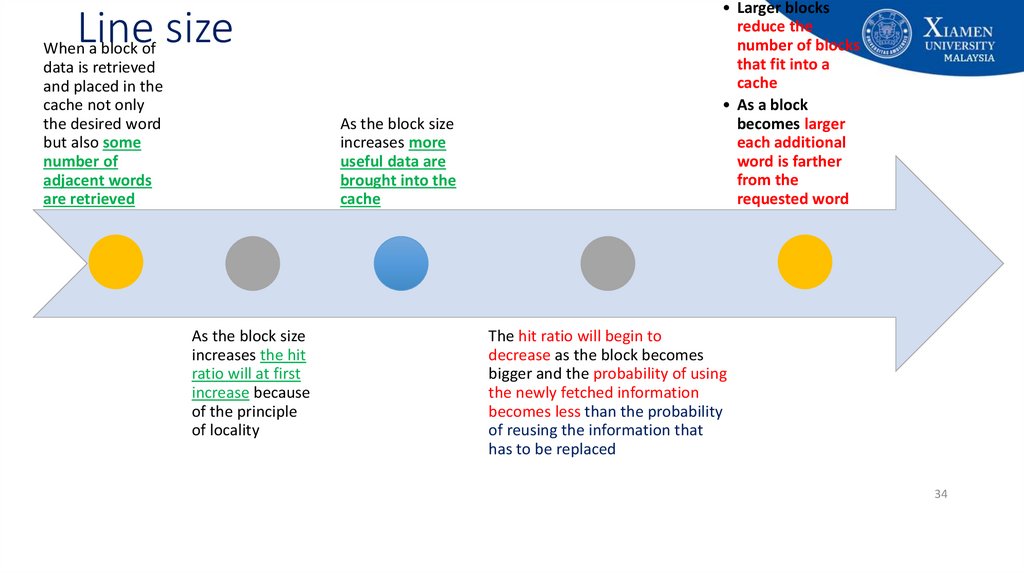
When a block ofdata is retrieved
and placed in the
cache not only
the desired word
but also some
number of
adjacent words
are retrieved
As the block size
increases more
useful data are
brought into the
cache
As the block size
increases the hit
ratio will at first
increase because
of the principle
of locality
• Larger blocks
reduce the
number of blocks
that fit into a
cache
• As a block
becomes larger
each additional
word is farther
from the
requested word
The hit ratio will begin to
decrease as the block becomes
bigger and the probability of using
the newly fetched information
becomes less than the probability
of reusing the information that
has to be replaced
34
35. 3 kinds of Cache Misses
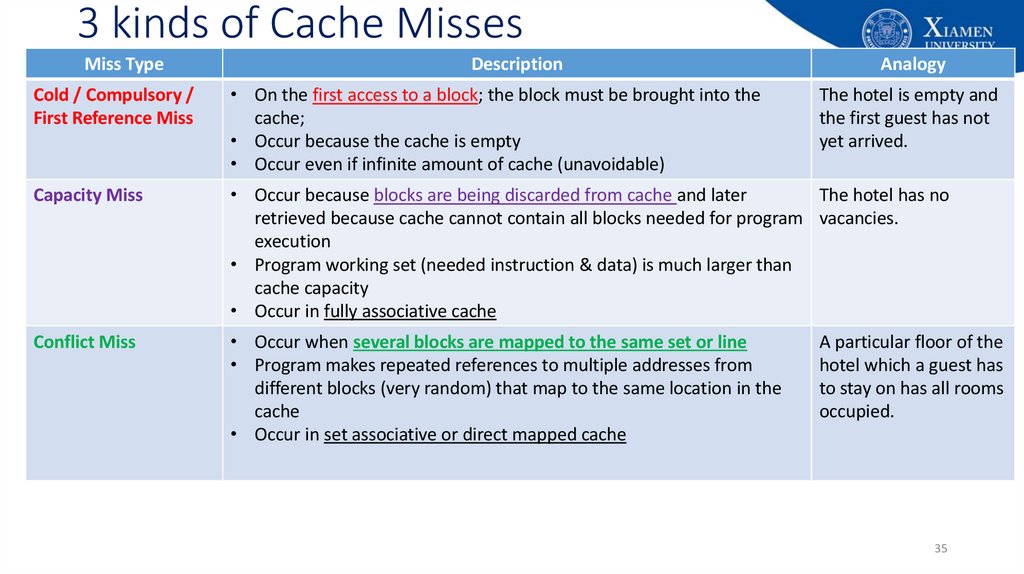
Miss TypeDescription
Analogy
Cold / Compulsory /
First Reference Miss
• On the first access to a block; the block must be brought into the
cache;
• Occur because the cache is empty
• Occur even if infinite amount of cache (unavoidable)
Capacity Miss
• Occur because blocks are being discarded from cache and later
The hotel has no
retrieved because cache cannot contain all blocks needed for program vacancies.
execution
• Program working set (needed instruction & data) is much larger than
cache capacity
• Occur in fully associative cache
Conflict Miss
• Occur when several blocks are mapped to the same set or line
• Program makes repeated references to multiple addresses from
different blocks (very random) that map to the same location in the
cache
• Occur in set associative or direct mapped cache
The hotel is empty and
the first guest has not
yet arrived.
A particular floor of the
hotel which a guest has
to stay on has all rooms
occupied.
35
36. Improving Cache Performance
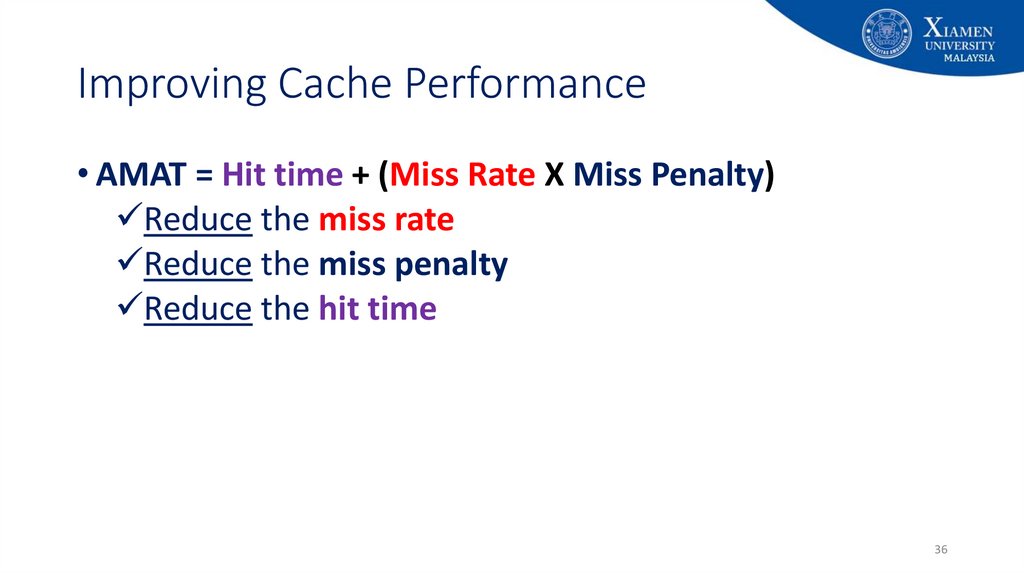
• AMAT = Hit time + (Miss Rate X Miss Penalty)Reduce the miss rate
Reduce the miss penalty
Reduce the hit time
36
37. Summary
• Memory hierarchy is an organizational approach• To improve the computer performance
• Objective is to provide the fastest possible speed with minimal cost
• Optimize the performance considering different trade-offs
37
38. End of Lecture 9!
End of Lecture 9!• Additional readings:
• Chapter 4 (Cache Memory): Stallings, W. Computer organization and architecture: Designing for performance, Tenth Edition Upper
Saddle River, N.J: Prentice Hall.
• Chapter 2 (Memory Hierarchy Design): John L. Hennessy and David Patterson, Computer Architecture: A Quantitative Approach,
Fourth Edition, Morgan Kaufham.
• Appendix B (Review of Memory Hierarchy): John L. Hennessy and David Patterson, Computer Architecture: A Quantitative Approach,
Fourth Edition, Morgan Kaufham.
• Questions?
38
39.
Appendix: University's vision and missionVision
Xiamen University Malaysia aspires to become a university with a
distinct global outlook, featuring first-class teaching and research, and
embracing cultural diversity.
Mission
To nurture young talents with dignity and wisdom, turning them into
fine citizens of the region who will contribute to the prosperity of the
people and social progress of Malaysia, China and Southeast Asia.
39
40.
Appendix: Additional Slides on CacheOptimization
40
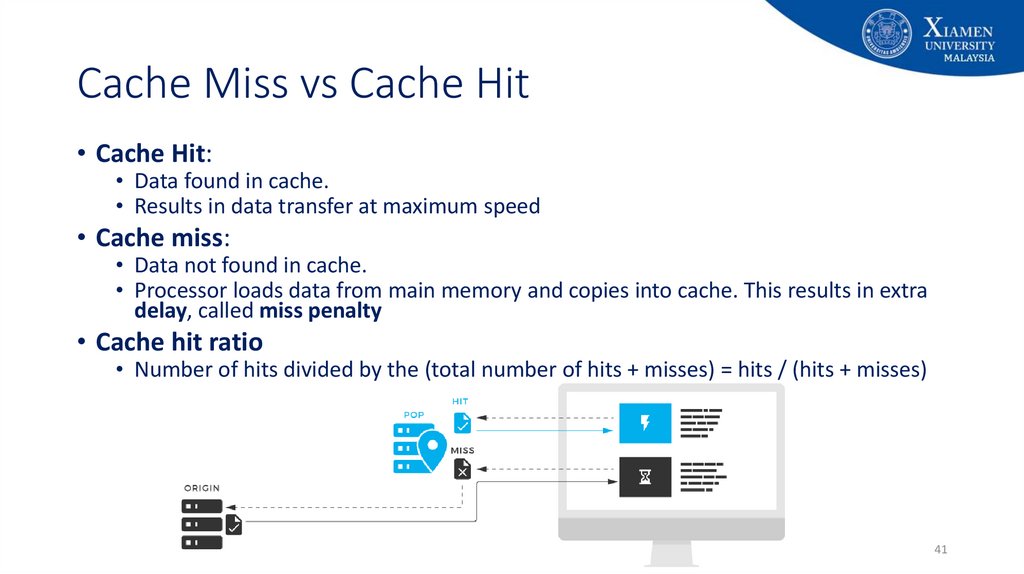
41. Cache Miss vs Cache Hit
• Cache Hit:• Data found in cache.
• Results in data transfer at maximum speed
• Cache miss:
• Data not found in cache.
• Processor loads data from main memory and copies into cache. This results in extra
delay, called miss penalty
• Cache hit ratio
• Number of hits divided by the (total number of hits + misses) = hits / (hits + misses)
41
42. Basic Cache Optimizations
• Reducing Miss Rate:1.
2.
3.
Larger Block size (reduce compulsory misses)
Larger Cache size (reduce capacity misses)
Higher Associativity (reduce conflict misses)
• Reducing Miss Penalty:
1.
2.
Multilevel Caches
Read priority over write on miss
• Reducing Hit Time
42
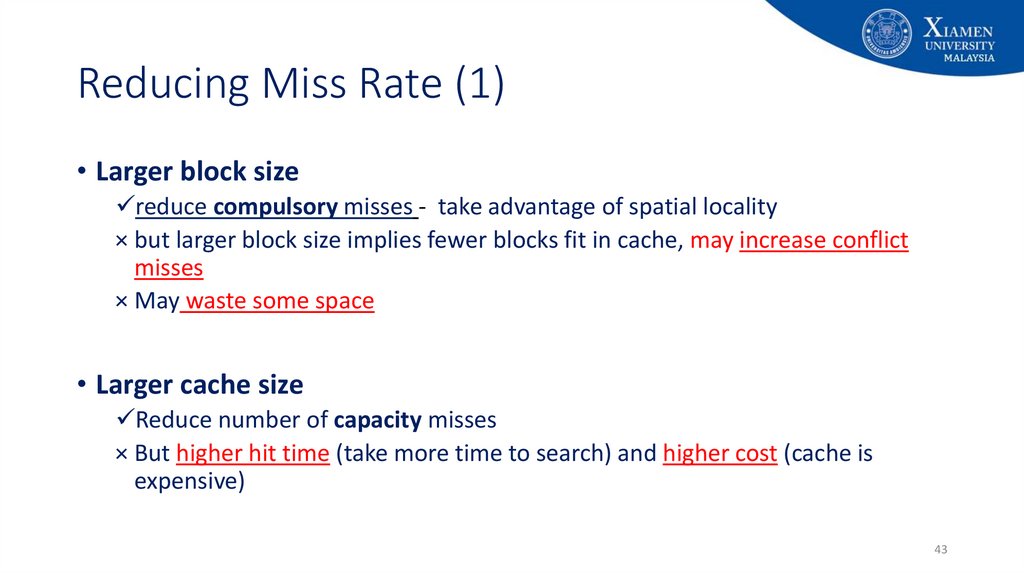
43. Reducing Miss Rate (1)
• Larger block sizereduce compulsory misses - take advantage of spatial locality
× but larger block size implies fewer blocks fit in cache, may increase conflict
misses
× May waste some space
• Larger cache size
Reduce number of capacity misses
× But higher hit time (take more time to search) and higher cost (cache is
expensive)
43
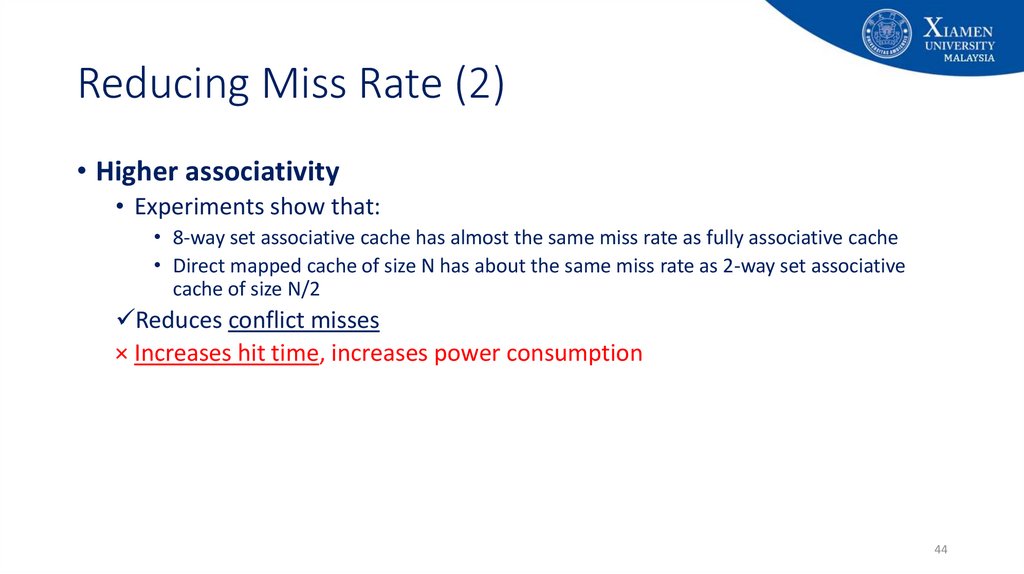
44. Reducing Miss Rate (2)
• Higher associativity• Experiments show that:
• 8-way set associative cache has almost the same miss rate as fully associative cache
• Direct mapped cache of size N has about the same miss rate as 2-way set associative
cache of size N/2
Reduces conflict misses
× Increases hit time, increases power consumption
44
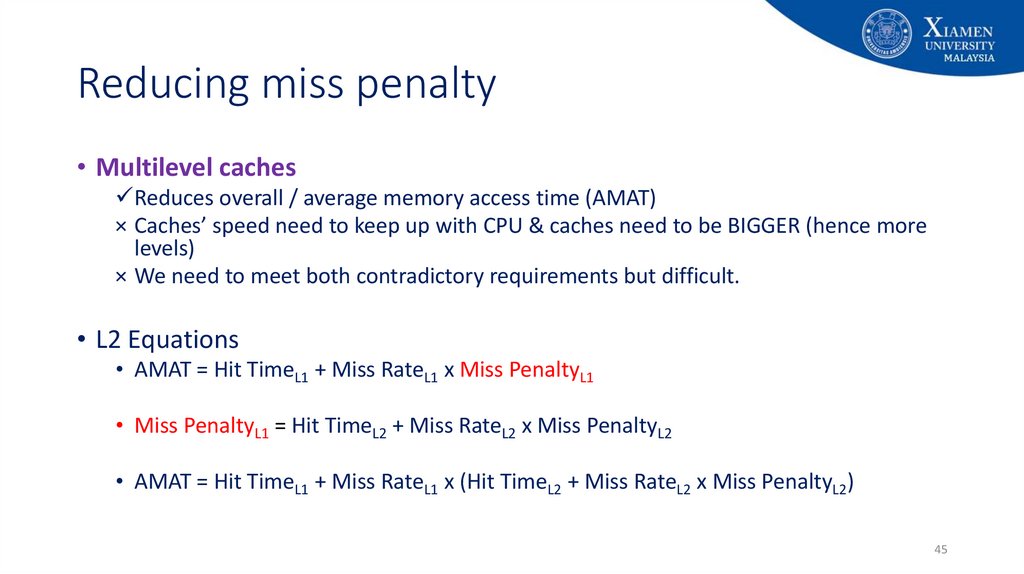
45. Reducing miss penalty
• Multilevel cachesReduces overall / average memory access time (AMAT)
× Caches’ speed need to keep up with CPU & caches need to be BIGGER (hence more
levels)
× We need to meet both contradictory requirements but difficult.
• L2 Equations
• AMAT = Hit TimeL1 + Miss RateL1 x Miss PenaltyL1
• Miss PenaltyL1 = Hit TimeL2 + Miss RateL2 x Miss PenaltyL2
• AMAT = Hit TimeL1 + Miss RateL1 x (Hit TimeL2 + Miss RateL2 x Miss PenaltyL2)
45
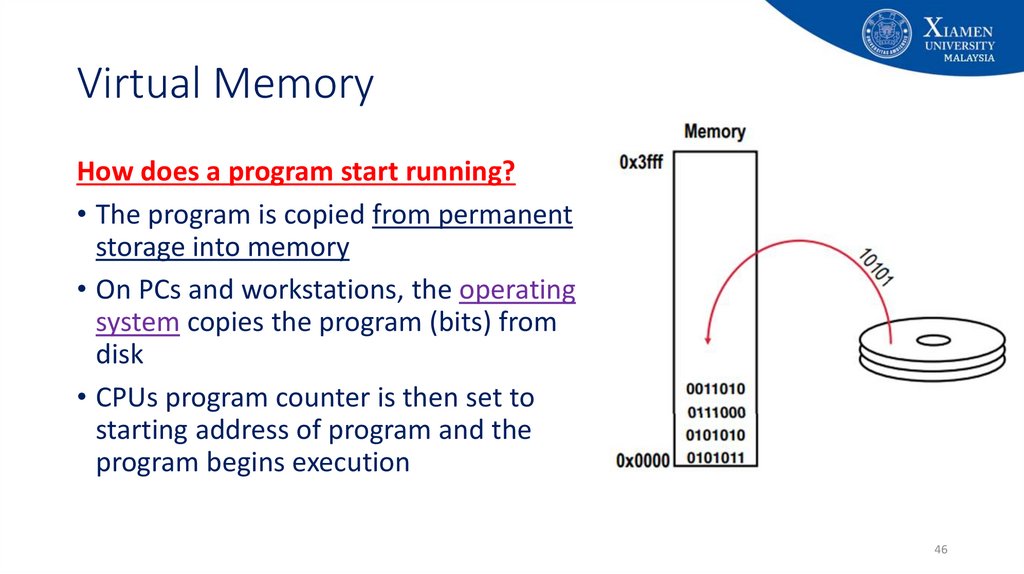
46. Virtual Memory
How does a program start running?• The program is copied from permanent
storage into memory
• On PCs and workstations, the operating
system copies the program (bits) from
disk
• CPUs program counter is then set to
starting address of program and the
program begins execution
46
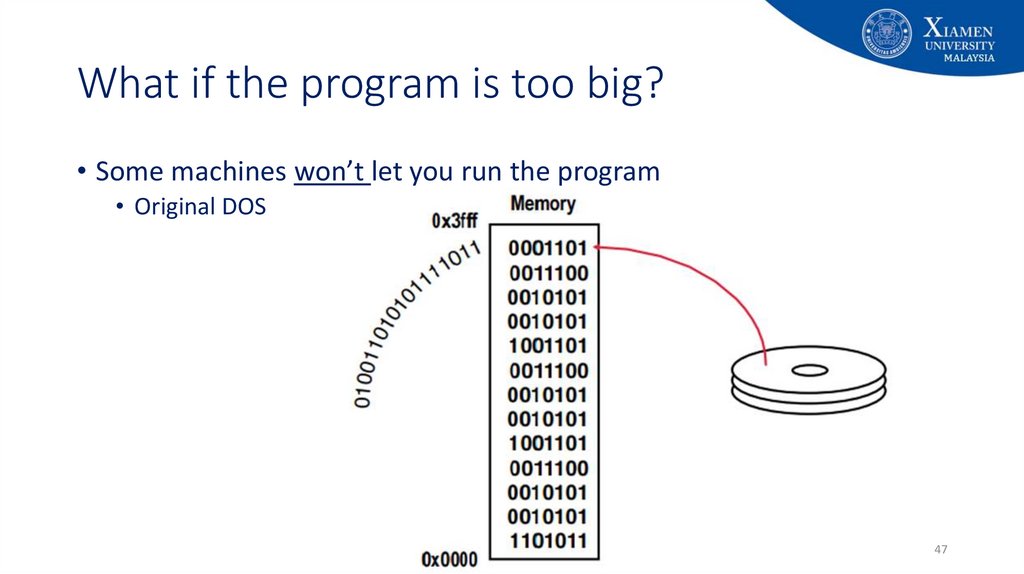
47. What if the program is too big?
• Some machines won’t let you run the program• Original DOS
47
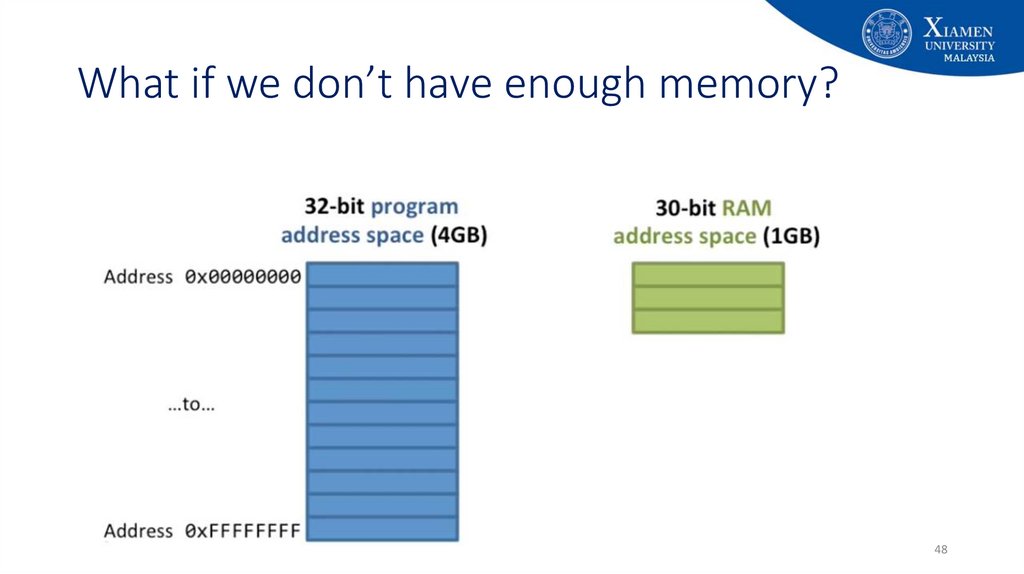
48. What if we don’t have enough memory?
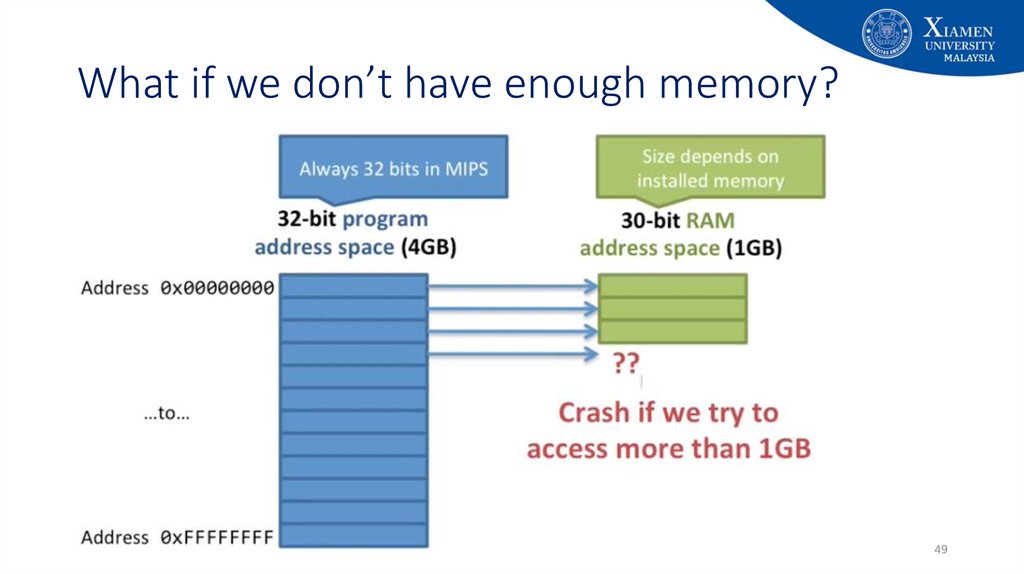
4849. What if we don’t have enough memory?
4950. Virtual memory is a layer of indirection!
• What is virtual memory?• Techniques that allow a program that
• can reside in non-contiguous memory locations
• does not have to completely reside in memory
• Allows the computer to fake a program believing that
• memory is contiguous
• memory space is larger than physical memory
50
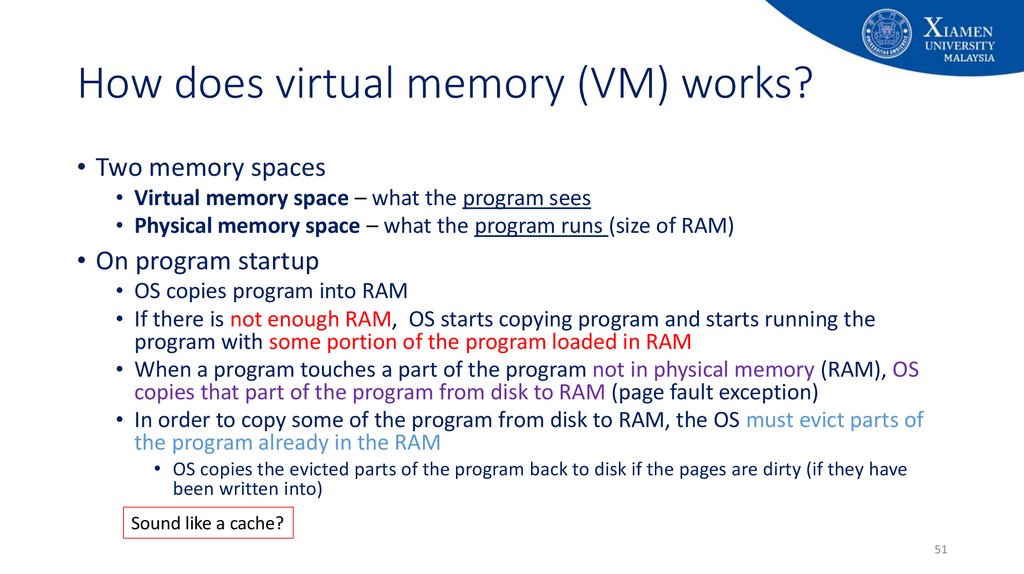
51. How does virtual memory (VM) works?
• Two memory spaces• Virtual memory space – what the program sees
• Physical memory space – what the program runs (size of RAM)
• On program startup
• OS copies program into RAM
• If there is not enough RAM, OS starts copying program and starts running the
program with some portion of the program loaded in RAM
• When a program touches a part of the program not in physical memory (RAM), OS
copies that part of the program from disk to RAM (page fault exception)
• In order to copy some of the program from disk to RAM, the OS must evict parts of
the program already in the RAM
• OS copies the evicted parts of the program back to disk if the pages are dirty (if they have
been written into)
Sound like a cache?
51
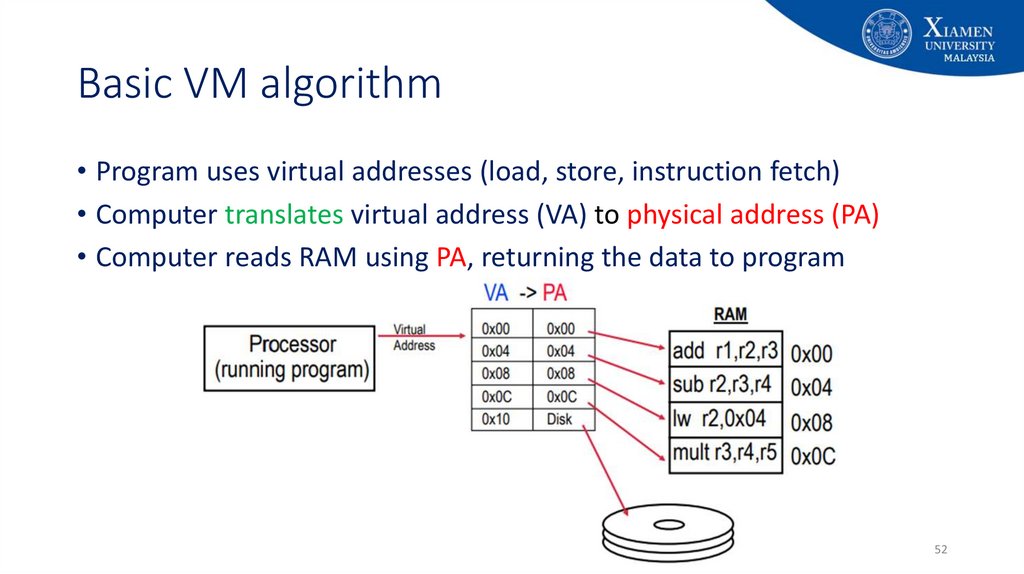
52. Basic VM algorithm
• Program uses virtual addresses (load, store, instruction fetch)• Computer translates virtual address (VA) to physical address (PA)
• Computer reads RAM using PA, returning the data to program
52
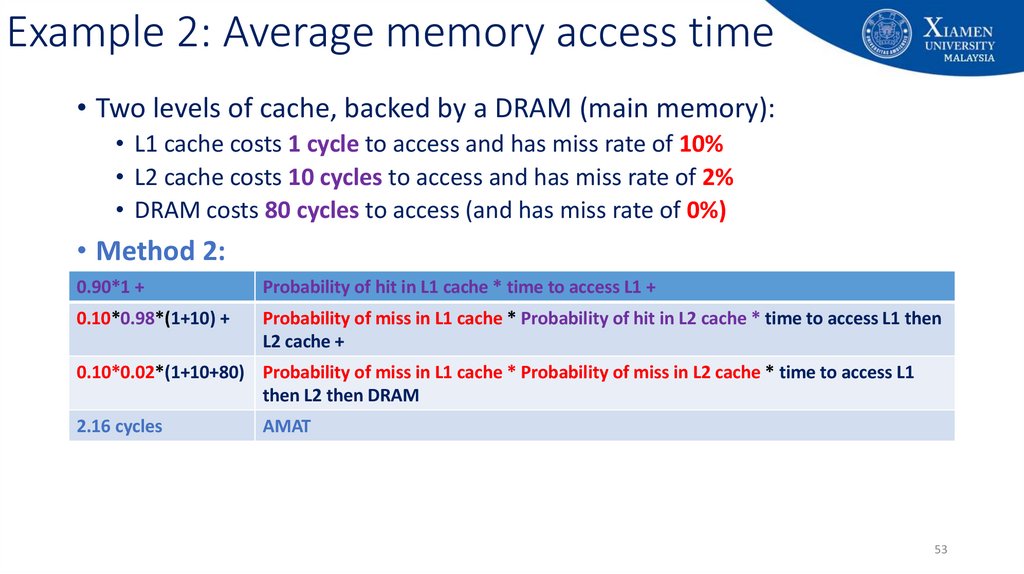
53. Example 2: Average memory access time
• Two levels of cache, backed by a DRAM (main memory):• L1 cache costs 1 cycle to access and has miss rate of 10%
• L2 cache costs 10 cycles to access and has miss rate of 2%
• DRAM costs 80 cycles to access (and has miss rate of 0%)
• Method 2:
0.90*1 +
Probability of hit in L1 cache * time to access L1 +
0.10*0.98*(1+10) +
Probability of miss in L1 cache * Probability of hit in L2 cache * time to access L1 then
L2 cache +
0.10*0.02*(1+10+80) Probability of miss in L1 cache * Probability of miss in L2 cache * time to access L1
then L2 then DRAM
2.16 cycles
AMAT
53