






 electronics
Similar presentations:



HCS 6x24 for Nokia RAN - Strategy and Guidance
1. HCS 6x24 for Nokia RAN - Strategy and Guidance
DELIVERING THE FUTURE OF WIRELESS.HCS 6x24 for Nokia RAN - Strategy
and Guidance
Cell Site Innovations
T-Mobile Confidential
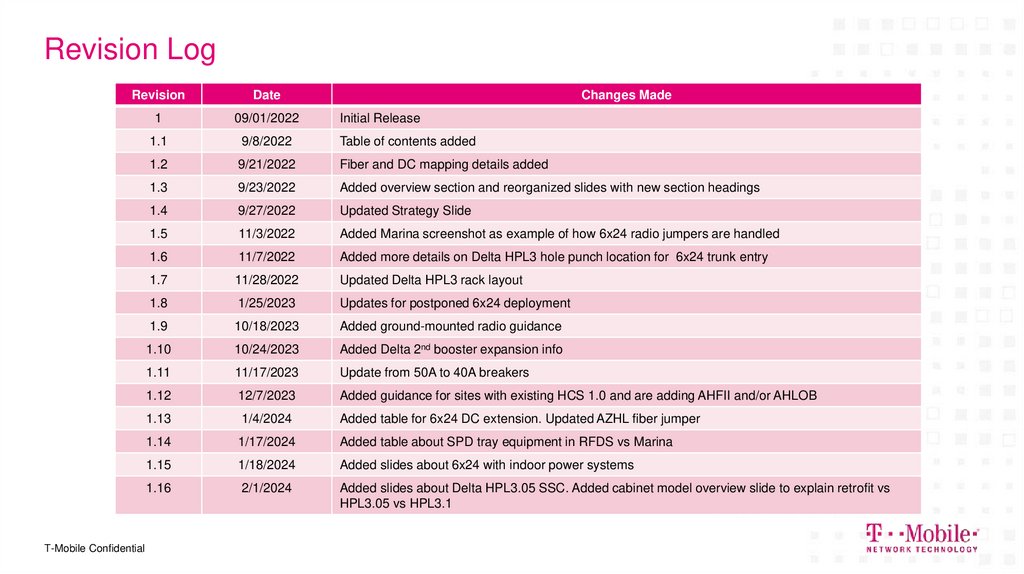
2. Revision Log
RevisionDate
1
09/01/2022
Initial Release
1.1
9/8/2022
Table of contents added
1.2
9/21/2022
Fiber and DC mapping details added
1.3
9/23/2022
Added overview section and reorganized slides with new section headings
1.4
9/27/2022
Updated Strategy Slide
1.5
11/3/2022
Added Marina screenshot as example of how 6x24 radio jumpers are handled
1.6
11/7/2022
Added more details on Delta HPL3 hole punch location for 6x24 trunk entry
1.7
11/28/2022
Updated Delta HPL3 rack layout
1.8
1/25/2023
Updates for postponed 6x24 deployment
1.9
10/18/2023
Added ground-mounted radio guidance
1.10
10/24/2023
Added Delta 2nd booster expansion info
1.11
11/17/2023
Update from 50A to 40A breakers
1.12
12/7/2023
Added guidance for sites with existing HCS 1.0 and are adding AHFII and/or AHLOB
1.13
1/4/2024
Added table for 6x24 DC extension. Updated AZHL fiber jumper
1.14
1/17/2024
Added table about SPD tray equipment in RFDS vs Marina
1.15
1/18/2024
Added slides about 6x24 with indoor power systems
1.16
2/1/2024
Added slides about Delta HPL3.05 SSC. Added cabinet model overview slide to explain retrofit vs
HPL3.05 vs HPL3.1
T-Mobile Confidential
Changes Made
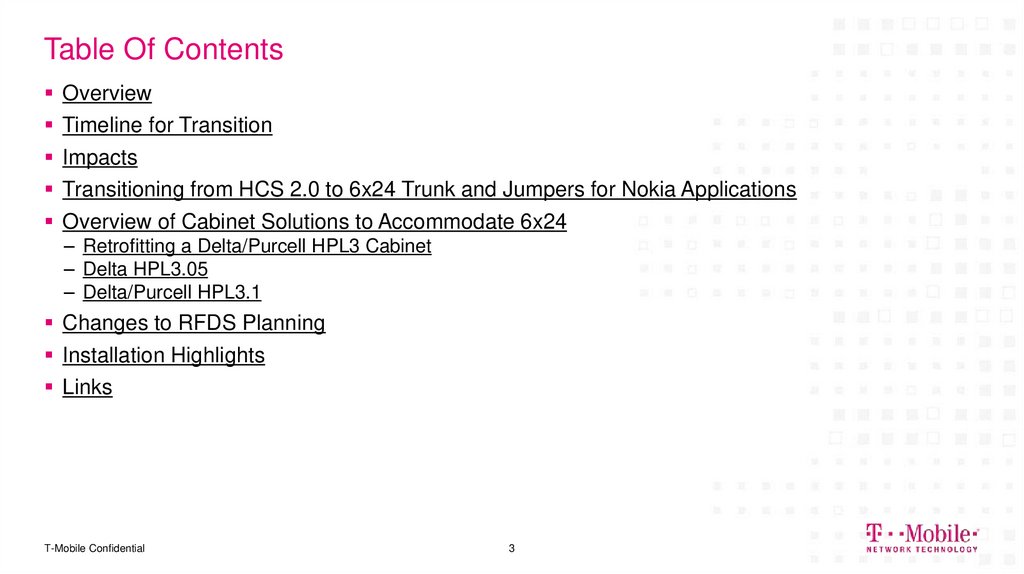
3. Table Of Contents
OverviewTimeline for Transition
Impacts
Transitioning from HCS 2.0 to 6x24 Trunk and Jumpers for Nokia Applications
Overview of Cabinet Solutions to Accommodate 6x24
– Retrofitting a Delta/Purcell HPL3 Cabinet
– Delta HPL3.05
– Delta/Purcell HPL3.1
Changes to RFDS Planning
Installation Highlights
Links
T-Mobile Confidential
3
4. Overview
DELIVERING THE FUTURE OF WIRELESS.Overview
T-Mobile Confidential
5. Overview
What– For Nokia markets, we are transitioning from HCS 2.0 to HCS 6x24 trunks (6 DC pairs, 24
fiber pairs)
New hardware being introduced
– New voltage boosters
One for Delta Cabinets (Delta BOOST)
One for Purcell Cabinets (Purcell HyperBoost)
– SPD tray (installed inside cabinet)
– Fiber tray w/ integrated patch panel (installed inside cabinet)
Why
– Each radio will have a dedicated DC feed circuit
Individual radio control, ability to shut off or power cycle a single radio for maintenance
– Same HCS SKU as we use in Ericsson Markets
Simplify sourcing
– 4 current suppliers: CommScope, RFS, NWS, Huber+Suhner
– Improved Electrical Design
T-Mobile Confidential
5
6. Overview
How– Delta and Purcell HPL3 cabinets can be retrofitted with supporting hardware
– New HPL3.1 cabinets (Delta and Purcell) will be introduced
Required 6x24 support hardware is pre-installed
Includes side mounted cable entry box (doghouse)
T-Mobile Confidential
6
7. HCS 6x24 Strategy
Use existing capacity on HCS trunks already installedNew trunks for additional capacity will be HCS 6x24
Rip-and-replace of HCS 1.0/2.0 trunks in-use is not within scope of this transition
Fiber jumpers will support radios being rolled out on 6x24 such as AEHC, AHFIG/I, AHLOA/B, AZHL, AAFIA
Existing HPL3 cabinets will be retrofitted to support HCS 6x24
HPL3.1 can support legacy HCS 1.0/2.0 if required
Rooftop NSD Configs:
– Install 1 HCS 6x24 trunk per sector
For sites with existing HCS 1.0 trunks that are adding a combination of:
– AHFII+AHLOA
– AHFII+AHLOB
– AHFIG+AHLOB
These sites will need to add a new trunk or replace the HCS 1.0 trunk, since the HCS 1.0 trunk cannot support the power load of these radio
combinations.
T-Mobile Confidential
7
8. Impacts
DELIVERING THE FUTURE OF WIRELESS.Impacts
T-Mobile Confidential
9. Impacts – Entitlement
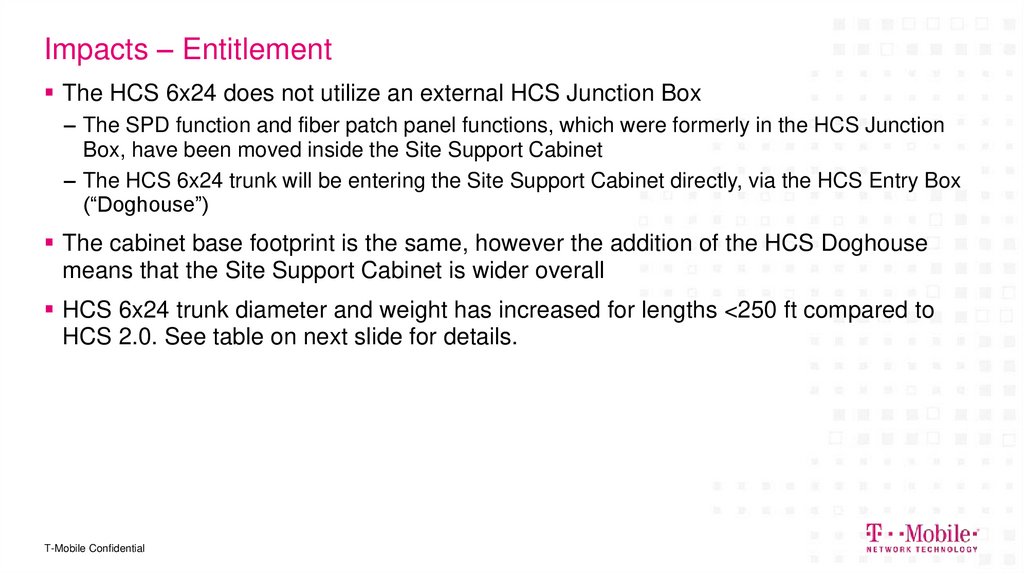
The HCS 6x24 does not utilize an external HCS Junction Box– The SPD function and fiber patch panel functions, which were formerly in the HCS Junction
Box, have been moved inside the Site Support Cabinet
– The HCS 6x24 trunk will be entering the Site Support Cabinet directly, via the HCS Entry Box
(“Doghouse”)
The cabinet base footprint is the same, however the addition of the HCS Doghouse
means that the Site Support Cabinet is wider overall
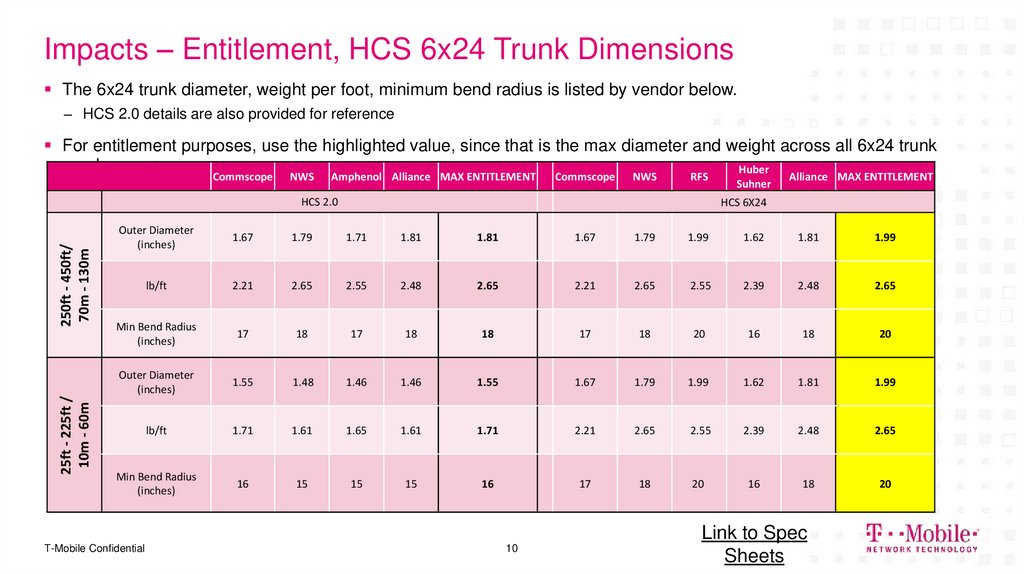
HCS 6x24 trunk diameter and weight has increased for lengths <250 ft compared to
HCS 2.0. See table on next slide for details.
T-Mobile Confidential
10. Impacts – Entitlement, HCS 6x24 Trunk Dimensions
The 6x24 trunk diameter, weight per foot, minimum bend radius is listed by vendor below.– HCS 2.0 details are also provided for reference
For entitlement purposes, use the highlighted value, since that is the max diameter and weight across all 6x24 trunk
vendors
Huber
Commscope
NWS
Amphenol Alliance MAX ENTITLEMENT
Commscope
NWS
RFS
25ft - 225ft /
10m - 60m
250ft - 450ft/
70m - 130m
HCS 2.0
Suhner
Alliance MAX ENTITLEMENT
HCS 6X24
Outer Diameter
(inches)
1.67
1.79
1.71
1.81
1.81
1.67
1.79
1.99
1.62
1.81
1.99
lb/ft
2.21
2.65
2.55
2.48
2.65
2.21
2.65
2.55
2.39
2.48
2.65
Min Bend Radius
(inches)
17
18
17
18
18
17
18
20
16
18
20
Outer Diameter
(inches)
1.55
1.48
1.46
1.46
1.55
1.67
1.79
1.99
1.62
1.81
1.99
lb/ft
1.71
1.61
1.65
1.61
1.71
2.21
2.65
2.55
2.39
2.48
2.65
Min Bend Radius
(inches)
16
15
15
15
16
17
18
20
16
18
20
T-Mobile Confidential
10
Link to Spec
Sheets
11. Impacts - RFDS
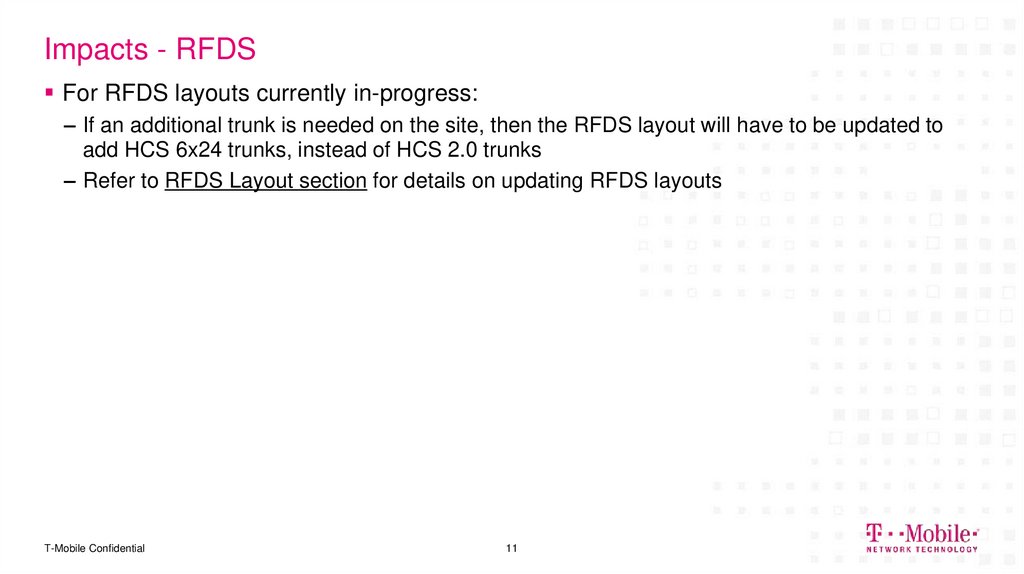
For RFDS layouts currently in-progress:– If an additional trunk is needed on the site, then the RFDS layout will have to be updated to
add HCS 6x24 trunks, instead of HCS 2.0 trunks
– Refer to RFDS Layout section for details on updating RFDS layouts
T-Mobile Confidential
11
12. Transitioning from HCS 2.0 to 6x24 Trunk and Jumpers for Nokia Applications
DELIVERING THE FUTURE OF WIRELESS.Transitioning from HCS 2.0 to 6x24
Trunk and Jumpers for Nokia
Applications
12
T-Mobile Confidential
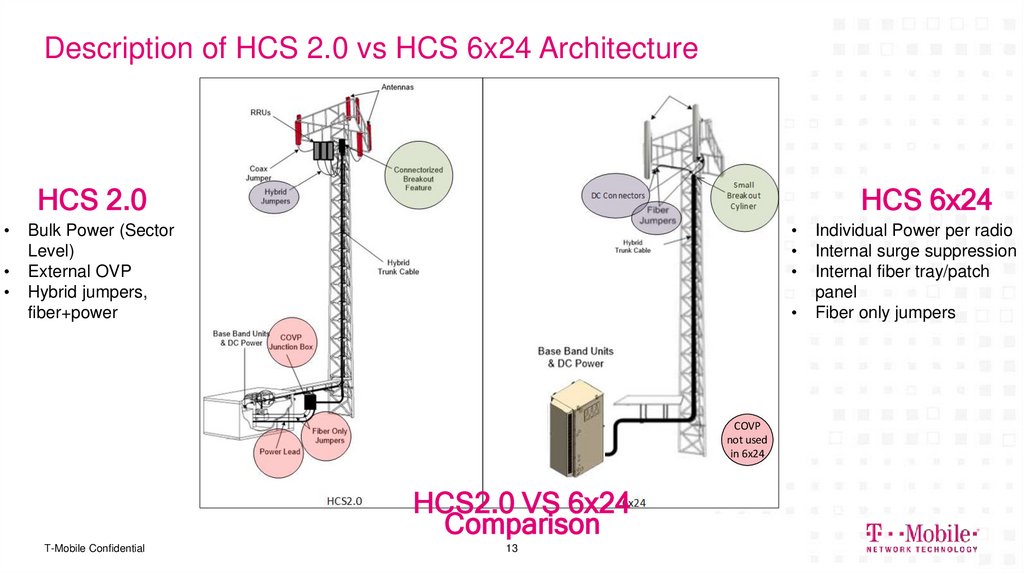
13. Description of HCS 2.0 vs HCS 6x24 Architecture
HCS 2.0HCS 6x24
Bulk Power (Sector
Level)
External OVP
Hybrid jumpers,
fiber+power
COVP
not used
in 6x24
HCS2.0 VS 6x24
Comparison
T-Mobile Confidential
13
Individual Power per radio
Internal surge suppression
Internal fiber tray/patch
panel
Fiber only jumpers
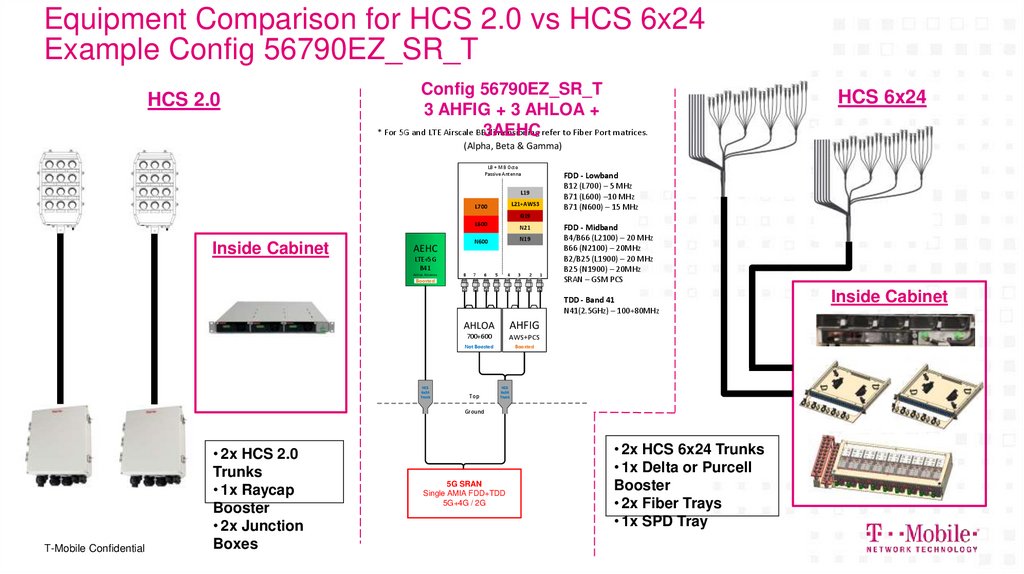
14. Equipment Comparison for HCS 2.0 vs HCS 6x24 Example Config 56790EZ_SR_T
HCS 2.0Config 56790EZ_SR_T
3 AHFIG + 3 AHLOA +
HCS 6x24 - Configuration 56790EZ_SR_T
* For 5G and LTE Airscale BB3AEHC
dimensioning refer to Fiber Port matrices.
HCS 6x24
(Alpha, Beta & Gamma)
LB + MB Octo
Passive Antenna
FDD - Lowband
B12 (L700) – MHz
B71 (L600) – MHz
B71 (N600) – MHz
L19
L21+AWS3
L700
G19
L600
Inside Cabinet
N21
N19
N600
AEHC
LTE+5G
B41
Active Antenna
8
7
6
5
4
3
2
1
Boosted
FDD - Midband
B4/B66 (L2100) – MHz
B66 (N2100) – 20MHz
B2/B25 (L1900) – MHz
B25 (N1900) – 20MHz
SRAN – GSM PCS
TDD - Band 41
N41(2.5GHz) – 100+80MHz
AHLOA
AHFIG
700+600
AWS+PCS
Not Boosted
Boosted
Top
Ground
T-Mobile Confidential
• 2x HCS 2.0
Trunks
• 1x Raycap
Booster
• 2x Junction
Boxes
5G SRAN
Single AMIA FDD+TDD
5G+4G / 2G
• 2x HCS 6x24 Trunks
• 1x Delta or Purcell
Booster
• 2x Fiber Trays
• 1x SPD Tray
Inside Cabinet
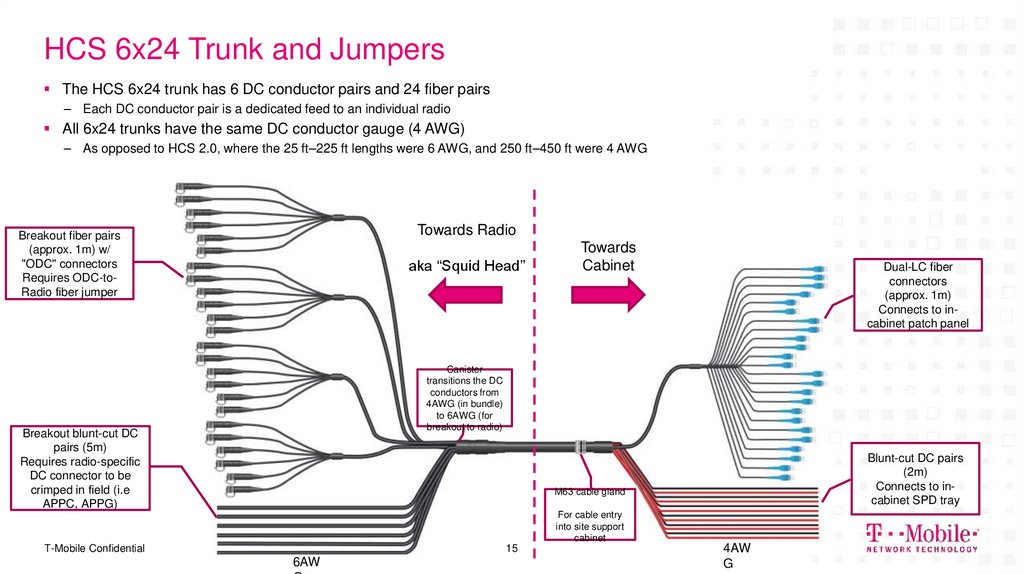
15. HCS 6x24 Trunk and Jumpers
The HCS 6x24 trunk has 6 DC conductor pairs and 24 fiber pairs– Each DC conductor pair is a dedicated feed to an individual radio
All 6x24 trunks have the same DC conductor gauge (4 AWG)
– As opposed to HCS 2.0, where the 25 ft–225 ft lengths were 6 AWG, and 250 ft–450 ft were 4 AWG
Towards Radio
Breakout fiber pairs
(approx. 1m) w/
"ODC" connectors
Requires ODC-toRadio fiber jumper
aka “Squid Head”
Towards
Cabinet
Dual-LC fiber
connectors
(approx. 1m)
Connects to incabinet patch panel
Canister
transitions the DC
conductors from
4AWG (in bundle)
to 6AWG (for
breakout to radio)
Breakout blunt-cut DC
pairs (5m)
Requires radio-specific
DC connector to be
crimped in field (i.e
APPC, APPG)
Blunt-cut DC pairs
(2m)
Connects to incabinet SPD tray
M63 cable gland
For cable entry
into site support
cabinet
T-Mobile Confidential
15
6AW
4AW
G
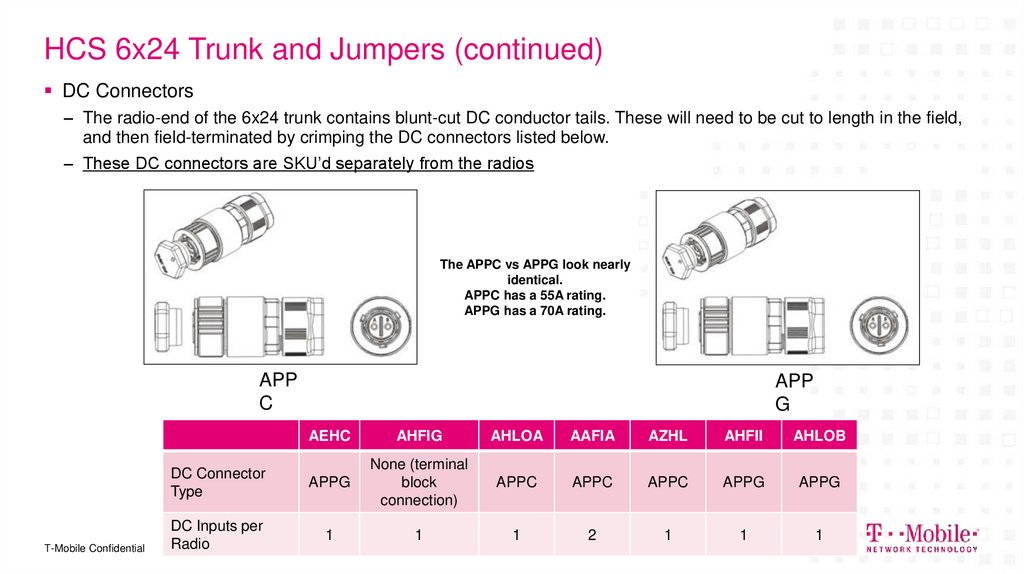
16. HCS 6x24 Trunk and Jumpers (continued)
DC Connectors– The radio-end of the 6x24 trunk contains blunt-cut DC conductor tails. These will need to be cut to length in the field,
and then field-terminated by crimping the DC connectors listed below.
– These DC connectors are SKU’d separately from the radios
The APPC vs APPG look nearly
identical.
APPC has a 55A rating.
APPG has a 70A rating.
APP
C
T-Mobile Confidential
APP
G
AEHC
AHFIG
AHLOA
AAFIA
AZHL
AHFII
AHLOB
DC Connector
Type
APPG
None (terminal
block
connection)
APPC
APPC
APPC
APPG
APPG
DC Inputs per
Radio
1
1
1
2
1
1
1
16
17. HCS 6x24 Trunk and Jumpers (continued)
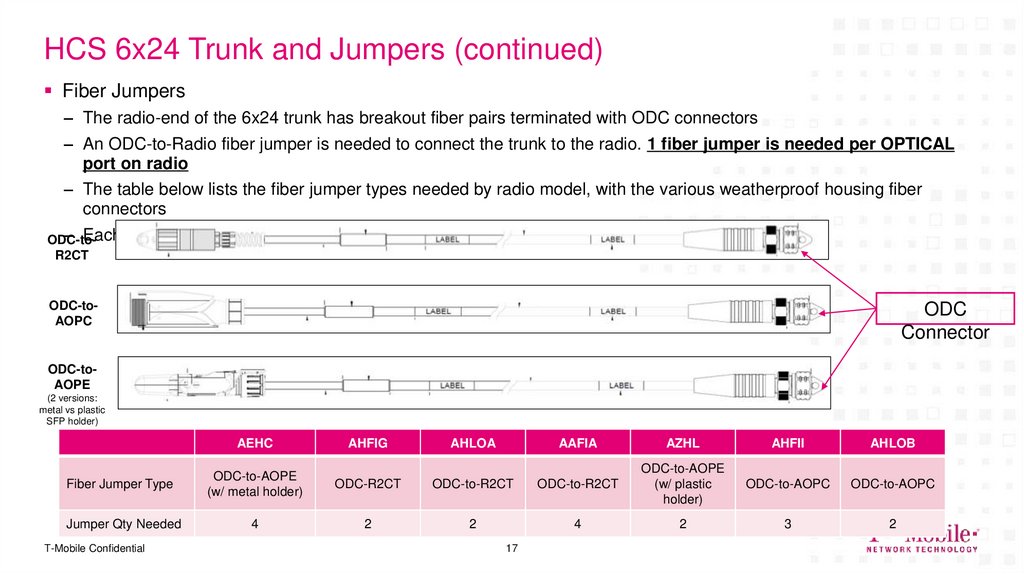
Fiber Jumpers– The radio-end of the 6x24 trunk has breakout fiber pairs terminated with ODC connectors
– An ODC-to-Radio fiber jumper is needed to connect the trunk to the radio. 1 fiber jumper is needed per OPTICAL
port on radio
– The table below lists the fiber jumper types needed by radio model, with the various weatherproof housing fiber
connectors
– Each jumper type is available on 3 lengths: 5, 10 and 20 meters
ODC-toR2CT
ODC-toAOPC
ODC
Connector
ODC-toAOPE
(2 versions:
metal vs plastic
SFP holder)
AEHC
AHFIG
AHLOA
AAFIA
AZHL
AHFII
AHLOB
ODC-to-AOPC
ODC-to-AOPC
3
2
Fiber Jumper Type
ODC-to-AOPE
(w/ metal holder)
ODC-R2CT
ODC-to-R2CT
ODC-to-R2CT
ODC-to-AOPE
(w/ plastic
holder)
Jumper Qty Needed
4
2
2
4
2
T-Mobile Confidential
17
18. Overview of Cabinet Solutions to Accommodate 6x24
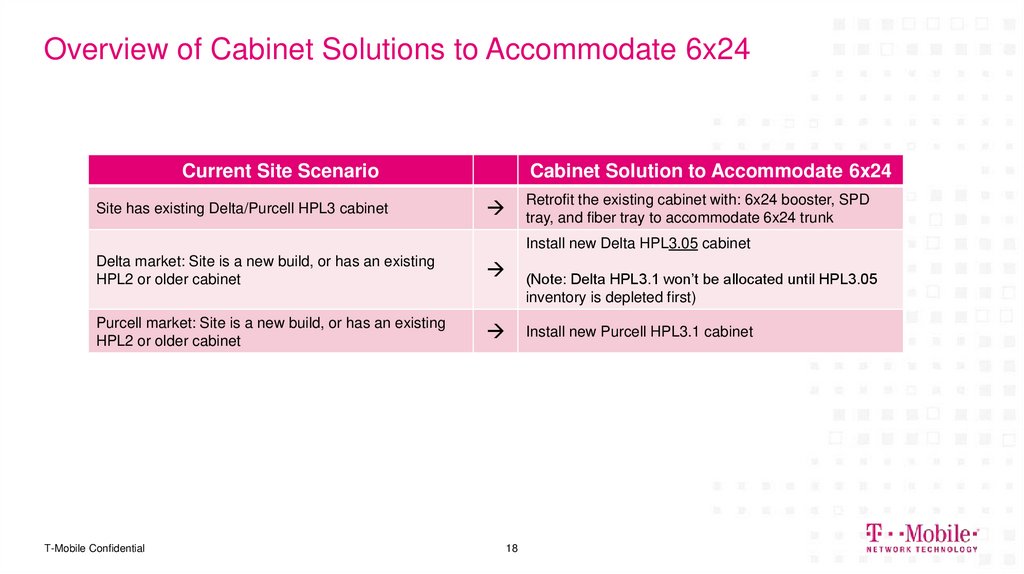
Current Site ScenarioSite has existing Delta/Purcell HPL3 cabinet
Cabinet Solution to Accommodate 6x24
Retrofit the existing cabinet with: 6x24 booster, SPD
tray, and fiber tray to accommodate 6x24 trunk
Install new Delta HPL3.05 cabinet
Delta market: Site is a new build, or has an existing
HPL2 or older cabinet
Purcell market: Site is a new build, or has an existing
HPL2 or older cabinet
T-Mobile Confidential
(Note: Delta HPL3.1 won’t be allocated until HPL3.05
inventory is depleted first)
Install new Purcell HPL3.1 cabinet
18
19. Retrofitting a Delta/Purcell HPL3
DELIVERING THE FUTURE OF WIRELESS.Retrofitting a
Delta/Purcell HPL3
19
T-Mobile Confidential
20. Retrofit of HPL3 – Cabinet Layout
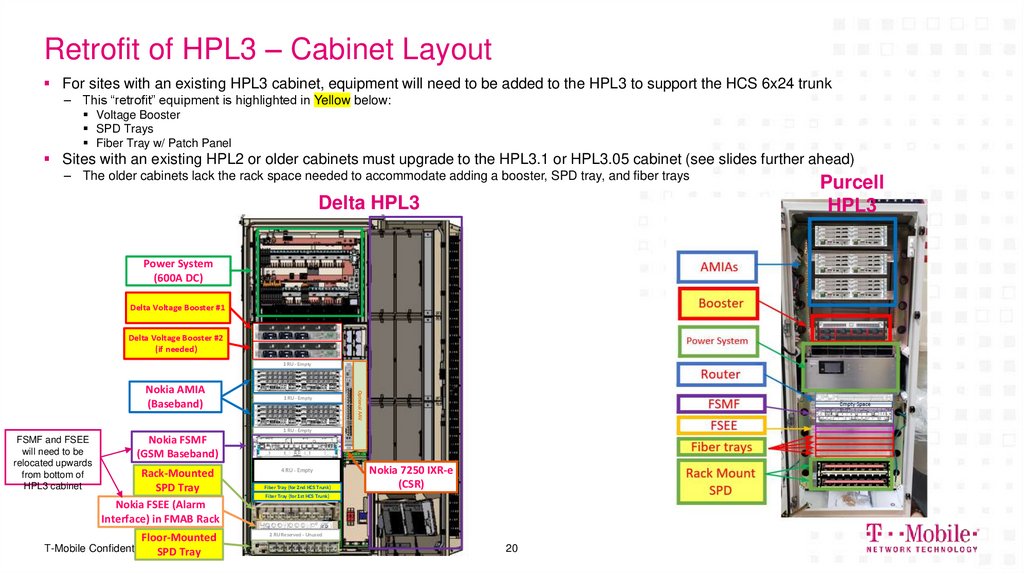
For sites with an existing HPL3 cabinet, equipment will need to be added to the HPL3 to support the HCS 6x24 trunk– This “retrofit” equipment is highlighted in Yellow below:
Voltage Booster
SPD Trays
Fiber Tray w/ Patch Panel
Sites with an existing HPL2 or older cabinets must upgrade to the HPL3.1 or HPL3.05 cabinet (see slides further ahead)
– The older cabinets lack the rack space needed to accommodate adding a booster, SPD tray, and fiber trays
Delta HPL3
Power System
(600A DC)
Delta Voltage Booster #1
Delta Voltage Booster #2
(if needed)
1 RU - Empty
1 RU - Empty
Optional AAV
Nokia AMIA
(Baseband)
1 RU - Empty
FSMF and FSEE
will need to be
relocated upwards
from bottom of
HPL3 cabinet
Nokia FSMF
(GSM Baseband)
Rack-Mounted
SPD Tray
Nokia FSEE (Alarm
Interface) in FMAB Rack
Floor-Mounted
T-Mobile Confidential SPD Tray
4 RU - Empty
Fiber Tray (for 2nd HCS Trunk)
Nokia 7250 IXR-e
(CSR)
Fiber Tray (for 1st HCS Trunk)
2 RU Reserved - Unused
20
Purcell
HPL3
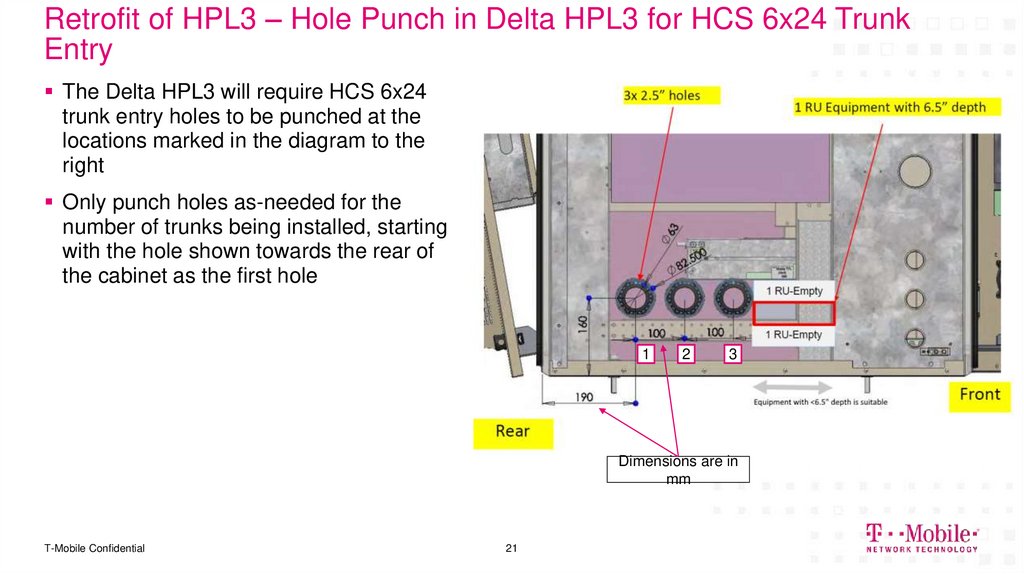
21. Retrofit of HPL3 – Hole Punch in Delta HPL3 for HCS 6x24 Trunk Entry
The Delta HPL3 will require HCS 6x24trunk entry holes to be punched at the
locations marked in the diagram to the
right
Only punch holes as-needed for the
number of trunks being installed, starting
with the hole shown towards the rear of
the cabinet as the first hole
1
2
3
Dimensions are in
mm
T-Mobile Confidential
21
22. Indoor Delta Power System Racks
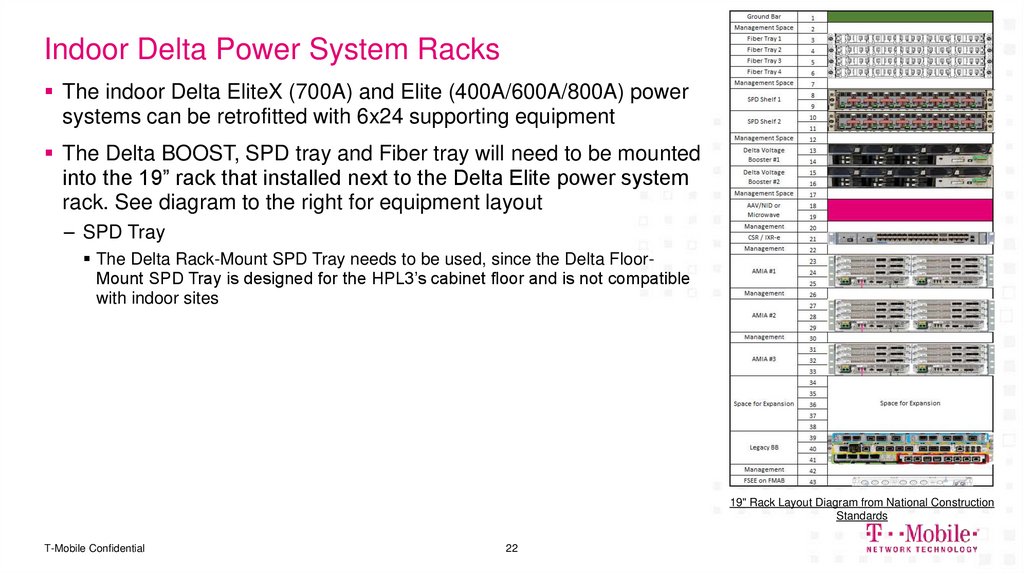
The indoor Delta EliteX (700A) and Elite (400A/600A/800A) powersystems can be retrofitted with 6x24 supporting equipment
The Delta BOOST, SPD tray and Fiber tray will need to be mounted
into the 19” rack that installed next to the Delta Elite power system
rack. See diagram to the right for equipment layout
– SPD Tray
The Delta Rack-Mount SPD Tray needs to be used, since the Delta FloorMount SPD Tray is designed for the HPL3’s cabinet floor and is not compatible
with indoor sites
19" Rack Layout Diagram from National Construction
Standards
T-Mobile Confidential
22
23. Voltage Booster
Upconverter Unit
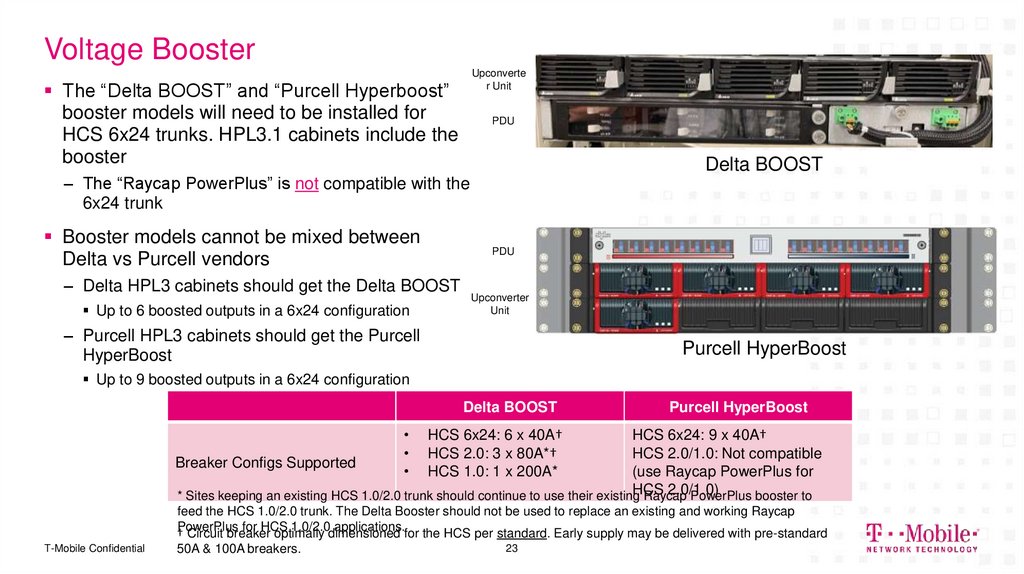
The “Delta BOOST” and “Purcell Hyperboost”
booster models will need to be installed for
HCS 6x24 trunks. HPL3.1 cabinets include the
booster
PDU
Delta BOOST
– The “Raycap PowerPlus” is not compatible with the
6x24 trunk
Booster models cannot be mixed between
Delta vs Purcell vendors
PDU
– Delta HPL3 cabinets should get the Delta BOOST
Up to 6 boosted outputs in a 6x24 configuration
Upconverter
Unit
– Purcell HPL3 cabinets should get the Purcell
HyperBoost
Purcell HyperBoost
Up to 9 boosted outputs in a 6x24 configuration
Delta BOOST
Purcell HyperBoost
HCS 6x24: 6 x 40A†
HCS 2.0: 3 x 80A*†
HCS 1.0: 1 x 200A*
HCS 6x24: 9 x 40A†
HCS 2.0/1.0: Not compatible
Breaker Configs Supported
(use Raycap PowerPlus for
HCS
2.0/1.0)
* Sites keeping an existing HCS 1.0/2.0 trunk should continue to use their existing
Raycap
PowerPlus booster to
feed the HCS 1.0/2.0 trunk. The Delta Booster should not be used to replace an existing and working Raycap
for HCS
1.0/2.0dimensioned
applications.for the HCS per standard. Early supply may be delivered with pre-standard
†PowerPlus
Circuit breaker
optimally
T-Mobile Confidential
50A & 100A breakers.
23
24. Booster Requirement
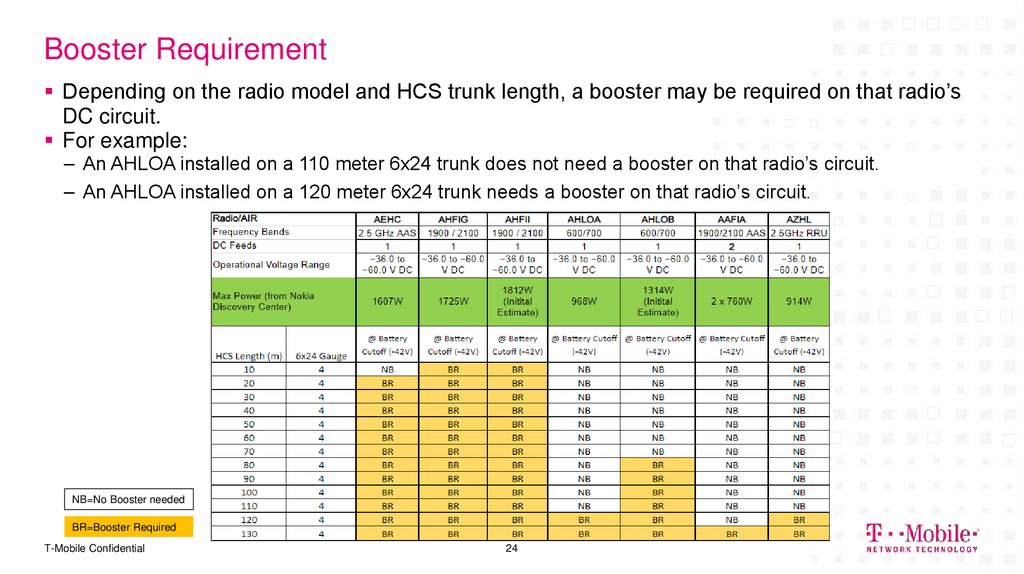
Depending on the radio model and HCS trunk length, a booster may be required on that radio’sDC circuit.
For example:
– An AHLOA installed on a 110 meter 6x24 trunk does not need a booster on that radio’s circuit.
– An AHLOA installed on a 120 meter 6x24 trunk needs a booster on that radio’s circuit.
NB=No Booster needed
BR=Booster Required
T-Mobile Confidential
24
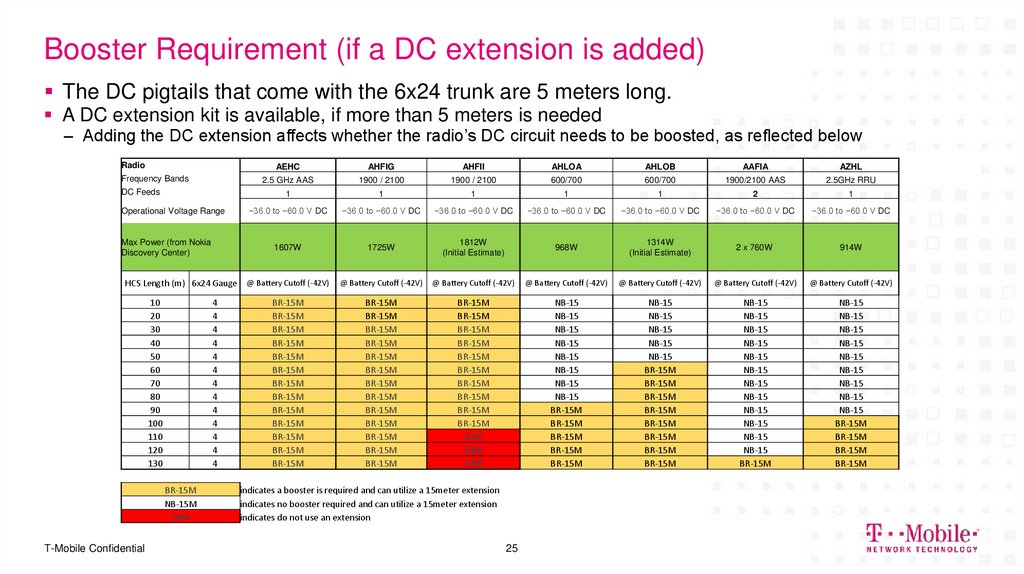
25. Booster Requirement (if a DC extension is added)
The DC pigtails that come with the 6x24 trunk are 5 meters long.A DC extension kit is available, if more than 5 meters is needed
– Adding the DC extension affects whether the radio’s DC circuit needs to be boosted, as reflected below
Radio
Frequency Bands
DC Feeds
Operational Voltage Range
Max Power (from Nokia
Discovery Center)
AEHC
AHFIG
AHFII
AHLOA
AHLOB
AAFIA
AZHL
2.5 GHz AAS
1900 / 2100
1900 / 2100
600/700
600/700
1900/2100 AAS
2.5GHz RRU
1
1
1
1
1
2
1
−36.0 to −60.0 V DC
−36.0 to −60.0 V DC
−36.0 to −60.0 V DC
−36.0 to −60.0 V DC
−36.0 to −60.0 V DC
−36.0 to −60.0 V DC
−36.0 to −60.0 V DC
1607W
1725W
1812W
(Initial Estimate)
968W
1314W
(Initial Estimate)
2 x 760W
914W
@ Battery Cutoff (-42V)
@ Battery Cutoff (-42V)
@ Battery Cutoff (-42V)
@ Battery Cutoff (-42V)
@ Battery Cutoff (-42V)
@ Battery Cutoff (-42V)
BR-15M
BR-15M
BR-15M
BR-15M
BR-15M
BR-15M
BR-15M
BR-15M
BR-15M
BR-15M
BR-15M
BR-15M
BR-15M
BR-15M
BR-15M
BR-15M
BR-15M
BR-15M
BR-15M
BR-15M
BR-15M
BR-15M
BR-15M
DNR
DNR
DNR
NB-15
NB-15
NB-15
NB-15
NB-15
NB-15
NB-15
NB-15
BR-15M
BR-15M
BR-15M
BR-15M
BR-15M
NB-15
NB-15
NB-15
NB-15
NB-15
BR-15M
BR-15M
BR-15M
BR-15M
BR-15M
BR-15M
BR-15M
BR-15M
NB-15
NB-15
NB-15
NB-15
NB-15
NB-15
NB-15
NB-15
NB-15
NB-15
NB-15
NB-15
BR-15M
NB-15
NB-15
NB-15
NB-15
NB-15
NB-15
NB-15
NB-15
NB-15
BR-15M
BR-15M
BR-15M
BR-15M
HCS Length (m) 6x24 Gauge @ Battery Cutoff (-42V)
10
20
30
40
50
60
70
80
90
100
110
120
130
4
4
4
4
4
4
4
4
4
4
4
4
4
BR-15M
NB-15M
DNR
T-Mobile Confidential
BR-15M
BR-15M
BR-15M
BR-15M
BR-15M
BR-15M
BR-15M
BR-15M
BR-15M
BR-15M
BR-15M
BR-15M
BR-15M
indicates a booster is required and can utilize a 15meter extension
indicates no booster required and can utilize a 15meter extension
indicates do not use an extension
25
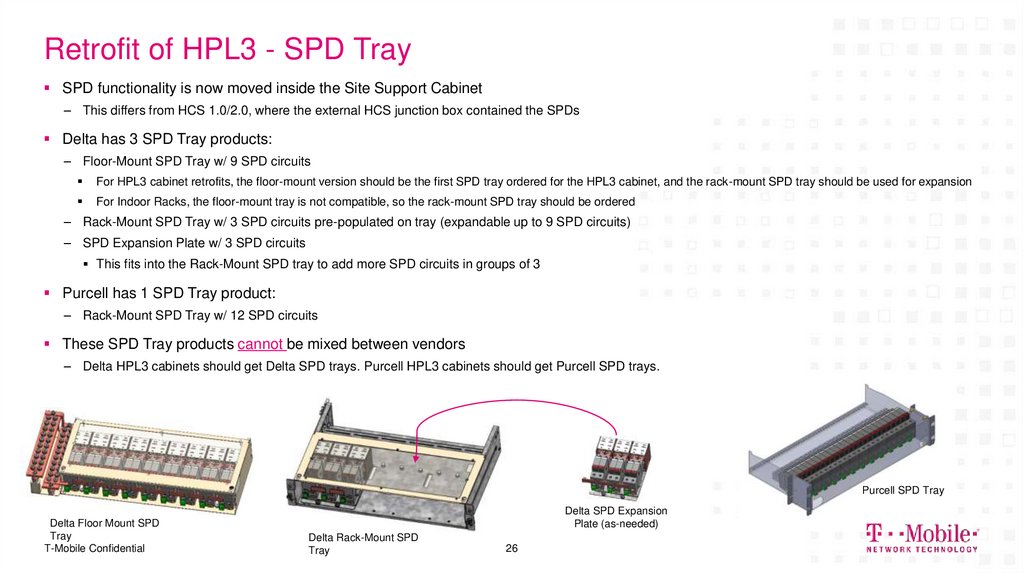
26. Retrofit of HPL3 - SPD Tray
SPD functionality is now moved inside the Site Support Cabinet– This differs from HCS 1.0/2.0, where the external HCS junction box contained the SPDs
Delta has 3 SPD Tray products:
– Floor-Mount SPD Tray w/ 9 SPD circuits
For HPL3 cabinet retrofits, the floor-mount version should be the first SPD tray ordered for the HPL3 cabinet, and the rack-mount SPD tray should be used for expansion
For Indoor Racks, the floor-mount tray is not compatible, so the rack-mount SPD tray should be ordered
– Rack-Mount SPD Tray w/ 3 SPD circuits pre-populated on tray (expandable up to 9 SPD circuits)
– SPD Expansion Plate w/ 3 SPD circuits
This fits into the Rack-Mount SPD tray to add more SPD circuits in groups of 3
Purcell has 1 SPD Tray product:
– Rack-Mount SPD Tray w/ 12 SPD circuits
These SPD Tray products cannot be mixed between vendors
– Delta HPL3 cabinets should get Delta SPD trays. Purcell HPL3 cabinets should get Purcell SPD trays.
Purcell SPD Tray
Delta Floor Mount SPD
Tray
T-Mobile Confidential
Delta SPD Expansion
Plate (as-needed)
Delta Rack-Mount SPD
Tray
26
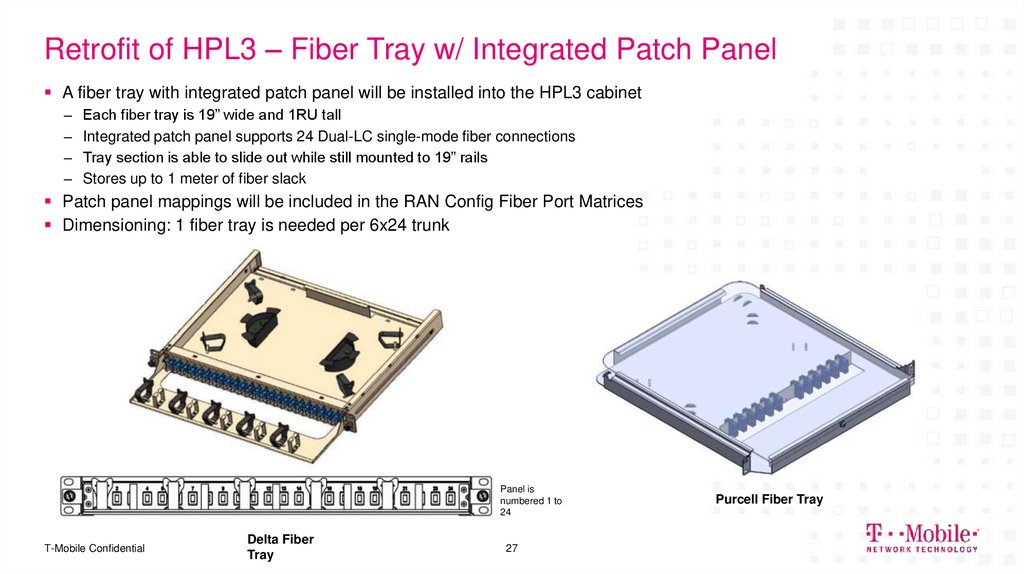
27. Retrofit of HPL3 – Fiber Tray w/ Integrated Patch Panel
A fiber tray with integrated patch panel will be installed into the HPL3 cabinet–
–
–
–
Each fiber tray is 19” wide and 1RU tall
Integrated patch panel supports 24 Dual-LC single-mode fiber connections
Tray section is able to slide out while still mounted to 19” rails
Stores up to 1 meter of fiber slack
Patch panel mappings will be included in the RAN Config Fiber Port Matrices
Dimensioning: 1 fiber tray is needed per 6x24 trunk
Panel is
numbered 1 to
24
T-Mobile Confidential
Delta Fiber
Tray
27
Purcell Fiber Tray
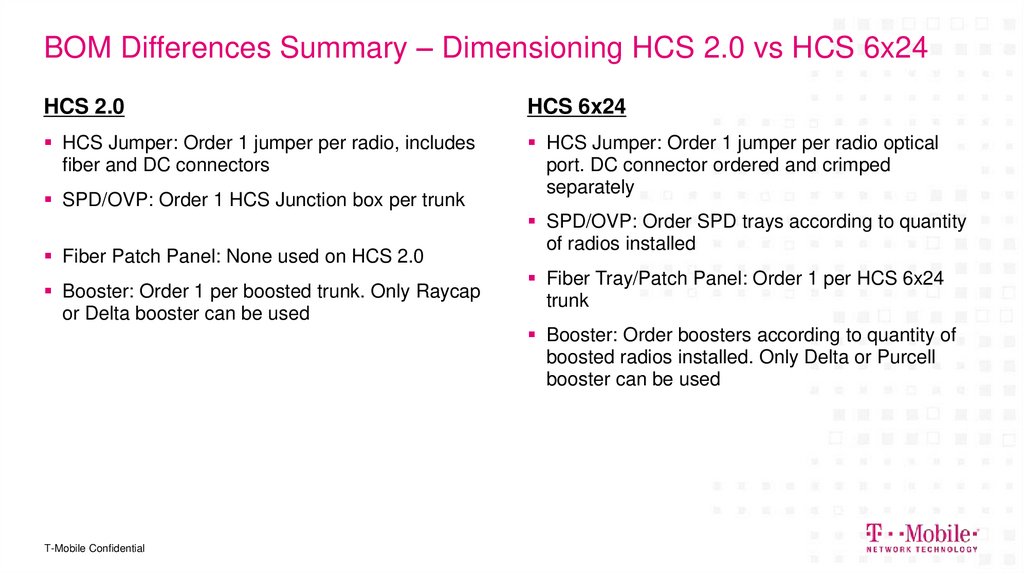
28. BOM Differences Summary – Dimensioning HCS 2.0 vs HCS 6x24
HCS 2.0HCS 6x24
HCS Jumper: Order 1 jumper per radio, includes
fiber and DC connectors
HCS Jumper: Order 1 jumper per radio optical
port. DC connector ordered and crimped
separately
SPD/OVP: Order 1 HCS Junction box per trunk
Fiber Patch Panel: None used on HCS 2.0
Booster: Order 1 per boosted trunk. Only Raycap
or Delta booster can be used
SPD/OVP: Order SPD trays according to quantity
of radios installed
Fiber Tray/Patch Panel: Order 1 per HCS 6x24
trunk
Booster: Order boosters according to quantity of
boosted radios installed. Only Delta or Purcell
booster can be used
T-Mobile Confidential
29. Delta HPL3.05 Site Support Cabinet
DELIVERING THE FUTURE OF WIRELESS.Delta HPL3.05 Site Support
Cabinet
29
T-Mobile Confidential
30. Delta HPL3.05 Site Support Cabinet – SKU 34867
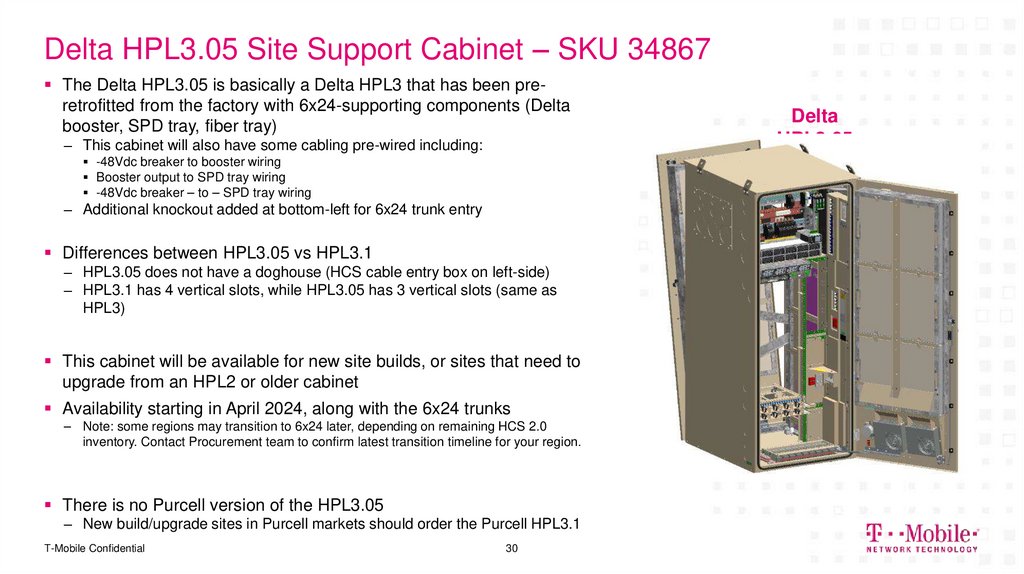
The Delta HPL3.05 is basically a Delta HPL3 that has been preretrofitted from the factory with 6x24-supporting components (Deltabooster, SPD tray, fiber tray)
– This cabinet will also have some cabling pre-wired including:
-48Vdc breaker to booster wiring
Booster output to SPD tray wiring
-48Vdc breaker – to – SPD tray wiring
– Additional knockout added at bottom-left for 6x24 trunk entry
Differences between HPL3.05 vs HPL3.1
– HPL3.05 does not have a doghouse (HCS cable entry box on left-side)
– HPL3.1 has 4 vertical slots, while HPL3.05 has 3 vertical slots (same as
HPL3)
This cabinet will be available for new site builds, or sites that need to
upgrade from an HPL2 or older cabinet
Availability starting in April 2024, along with the 6x24 trunks
– Note: some regions may transition to 6x24 later, depending on remaining HCS 2.0
inventory. Contact Procurement team to confirm latest transition timeline for your region.
There is no Purcell version of the HPL3.05
– New build/upgrade sites in Purcell markets should order the Purcell HPL3.1
T-Mobile Confidential
30
Delta
HPL3.05
31. Delta/Purcell HPL3.1
DELIVERING THE FUTURE OF WIRELESS.Delta/Purcell HPL3.1
31
T-Mobile Confidential
32. Introduction of HPL3.1
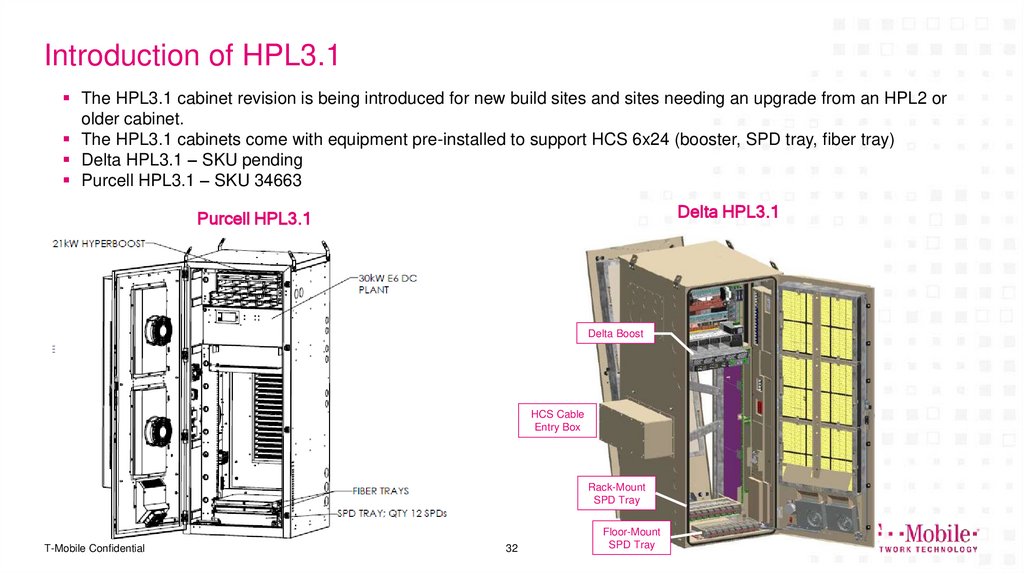
The HPL3.1 cabinet revision is being introduced for new build sites and sites needing an upgrade from an HPL2 orolder cabinet.
The HPL3.1 cabinets come with equipment pre-installed to support HCS 6x24 (booster, SPD tray, fiber tray)
Delta HPL3.1 – SKU pending
Purcell HPL3.1 – SKU 34663
Delta HPL3.1
Purcell HPL3.1
Delta Boost
HCS Cable
Entry Box
Rack-Mount
SPD Tray
T-Mobile Confidential
32
Floor-Mount
SPD Tray
33. Introduction of HPL3.1 (continued)
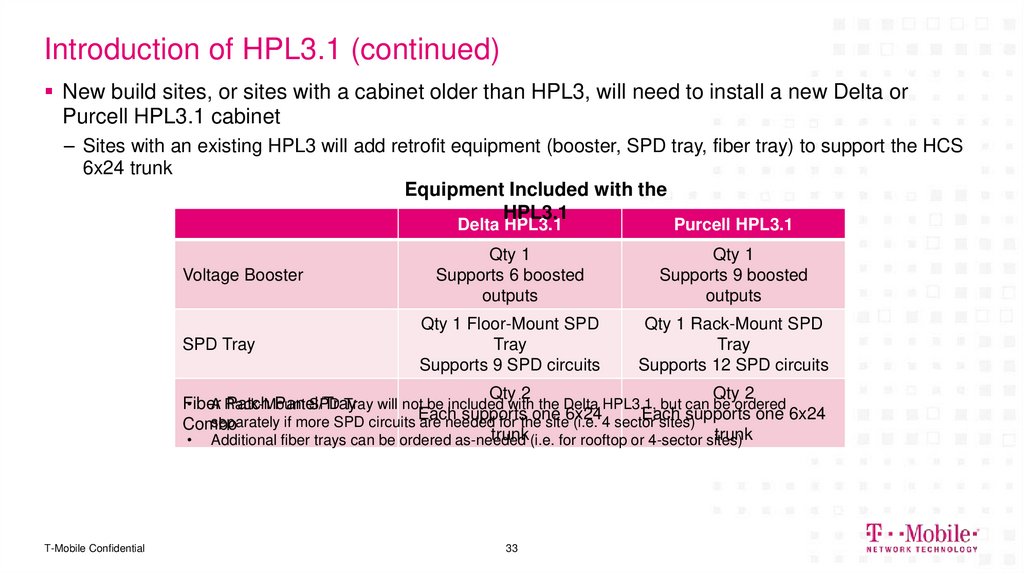
New build sites, or sites with a cabinet older than HPL3, will need to install a new Delta orPurcell HPL3.1 cabinet
– Sites with an existing HPL3 will add retrofit equipment (booster, SPD tray, fiber tray) to support the HCS
6x24 trunk
Equipment Included with the
HPL3.1
Voltage Booster
SPD Tray
Delta HPL3.1
Purcell HPL3.1
Qty 1
Supports 6 boosted
outputs
Qty 1
Supports 9 boosted
outputs
Qty 1 Floor-Mount SPD
Tray
Supports 9 SPD circuits
Qty 1 Rack-Mount SPD
Tray
Supports 12 SPD circuits
Qty 2
Qty 2
• A Rack-Mount
SPD Tray will not be included with the Delta HPL3.1, but can be ordered
Fiber
Patch Panel/Tray
supports
one
Each
supports one 6x24
separately if more SPD circuits Each
are needed
for the
site6x24
(i.e. 4 sector
sites)
Combo
trunk (i.e. for rooftop or 4-sector sites)
trunk
• Additional fiber trays can be ordered as-needed
T-Mobile Confidential
33
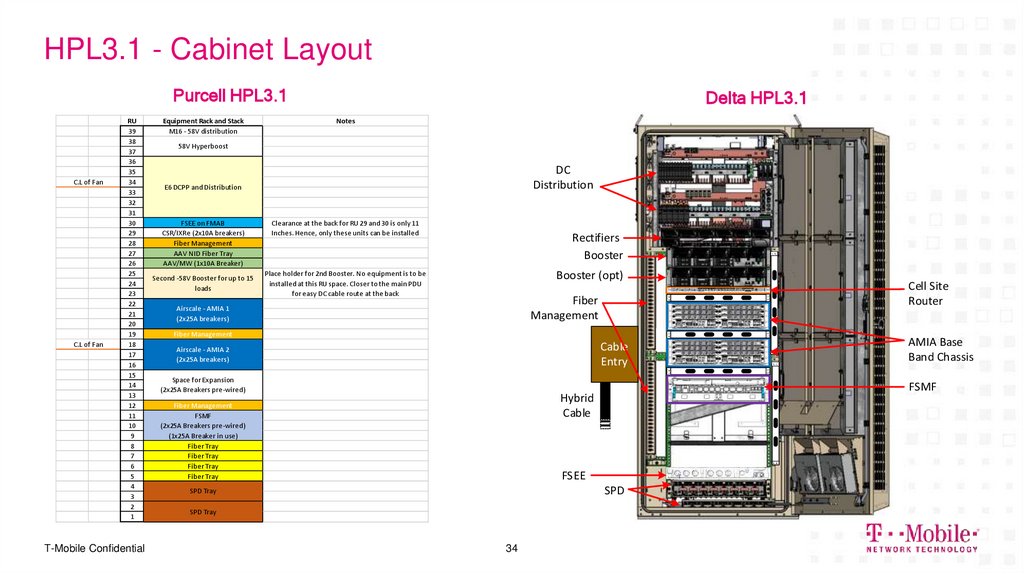
34. HPL3.1 - Cabinet Layout
Purcell HPL3.1C.L of Fan
C.L of Fan
RU
39
38
37
36
35
34
33
32
31
30
29
28
27
26
25
24
23
22
21
20
19
18
17
16
15
14
13
12
11
10
9
8
7
6
5
4
3
2
1
T-Mobile Confidential
Equipment Rack and Stack
M16 - 58V distribution
Delta HPL3.1
Notes
58V Hyperboost
DC
Distribution
E6 DCPP and Distribution
FSEE on FMAB
CSR/IXRe (2x10A breakers)
Fiber Management
AAV NID Fiber Tray
AAV/MW (1x10A Breaker)
Second -58V Booster for up to 15
loads
Clearance at the back for RU 29 and 30 is only 11
Inches. Hence, only these units can be installed
Rectifiers
Booster
Booster (opt)
Place holder for 2nd Booster. No equipment is to be
installed at this RU space. Closer to the main PDU
for easy DC cable route at the back
Fiber
Management
Airscale - AMIA 1
(2x25A breakers)
Fiber Management
Cable
Entry
Airscale - AMIA 2
(2x25A breakers)
Space for Expansion
(2x25A Breakers pre-wired)
FSEE
SPD
SPD Tray
SPD Tray
34
AMIA Base
Band Chassis
FSMF
Hybrid
Cable
Fiber Management
FSMF
(2x25A Breakers pre-wired)
(1x25A Breaker in use)
Fiber Tray
Fiber Tray
Fiber Tray
Fiber Tray
Cell Site
Router
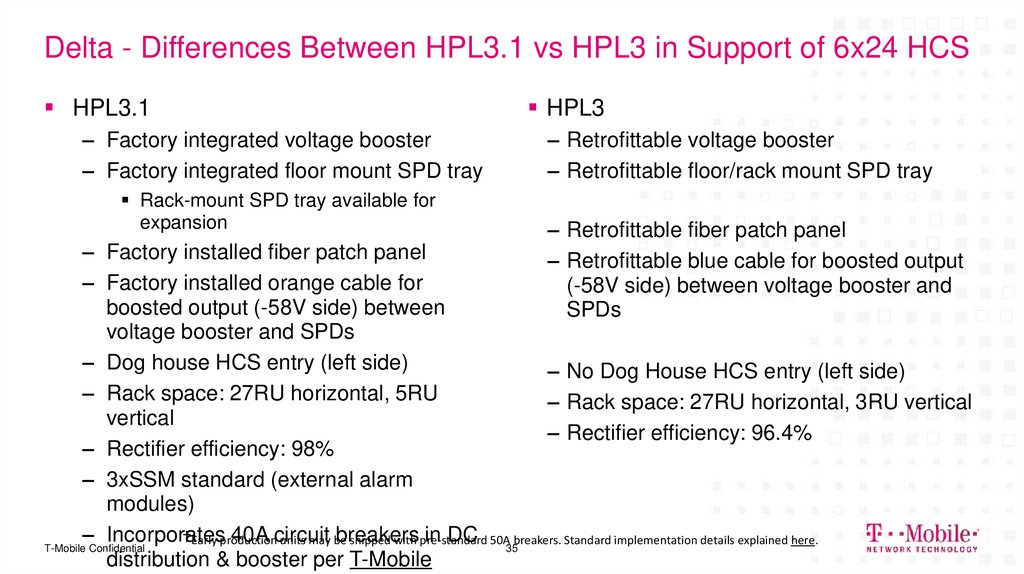
35. Delta - Differences Between HPL3.1 vs HPL3 in Support of 6x24 HCS
HPL3.1– Factory integrated voltage booster
– Factory integrated floor mount SPD tray
Rack-mount SPD tray available for
expansion
HPL3
– Retrofittable voltage booster
– Retrofittable floor/rack mount SPD tray
– Retrofittable fiber patch panel
– Retrofittable blue cable for boosted output
(-58V side) between voltage booster and
SPDs
– Factory installed fiber patch panel
– Factory installed orange cable for
boosted output (-58V side) between
voltage booster and SPDs
– Dog house HCS entry (left side)
– No Dog House HCS entry (left side)
– Rack space: 27RU horizontal, 5RU
– Rack space: 27RU horizontal, 3RU vertical
vertical
– Rectifier efficiency: 96.4%
– Rectifier efficiency: 98%
– 3xSSM standard (external alarm
modules)
– Incorporates
40A circuit
breakers
in DC 50A35breakers. Standard implementation details explained here.
†Early production
units may be
shipped with pre-standard
T-Mobile Confidential
distribution & booster per T-Mobile
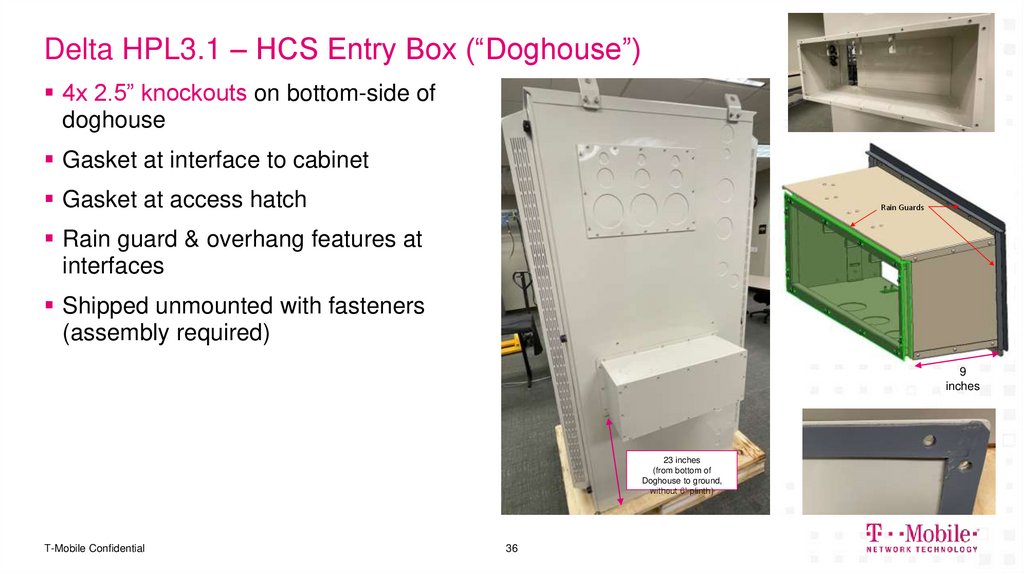
36. Delta HPL3.1 – HCS Entry Box (“Doghouse”)
4x 2.5” knockouts on bottom-side ofdoghouse
Gasket at interface to cabinet
Gasket at access hatch
Rain Guards
Rain guard & overhang features at
interfaces
Shipped unmounted with fasteners
(assembly required)
9
inches
23 inches
(from bottom of
Doghouse to ground,
without 6” plinth)
T-Mobile Confidential
36
37. Purcell - Differences Between HPL3.1 vs HPL3 in Support of 6x24 HCS
HPL3.1HPL3
– Powerplant relocated to the top of the
cabinet
– Factory installed Hyperboost (voltage
booster)
– Factory integrated SPD tray
– Factory installed fiber patch panels
– Factory installed orange cable for
boosted output (-58V side) between
voltage booster and SPDs
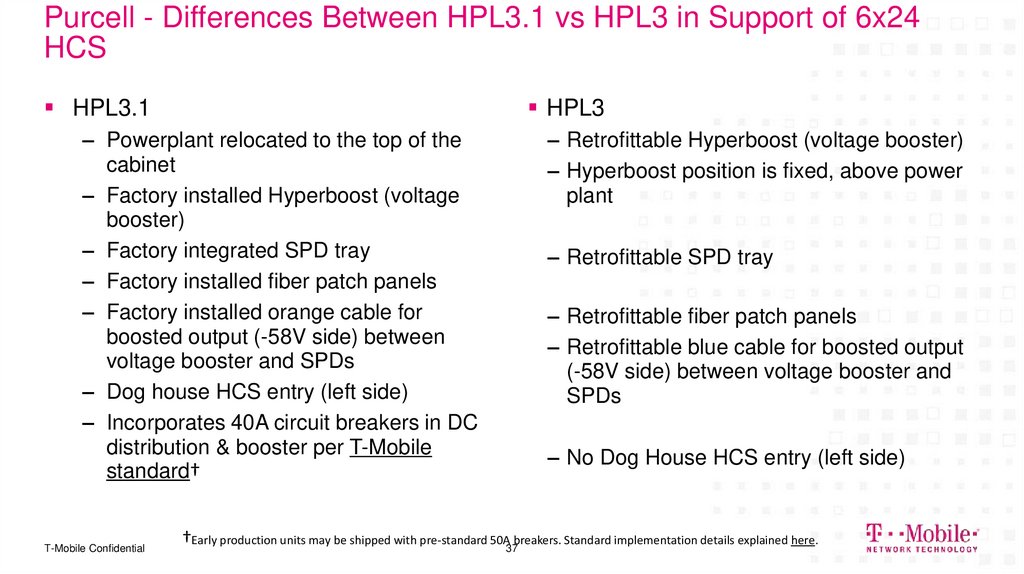
– Dog house HCS entry (left side)
– Incorporates 40A circuit breakers in DC
distribution & booster per T-Mobile
standard†
T-Mobile Confidential
– Retrofittable Hyperboost (voltage booster)
– Hyperboost position is fixed, above power
plant
– Retrofittable SPD tray
– Retrofittable fiber patch panels
– Retrofittable blue cable for boosted output
(-58V side) between voltage booster and
SPDs
– No Dog House HCS entry (left side)
†Early production units may be shipped with pre-standard 50A37breakers. Standard implementation details explained here.
38. RFDS Layouts
DELIVERING THE FUTURE OF WIRELESS.RFDS Layouts
T-Mobile Confidential
39. RFDS Layouts
RFDS Templates that cover 80% of sites on POR have been created– Please contact the CSI team if Regions/Markets have questions about the other 20% of sites they’re designing for
For sites with expected BOM allocation date:
Before TBD – Continue designing with HCS 2.0
After TBD – Design with HCS 6x24 where additional capacity is required
The HCS 6x24 version of the RFDS template has “_6x24” appended to the config name
Site Build Config
56790EZ_SR_T
56791EZ_SR
6790S_SR_T
56790EZ_SR_4sec
56792EZ_SR
6791B_SR
56790EZ_SR_R
56794EZ_SR
T-Mobile Confidential
Template with HCS 2.0
56790EZ_SR_T
56791EZ_SR
6790S_SR_T
56790EZ_SR_4sec
56792EZ_SR
6791B_SR
56790EZ_SR_R
56794EZ_SR
39
New Template with HCS
6x24 and AHFII
56790EAH_SR_T_6x24
56791EAH_SR_6x24
6790AH_SR_T_6x24
56790EAH_SR_4sec_6x24
56792EAH_SR_6x24
6791AH_SR_6x24
56790EAH_SR_R_6x24
56794EAH_SR_6x24
40. 6x24 Templates - Selecting Cabinet Type
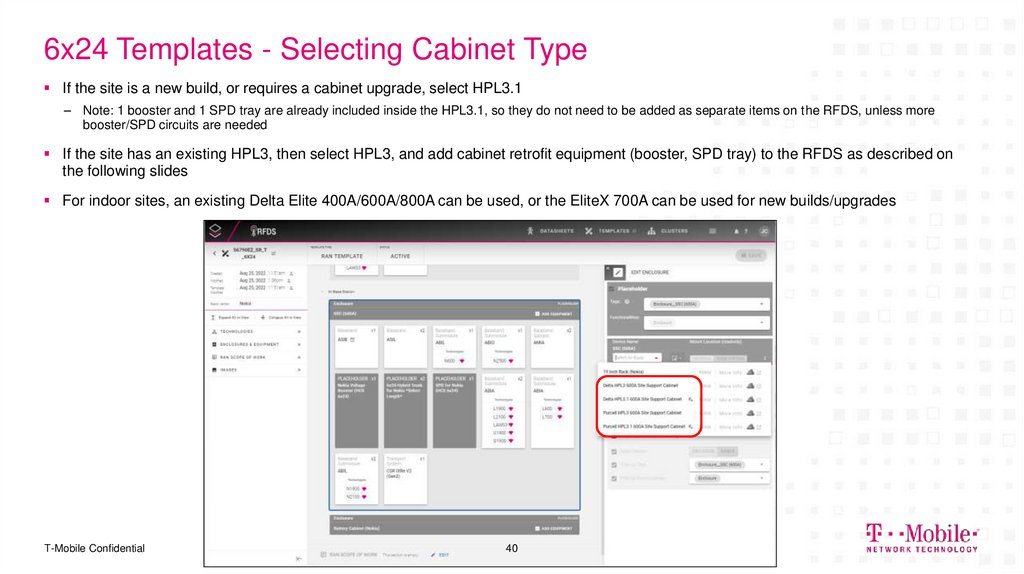
If the site is a new build, or requires a cabinet upgrade, select HPL3.1– Note: 1 booster and 1 SPD tray are already included inside the HPL3.1, so they do not need to be added as separate items on the RFDS, unless more
booster/SPD circuits are needed
If the site has an existing HPL3, then select HPL3, and add cabinet retrofit equipment (booster, SPD tray) to the RFDS as described on
the following slides
For indoor sites, an existing Delta Elite 400A/600A/800A can be used, or the EliteX 700A can be used for new builds/upgrades
T-Mobile Confidential
40
41. 6x24 Templates - Selecting Trunk Type
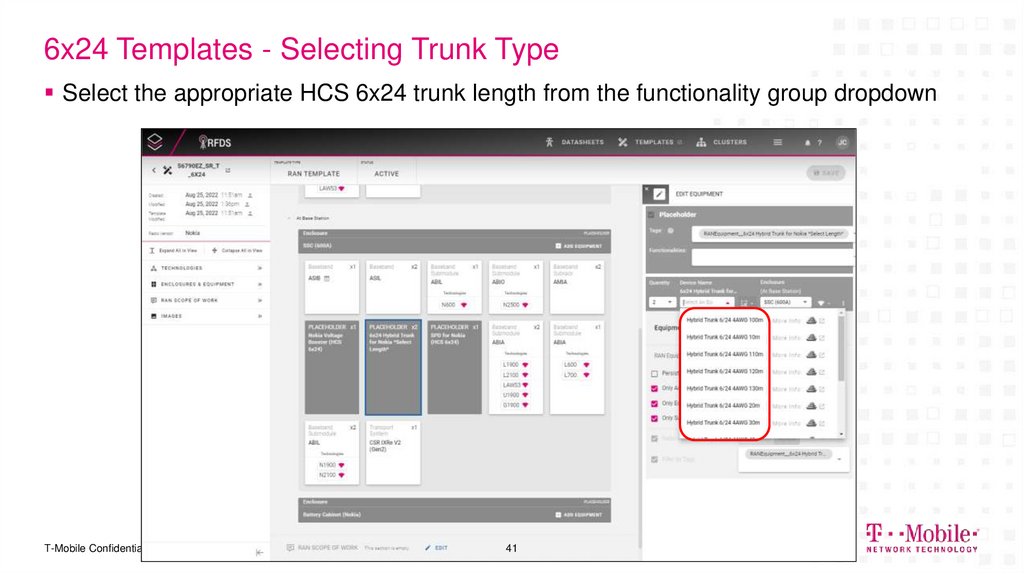
Select the appropriate HCS 6x24 trunk length from the functionality group dropdownT-Mobile Confidential
41
42. 6x24 Templates - Selecting Booster
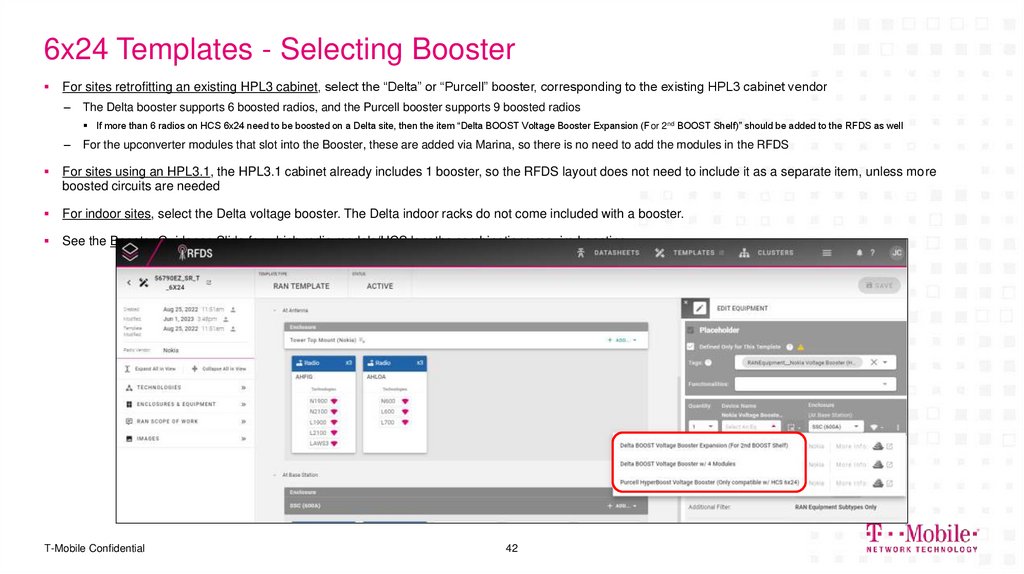
For sites retrofitting an existing HPL3 cabinet, select the “Delta” or “Purcell” booster, corresponding to the existing HPL3 cabinet vendor–
The Delta booster supports 6 boosted radios, and the Purcell booster supports 9 boosted radios
If more than 6 radios on HCS 6x24 need to be boosted on a Delta site, then the item “Delta BOOST Voltage Booster Expansion (For 2nd BOOST Shelf)” should be added to the RFDS as well
–
For the upconverter modules that slot into the Booster, these are added via Marina, so there is no need to add the modules in the RFDS
For sites using an HPL3.1, the HPL3.1 cabinet already includes 1 booster, so the RFDS layout does not need to include it as a separate item, unless more
boosted circuits are needed
For indoor sites, select the Delta voltage booster. The Delta indoor racks do not come included with a booster.
See the Booster Guidance Slide for which radio models/HCS lengths combinations require boosting
T-Mobile Confidential
42
43. 6x24 Templates - Selecting SPD Tray
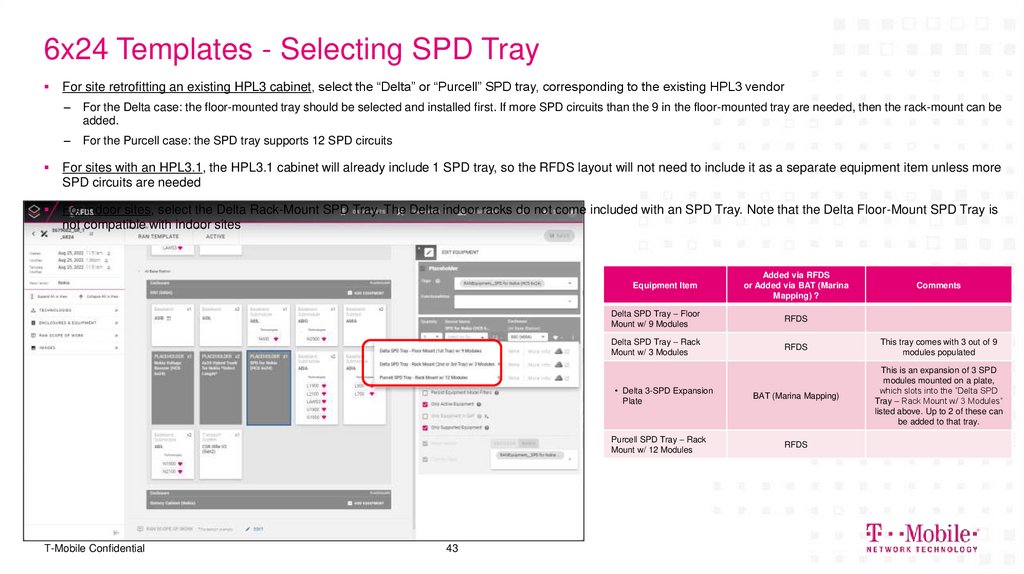
For site retrofitting an existing HPL3 cabinet, select the “Delta” or “Purcell” SPD tray, corresponding to the existing HPL3 vendor–
For the Delta case: the floor-mounted tray should be selected and installed first. If more SPD circuits than the 9 in the floor-mounted tray are needed, then the rack-mount can be
added.
–
For the Purcell case: the SPD tray supports 12 SPD circuits
For sites with an HPL3.1, the HPL3.1 cabinet will already include 1 SPD tray, so the RFDS layout will not need to include it as a separate equipment item unless more
SPD circuits are needed
For indoor sites, select the Delta Rack-Mount SPD Tray. The Delta indoor racks do not come included with an SPD Tray. Note that the Delta Floor-Mount SPD Tray is
not compatible with indoor sites
Equipment Item
T-Mobile Confidential
43
Added via RFDS
or Added via BAT (Marina
Mapping) ?
Comments
Delta SPD Tray – Floor
Mount w/ 9 Modules
RFDS
Delta SPD Tray – Rack
Mount w/ 3 Modules
RFDS
This tray comes with 3 out of 9
modules populated
• Delta 3-SPD Expansion
Plate
BAT (Marina Mapping)
This is an expansion of 3 SPD
modules mounted on a plate,
which slots into the “Delta SPD
Tray – Rack Mount w/ 3 Modules”
listed above. Up to 2 of these can
be added to that tray.
Purcell SPD Tray – Rack
Mount w/ 12 Modules
RFDS
44. Ordering the 1RU Fiber Tray w/ Integrated Patch Panel
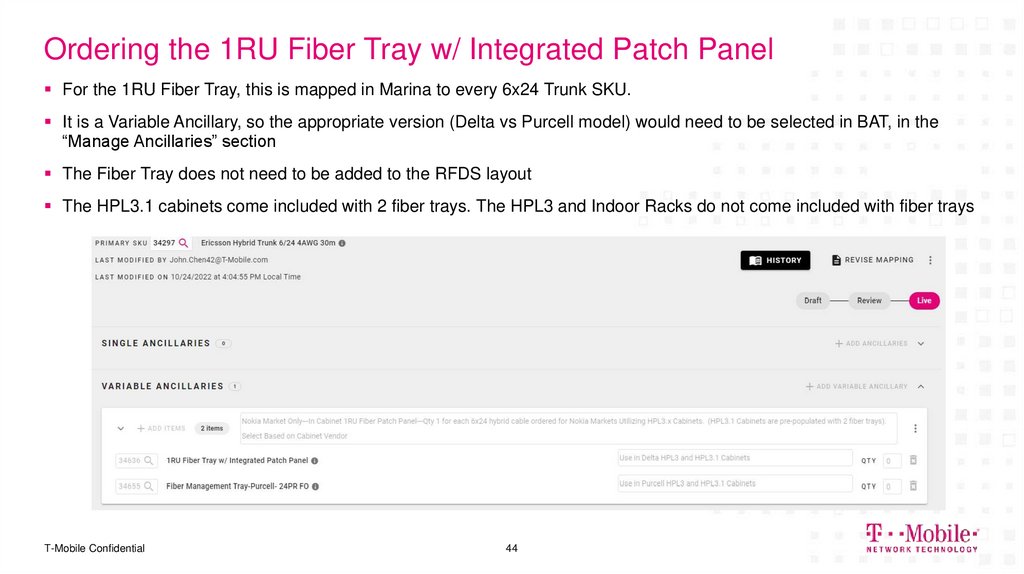
For the 1RU Fiber Tray, this is mapped in Marina to every 6x24 Trunk SKU.It is a Variable Ancillary, so the appropriate version (Delta vs Purcell model) would need to be selected in BAT, in the
“Manage Ancillaries” section
The Fiber Tray does not need to be added to the RFDS layout
The HPL3.1 cabinets come included with 2 fiber trays. The HPL3 and Indoor Racks do not come included with fiber trays
T-Mobile Confidential
44
45. RFDS Layouts – HPL3.1 Scenarios
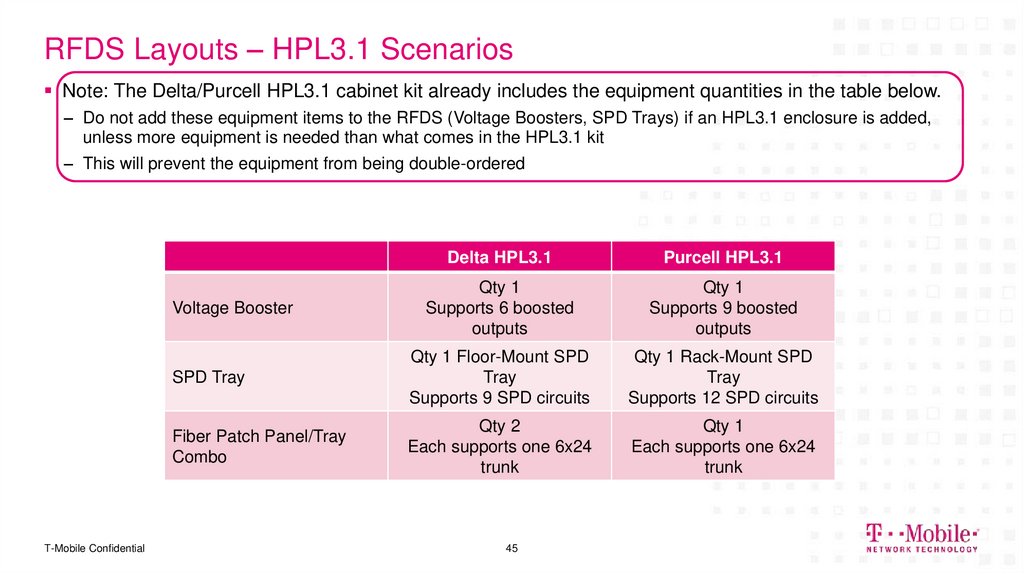
Note: The Delta/Purcell HPL3.1 cabinet kit already includes the equipment quantities in the table below.– Do not add these equipment items to the RFDS (Voltage Boosters, SPD Trays) if an HPL3.1 enclosure is added,
unless more equipment is needed than what comes in the HPL3.1 kit
– This will prevent the equipment from being double-ordered
Delta HPL3.1
Purcell HPL3.1
Qty 1
Supports 6 boosted
outputs
Qty 1
Supports 9 boosted
outputs
SPD Tray
Qty 1 Floor-Mount SPD
Tray
Supports 9 SPD circuits
Qty 1 Rack-Mount SPD
Tray
Supports 12 SPD circuits
Fiber Patch Panel/Tray
Combo
Qty 2
Each supports one 6x24
trunk
Qty 1
Each supports one 6x24
trunk
Voltage Booster
T-Mobile Confidential
45
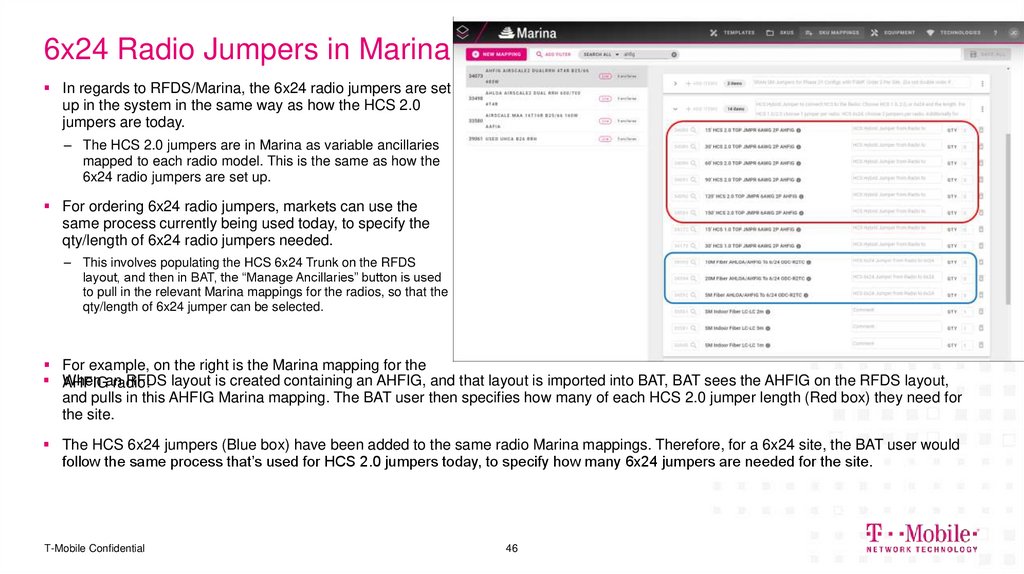
46. 6x24 Radio Jumpers in Marina
In regards to RFDS/Marina, the 6x24 radio jumpers are setup in the system in the same way as how the HCS 2.0
jumpers are today.
– The HCS 2.0 jumpers are in Marina as variable ancillaries
mapped to each radio model. This is the same as how the
6x24 radio jumpers are set up.
For ordering 6x24 radio jumpers, markets can use the
same process currently being used today, to specify the
qty/length of 6x24 radio jumpers needed.
– This involves populating the HCS 6x24 Trunk on the RFDS
layout, and then in BAT, the “Manage Ancillaries” button is used
to pull in the relevant Marina mappings for the radios, so that the
qty/length of 6x24 jumper can be selected.
For example, on the right is the Marina mapping for the
When
RFDS layout is created containing an AHFIG, and that layout is imported into BAT, BAT sees the AHFIG on the RFDS layout,
AHFIGan
radio:
and pulls in this AHFIG Marina mapping. The BAT user then specifies how many of each HCS 2.0 jumper length (Red box) they need for
the site.
The HCS 6x24 jumpers (Blue box) have been added to the same radio Marina mappings. Therefore, for a 6x24 site, the BAT user would
follow the same process that’s used for HCS 2.0 jumpers today, to specify how many 6x24 jumpers are needed for the site.
T-Mobile Confidential
46
47. Installation Highlights
DELIVERING THE FUTURE OF WIRELESS.Installation Highlights
T-Mobile Confidential
48. Installation Highlights and Guidance
Below are some key points regarding HCS 6x24 installation.The HCS 6x24 enters directly into the Site Support Cabinet
– There is no external COVP box, like with the HCS 1.0 and 2.0 designs
– Uses the same tower hardware, e.g. hangers and grounding straps, as HCS 1.0 and 2.0
6x24 cables ship with ground straps (MUST BE INSTALLED) and hoisting grips
6x24 cables do NOT ship with cable hangers, MUST BE PROVIDED BY GENERAL CONTRACTOR
– For an HPL3 retrofit install, the 6x24 trunk needs to enter the bottom section of the cabinet, near where the SPD trays
are located
– For an HPL3.1 install, there is an HCS entry box (aka “doghouse”) on the side of the Delta cabinet for the trunks to
enter
6x24 trunk will enter Purcell cabinets through the knockouts on the back-side of the cabinet
For sites with ground-mounted radio, the 6x24 trunk solution consists of using a short 6x24 trunk (10
meters) between the cabinet and radios
Each radio will have its own dedicated breaker, located either at the booster output or the powerplant DC
distribution panel (see following details)
A combination fiber patch panel / spool tray will be installed in the cabinet
– Each patch panel contains 24 Dual-LC fiber connections, so 1 6x24 trunk is supported per patch panel
T-Mobile Confidential
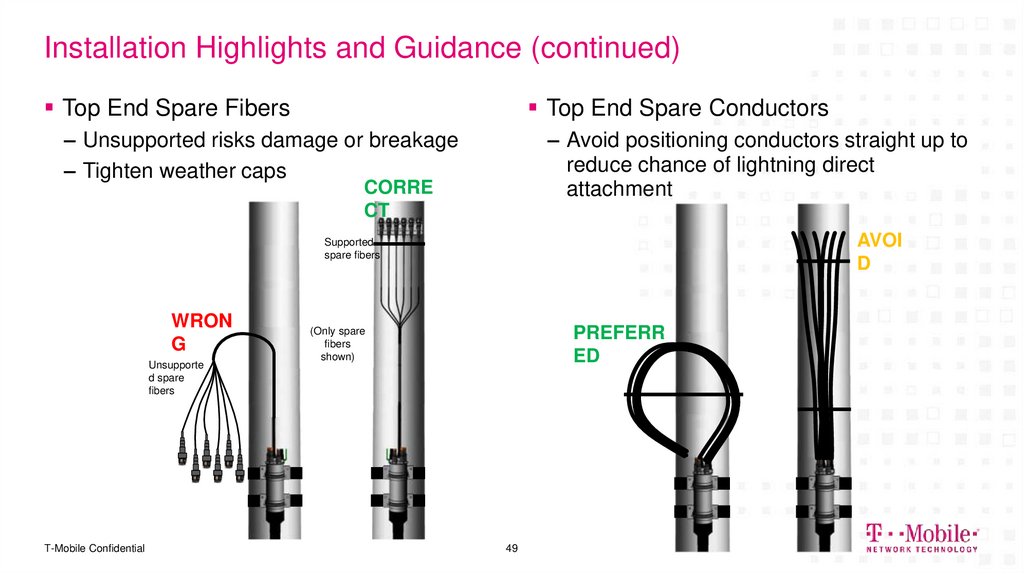
49. Installation Highlights and Guidance (continued)
Top End Spare FibersTop End Spare Conductors
– Unsupported risks damage or breakage
– Tighten weather caps
– Avoid positioning conductors straight up to
reduce chance of lightning direct
attachment
CORRE
CT
AVOI
D
Supported
spare fibers
WRON
G
Unsupporte
d spare
fibers
T-Mobile Confidential
PREFERR
ED
(Only spare
fibers
shown)
49
50. Determine HCS Length
HCS 2.06x24
RRU
Pendant
Hybrid
Jumpers
Coax
Feeders
Required HCS
2.0 Length
Baseband
Unit
(Not to
scale)
(COVP
not used)
DC
Fiber Only
Jumpers
Power Lead
T-Mobile Confidential
COVP
50
51. Q&A
DELIVERING THE FUTURE OF WIRELESS.Q&A
51
T-Mobile Confidential
52. Links
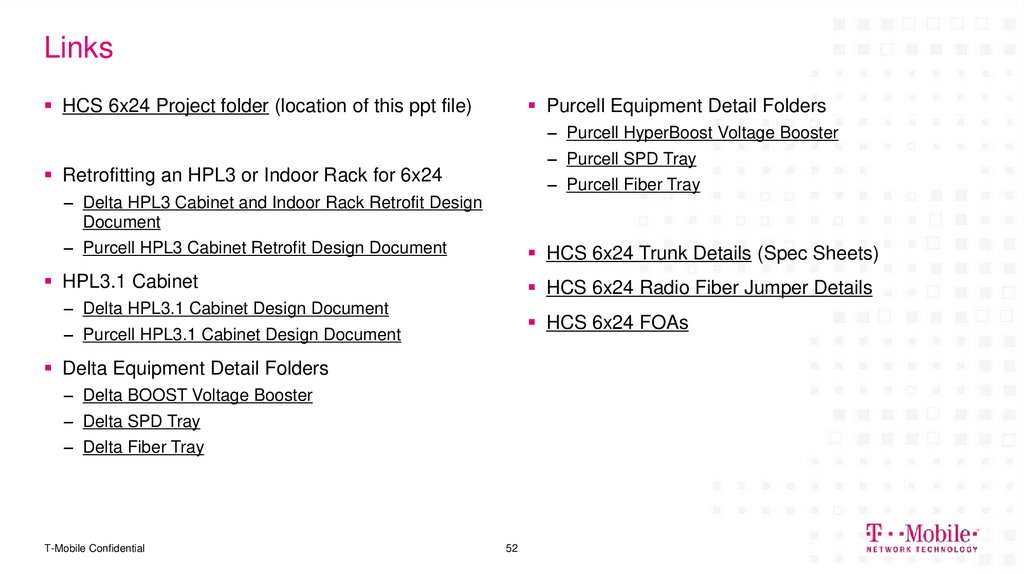
HCS 6x24 Project folder (location of this ppt file)Purcell Equipment Detail Folders
– Purcell HyperBoost Voltage Booster
– Purcell SPD Tray
Retrofitting an HPL3 or Indoor Rack for 6x24
– Purcell Fiber Tray
– Delta HPL3 Cabinet and Indoor Rack Retrofit Design
Document
– Purcell HPL3 Cabinet Retrofit Design Document
HCS 6x24 Trunk Details (Spec Sheets)
HPL3.1 Cabinet
HCS 6x24 Radio Fiber Jumper Details
– Delta HPL3.1 Cabinet Design Document
HCS 6x24 FOAs
– Purcell HPL3.1 Cabinet Design Document
Delta Equipment Detail Folders
– Delta BOOST Voltage Booster
– Delta SPD Tray
– Delta Fiber Tray
T-Mobile Confidential
52
53. Backup
DELIVERING THE FUTURE OF WIRELESS.Backup
T-Mobile Confidential
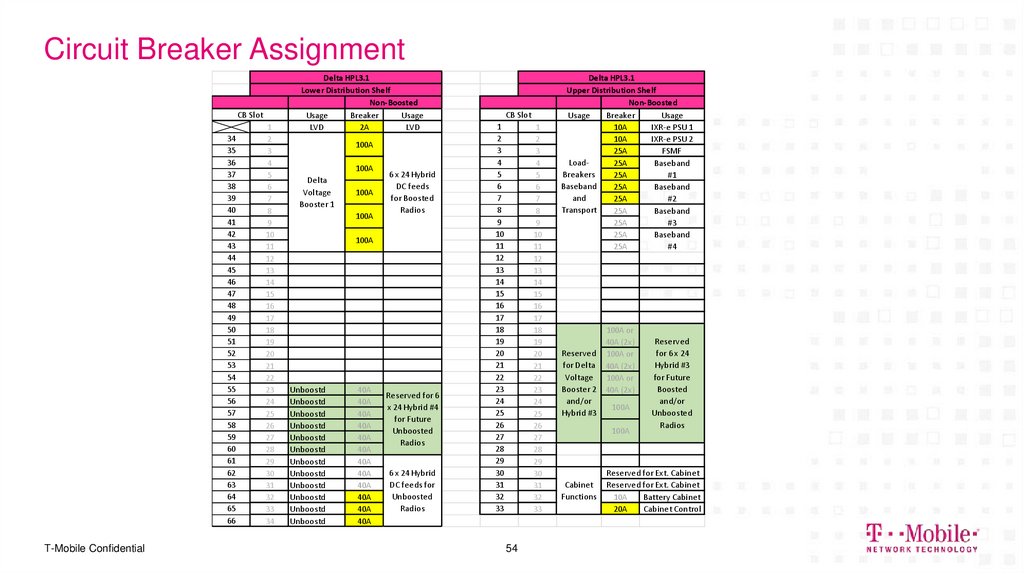
54. Circuit Breaker Assignment
CB Slot34
35
36
37
38
39
40
41
42
43
44
45
46
47
48
49
50
51
52
53
54
55
56
57
58
59
60
61
62
63
64
65
66
T-Mobile Confidential
1
2
3
4
5
6
7
8
9
10
11
12
13
14
15
16
17
18
19
20
21
22
23
24
25
26
27
28
29
30
31
32
33
34
Delta HPL3.1
Lower Distribution Shelf
Non-Boosted
Usage
Breaker
Usage
LVD
2A
LVD
100A
100A
Delta
Voltage
Booster 1
100A
100A
6 x 24 Hybrid
DC feeds
for Boosted
Radios
100A
Unboostd
Unboostd
Unboostd
Unboostd
Unboostd
Unboostd
Unboostd
Unboostd
Unboostd
Unboostd
Unboostd
Unboostd
40A
40A
40A
40A
40A
40A
40A
40A
40A
40A
40A
40A
Reserved for 6
x 24 Hybrid #4
for Future
Unboosted
Radios
6 x 24 Hybrid
DC feeds for
Unboosted
Radios
CB Slot
1
2
3
4
5
6
7
8
9
10
11
12
13
14
15
16
17
18
19
20
21
22
23
24
25
26
27
28
29
30
31
32
33
1
2
3
4
5
6
7
8
9
10
11
12
13
14
15
16
17
18
19
20
21
22
23
24
25
26
27
28
29
30
31
32
33
54
Delta HPL3.1
Upper Distribution Shelf
Non-Boosted
Usage
Breaker
Usage
10A
IXR-e PSU 1
10A
IXR-e PSU 2
25A
FSMF
Load25A
Baseband
Breakers
25A
#1
Baseband
25A
Baseband
and
25A
#2
Transport
25A
Baseband
25A
#3
25A
Baseband
25A
#4
100A or
40A (2x)
Reserved 100A or
for Delta 40A (2x)
Voltage
100A or
Booster 2 40A (2x)
and/or
100A
Hybrid #3
100A
Cabinet
Functions
Reserved
for 6 x 24
Hybrid #3
for Future
Boosted
and/or
Unboosted
Radios
Reserved for Ext. Cabinet
Reserved for Ext. Cabinet
10A
Battery Cabinet
20A
Cabinet Control
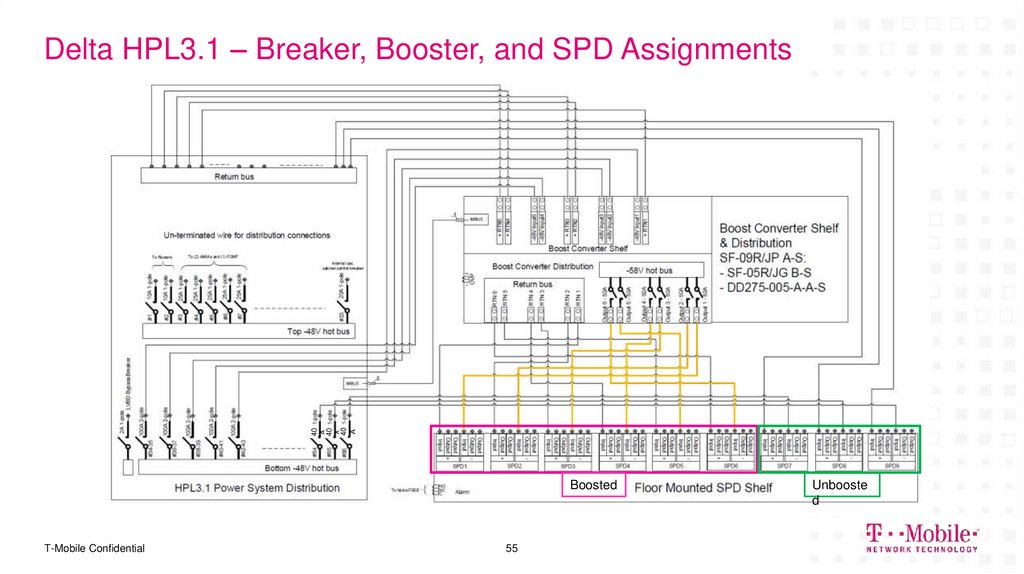
55. Delta HPL3.1 – Breaker, Booster, and SPD Assignments
40A
40
A
40
A
Delta HPL3.1 – Breaker, Booster, and SPD Assignments
Boosted
T-Mobile Confidential
55
Unbooste
d
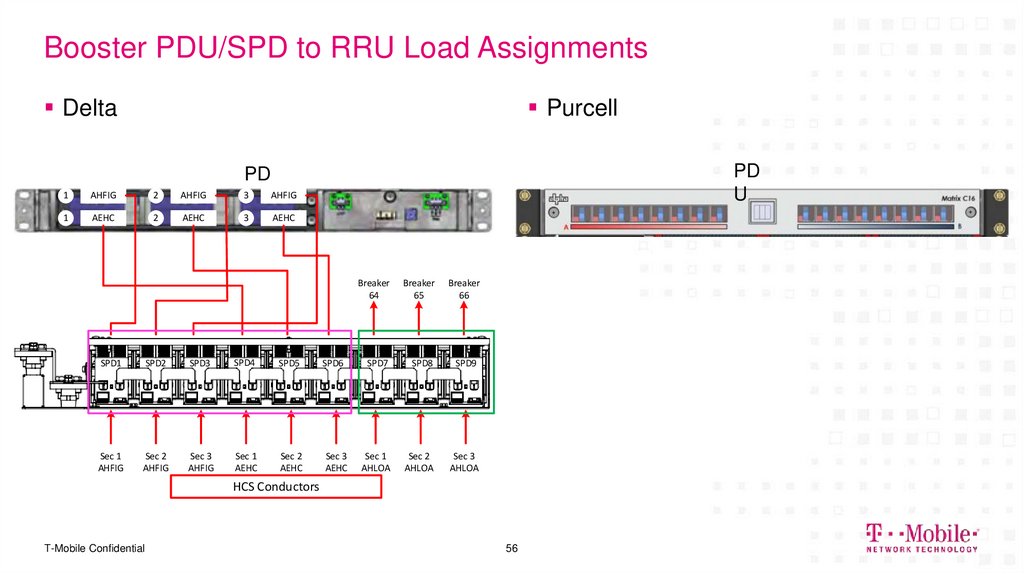
56. Booster PDU/SPD to RRU Load Assignments
DeltaPurcell
1
AHFIG
2
AHFIG
1
AEHC
2
AEHC
PD
U
PD
3
U AHFIG
3
AEHC
Breaker
64
Breaker
65
Breaker
66
SPD1
SPD2
SPD3
SPD4
SPD5
SPD6
SPD7
SPD8
SPD9
Sec 1
AHFIG
Sec 2
AHFIG
Sec 3
AHFIG
Sec 1
AEHC
Sec 2
AEHC
Sec 3
AEHC
Sec 1
AHLOA
Sec 2
AHLOA
Sec 3
AHLOA
HCS Conductors
T-Mobile Confidential
56
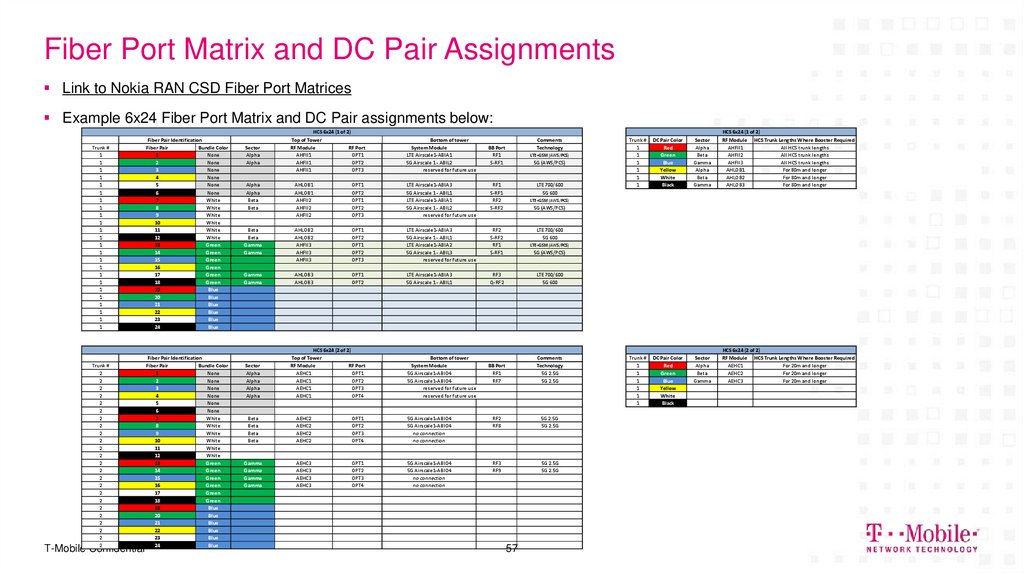
57. Fiber Port Matrix and DC Pair Assignments
Link to Nokia RAN CSD Fiber Port MatricesExample 6x24 Fiber Port Matrix and DC Pair assignments below:
Trunk #
1
1
1
1
1
1
1
1
1
1
1
1
1
1
1
1
1
1
1
1
1
1
1
1
Fiber Pair Identification
Fiber Pair
Bundle Color
1
None
2
None
3
None
4
None
5
None
6
None
7
White
8
White
9
White
10
White
11
White
12
White
13
Green
14
Green
15
Green
16
Green
17
Green
18
Green
19
Blue
20
Blue
21
Blue
22
Blue
23
Blue
24
Blue
Trunk #
2
2
2
2
2
2
2
2
2
2
2
2
2
2
2
2
2
2
2
2
2
2
2
2
Fiber Pair Identification
Fiber Pair
Bundle Color
1
None
2
None
3
None
4
None
5
None
6
None
7
White
8
White
9
White
10
White
11
White
12
White
13
Green
14
Green
15
Green
16
Green
17
Green
18
Green
19
Blue
20
Blue
21
Blue
22
Blue
23
Blue
24
Blue
T-Mobile Confidential
Sector
Alpha
Alpha
HCS 6x24 (1 of 2)
Top of Tower
RF Module
RF Port
AHFII1
OPT1
AHFII1
OPT2
AHFII1
OPT3
Bottom of tower
System Module
LTE Airscale1-ABIA1
5G Airscale 1 - ABIL2
reserved for future use
Comments
Technology
BB Port
RF1
S-RF1
LTE+GSM (AWS/PCS)
5G (AWS/PCS)
Alpha
Alpha
Beta
Beta
AHLOB1
AHLOB1
AHFII2
AHFII2
AHFII2
OPT1
OPT2
OPT1
OPT2
OPT3
LTE Airscale1-ABIA3
5G Airscale 1 - ABIL1
LTE Airscale1-ABIA1
5G Airscale 1 - ABIL2
reserved for future use
RF1
S-RF1
RF2
S-RF2
Beta
Beta
Gamma
Gamma
AHLOB2
AHLOB2
AHFII3
AHFII3
AHFII3
OPT1
OPT2
OPT1
OPT2
OPT3
LTE Airscale1-ABIA3
5G Airscale 1 - ABIL1
LTE Airscale1-ABIA2
5G Airscale 1 - ABIL3
reserved for future use
RF2
S-RF2
RF1
S-RF1
Gamma
Gamma
AHLOB3
AHLOB3
OPT1
OPT2
LTE Airscale1-ABIA3
5G Airscale 1 - ABIL1
RF3
Q-RF2
LTE 700/600
5G 600
BB Port
RF1
RF7
Comments
Technology
5G 2.5G
5G 2.5G
Sector
Alpha
Alpha
Alpha
Alpha
HCS 6x24 (2 of 2)
Top of Tower
RF Module
RF Port
AEHC1
OPT1
AEHC1
OPT2
AEHC1
OPT3
AEHC1
OPT4
Bottom of tower
System Module
5G Airscale1-ABIO4
5G Airscale1-ABIO4
reserved for future use
reserved for future use
LTE 700/600
5G 600
Trunk #
1
1
1
1
1
1
DC Pair Color
Red
Green
Blue
Yellow
White
Black
Sector
Alpha
Beta
Gamma
Alpha
Beta
Gamma
HCS 6x24 (1 of 2)
RF Module HCS Trunk Lengths Where Booster Required
AHFII1
All HCS trunk lengths
AHFII2
All HCS trunk lengths
AHFII3
All HCS trunk lengths
AHLOB1
For 80m and longer
AHLOB2
For 80m and longer
AHLOB3
For 80m and longer
Trunk #
1
1
1
1
1
1
DC Pair Color
Red
Green
Blue
Yellow
White
Black
Sector
Alpha
Beta
Gamma
HCS 6x24 (2 of 2)
RF Module HCS Trunk Lengths Where Booster Required
AEHC1
For 20m and longer
AEHC2
For 20m and longer
AEHC3
For 20m and longer
LTE+GSM (AWS/PCS)
5G (AWS/PCS)
LTE 700/600
5G 600
LTE+GSM (AWS/PCS)
5G (AWS/PCS)
Beta
Beta
Beta
Beta
AEHC2
AEHC2
AEHC2
AEHC2
OPT1
OPT2
OPT3
OPT4
5G Airscale1-ABIO4
5G Airscale1-ABIO4
no connection
no connection
RF2
RF8
5G 2.5G
5G 2.5G
Gamma
Gamma
Gamma
Gamma
AEHC3
AEHC3
AEHC3
AEHC3
OPT1
OPT2
OPT3
OPT4
5G Airscale1-ABIO4
5G Airscale1-ABIO4
no connection
no connection
RF3
RF9
5G 2.5G
5G 2.5G
57
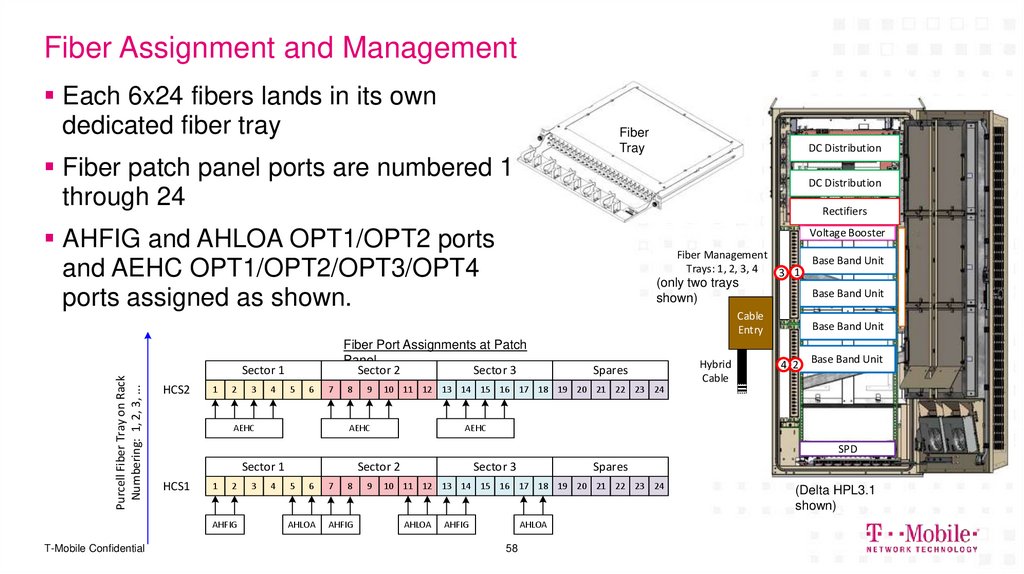
58. Fiber Assignment and Management
Each 6x24 fibers lands in its owndedicated fiber tray
Fiber
Tray
Fiber patch panel ports are numbered 1
through 24
DC Distribution
DC Distribution
Rectifiers
AHFIG and AHLOA OPT1/OPT2 ports
and AEHC OPT1/OPT2/OPT3/OPT4
ports assigned as shown.
Voltage Booster
Fiber Management
Trays: 1, 2, 3, 4
3 1
(only two trays
shown)
Base Band Unit
Purcell Fiber Tray on Rack
Numbering: 1, 2, 3, ...
Cable
Entry
Sector 1
HCS2
1
2
3
4
5
6
7
AEHC
8
9
Spares
Hybrid
Cable
Base Band Unit
4 2
Base Band Unit
10 11 12 13 14 15 16 17 18 19 20 21 22 23 24
AEHC
AEHC
SPD
Sector 1
HCS1
1
2
AHFIG
T-Mobile Confidential
Fiber Port Assignments at Patch
Panel
Sector 2
Sector 3
Base Band Unit
3
4
Sector 2
5
6
AHLOA
7
8
AHFIG
9
Sector 3
Spares
10 11 12 13 14 15 16 17 18 19 20 21 22 23 24
AHLOA
AHFIG
AHLOA
58
(Delta HPL3.1
shown)
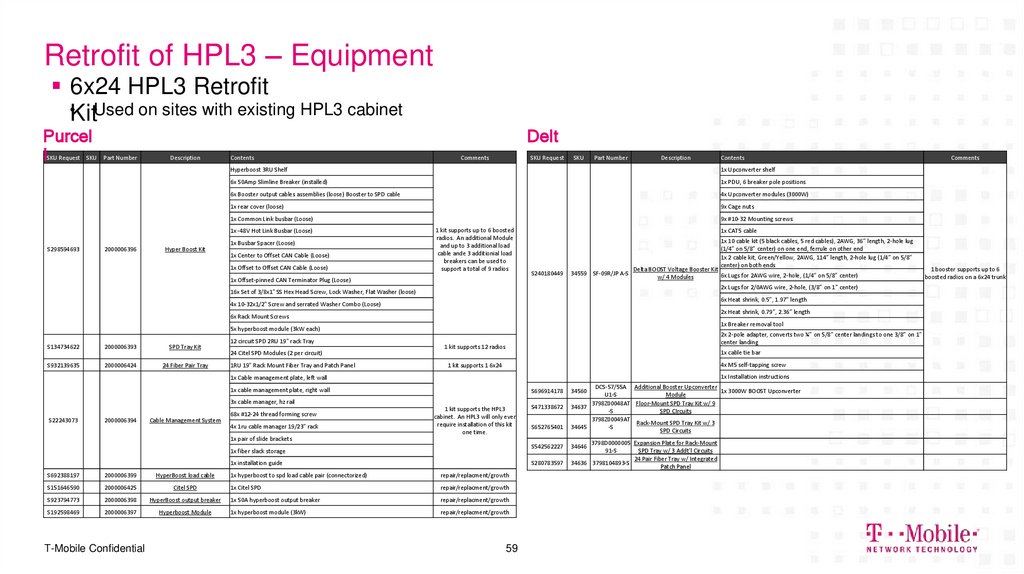
59. Retrofit of HPL3 – Equipment
6x24 HPL3 Retrofit•KitUsed on sites with existing HPL3 cabinet
Purcel
l
SKU Request
SKU
Part Number
Description
Contents
Delt
a
Comments
SKU Request
SKU
Part Number
Description
1x Upconverter shelf
6x 50Amp Slimline Breaker (installed)
1x PDU, 6 breaker pole positions
6x Booster output cables assemblies (loose) Booster to SPD cable
4x Upconverter modules (3000W)
1x rear cover (loose)
9x Cage nuts
1x Common Link busbar (Loose)
1x -48V Hot Link Busbar (Loose)
S298594693
2000006396
Hyper Boost Kit
1x Busbar Spacer (Loose)
1x Center to Offset CAN Cable (Loose)
1x Offset to Offset CAN Cable (Loose)
1x CAT5 cable
1x 10 cable kit (5 black cables, 5 red cables), 2AWG, 36” length, 2-hole lug
(1/4” on 5/8” center) on one end, ferrule on other end
1x 2 cable kit, Green/Yellow, 2AWG, 114” length, 2-hole lug (1/4” on 5/8”
center) on both ends
S240180449
34559 SF-09R/JP A-S
Delta BOOST Voltage Booster Kit
6x Lugs for 2AWG wire, 2-hole, (1/4” on 5/8” center)
w/ 4 Modules
2x Lugs for 2/0AWG wire, 2-hole, (3/8” on 1” center)
16x Set of 3/8x1" SS Hex Head Screw, Lock Washer, Flat Washer (loose)
6x Heat shrink, 0.5”, 1.97” length
4x 10-32x1/2" Screw and serrated Washer Combo (Loose)
2x Heat shrink, 0.79”, 2.36” length
6x Rack Mount Screws
1x Breaker removal tool
5x hyperboost module (3kW each)
2000006393
SPD Tray Kit
S932139635
2000006424
24 Fiber Pair Tray
12 circuit SPD 2RU 19" rack Tray
24 Citel SPD Modules (2 per circuit)
1RU 19" Rack Mount Fiber Tray and Patch Panel
2x 2-pole adapter, converts two ¼” on 5/8” center landings to one 3/8” on 1”
center landing
1 kit supports 12 radios
1x cable tie bar
4x M5 self-tapping screw
1 kit supports 1 6x24
1x Installation instructions
1x Cable management plate, left wall
1x cable management plate, right wall
S696914178
3x cable manager, hz rail
S22243073
2000006394
Cable Management System
68x #12-24 thread forming screw
4x 1ru cable manager 19/23" rack
1 kit supports the HPL3
cabinet. An HPL3 will only ever
require installation of this kit
one time.
S471338672
S652765401
1x pair of slide brackets
S542562227
1x fiber slack storage
S280783597
1x installation guide
S692388197
2000006399
S151646590
2000006425
Citel SPD
S923794773
2000006398
HyperBoost output breaker
S192598469
2000006397
Hyperboost Module
T-Mobile Confidential
HyperBoost load cable
Comments
9x #10-32 Mounting screws
1 kit supports up to 6 boosted
radios. An additional Module
and up to 3 additional load
cable ande 3 additionial load
breakers can be used to
support a total of 9 radios
1x Offset-pinned CAN Terminator Plug (Loose)
S134734622
Contents
Hyperboost 3RU Shelf
1x hyperboost to spd load cable pair (connectorized)
repair/replacment/growth
1x Citel SPD
repair/replacment/growth
1x 50A hyperboost output breaker
repair/replacment/growth
1x hyperboost module (3kW)
repair/replacment/growth
59
DCS-57/55A Additional Booster Upconverter
34560
1x 3000W BOOST Upconverter
U1-S
Module
3798Z00048AT Floor-Mount SPD Tray Kit w/ 9
34637
-S
SPD CIrcuits
3798Z00049AT
Rack-Mount SPD Tray Kit w/ 3
34645
-S
SPD Circuits
3798D0000005 Expansion Plate for Rack-Mount
91-S
SPD Tray w/ 3 Addt’l Circuits
24 Pair Fiber Tray w/ Integrated
34636 3798104893-S
Patch Panel
34646
1 booster supports up to 6
boosted radios on a 6x24 trunk
60. Power Equipment Ordering Guide
DeltaSKU
Purcell
SKU
– HPL3.1 SSC
– HPL3.1 SSC
TBD
34663
– Retrofit Delta BOOST voltage booster
– Retrofit Hyperboost voltage booster 34659
(w/ 4 modules
)
– Retrofit Additional Hyperboost module
34559
34658
– Additional booster module*
34560
– Retrofit/expansion Rack-mount SPD tray
– 2nd Boost Shelf Expansion
34830
34656
– 40A DIN breaker for HPL3 distribution
– 6x24 fiber tray
34825
34655
– 100A DIN breaker for HPL3 distribution
– Cable management kit
31919
34657
– 40A bullet breaker for booster output34826
– Retrofit floor-mount SPD tray
34637
for HCS2.0 and
– Retrofit/expansion rack-mount SPD*Required
tray
6x24
T-Mobile Confidential
60
34645
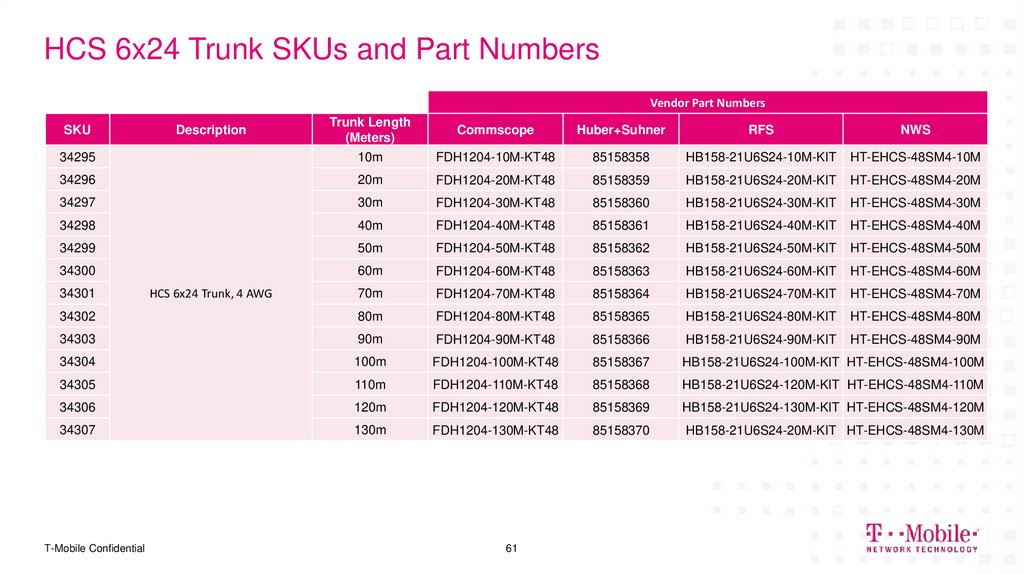
61. HCS 6x24 Trunk SKUs and Part Numbers
Vendor Part NumbersTrunk Length
(Meters)
Commscope
Huber+Suhner
RFS
NWS
34295
10m
FDH1204-10M-KT48
85158358
HB158-21U6S24-10M-KIT
HT-EHCS-48SM4-10M
34296
20m
FDH1204-20M-KT48
85158359
HB158-21U6S24-20M-KIT
HT-EHCS-48SM4-20M
34297
30m
FDH1204-30M-KT48
85158360
HB158-21U6S24-30M-KIT
HT-EHCS-48SM4-30M
34298
40m
FDH1204-40M-KT48
85158361
HB158-21U6S24-40M-KIT
HT-EHCS-48SM4-40M
34299
50m
FDH1204-50M-KT48
85158362
HB158-21U6S24-50M-KIT
HT-EHCS-48SM4-50M
34300
60m
FDH1204-60M-KT48
85158363
HB158-21U6S24-60M-KIT
HT-EHCS-48SM4-60M
70m
FDH1204-70M-KT48
85158364
HB158-21U6S24-70M-KIT
HT-EHCS-48SM4-70M
34302
80m
FDH1204-80M-KT48
85158365
HB158-21U6S24-80M-KIT
HT-EHCS-48SM4-80M
34303
90m
FDH1204-90M-KT48
85158366
HB158-21U6S24-90M-KIT
HT-EHCS-48SM4-90M
34304
100m
FDH1204-100M-KT48
85158367
HB158-21U6S24-100M-KIT HT-EHCS-48SM4-100M
34305
110m
FDH1204-110M-KT48
85158368
HB158-21U6S24-120M-KIT HT-EHCS-48SM4-110M
34306
120m
FDH1204-120M-KT48
85158369
HB158-21U6S24-130M-KIT HT-EHCS-48SM4-120M
34307
130m
FDH1204-130M-KT48
85158370
HB158-21U6S24-20M-KIT HT-EHCS-48SM4-130M
SKU
34301
T-Mobile Confidential
Description
HCS 6x24 Trunk, 4 AWG
61
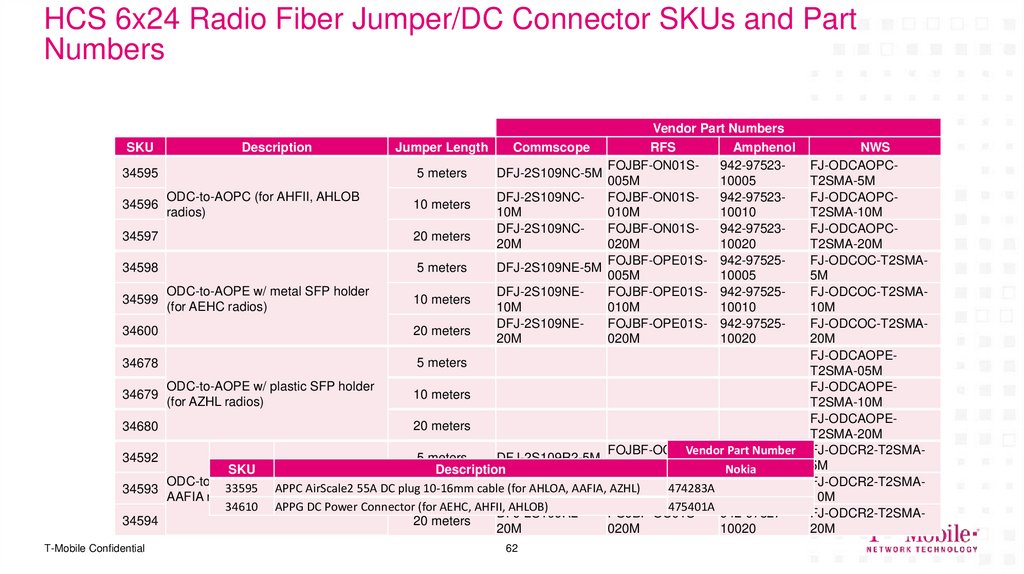
62. HCS 6x24 Radio Fiber Jumper/DC Connector SKUs and Part Numbers
SKUDescription
34595
34596
ODC-to-AOPC (for AHFII, AHLOB
radios)
34597
34598
34599
ODC-to-AOPE w/ metal SFP holder
(for AEHC radios)
34600
5 meters
34678
34679
34680
Vendor Part Numbers
Jumper Length
Commscope
RFS
Amphenol
FOJBF-ON01S942-975235 meters
DFJ-2S109NC-5M
005M
10005
DFJ-2S109NCFOJBF-ON01S942-9752310 meters
10M
010M
10010
DFJ-2S109NCFOJBF-ON01S942-9752320 meters
20M
020M
10020
FOJBF-OPE01S- 942-975255 meters
DFJ-2S109NE-5M
005M
10005
DFJ-2S109NEFOJBF-OPE01S- 942-9752510 meters
10M
010M
10010
DFJ-2S109NEFOJBF-OPE01S- 942-9752520 meters
20M
020M
10020
ODC-to-AOPE w/ plastic SFP holder
(for AZHL radios)
10 meters
20 meters
FOJBF-OC01SVendor942-97527Part Number
5 meters
DFJ-2S109R2-5M
005M
10005
Nokia
SKU
Description
ODC-to-R2CT (for AHFIG, AHLOA,
DFJ-2S109R2FOJBF-OC01S942-9752733595 APPC AirScale2 55A DC plug
474283A
34593
1010-16mm
meters cable (for AHLOA, AAFIA, AZHL)
AAFIA radios)
10M
010M
10010
34610 APPG DC Power Connector (for AEHC, AHFII, AHLOB)
475401A
DFJ-2S109R2FOJBF-OC01S942-9752734594
20 meters
20M
020M
10020
34592
T-Mobile Confidential
62
NWS
FJ-ODCAOPCT2SMA-5M
FJ-ODCAOPCT2SMA-10M
FJ-ODCAOPCT2SMA-20M
FJ-ODCOC-T2SMA5M
FJ-ODCOC-T2SMA10M
FJ-ODCOC-T2SMA20M
FJ-ODCAOPET2SMA-05M
FJ-ODCAOPET2SMA-10M
FJ-ODCAOPET2SMA-20M
FJ-ODCR2-T2SMA5M
FJ-ODCR2-T2SMA10M
FJ-ODCR2-T2SMA20M
63. In-Cabinet Fiber Jumpers (from Patch Panel to Baseband)
SKUDescription
33645 Fiber Jumper, SM, Dual LC-to-Dual LC, 1 meter
33561 Fiber Jumper, SM, Dual LC-to-Dual LC, 2 meter
33581 Fiber Jumper, SM, Dual LC-to-Dual LC, 5 meter
T-Mobile Confidential
63
64. Site Evolution Examples and SOW
DELIVERING THE FUTURE OF WIRELESS.Site Evolution
Examples and SOW
64
T-Mobile Confidential
65. Example Site SOW – From:6700C_R4 To:56790EAH_SR_T (3 Sector)
Example Site SOW – From:6700C_R4 To:56790EAH_SR_T (3Sector)
Starting
Configuration
6700C_R4
6x24-Related Tower Impacts
Add 1x HCS 6x24 Trunk
Add 21x 6x24 Fiber Jumpers (AEHC,
AHFII)
Cut DC conductor tails to length and
crimp required DC connector (APPG)
6x24-Related Ground Impacts
Swap with new cabinet
Delta/Purcell HPL3.1
Battery Cabinet
Connect 6x24 trunk gland to HCS entry
box on SSC
Connect 6x24 fiber tails to in-cabinet
patch panel
Connect fiber jumpers from patch
panel to baseband
Connect 6x24 DC conductor tails to
SPD tray
T-Mobile Confidential
Ending
Configuration
56790EAH_SR_T
LB + MB Octo
Passive Antenna
FDD - Lowband
B12 (L700) – MHz
B71 (L600) – MHz
B71 (N600) – MHz
L19
L21+AWS3
L700
G19
L600
N21
N19
N600
AEHC
LTE+5G
B41
Active Antenna
8
7
6
5
4
3
2
Boosted if >10m
1
FDD - Midband
B4/B66 (L2100) – MHz
B66 (N2100) – 20MHz
B2/B25 (L1900) – MHz
B25 (N1900) – 20MHz
SRAN – GSM PCS
TDD - Band 41
N41(2.5GHz) – 100+80MHz
AHLOA
AHFII
700+600
AWS+PCS
Boosted
Not Boosted
Top
Ground
HCS2.0
TowerTop
5G SRAN
Single AMIA FDD+TDD
5G+4G / 2G
66. Example Site SOW – From:6791B_SR To:56790EZ_SR_T (3 Sector)
Example Site SOW – From:6791B_SR To:56790EZ_SR_T (3Sector)
Starting
Configuration
6791B_SR
6x24-Related Tower Impacts
LB + MB Octo
Passive Antenna
L700
L19+
L600
L21+AWS3
G19
N600
8
7
U19
6
5
4
3
2
1
AHLOA
AHFIG
700+600
AWS+PCS
Top
Ground
HCS2.0
TowerTop
T-Mobile Confidential
Ending
Configuration
LB +56790EZ_SR_T
MB Octo
Passive Antenna
FDD - Lowband
B12 (L700) – MHz
B71 (L600) – MHz
B71 (N600) – MHz
FDD - Midband
B4/B66 (L2100) – MHz
B66 (AWS3) – 5MHz
B2 (L1900) – MHz
B25 (L1900) – MHz
SRAN – GSM/UMTS PCS
Add 1x HCS 6x24 Trunk
Add 12x 6x24 Fiber Jumpers (AEHC)
Cut DC conductor tails to length and
crimp required DC connector (APPG)
6x24-Related Ground Impacts
If existing cabinet is HPL2 or older,
swap with new cabinet
L19
L21+AWS3
L700
G19
L600
N21
N19
N600
AEHC
LTE+5G
B41
Active Antenna
8
7
6
5
3
2
1
FDD - Midband
B4/B66 (L2100) – MHz
B66 (N2100) – 20MHz
B2/B25 (L1900) – MHz
B25 (N1900) – 20MHz
SRAN – GSM PCS
TDD - Band 41
N41(2.5GHz) – 100+80MHz
AHLOA
AHFIG
700+600
AWS+PCS
Boosted
Top
Ground
HCS2.0
TowerTop
Power
booster
needed
5G SRAN
Single AMIA FDD+TDD
(ASIL+ABIO+ABIA)
5G+4G / 2G+3G
4
Boosted if >10m
Delta/Purcell HPL3.1
Battery Cabinet
Connect 6x24 trunk gland to HCS
entry box on SSC
Connect 6x24 fiber tails to in-cabinet
patch panel
Connect fiber jumpers from patch
panel to baseband
Connect 6x24 DC conductor tails to
SPD tray
FDD - Lowband
B12 (L700) – MHz
B71 (L600) – MHz
B71 (N600) – MHz
5G SRAN
Single AMIA FDD+TDD
5G+4G / 2G