





 programming
Similar presentations:






Creating images
1. Creating images.
CREATINGIMAGES.
• 12.6.2.1 determine standard
colors by RGB code;
• 12.6.2.2 use commands of
module Image in PIL library
(load, create, size, save) to
manipulate images;
• 12.6.2.3 apply graphic
primitives to create
drawings.
10/7/2025
1
2. Pillow library
• Python Imaging Library (expansion of PIL) is the de facto image processing package forPython language. It incorporates lightweight image processing tools that aids in editing,
creating and saving images. Pillow was announced as a replacement for PIL for future
usage. Pillow supports a large number of image file formats including BMP, PNG, JPEG,
and TIFF. The library encourages adding support for newer formats in the library by
creating new file decoders.
3. 1. Opening an image using open(): The PIL.Image.Image class represents the image object. This class provides the open() method
1. Opening an image usingopen(): The PIL.Image.Image class
represents the image object. This
class provides the open() method
that is used to open the image.
2. Displaying the image using sho
w(): This method is used to display t
he
image.
3
4. 3. Getting the size of the image:This attribute provides the size of the image. It returns a tuple that contains width
3. Getting the size of the image:Thisattribute provides the size of the image. It
returns a tuple that contains width
and height.
4. Getting the format of the image: This
method returns the format of the image
file.
4
5. 5. Rotating an image using rotate(): After rotating the image, the sections of the image having no pixel values are filled with
5.Rotating
an
image
using
rotate(): After rotating the image, the
sections of the image having no pixel
values are filled with black (for non-alpha
images) and with completely transparent
pixels
(for
images
supporting
transparency)
6.
Resizing
an
image
using
resize(): Interpolation happens during the
resize process, due to which the quality of
image changes whether it is being
upscaled (resized to a higher dimension
than original) or downscaled (resized to a
lower Image then original).
5
6.
Image.save() Saves this image under the given filename. If no format is specified, the format to use isdetermined from the filename extension, if possible.
6
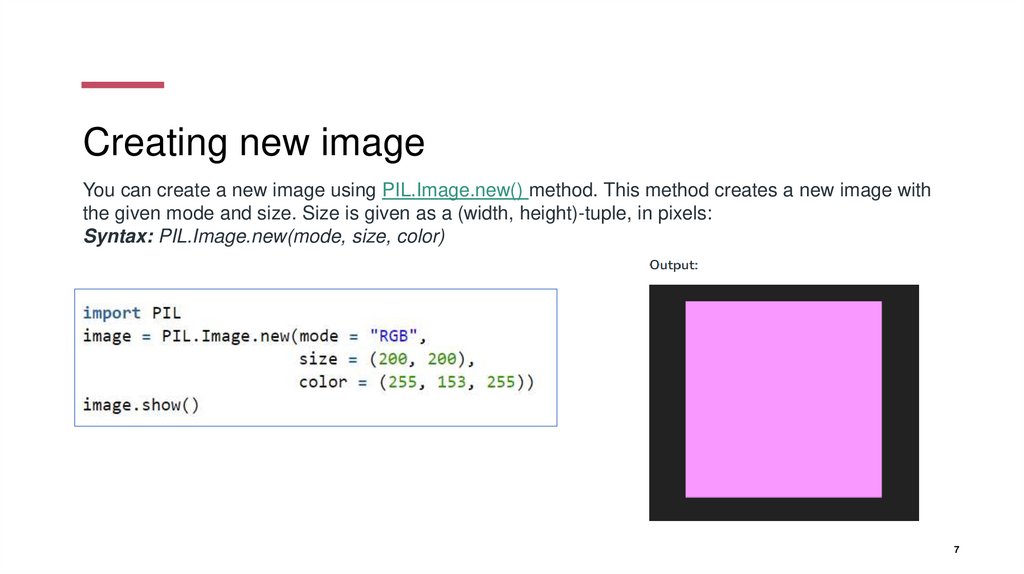
7. Creating new image
You can create a new image using PIL.Image.new() method. This method creates a new image withthe given mode and size. Size is given as a (width, height)-tuple, in pixels:
Syntax: PIL.Image.new(mode, size, color)
7
8. Renaming and Saving Image
Output:We can change the name, format of the image, and
can also rename it using the image.save() method.
Syntax: Image.save(fp, format=None, **params)
9. Cropping the image
PIL is the Python Imaging Library whichprovides the python interpreter with image
editing
capabilities. PIL.Image.crop() method is
used to crop a rectangular portion of any
image.
Syntax: PIL.Image.crop(box = None)
10. Filtering the image
The current version of the Pillow library provides the below-mentioned set of predefined imageenhancement filters.
BLUR
CONTOUR
DETAIL
EDGE_ENHANCE
EDGE_ENHANCE_MORE
EMBOSS
FIND_EDGES
SHARPEN
SMOOTH
SMOOTH_MORE
11. The ImageFilter module contains definitions for a pre-defined set of filters, which can be used with the Image.filter() method.
The ImageFilter module contains definitions for a pre-defined set of filters,which can be used with the Image.filter() method.
.
[object File]
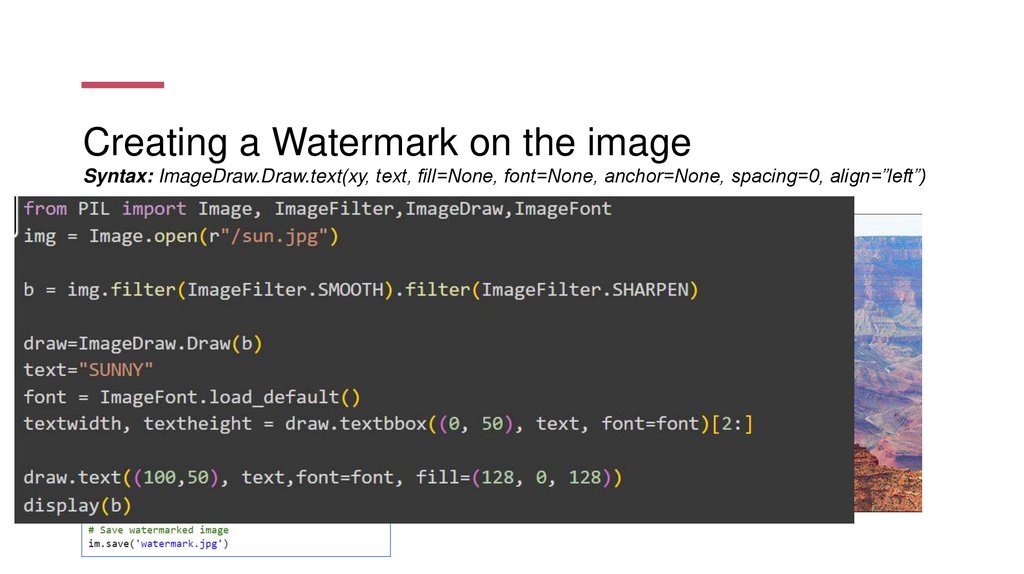
12. Creating a Watermark on the image Syntax: ImageDraw.Draw.text(xy, text, fill=None, font=None, anchor=None, spacing=0,
Creating a Watermark on the imageSyntax: ImageDraw.Draw.text(xy, text, fill=None, font=None, anchor=None, spacing=0, align=”left”)
[object File]
13. Tasks
Tasks• Create a program that returns a resized copy of uploaded image.
• Create a program that reads an image, flips it horizontally, and displays the original and
flipped image using standard PNG display utility.
• Using python pillow library create a program that will add watermark to an image.
14. Tasks
Tasks1. Open an image file and get a copy of the image into a new file.
2. Edit picture. Get only the red channel of the picture. The green and blue channels of all pixels replace to 0.
(use this link
https://www.bzfar.org/publ/algorithms_programming/algorithms/python_pil_library_image_processing/56-1-0202 )
3. Convert any pictures to the black-white picture. Each color is integer of (R + G + B) / 3
15.
16.
17.
18.
19.
20.
21.
22. Reflection
• What has been learned?• What remained unclear?
• What is necessary to work on?
SAMPLE FOOTER TEXT
22