 marketing
Similar presentations:





Kia Digital Quick Start Guide Kia India
1.
┌Best Practice┘
KIN’s Pilot Launching for
Kia Digital Quick Start Guide
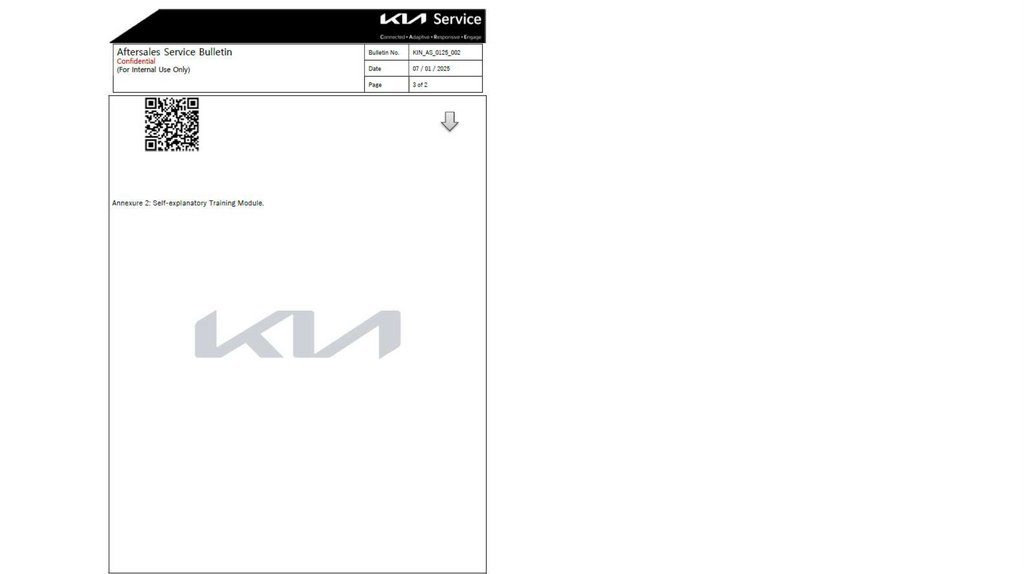
Kia India
Aug. 2025
2.
┌Best Practice┘
KIN’s Pilot Launching for
Kia Digital Quick Start Guide
Time Schedule for
Pilot Launching
Kia India
Aug. 2025
3.
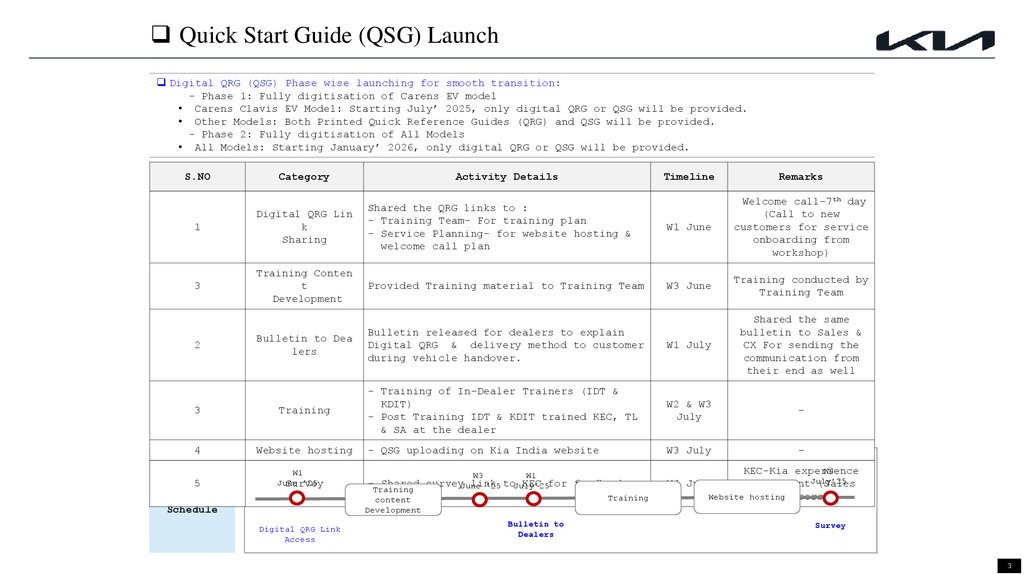
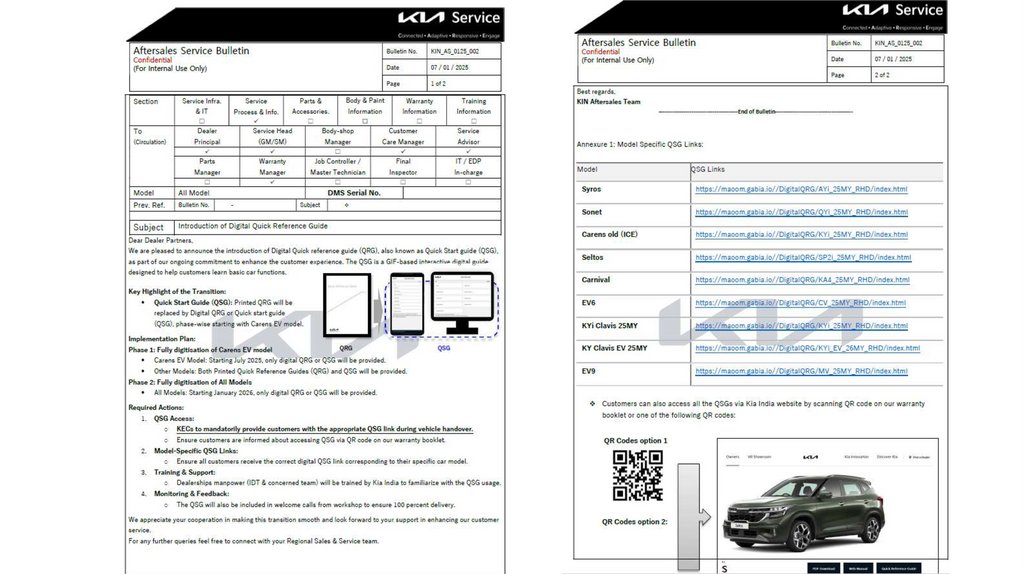
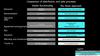
Quick Start Guide (QSG) LaunchDigital QRG (QSG) Phase wise launching for smooth transition:
- Phase 1: Fully digitisation of Carens EV model
• Carens Clavis EV Model: Starting July’ 2025, only digital QRG or QSG will be provided.
• Other Models: Both Printed Quick Reference Guides (QRG) and QSG will be provided.
- Phase 2: Fully digitisation of All Models
• All Models: Starting January’ 2026, only digital QRG or QSG will be provided.
S.NO
Category
Activity Details
Timeline
Remarks
W1 June
Welcome call-7th day
(Call to new
customers for service
onboarding from
workshop)
W3 June
Training conducted by
Training Team
1
Digital QRG Lin
k
Sharing
Shared the QRG links to :
- Training Team- For training plan
- Service Planning- for website hosting &
welcome call plan
3
Training Conten
t
Development
Provided Training material to Training Team
Bulletin to Dea
lers
Bulletin released for dealers to explain
Digital QRG & delivery method to customer
during vehicle handover.
W1 July
Shared the same
bulletin to Sales &
CX For sending the
communication from
their end as well
3
Training
- Training of In-Dealer Trainers (IDT &
KDIT)
- Post Training IDT & KDIT trained KEC, TL
& SA at the dealer
W2 & W3
July
-
4
Website hosting
- QSG uploading on Kia India website
W3 July
-
2
5
Launch
W1
June
’25
Survey
Schedule
Digital QRG Link
Access
W3
W1
- Shared surveyJune
link
KEC for feedback
’25 toJuly’25
Training
content
Development
Training
Bulletin to
Dealers
W4
KEC-Kia experience
consultantJuly’25
(Sales
Website hosting
Advisors)
W4 July
Survey
3
4.
┌Best Practice┘
KIN’s Pilot Launching for
Kia Digital Quick Start Guide
Market’s Feeback Review
through Dealer Survey
(By KHQ)
Ownership Technology Information Team
Aug. 18, 2025
5.
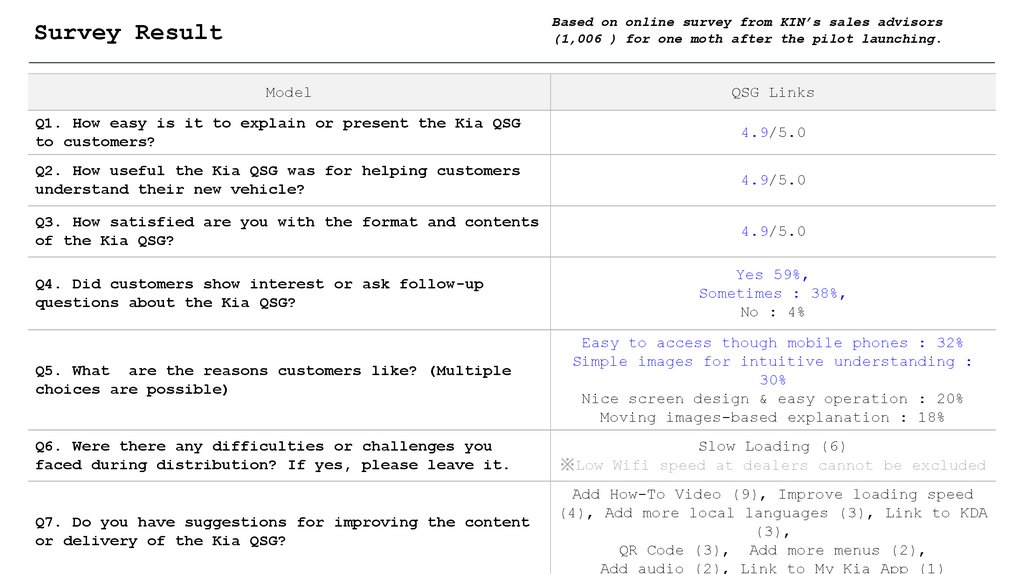
Based on online survey from KIN’s sales advisors(1,006 ) for one moth after the pilot launching.
Survey Result
Model
QSG Links
Q1. How easy is it to explain or present the Kia QSG
to customers?
4.9/5.0
Q2. How useful the Kia QSG was for helping customers
understand their new vehicle?
4.9/5.0
Q3. How satisfied are you with the format and contents
of the Kia QSG?
4.9/5.0
Q4. Did customers show interest or ask follow-up
questions about the Kia QSG?
Yes 59%,
Sometimes : 38%,
No : 4%
Q5. What are the reasons customers like? (Multiple
choices are possible)
Easy to access though mobile phones : 32%
Simple images for intuitive understanding :
30%
Nice screen design & easy operation : 20%
Moving images-based explanation : 18%
Q6. Were there any difficulties or challenges you
faced during distribution? If yes, please leave it.
Slow Loading (6)
※Low Wifi speed at dealers cannot be excluded
Q7. Do you have suggestions for improving the content
or delivery of the Kia QSG?
Add How-To Video (9), Improve loading speed
(4), Add more local languages (3), Link to KDA
(3),
QR Code (3), Add more menus (2),
Add audio (2), Link to My Kia App (1)
6.
┌Best Practice┘
KIN’s Pilot Launching for
Kia Digital Quick Start Guide
Training Materials
Kia India
Aug. 2025
7.
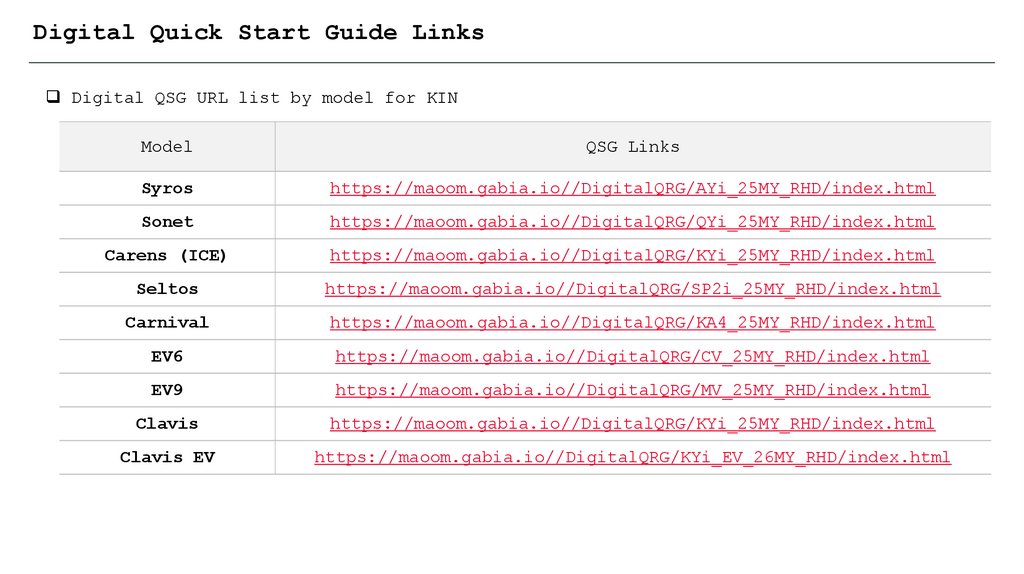
Digital Quick Start Guide LinksDigital QSG URL list by model for KIN
Model
QSG Links
Syros
https://maoom.gabia.io//DigitalQRG/AYi_25MY_RHD/index.html
Sonet
https://maoom.gabia.io//DigitalQRG/QYi_25MY_RHD/index.html
Carens (ICE)
https://maoom.gabia.io//DigitalQRG/KYi_25MY_RHD/index.html
Seltos
https://maoom.gabia.io//DigitalQRG/SP2i_25MY_RHD/index.html
Carnival
https://maoom.gabia.io//DigitalQRG/KA4_25MY_RHD/index.html
EV6
https://maoom.gabia.io//DigitalQRG/CV_25MY_RHD/index.html
EV9
https://maoom.gabia.io//DigitalQRG/MV_25MY_RHD/index.html
Clavis
https://maoom.gabia.io//DigitalQRG/KYi_25MY_RHD/index.html
Clavis EV
https://maoom.gabia.io//DigitalQRG/KYi_EV_26MY_RHD/index.html
8.
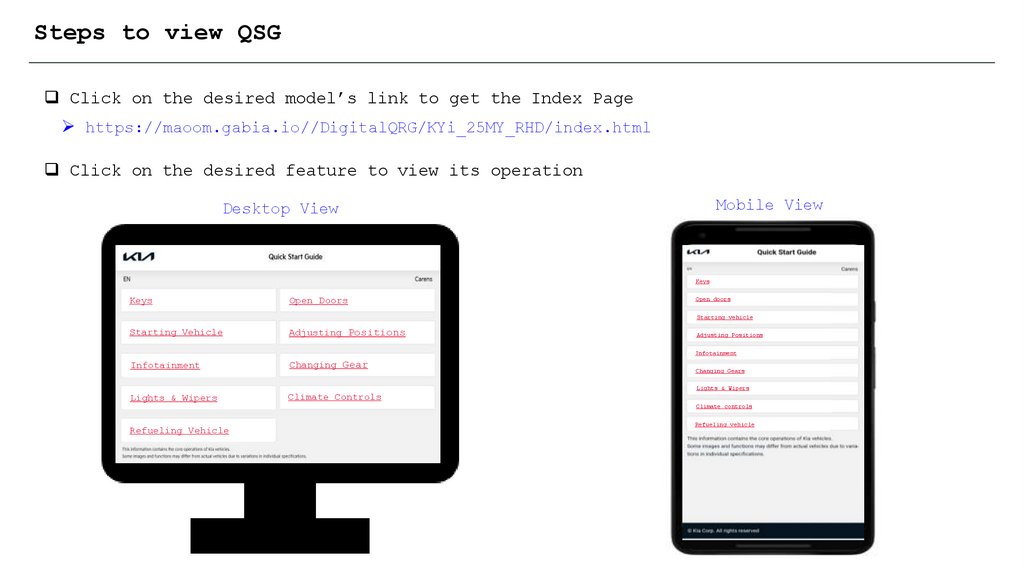
Steps to view QSGClick on the desired model’s link to get the Index Page
https://maoom.gabia.io//DigitalQRG/KYi_25MY_RHD/index.html
Click on the desired feature to view its operation
Mobile View
Desktop View
Keys
Keys
Open Doors
Open doors
Starting vehicle
Starting Vehicle
Adjusting Positions
Adjusting Positions
Infotainment
Infotainment
Changing Gear
Lights & Wipers
Climate Controls
Changing Gears
Lights & Wipers
Climate controls
Refueling Vehicle
Refueling vehicle
9.
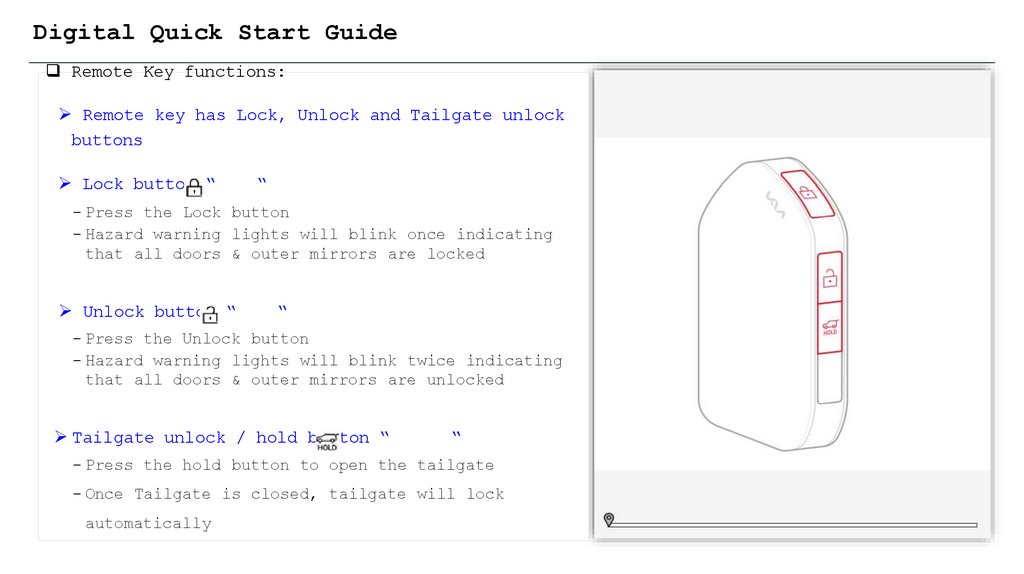
Digital Quick Start GuideRemote Key functions:
Remote key has Lock, Unlock and Tailgate unlock
buttons
Lock button “
“
- Press the Lock button
- Hazard warning lights will blink once indicating
that all doors & outer mirrors are locked
Unlock button “
“
- Press the Unlock button
- Hazard warning lights will blink twice indicating
that all doors & outer mirrors are unlocked
Tailgate unlock / hold button “
“
- Press the hold button to open the tailgate
- Once Tailgate is closed, tailgate will lock
automatically
10.
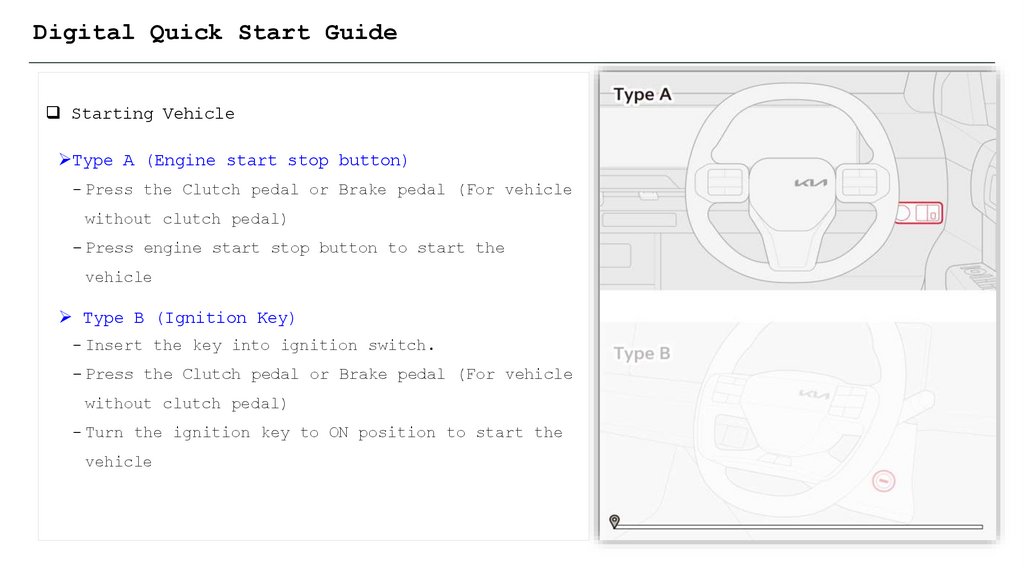
Digital Quick Start GuideStarting Vehicle
Type A (Engine start stop button)
- Press the Clutch pedal or Brake pedal (For vehicle
without clutch pedal)
- Press engine start stop button to start the
vehicle
Type B (Ignition Key)
- Insert the key into ignition switch.
- Press the Clutch pedal or Brake pedal (For vehicle
without clutch pedal)
- Turn the ignition key to ON position to start the
vehicle
11.
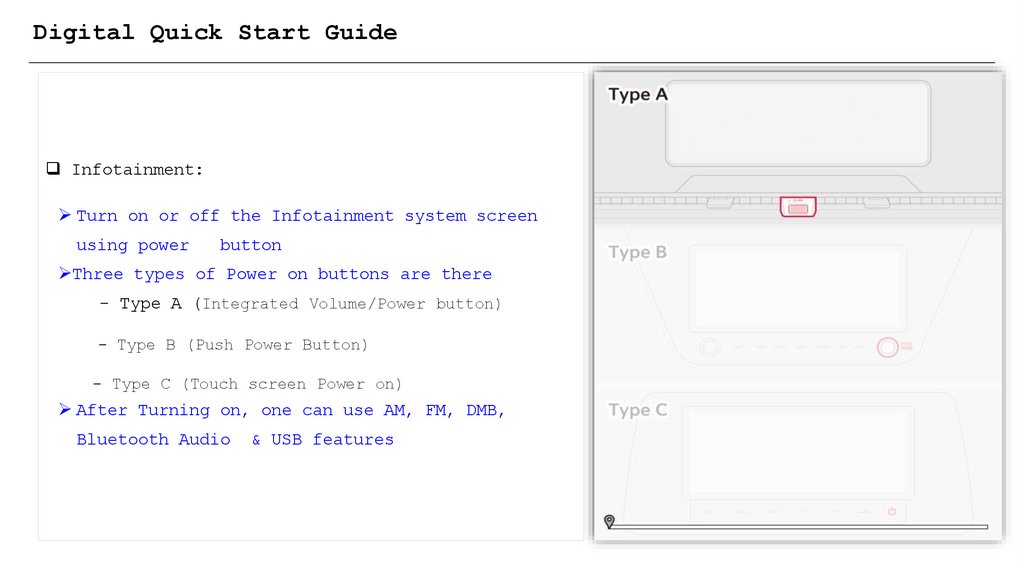
Digital Quick Start GuideInfotainment:
Turn on or off the Infotainment system screen
using power
button
Three types of Power on buttons are there
- Type A (Integrated Volume/Power button)
- Type B (Push Power Button)
- Type C (Touch screen Power on)
After Turning on, one can use AM, FM, DMB,
Bluetooth Audio
& USB features
12.
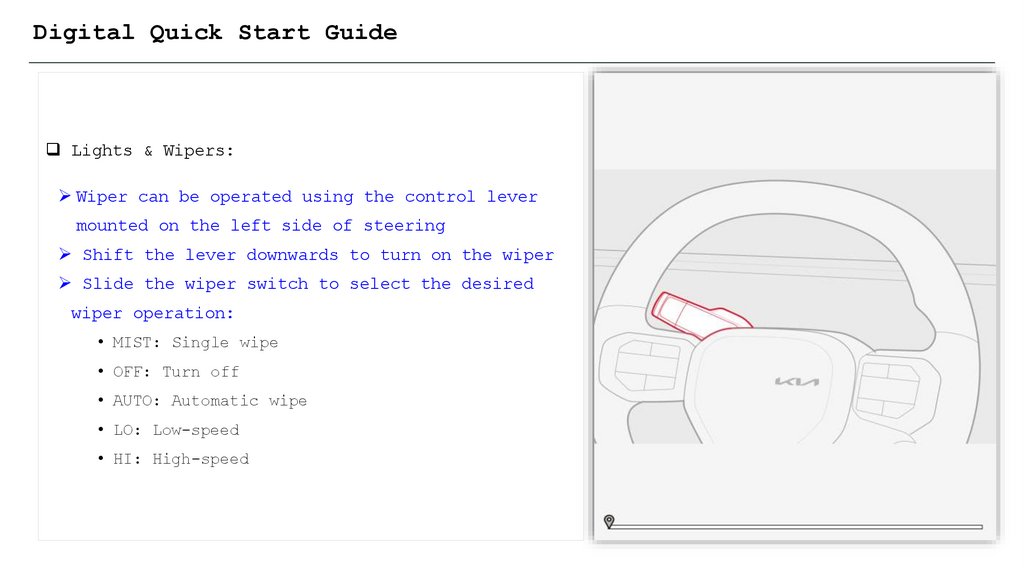
Digital Quick Start GuideLights & Wipers:
Wiper can be operated using the control lever
mounted on the left side of steering
Shift the lever downwards to turn on the wiper
Slide the wiper switch to select the desired
wiper operation:
• MIST: Single wipe
• OFF: Turn off
• AUTO: Automatic wipe
• LO: Low-speed
• HI: High-speed
13.
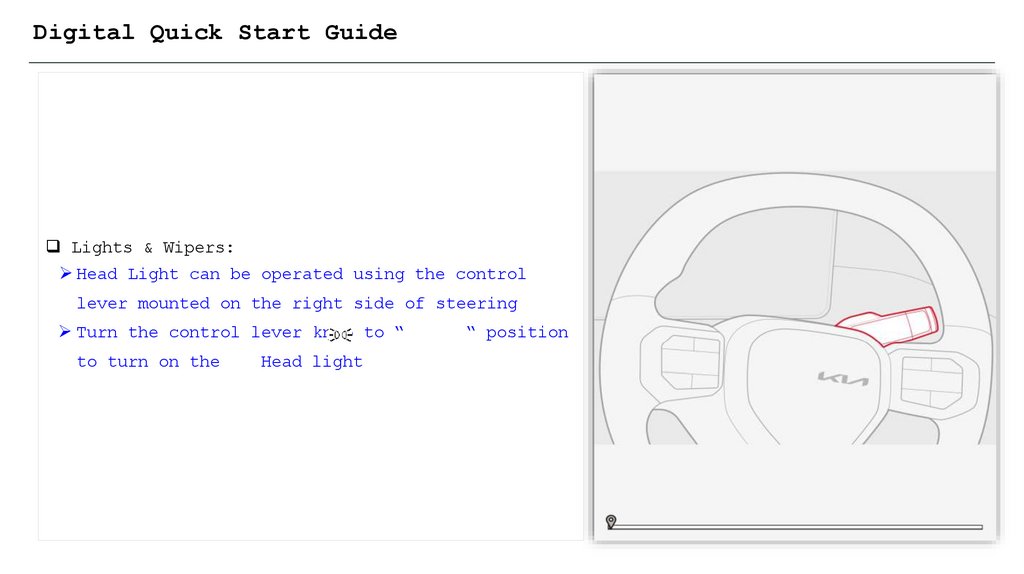
Digital Quick Start GuideLights & Wipers:
Head Light can be operated using the control
lever mounted on the right side of steering
Turn the control lever knob to “
to turn on the
Head light
“ position
14.
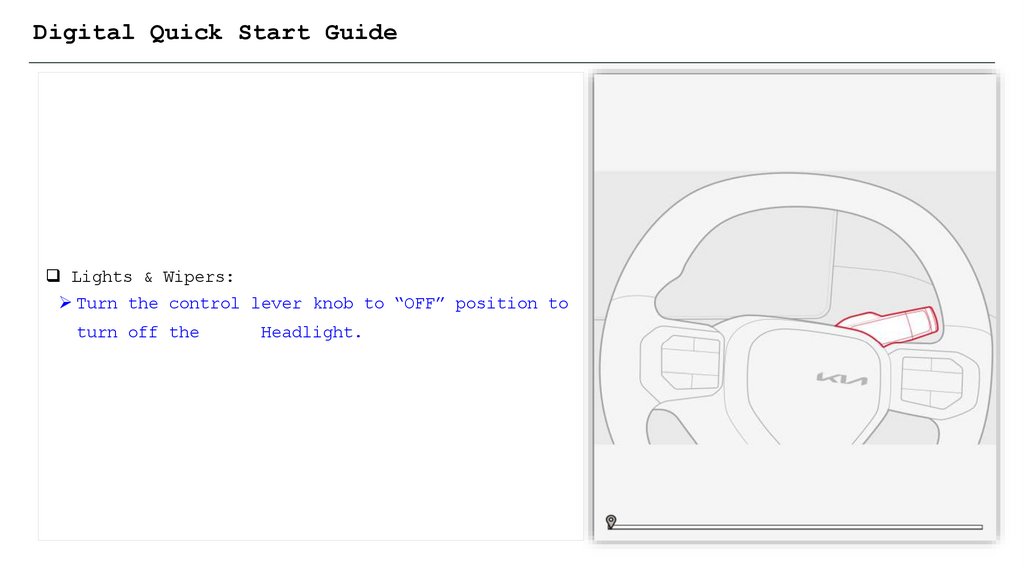
Digital Quick Start GuideLights & Wipers:
Turn the control lever knob to “OFF” position to
turn off the
Headlight.
15.
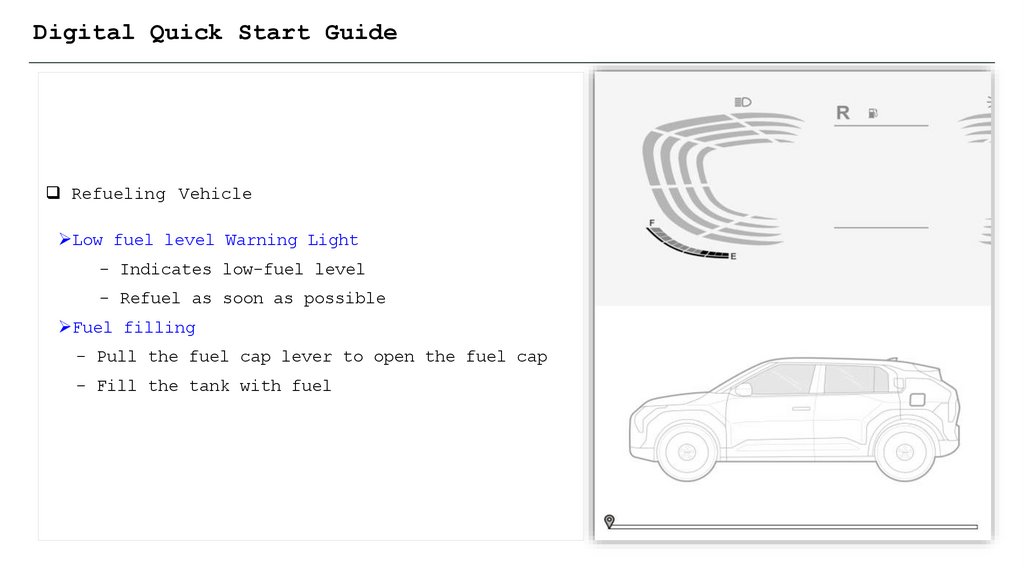
Digital Quick Start GuideRefueling Vehicle
Low fuel level Warning Light
- Indicates low-fuel level
- Refuel as soon as possible
Fuel filling
- Pull the fuel cap lever to open the fuel cap
- Fill the tank with fuel
16.
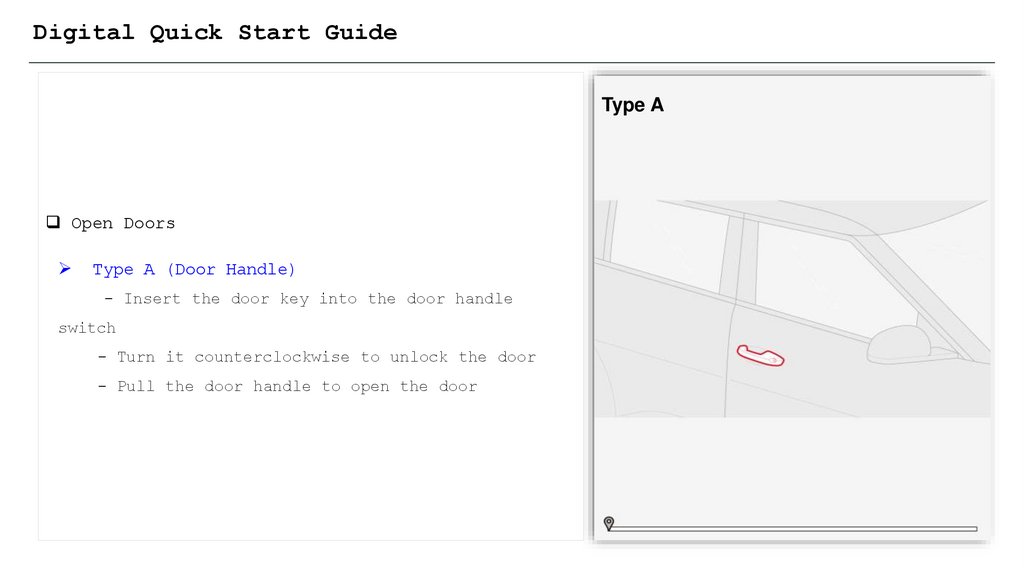
Digital Quick Start GuideType A
Open Doors
Type A (Door Handle)
- Insert the door key into the door handle
switch
- Turn it counterclockwise to unlock the door
- Pull the door handle to open the door
17.
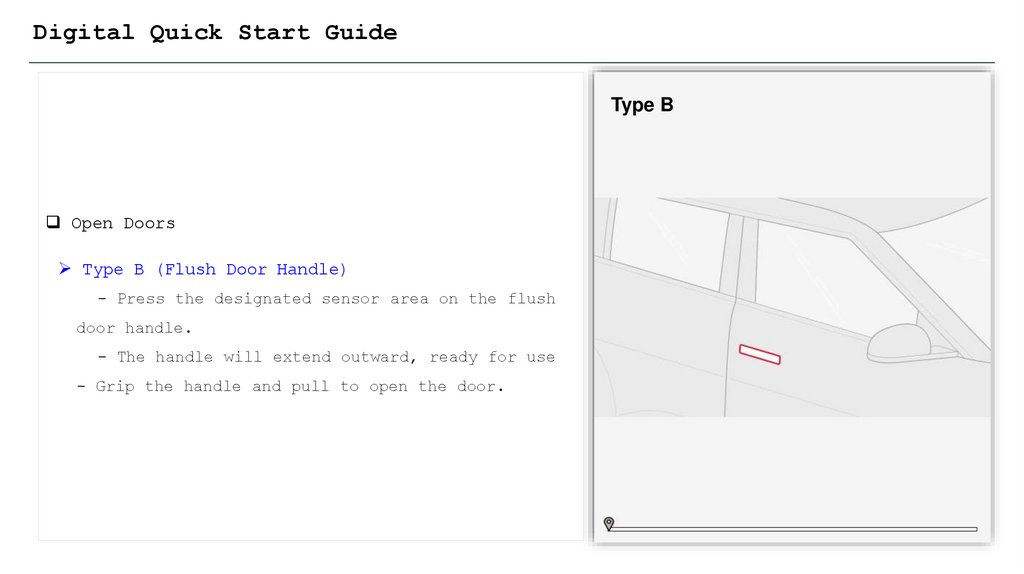
Digital Quick Start GuideType B
Open Doors
Type B (Flush Door Handle)
- Press the designated sensor area on the flush
door handle.
- The handle will extend outward, ready for use
- Grip the handle and pull to open the door.
18.
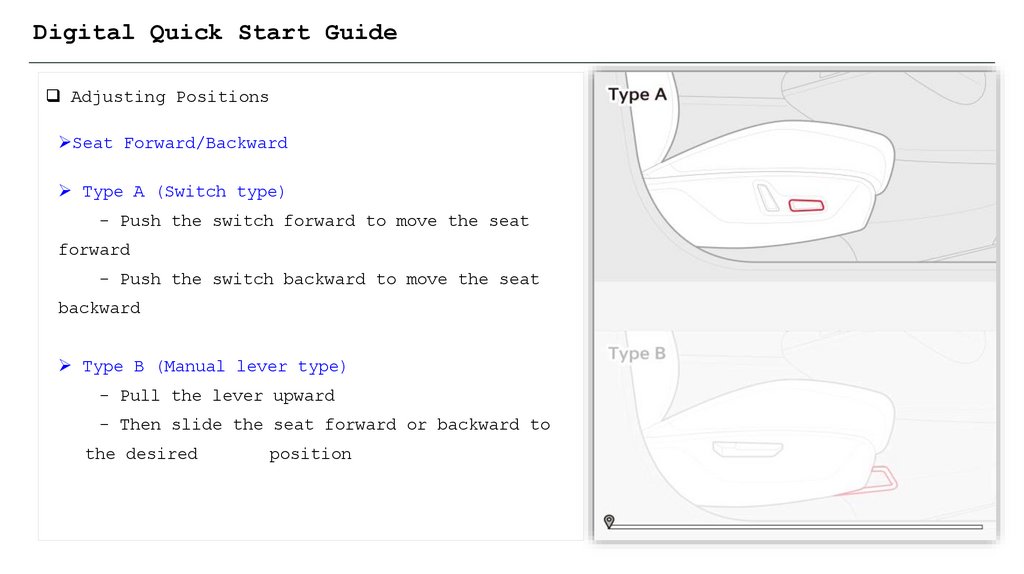
Digital Quick Start GuideAdjusting Positions
Seat Forward/Backward
Type A (Switch type)
- Push the switch forward to move the seat
forward
- Push the switch backward to move the seat
backward
Type B (Manual lever type)
- Pull the lever upward
- Then slide the seat forward or backward to
the desired
position
19.
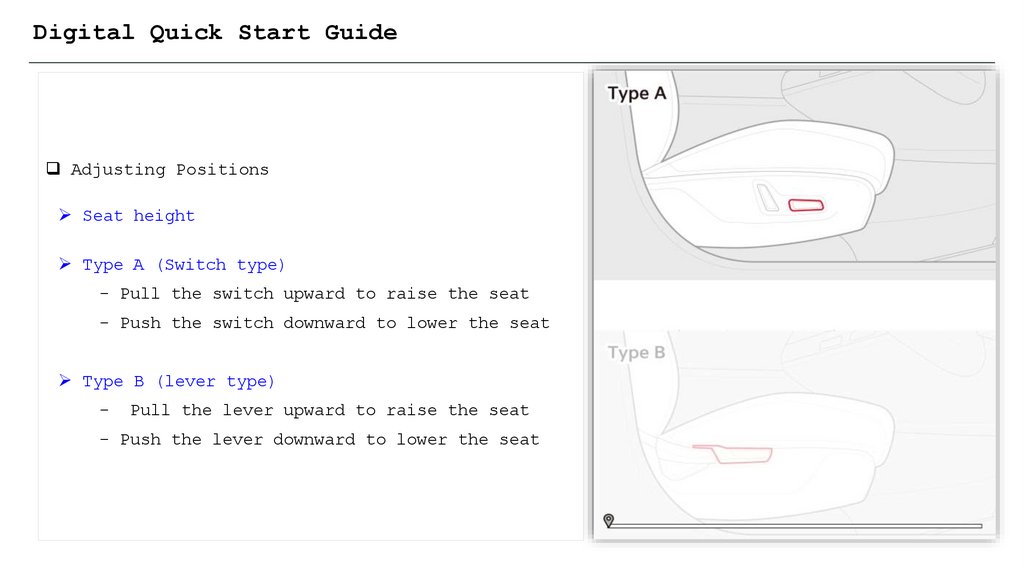
Digital Quick Start GuideAdjusting Positions
Seat height
Type A (Switch type)
- Pull the switch upward to raise the seat
- Push the switch downward to lower the seat
Type B (lever type)
-
Pull the lever upward to raise the seat
- Push the lever downward to lower the seat
20.
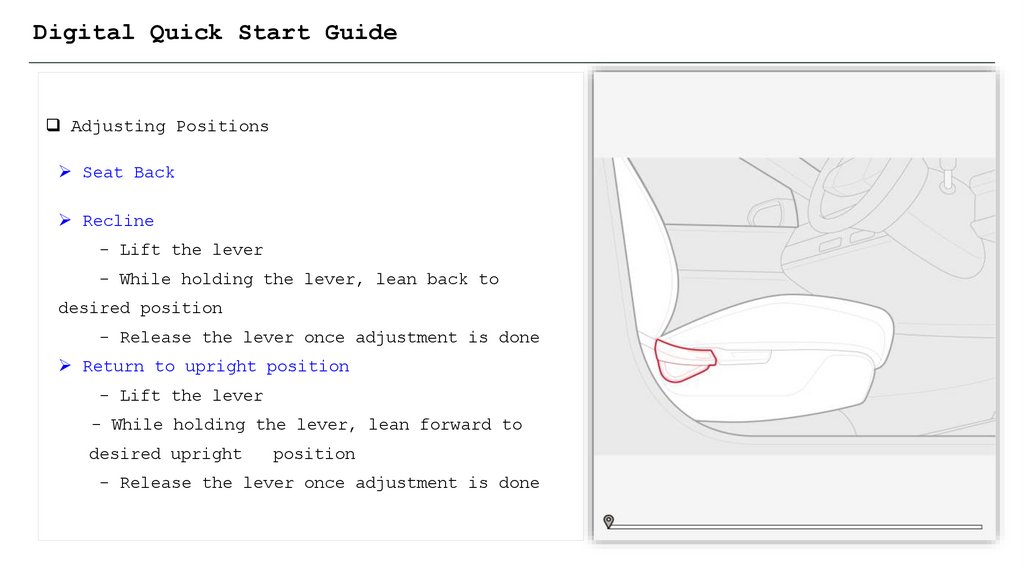
Digital Quick Start GuideAdjusting Positions
Seat Back
Recline
- Lift the lever
- While holding the lever, lean back to
desired position
- Release the lever once adjustment is done
Return to upright position
- Lift the lever
- While holding the lever, lean forward to
desired upright
position
- Release the lever once adjustment is done
21.
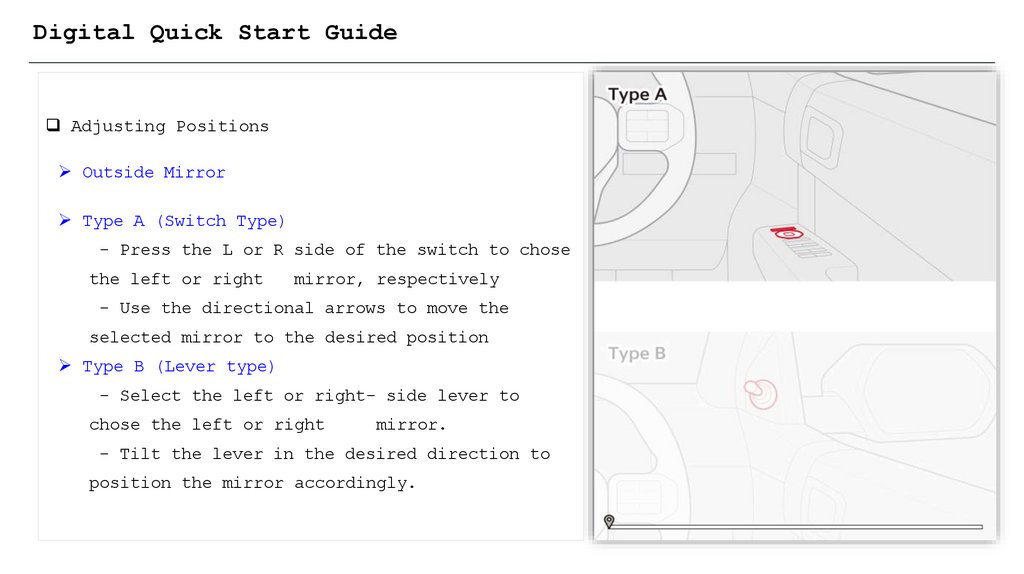
Digital Quick Start GuideAdjusting Positions
Outside Mirror
Type A (Switch Type)
- Press the L or R side of the switch to chose
the left or right
mirror, respectively
- Use the directional arrows to move the
selected mirror to the desired position
Type B (Lever type)
- Select the left or right- side lever to
chose the left or right
mirror.
- Tilt the lever in the desired direction to
position the mirror accordingly.
22.
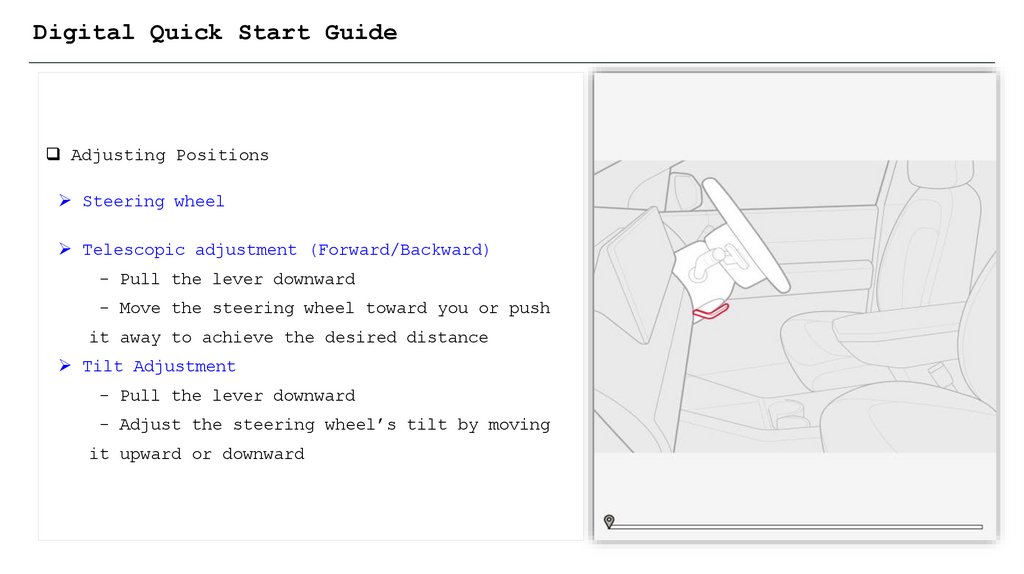
Digital Quick Start GuideAdjusting Positions
Steering wheel
Telescopic adjustment (Forward/Backward)
- Pull the lever downward
- Move the steering wheel toward you or push
it away to achieve the desired distance
Tilt Adjustment
- Pull the lever downward
- Adjust the steering wheel’s tilt by moving
it upward or downward
23.
ChangingQuickGear
Digital
Start Guide
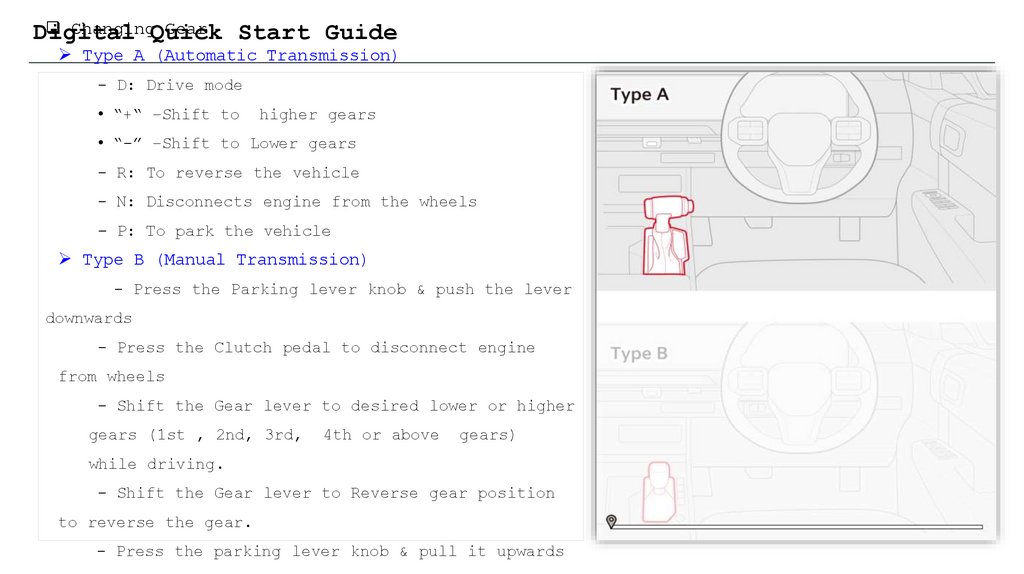
Type A (Automatic Transmission)
- D: Drive mode
• “+“ –Shift to
higher gears
• “-” –Shift to Lower gears
- R: To reverse the vehicle
- N: Disconnects engine from the wheels
- P: To park the vehicle
Type B (Manual Transmission)
- Press the Parking lever knob & push the lever
downwards
- Press the Clutch pedal to disconnect engine
from wheels
- Shift the Gear lever to desired lower or higher
gears (1st , 2nd, 3rd,
4th or above
gears)
while driving.
- Shift the Gear lever to Reverse gear position
to reverse the gear.
- Press the parking lever knob & pull it upwards
24.
┌Best Practice┘
KIN’s Pilot Launching for
Kia Digital Quick Start Guide
Dealer Bulletin
Kia India
Aug. 2025