

 management
Similar presentations:








MRP process definition & scope
1.
EAGLE – MATERIALS REQUIREMENT PLANNING - MRPDECEMBER, 2016
Nutricia Poland Deployment
2. MRP process definition & scope
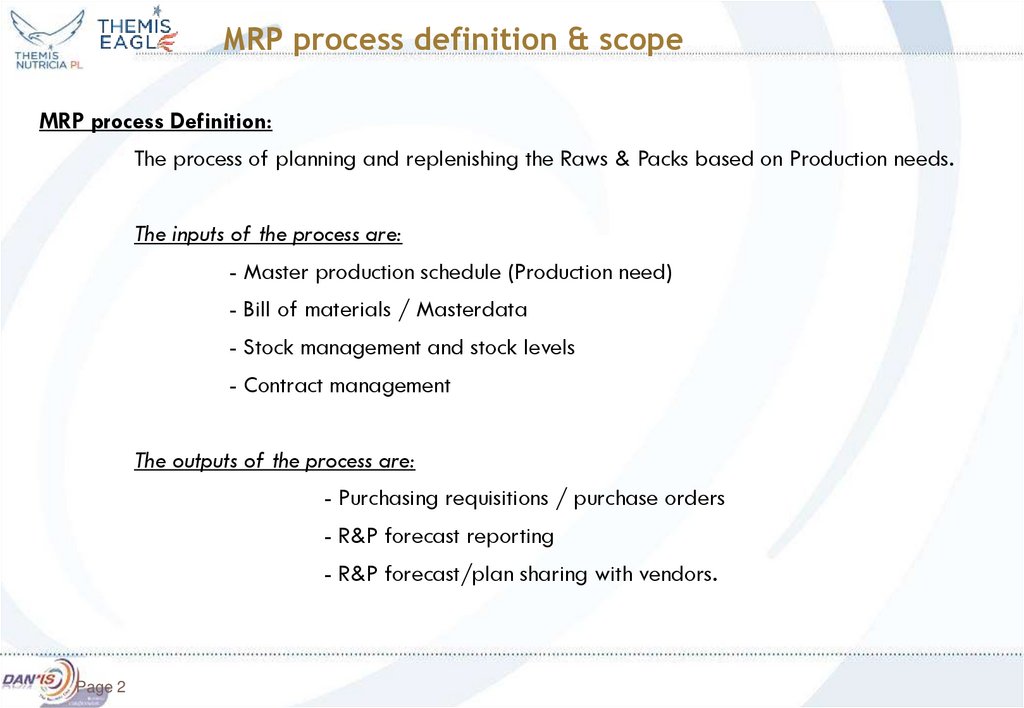
MRP process definition & scopeMRP process Definition:
The process of planning and replenishing the Raws & Packs based on Production needs.
The inputs of the process are:
- Master production schedule (Production need)
- Bill of materials / Masterdata
- Stock management and stock levels
- Contract management
The outputs of the process are:
- Purchasing requisitions / purchase orders
- R&P forecast reporting
- R&P forecast/plan sharing with vendors.
Page 2
3. MRP objectives
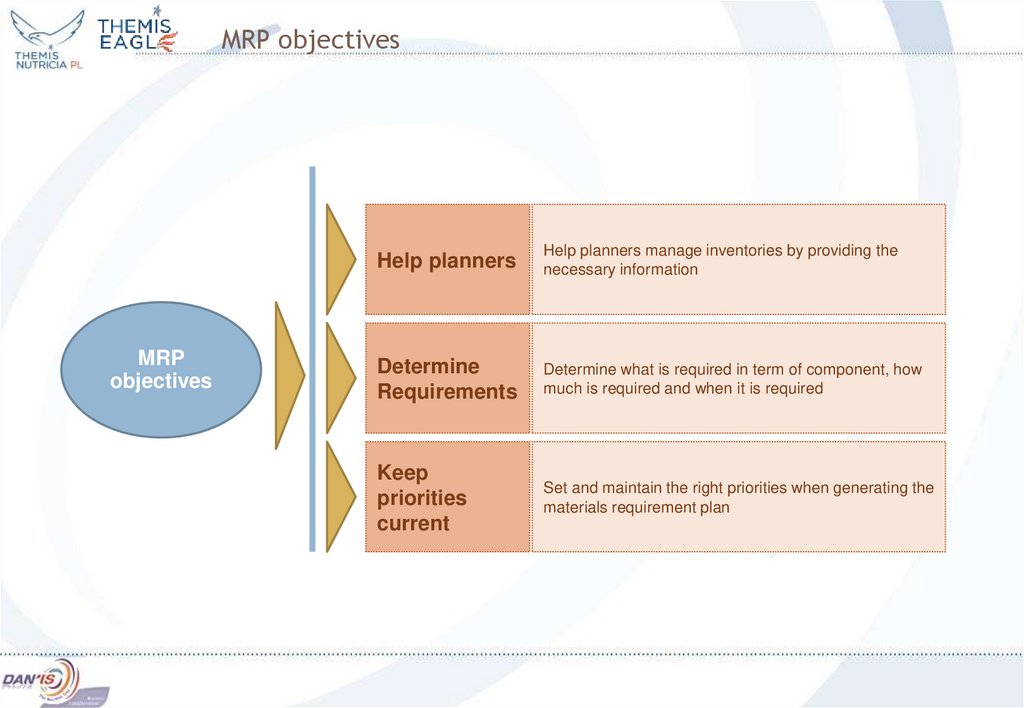
MRPobjectives
Help planners
Help planners manage inventories by providing the
necessary information
Determine
Requirements
Determine what is required in term of component, how
much is required and when it is required
Keep
priorities
current
Set and maintain the right priorities when generating the
materials requirement plan
4. MRP process characteristic
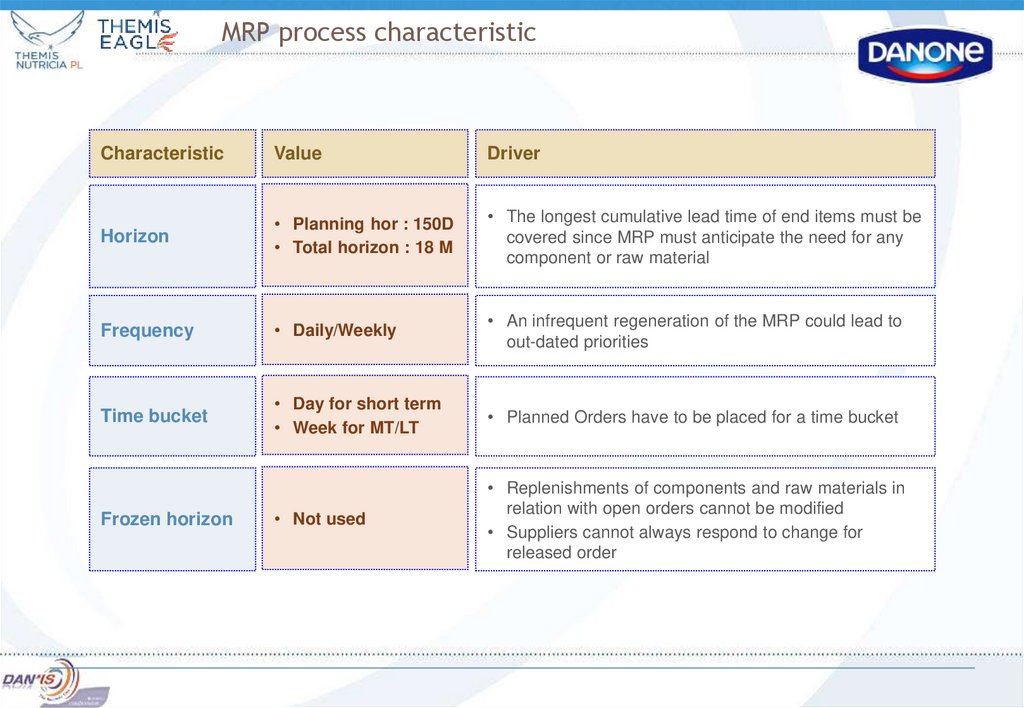
CharacteristicValue
Driver
Horizon
• Planning hor : 150D
• Total horizon : 18 M
• The longest cumulative lead time of end items must be
covered since MRP must anticipate the need for any
component or raw material
Frequency
• Daily/Weekly
• An infrequent regeneration of the MRP could lead to
out-dated priorities
Time bucket
• Day for short term
• Week for MT/LT
• Planned Orders have to be placed for a time bucket
• Not used
• Replenishments of components and raw materials in
relation with open orders cannot be modified
• Suppliers cannot always respond to change for
released order
Frozen horizon
5. MRP process input
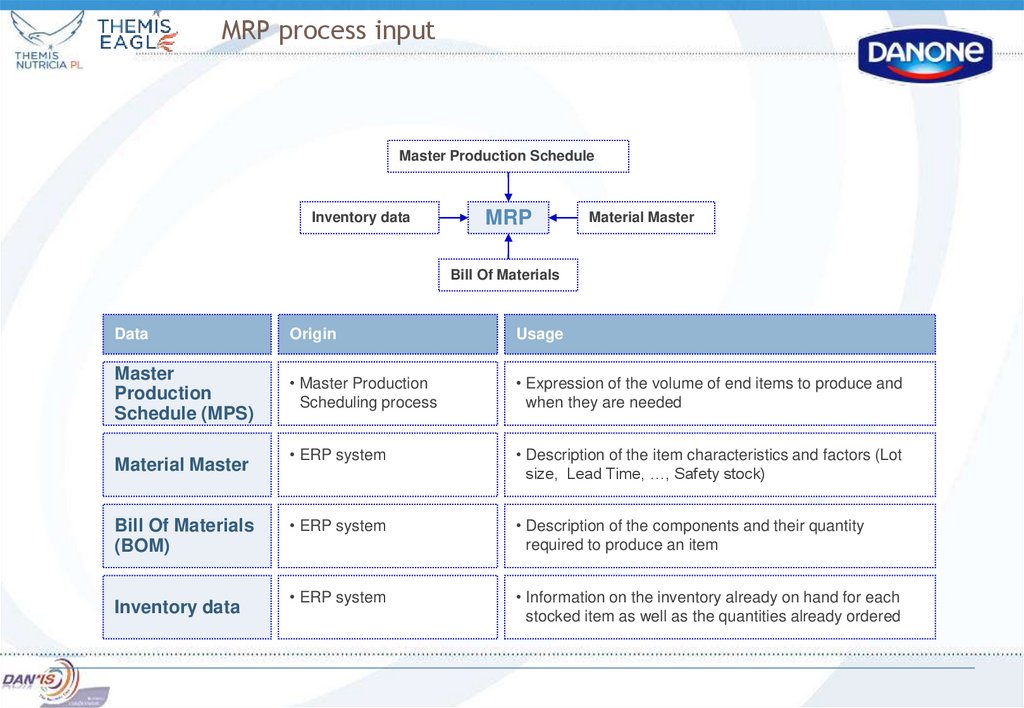
Master Production ScheduleInventory data
MRP
Material Master
Bill Of Materials
Data
Origin
Usage
Master
Production
Schedule (MPS)
• Master Production
Scheduling process
• Expression of the volume of end items to produce and
when they are needed
• ERP system
• Description of the item characteristics and factors (Lot
size, Lead Time, …, Safety stock)
• ERP system
• Description of the components and their quantity
required to produce an item
• ERP system
• Information on the inventory already on hand for each
stocked item as well as the quantities already ordered
Material Master
Bill Of Materials
(BOM)
Inventory data
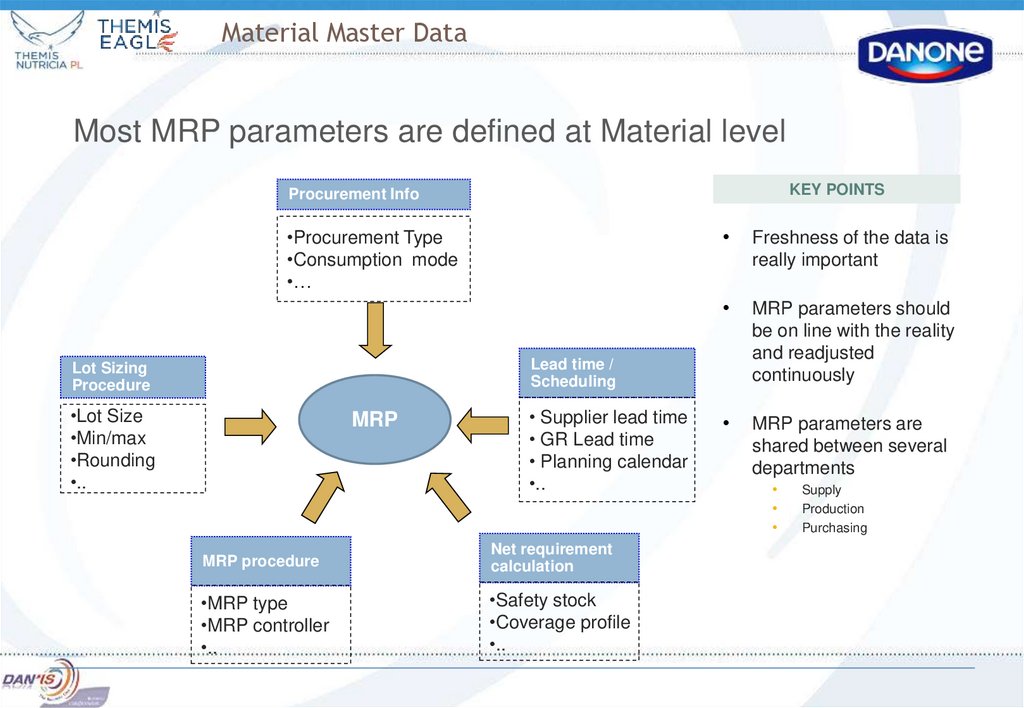
6. Material Master Data
Most MRP parameters are defined at Material levelKEY POINTS
Procurement Info
•Procurement Type
•Consumption mode
•…
Freshness of the data is
really important
MRP parameters should
be on line with the reality
and readjusted
continuously
MRP parameters are
shared between several
departments
Lead time /
Scheduling
Lot Sizing
Procedure
•Lot Size
•Min/max
•Rounding
•..
MRP
• Supplier lead time
• GR Lead time
• Planning calendar
•..
MRP procedure
Net requirement
calculation
•MRP type
•MRP controller
•..
•Safety stock
•Coverage profile
•..
Supply
Production
Purchasing
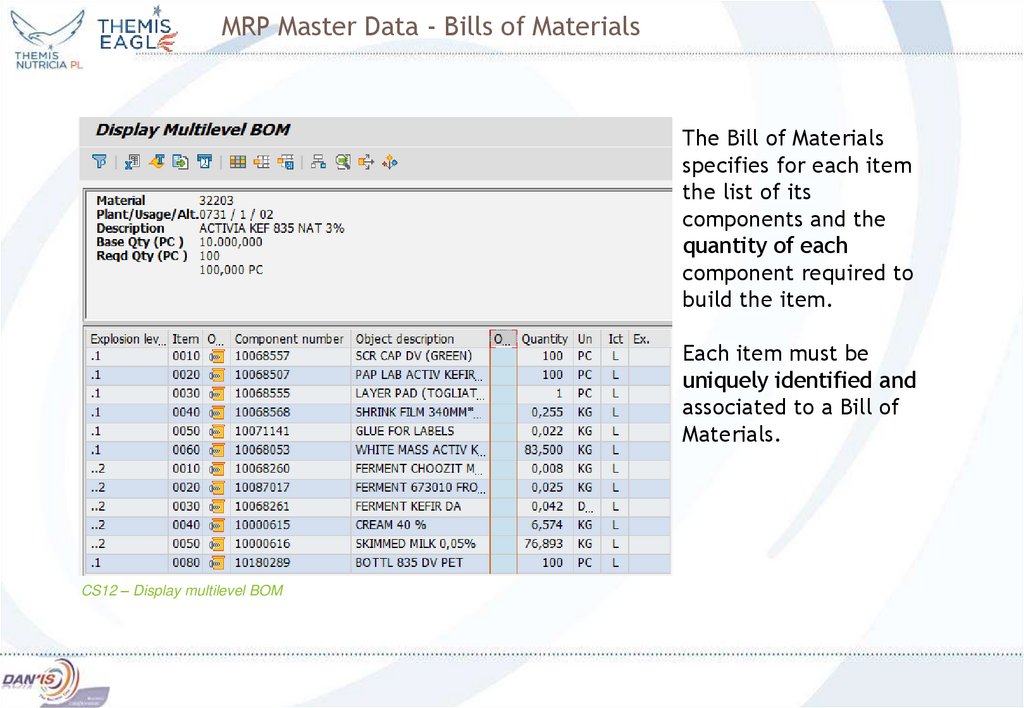
7. MRP Master Data - Bills of Materials
The Bill of Materialsspecifies for each item
the list of its
components and the
quantity of each
component required to
build the item.
Each item must be
uniquely identified and
associated to a Bill of
Materials.
CS12 – Display multilevel BOM
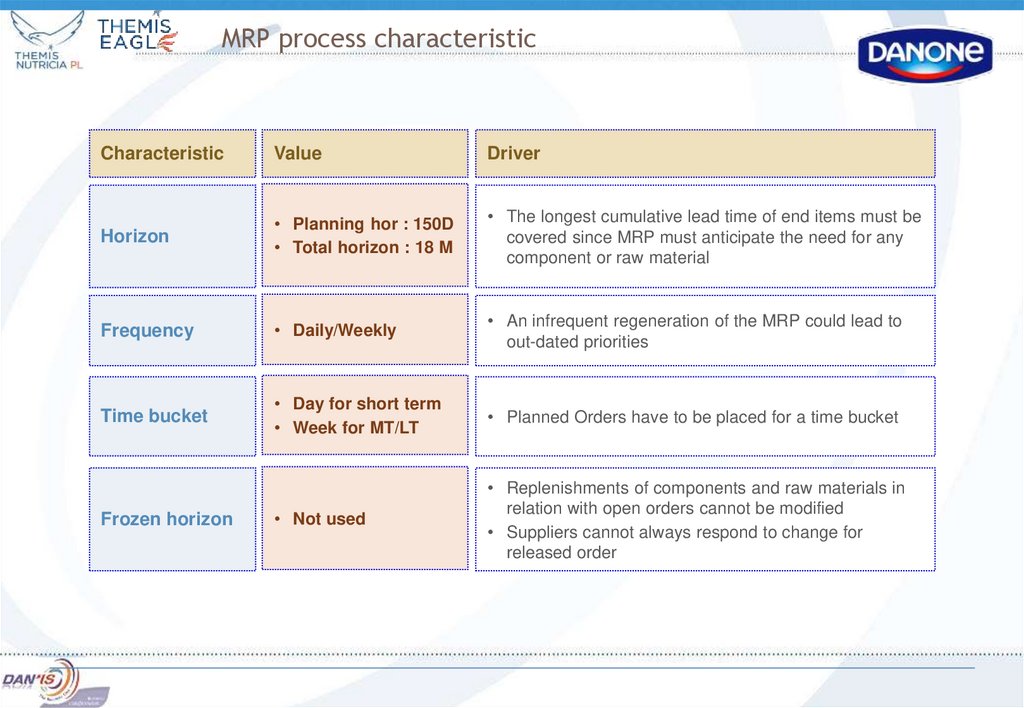
8. MRP process characteristic
CharacteristicValue
Driver
Horizon
• Planning hor : 150D
• Total horizon : 18 M
• The longest cumulative lead time of end items must be
covered since MRP must anticipate the need for any
component or raw material
Frequency
• Daily/Weekly
• An infrequent regeneration of the MRP could lead to
out-dated priorities
Time bucket
• Day for short term
• Week for MT/LT
• Planned Orders have to be placed for a time bucket
• Not used
• Replenishments of components and raw materials in
relation with open orders cannot be modified
• Suppliers cannot always respond to change for
released order
Frozen horizon
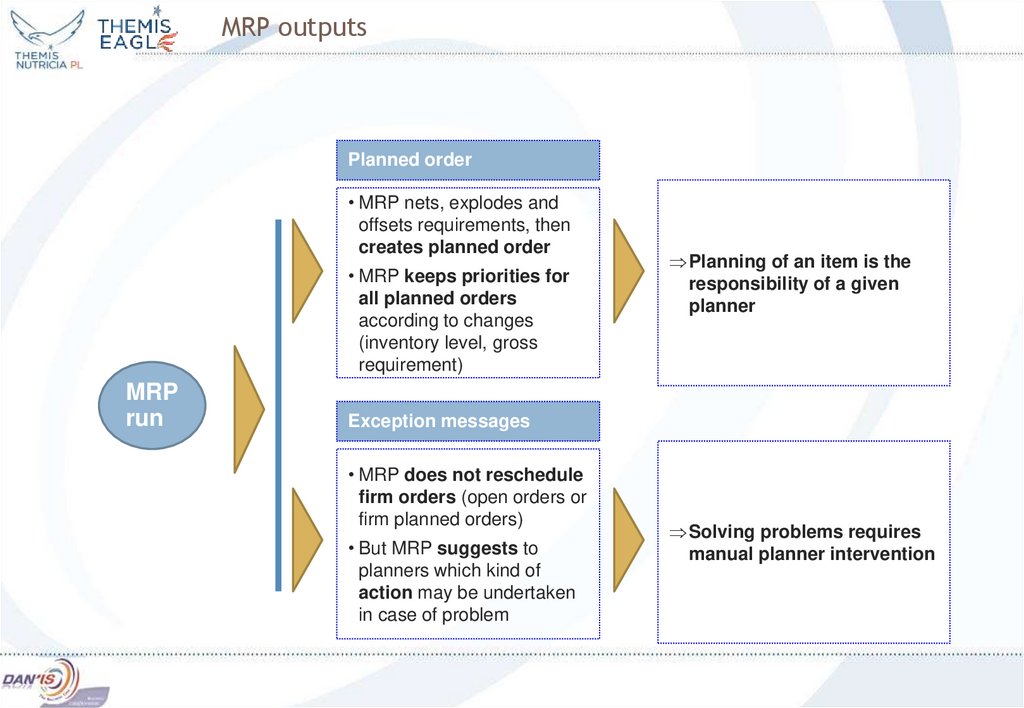
9. MRP outputs
Planned order• MRP nets, explodes and
offsets requirements, then
creates planned order
• MRP keeps priorities for
all planned orders
according to changes
(inventory level, gross
requirement)
MRP
run
Planning of an item is the
responsibility of a given
planner
Exception messages
• MRP does not reschedule
firm orders (open orders or
firm planned orders)
• But MRP suggests to
planners which kind of
action may be undertaken
in case of problem
Solving problems requires
manual planner intervention
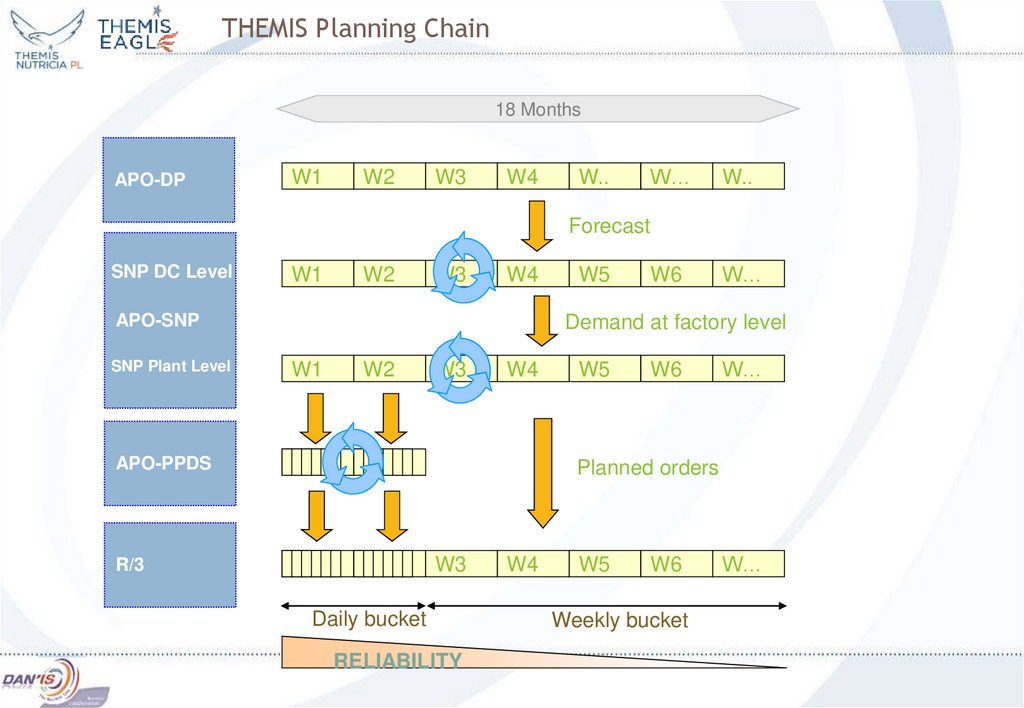
10. THEMIS Planning Chain
18 MonthsAPO-DP
W1
W2
W3
W4
W..
W…
W..
W6
W…
Forecast
SNP DC Level
W1
W2
W3
W4
APO-SNP
SNP Plant Level
W5
Demand at factory level
W1
W2
W3
W4
APO-PPDS
W5
W6
W…
Planned orders
W3
R/3
Daily bucket
RELIABILITY
W4
W5
W6
Weekly bucket
W…
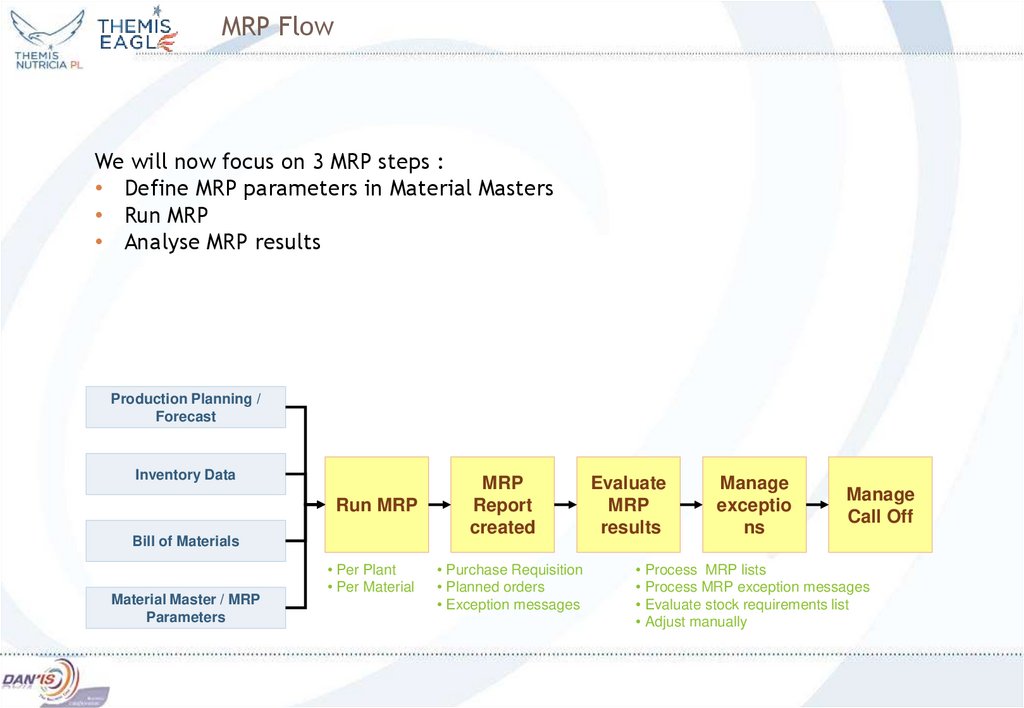
11. MRP Flow
We will now focus on 3 MRP steps :• Define MRP parameters in Material Masters
• Run MRP
• Analyse MRP results
Production Planning /
Forecast
Inventory Data
Run MRP
Bill of Materials
Material Master / MRP
Parameters
• Per Plant
• Per Material
MRP
Report
created
• Purchase Requisition
• Planned orders
• Exception messages
Evaluate
MRP
results
Manage
exceptio
ns
Manage
Call Off
• Process MRP lists
• Process MRP exception messages
• Evaluate stock requirements list
• Adjust manually
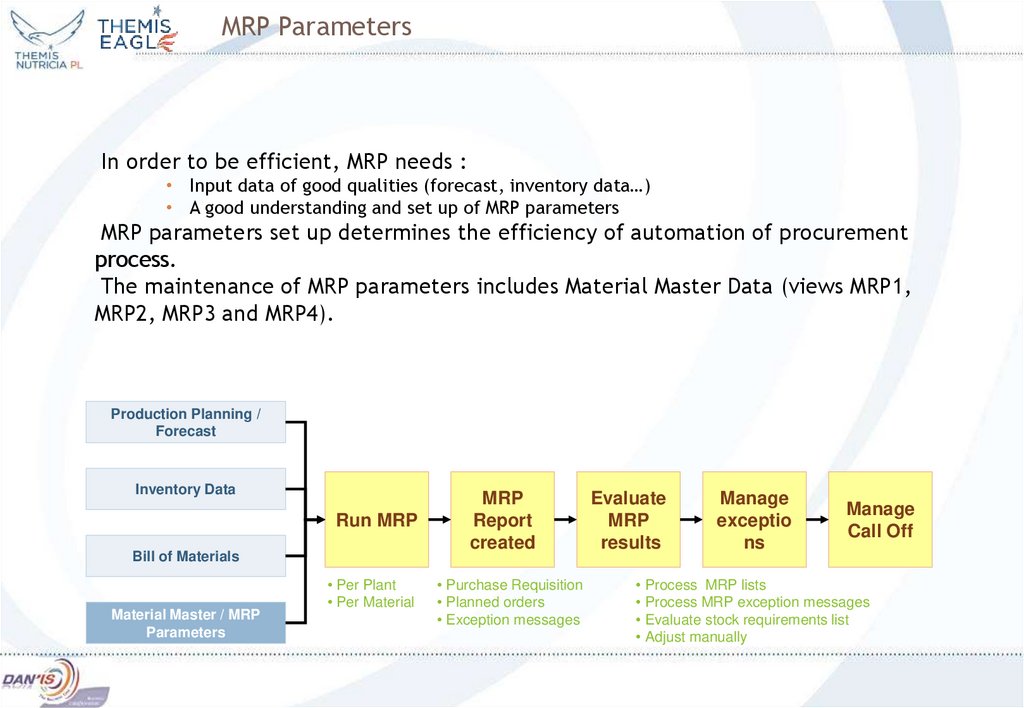
12. MRP Parameters
In order to be efficient, MRP needs :• Input data of good qualities (forecast, inventory data…)
• A good understanding and set up of MRP parameters
MRP parameters set up determines the efficiency of automation of procurement
process.
The maintenance of MRP parameters includes Material Master Data (views MRP1,
MRP2, MRP3 and MRP4).
Production Planning /
Forecast
Inventory Data
Run MRP
Bill of Materials
Material Master / MRP
Parameters
• Per Plant
• Per Material
MRP
Report
created
• Purchase Requisition
• Planned orders
• Exception messages
Evaluate
MRP
results
Manage
exceptio
ns
Manage
Call Off
• Process MRP lists
• Process MRP exception messages
• Evaluate stock requirements list
• Adjust manually
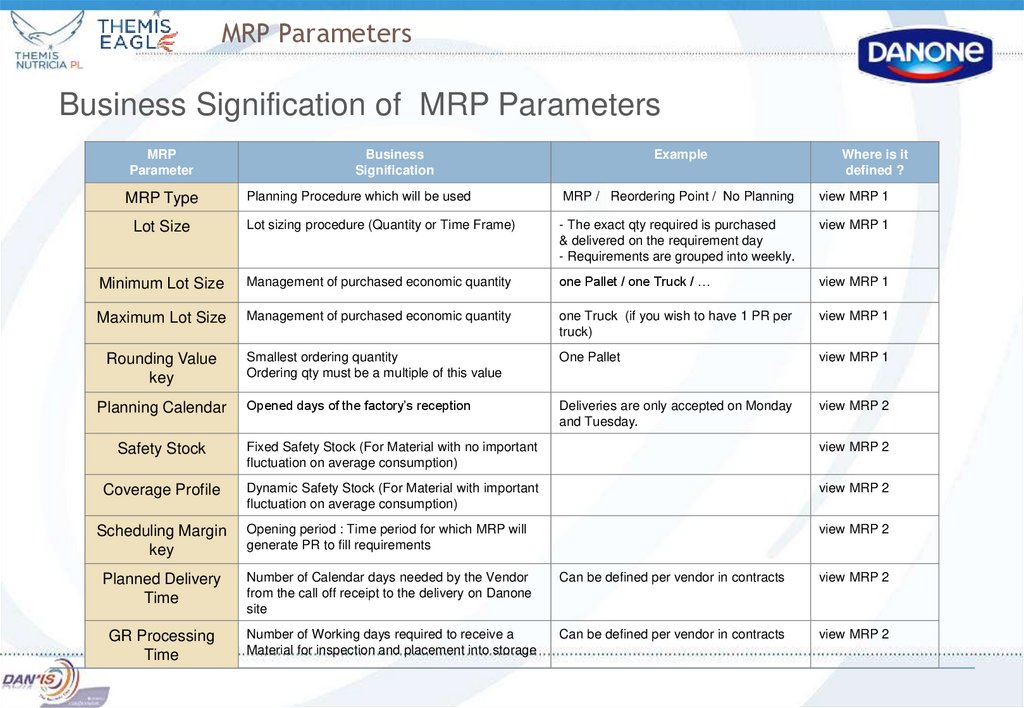
13. MRP Parameters
Business Signification of MRP ParametersMRP
Parameter
Business
Signification
Example
Where is it
defined ?
MRP Type
Planning Procedure which will be used
MRP / Reordering Point / No Planning
view MRP 1
Lot Size
Lot sizing procedure (Quantity or Time Frame)
- The exact qty required is purchased
& delivered on the requirement day
- Requirements are grouped into weekly.
view MRP 1
Minimum Lot Size
Management of purchased economic quantity
one Pallet / one Truck / …
view MRP 1
Maximum Lot Size
Management of purchased economic quantity
one Truck (if you wish to have 1 PR per
truck)
view MRP 1
Rounding Value
key
Smallest ordering quantity
Ordering qty must be a multiple of this value
One Pallet
view MRP 1
Planning Calendar
Opened days of the factory’s reception
Deliveries are only accepted on Monday
and Tuesday.
view MRP 2
Safety Stock
Fixed Safety Stock (For Material with no important
fluctuation on average consumption)
view MRP 2
Coverage Profile
Dynamic Safety Stock (For Material with important
fluctuation on average consumption)
view MRP 2
Scheduling Margin
key
Opening period : Time period for which MRP will
generate PR to fill requirements
view MRP 2
Planned Delivery
Time
Number of Calendar days needed by the Vendor
from the call off receipt to the delivery on Danone
site
Can be defined per vendor in contracts
view MRP 2
GR Processing
Time
Number of Working days required to receive a
Material for inspection and placement into storage
Can be defined per vendor in contracts
view MRP 2
14. MRP Parameters
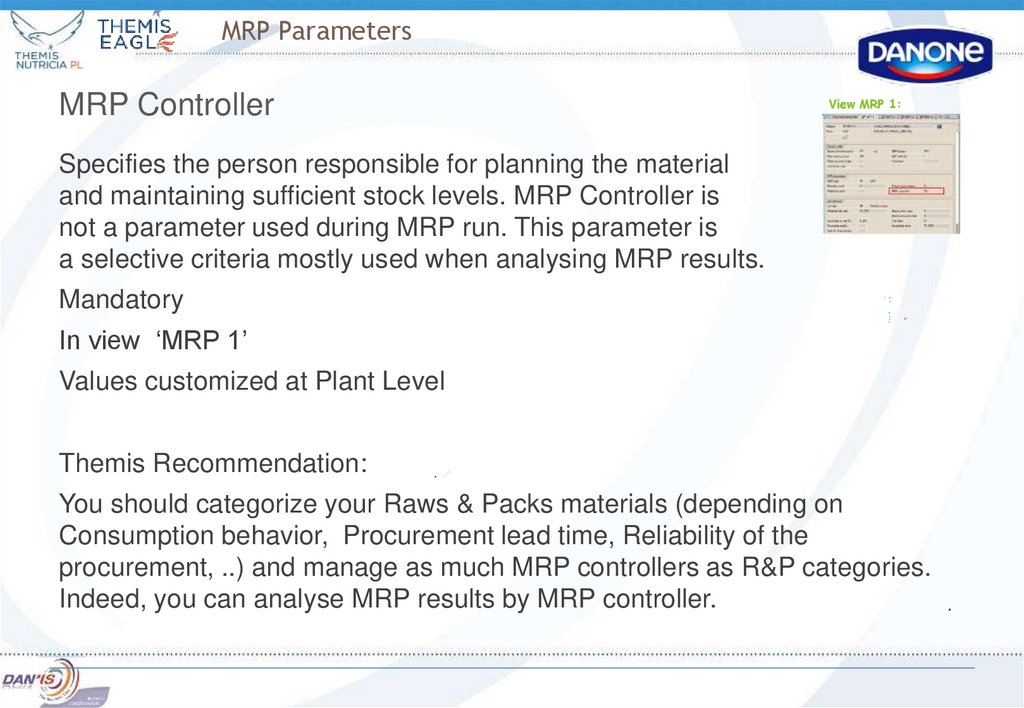
MRP ControllerView MRP 1:
Specifies the person responsible for planning the material
and maintaining sufficient stock levels. MRP Controller is
not a parameter used during MRP run. This parameter is
a selective criteria mostly used when analysing MRP results.
Mandatory
In view ‘MRP 1’
Values customized at Plant Level
Themis Recommendation:
You should categorize your Raws & Packs materials (depending on
Consumption behavior, Procurement lead time, Reliability of the
procurement, ..) and manage as much MRP controllers as R&P categories.
Indeed, you can analyse MRP results by MRP controller.
15. MRP Parameters
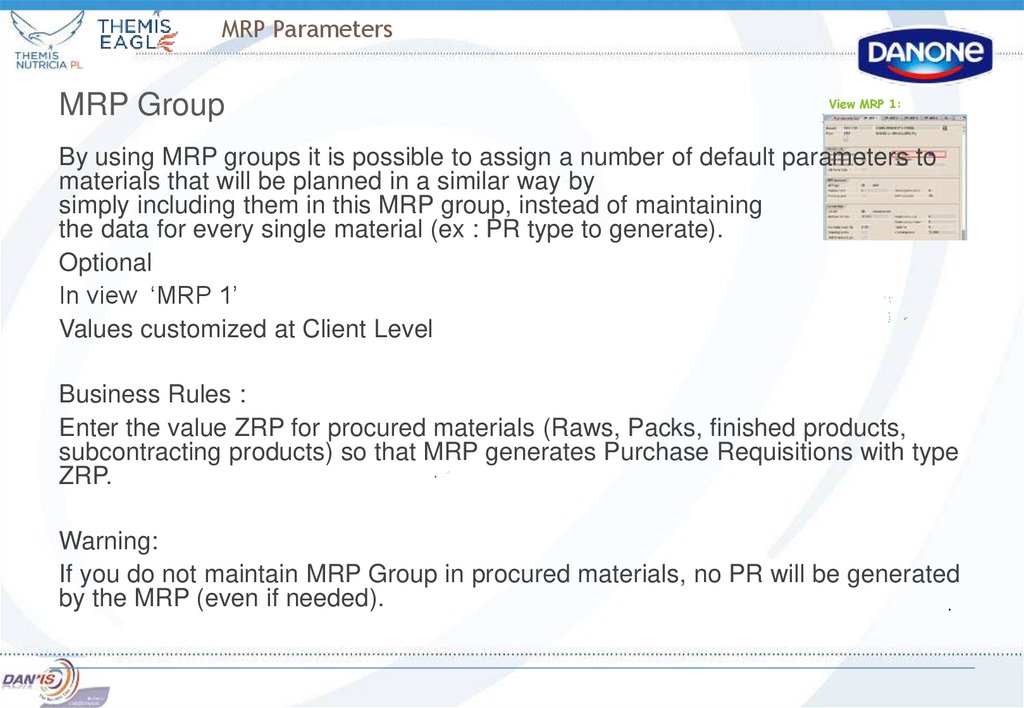
MRP GroupView MRP 1:
By using MRP groups it is possible to assign a number of default parameters to
materials that will be planned in a similar way by
simply including them in this MRP group, instead of maintaining
the data for every single material (ex : PR type to generate).
Optional
In view ‘MRP 1’
Values customized at Client Level
Business Rules :
Enter the value ZRP for procured materials (Raws, Packs, finished products,
subcontracting products) so that MRP generates Purchase Requisitions with type
ZRP.
Warning:
If you do not maintain MRP Group in procured materials, no PR will be generated
by the MRP (even if needed).
16.
MRP ParametersMRP Types
View MRP 1:
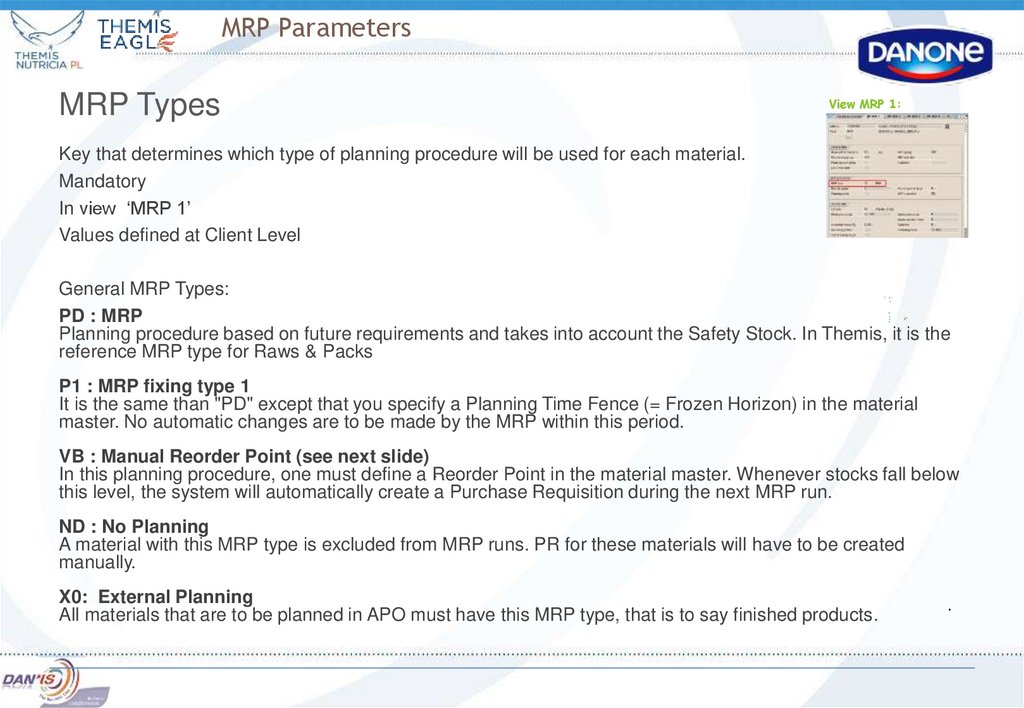
Key that determines which type of planning procedure will be used for each material.
Mandatory
In view ‘MRP 1’
Values defined at Client Level
General MRP Types:
PD : MRP
Planning procedure based on future requirements and takes into account the Safety Stock. In Themis, it is the
reference MRP type for Raws & Packs
P1 : MRP fixing type 1
It is the same than "PD" except that you specify a Planning Time Fence (= Frozen Horizon) in the material
master. No automatic changes are to be made by the MRP within this period.
VB : Manual Reorder Point (see next slide)
In this planning procedure, one must define a Reorder Point in the material master. Whenever stocks fall below
this level, the system will automatically create a Purchase Requisition during the next MRP run.
ND : No Planning
A material with this MRP type is excluded from MRP runs. PR for these materials will have to be created
manually.
X0: External Planning
All materials that are to be planned in APO must have this MRP type, that is to say finished products.
17.
MRP ParametersMRP Types – VB Manual reordering point
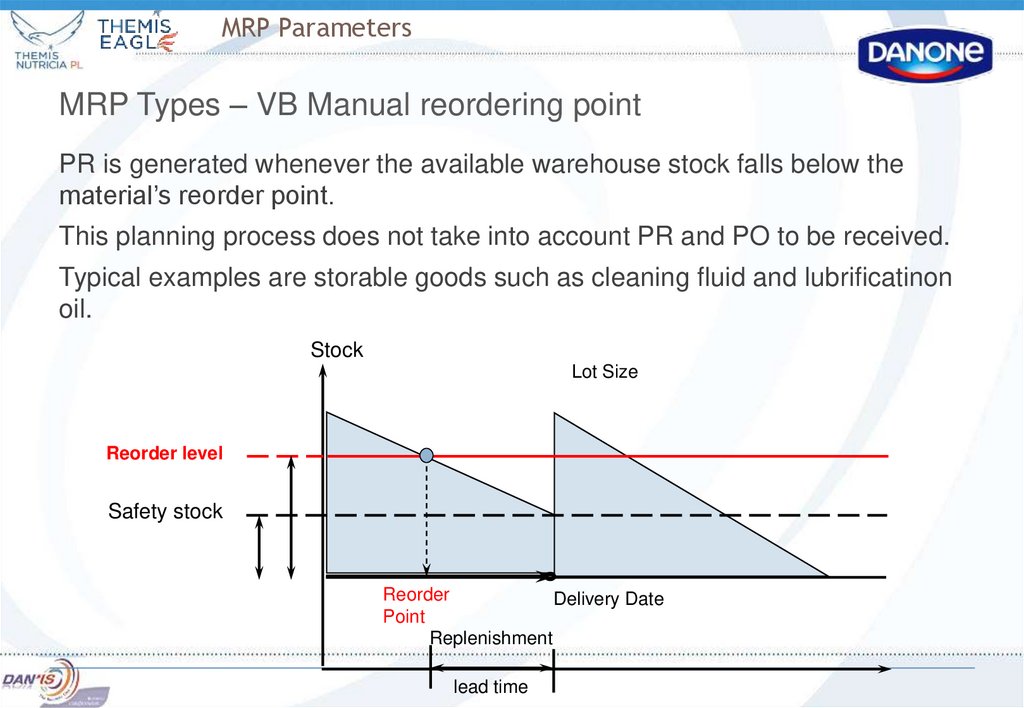
PR is generated whenever the available warehouse stock falls below the
material’s reorder point.
This planning process does not take into account PR and PO to be received.
Typical examples are storable goods such as cleaning fluid and lubrificatinon
oil.
Stock
Lot Size
Reorder level
Safety stock
Reorder
Delivery Date
Point
Replenishment
lead time
18. Manual reordering point planning
Ordering quantity should fill the stock to maximum level or create an order with fixed number of material. It
can be set in Material Master Record
This planning type can be used for materials that are not included to BOM
Safety stock is specified as for cases of excessive usage of material within the period of stock replacement
so as additional needs in cases of delivery delay. Consequently safety stock is included to the reordering point
level.
Safety stock – it is a quantity of material in BuM that should always exist on stock. BuM is base unit of
measurement – material units that are on stock.
Example for calculating reordering point value:
We have daily requirement = 10 BuM
The delivery time is 10 days
So the reordering point level = 100 PC
18
19. MRP Parameters
Lot Size (1/5)Key that determines which lot-sizing procedure MRP uses to
calculate the quantity to be procured. Lot Size can be defined
in quantity frame or in time frame.
Mandatory
In view ‘MRP 1’
Values defined at Client Level
View MRP 1:
20. MRP Parameters
Lot Size (2/5) – Quantity Frame Lot SizeEX : exact lot size
MRP generates requirements (PR, Schedule line or planned order) with quantity = requirement quantity.
Possible to define a Rounding Value, Maximum and Minimum Lot Size
Example : Requirement = 150 kg. MRP generates a PR of 150 kg.
FX : fixed lot size
MRP generates requirements (PR, Schedule line or planned order) with quantity = fixed lot size.
Not possible to define Rounding Value, Maximum nor a Minimum Lot Size
Example : Fixed lot size = 30 kg, Requirement = 50 kg. MRP generates two PR of 30 kg.
21. MRP Parameters
Lot Size (3/5) – Time Frame Lot SizeFor all following Lot Size, it is possible to define a Rounding Value, Maximum and Minimum Lot Size
TB : Daily Lot Size
MRP creates one requirement (PR, Schedule line or planned order) per day : material’s requirements are
grouped into daily.
WB : Weekly Lot Size
MRP creates 1 requirement per week: material’s requirements are grouped into weekly.
The requirement date is the date of the first requirement of the week.
MB : Monthly Lot Size
MRP creates 1 requirement per month : material’s requirements grouped into monthly.
The requirement date is the first day of the month (different from WB).
ZK : Lot Size with planning calendar
Special planning calendar is defined to schedule deliveries.
IMPORTANT : in case of Lot Size “ZK“, you have to set up in the Material Master (MPR2 View) a Planning
Calendar. (see next slide for more detail)
22. MRP Parameters
Lot Size (4/5) – Planning CalendarView MRP 2:
Only used for Lot Size : ZK
Mandatory only if Lot Size : ‘ZK’
In view ‘MRP 2’
Values customized at Plant Level
A Factory Calendar is assigned to each Plant. It defines working days of the week (ex : Monday to Friday, Monday to
Sunday, …). For most plants, all days of the week are considered as workings days (From Monday to Sunday).
If all days are defined as working days, the MRP generates requirements without any constraint on the delivery date
(deliveries on Sunday are proposed by the MRP).
If you wish to accept deliveries of a material only on specific days, you must define a Planning Calendar in the material
master.
Business Rule:
A Planning Calendar defines opening days of the factory’s reception.
SAP Limit:
It is not possible to merge Lot Size 'WB- Weekly' or 'MB- Monthly' with the use of a Planning Calendar.
23. MRP Parameters
Lot Size (5/5) – Example of Time Frame Lot SizeNo GR processing Time, No Minimum or Maximum Lot size, No rounding value …
TB : Daily Lot Size
For 17/11 , 3 Requirements: one of 100, one of 50 and one of 2
MRP generates one PR of 152 for 17/11.
WB : Weekly Lot Size
For week 42, 2 Requirements : one of 500 for Tuesday and one of 700 for Friday.
MRP generates one PR of 1200 for Tuesday.
MB : Monthly Lot Size
For month November, 3 Requirements : 20 on the 10th, 50 on the 22th and 10 on the 25th.
MRP generates one PR with 80kg for the working day of November (for beginning of the month and not for first
requirement !)
ZK : Lot Size with planning calendar
Planning Calendar : Deliveries on Wednesday
For next days, 2 Requirements : one of 100 for Friday and one of 500 for Monday.
MRP generates one PR with 600 with delivery date previous Wednesday.
24. MRP Parameters
Minimum and Maximum Lot SizeView MRP 1:
Minimum lot size:
Optional
in view MRP1
Values in Basic UoM entered Manually
Minimum qty used by MRP when creating a requirement (PR, schedule line or planned order).
Example: Minimum lot size = 30. Requirement = 20. MRP creates a PR = 30.
Business example: Minimum Lot Size : one pallet, or one truck, …
Maximum lot size:
Optional
in view MRP1
Values in Basic UoM entered Manually
Maximum quantity used by MRP when creating requirement (PR, schedule line or planned
order). Maximum lot size must be > rounding value.
Example : Maximum lot size = 40. Requirement = 50. MRP creates 2 PR : with qty 40 and 10.
25. MRP Parameters
Rounding valueView MRP 1:
Optional
in view MRP1
Values in Basic UoM entered Manually
MRP proposes only multiples of the rounding value as requirement quantity (in PR and PO).
Business example: Rounding value = one pallet
Example 1: material managed with a contract
Minimum lot size : 55, Rounding value = 50, Requirement : 40
MRP creates a PR = 100.
Example 2: material managed with a scheduling agreement, MRP does not take into account the
rounding value key.
Minimum lot size : 55, Rounding value = 50, Requirement : 40
MRP creates a schedule line = 55.
26. MRP Parameters
Lot Size ParametersBusiness Rule concerning Lot Size Parameters
Lot Size Parameters are : Lot Size, Rounding Value, Minimum and Maximum lot Size, Reorder Point, Fixed
Value, …
Purchasing Department might take decisions on Lot Size Parameters values when negotiating contracts with
vendors.
Examples:
Minimum quantity per call off is 10 000 PCE ‘Minimum Lot Size’ : 10 000 PCE
One single PO number per truck ‘Maximum Lot Size’ : One truck
Purchasing Department must consult Procurement Department when defining Lot Size Parameters in contracts
to ensure what is negotiated is coherent.
Example:
Purchasing Dept negotiated an interesting price with a vendor but the minimum Lot Size per call off
must be 10 000 PCE. But the average needed stock for this material is 50 PCE Incoherence
Therefore, it is important that Purchasing & Procurement Departments communicate together
to define Lot size parameters to ensure the MRP coherence.
27. MRP Parameters
Procurement typeView MRP 2:
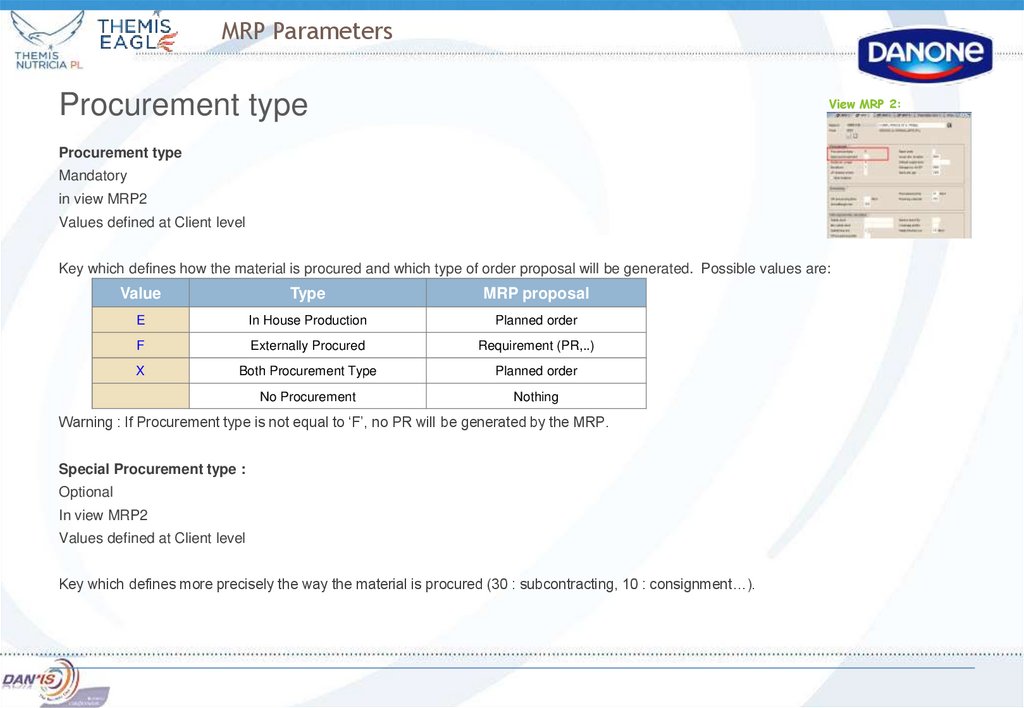
Procurement type
Mandatory
in view MRP2
Values defined at Client level
Key which defines how the material is procured and which type of order proposal will be generated. Possible values are:
Value
Type
MRP proposal
E
In House Production
Planned order
F
Externally Procured
Requirement (PR,..)
X
Both Procurement Type
Planned order
No Procurement
Nothing
Warning : If Procurement type is not equal to ‘F’, no PR will be generated by the MRP.
Special Procurement type :
Optional
In view MRP2
Values defined at Client level
Key which defines more precisely the way the material is procured (30 : subcontracting, 10 : consignment…).
28. MRP Parameters
Safety StockView MRP 2:
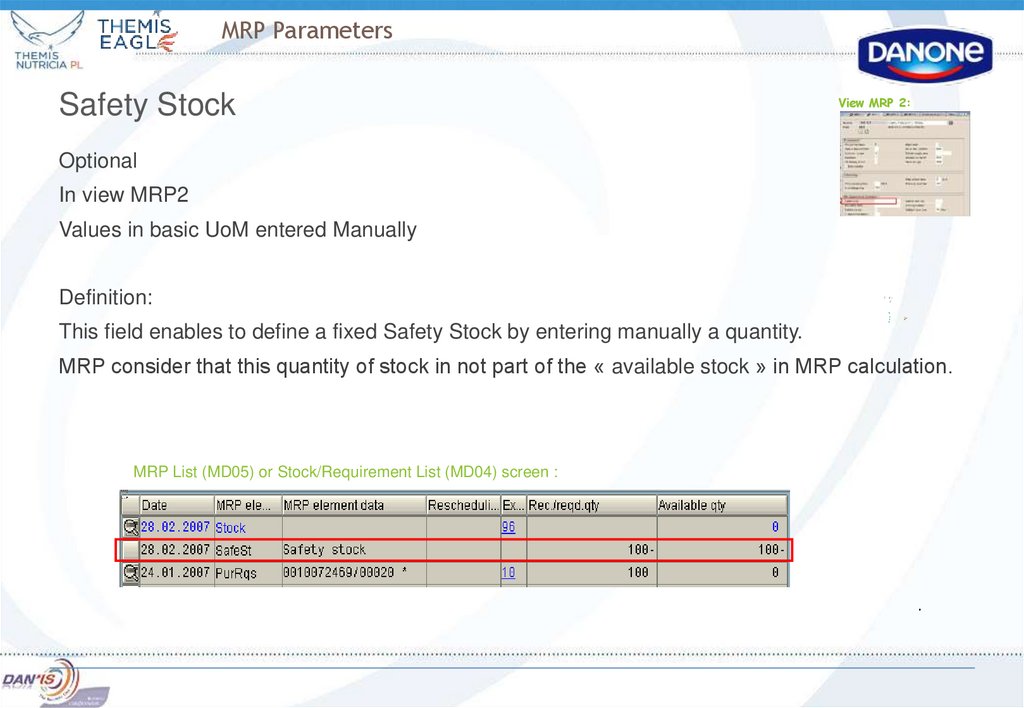
Optional
In view MRP2
Values in basic UoM entered Manually
Definition:
This field enables to define a fixed Safety Stock by entering manually a quantity.
MRP consider that this quantity of stock in not part of the « available stock » in MRP calculation.
MRP List (MD05) or Stock/Requirement List (MD04) screen :
29. MRP Parameters
Coverage ProfileView MRP 2:
Optional
In view MRP2
Values customized at Plant Level
Definition:
Range of coverage = number of days for which a material is available in order to satisfy the
requirements.
For example, 10 days of coverage are available if we have 100 kg of a material in stock
and the consumption is planned to be 10 kg each day.
Average daily requirements = Requirements for a specified period / number of days in the
specified length.
It enables to determine for each material a dynamic safety stock level that is based on
requirements and the range of coverage.
In this case the Safety Stock = [Average daily requirements] * [Range of coverage]
30. MRP Parameters
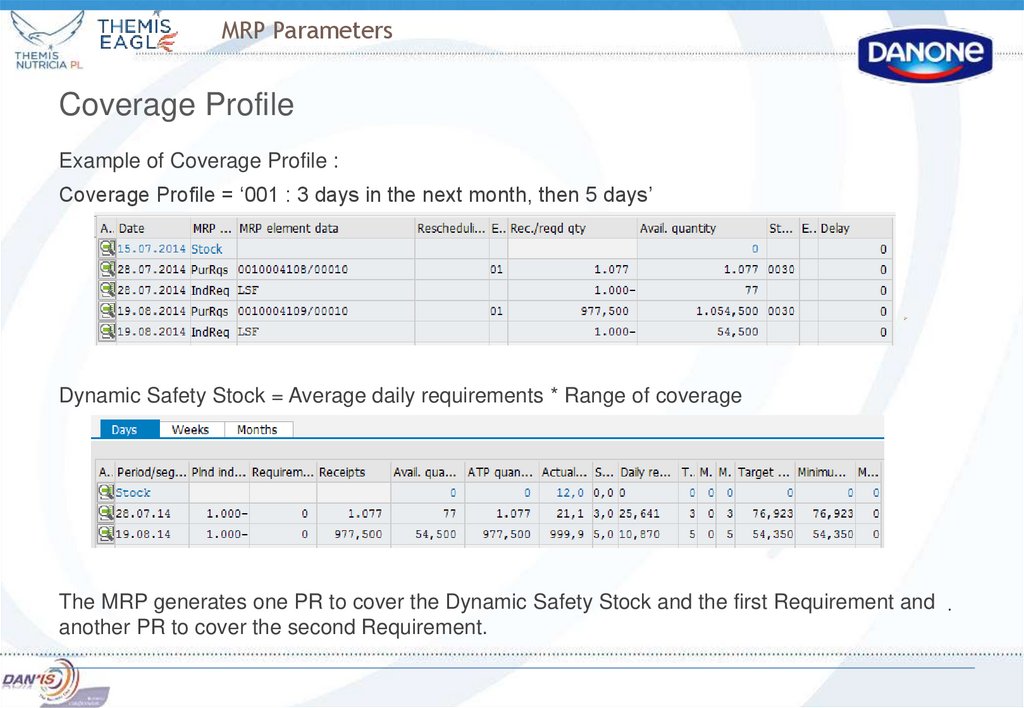
Coverage ProfileExample of Coverage Profile :
Coverage Profile = ‘001 : 3 days in the next month, then 5 days’
Dynamic Safety Stock = Average daily requirements * Range of coverage
The MRP generates one PR to cover the Dynamic Safety Stock and the first Requirement and
another PR to cover the second Requirement.
31. MRP Concept
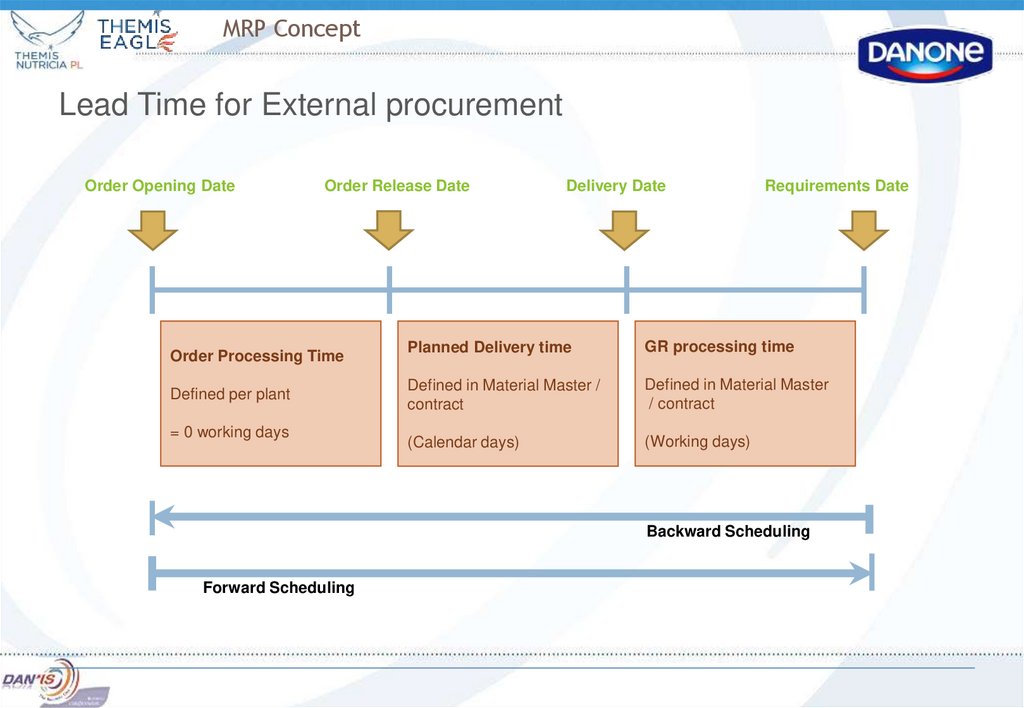
Lead Time for External procurementOrder Opening Date
Order Release Date
Order Processing Time
Defined per plant
= 0 working days
Delivery Date
Requirements Date
Planned Delivery time
GR processing time
Defined in Material Master /
contract
Defined in Material Master
/ contract
(Calendar days)
(Working days)
Backward Scheduling
Forward Scheduling
32. MRP Parameters
Planned delivery Time and GR processing TimeView MRP 2:
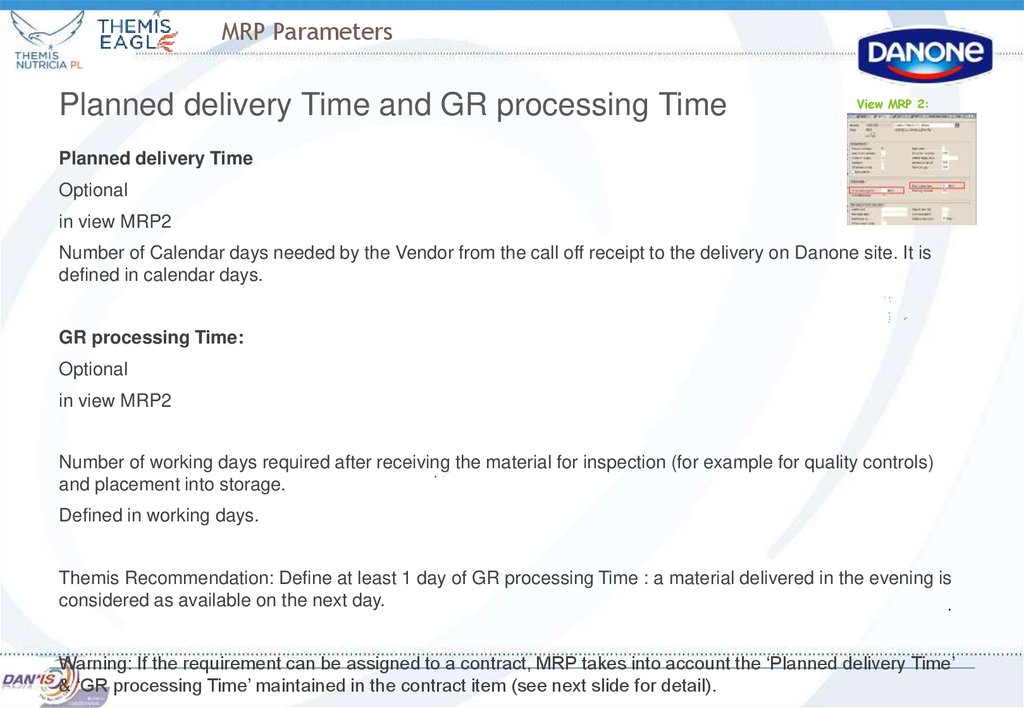
Planned delivery Time
Optional
in view MRP2
Number of Calendar days needed by the Vendor from the call off receipt to the delivery on Danone site. It is
defined in calendar days.
GR processing Time:
Optional
in view MRP2
Number of working days required after receiving the material for inspection (for example for quality controls)
and placement into storage.
Defined in working days.
Themis Recommendation: Define at least 1 day of GR processing Time : a material delivered in the evening is
considered as available on the next day.
Warning: If the requirement can be assigned to a contract, MRP takes into account the ‘Planned delivery Time’
& ‘GR processing Time’ maintained in the contract item (see next slide for detail).
33. MRP Parameters
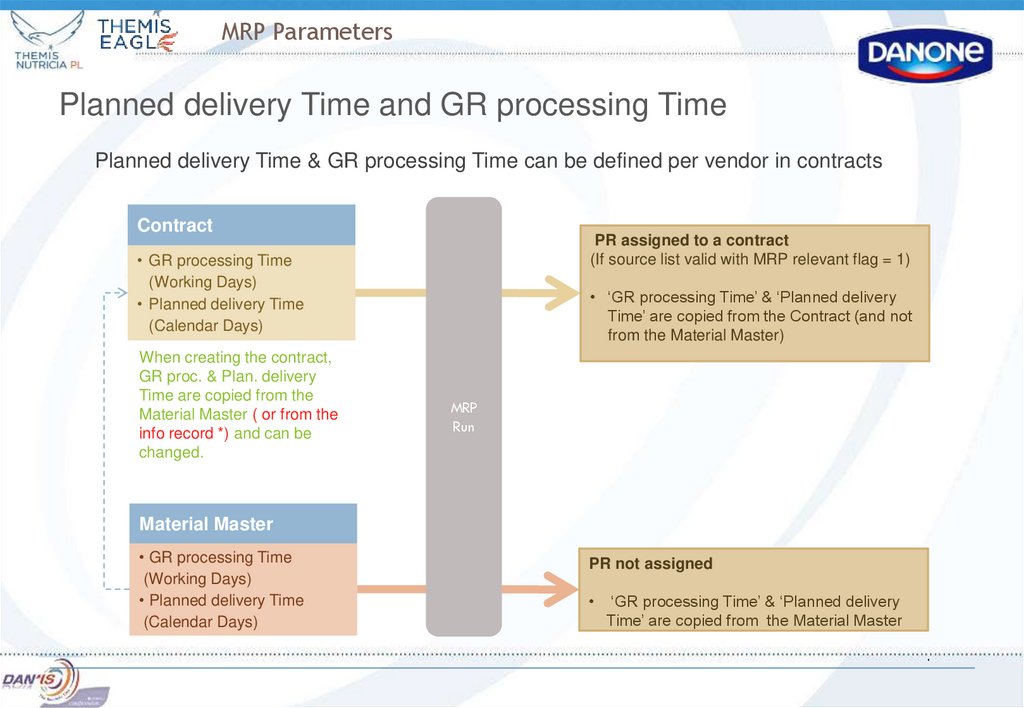
Planned delivery Time and GR processing TimePlanned delivery Time & GR processing Time can be defined per vendor in contracts
Contract
PR assigned to a contract
(If source list valid with MRP relevant flag = 1)
• GR processing Time
(Working Days)
• Planned delivery Time
(Calendar Days)
When creating the contract,
GR proc. & Plan. delivery
Time are copied from the
Material Master ( or from the
info record *) and can be
changed.
• ‘GR processing Time’ & ‘Planned delivery
Time’ are copied from the Contract (and not
from the Material Master)
MRP
Run
Material Master
• GR processing Time
(Working Days)
• Planned delivery Time
(Calendar Days)
PR not assigned
‘GR processing Time’ & ‘Planned delivery
Time’ are copied from the Material Master
34. MRP Run
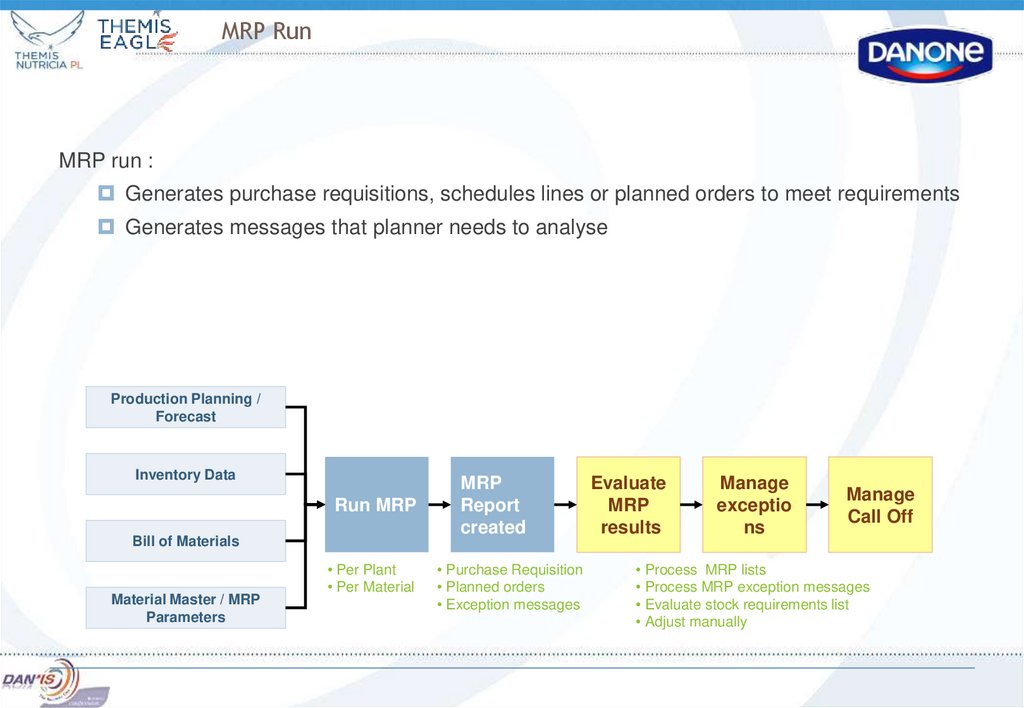
MRP run :Generates purchase requisitions, schedules lines or planned orders to meet requirements
Generates messages that planner needs to analyse
Production Planning /
Forecast
Inventory Data
Run MRP
Bill of Materials
Material Master / MRP
Parameters
• Per Plant
• Per Material
MRP
Report
created
• Purchase Requisition
• Planned orders
• Exception messages
Evaluate
MRP
results
Manage
exceptio
ns
Manage
Call Off
• Process MRP lists
• Process MRP exception messages
• Evaluate stock requirements list
• Adjust manually
35.
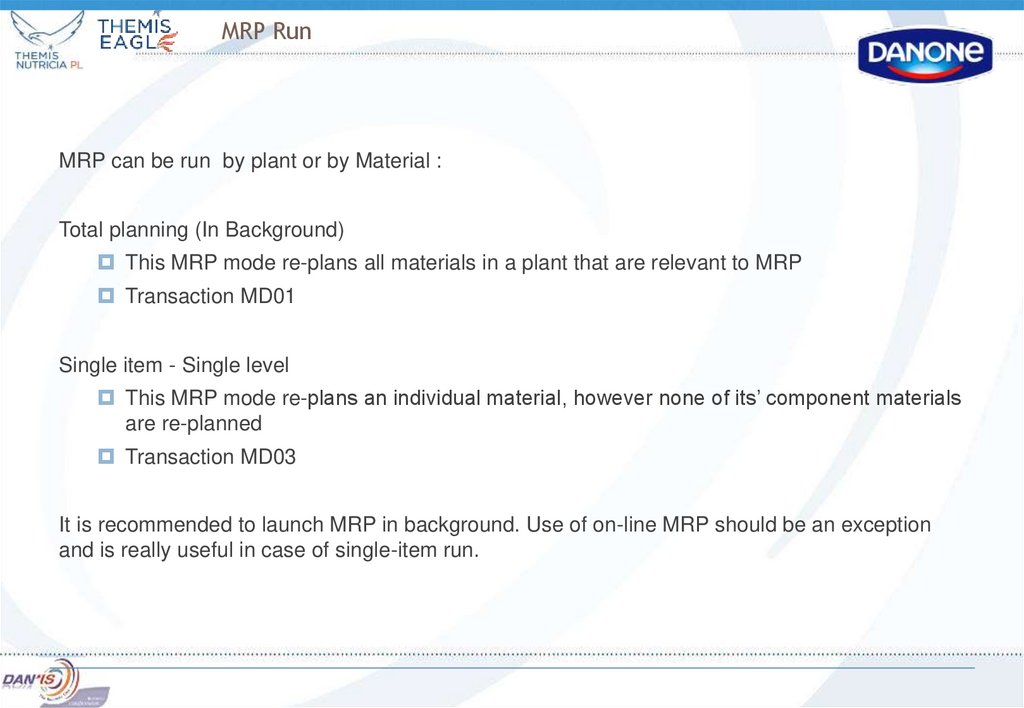
MRP RunMRP can be run by plant or by Material :
Total planning (In Background)
This MRP mode re-plans all materials in a plant that are relevant to MRP
Transaction MD01
Single item - Single level
This MRP mode re-plans an individual material, however none of its’ component materials
are re-planned
Transaction MD03
It is recommended to launch MRP in background. Use of on-line MRP should be an exception
and is really useful in case of single-item run.
36.
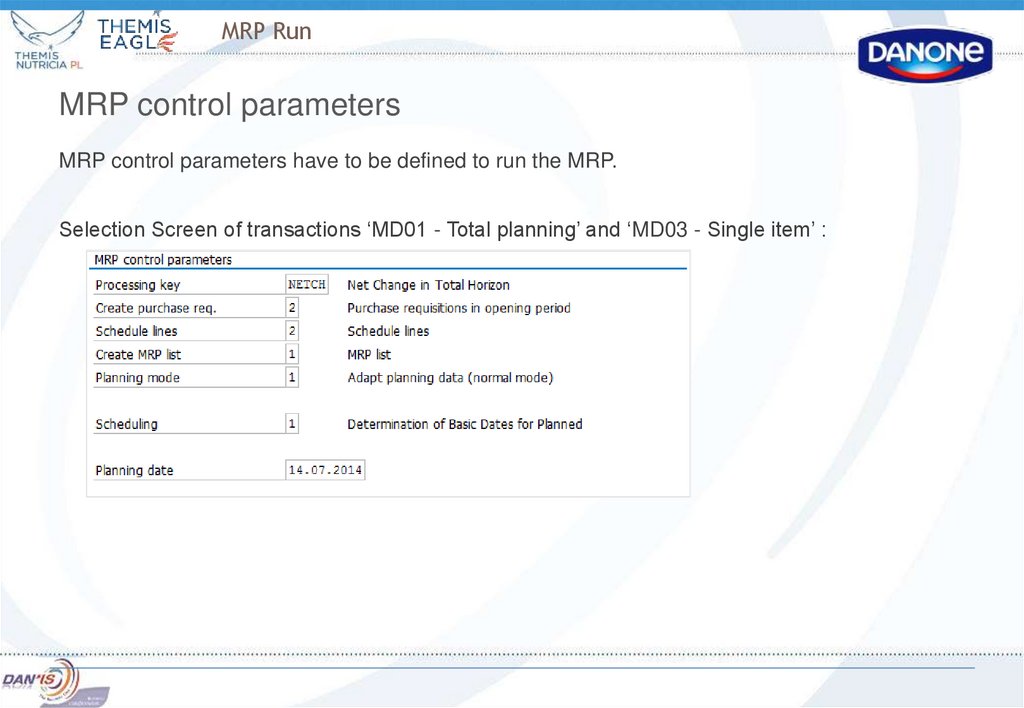
MRP RunMRP control parameters
MRP control parameters have to be defined to run the MRP.
Selection Screen of transactions ‘MD01 - Total planning’ and ‘MD03 - Single item’ :
37.
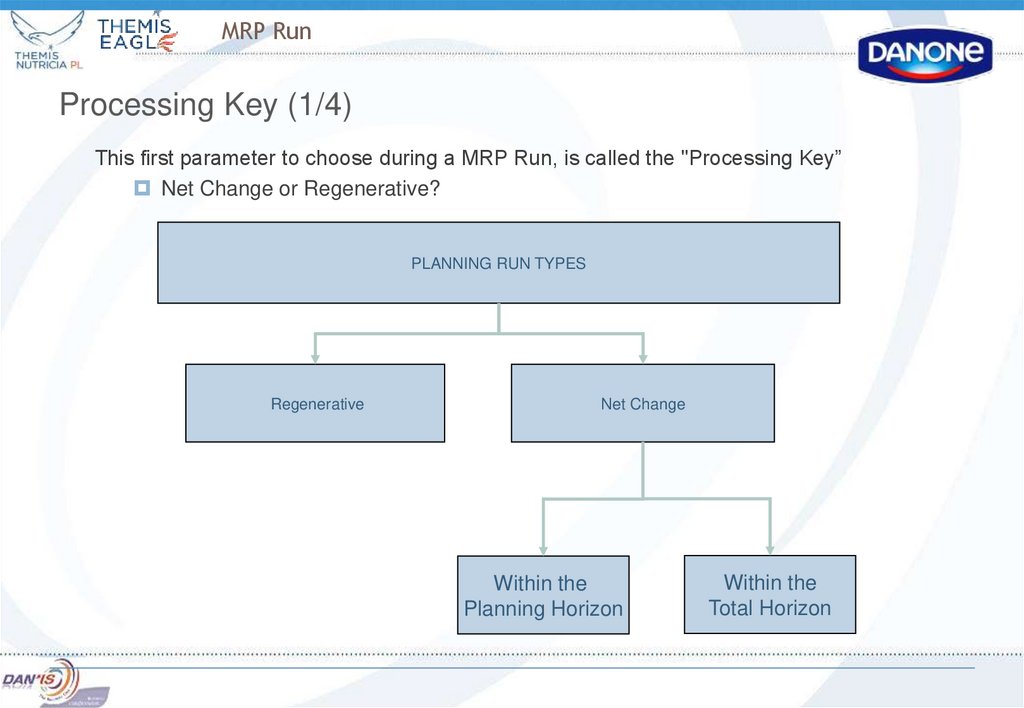
MRP RunProcessing Key (1/4)
This first parameter to choose during a MRP Run, is called the "Processing Key”
Net Change or Regenerative?
PLANNING RUN TYPES
Regenerative
Net Change
Within the
Planning Horizon
Within the
Total Horizon
38.
MRP RunTo understand the difference MRP planning run types, one must first understand what a planning
file is :
Planning File Definition :
The MRP run uses a data file called the Planning File.
Any changes to master data, requirements, production or planned orders, purchases orders and
requisition will create an entry in the Planning File.
The Planning File therefore contains a list of all materials relevant for MRP that have been
changed, as well as information about date and time of the change.
39.
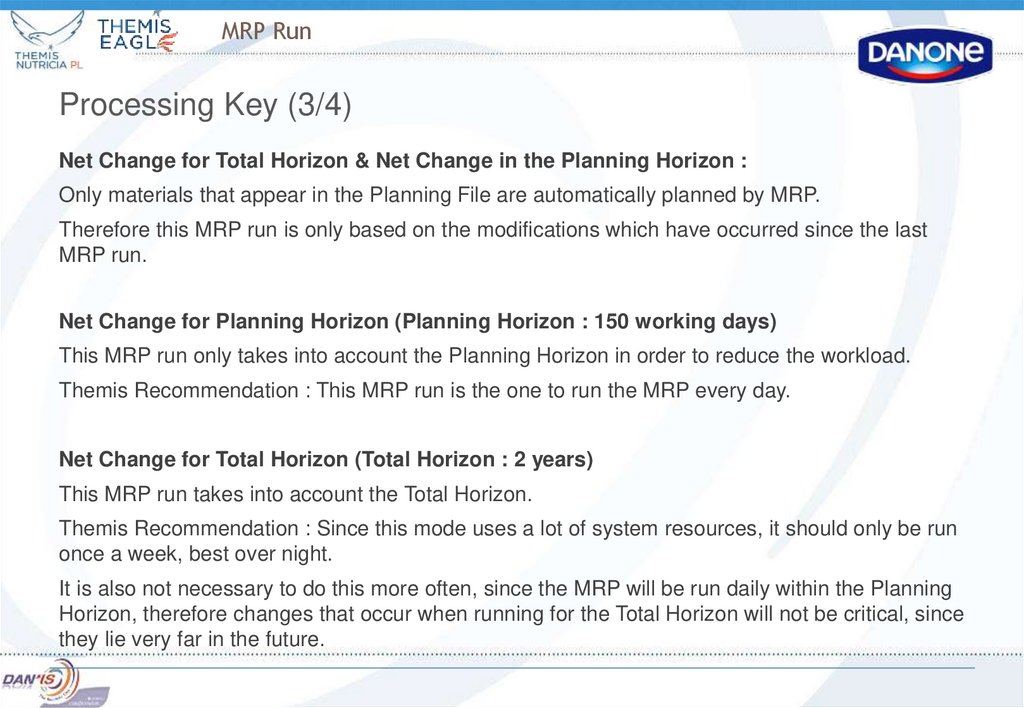
MRP RunProcessing Key (3/4)
Net Change for Total Horizon & Net Change in the Planning Horizon :
Only materials that appear in the Planning File are automatically planned by MRP.
Therefore this MRP run is only based on the modifications which have occurred since the last
MRP run.
Net Change for Planning Horizon (Planning Horizon : 150 working days)
This MRP run only takes into account the Planning Horizon in order to reduce the workload.
Themis Recommendation : This MRP run is the one to run the MRP every day.
Net Change for Total Horizon (Total Horizon : 2 years)
This MRP run takes into account the Total Horizon.
Themis Recommendation : Since this mode uses a lot of system resources, it should only be run
once a week, best over night.
It is also not necessary to do this more often, since the MRP will be run daily within the Planning
Horizon, therefore changes that occur when running for the Total Horizon will not be critical, since
they lie very far in the future.
40. MRP Run
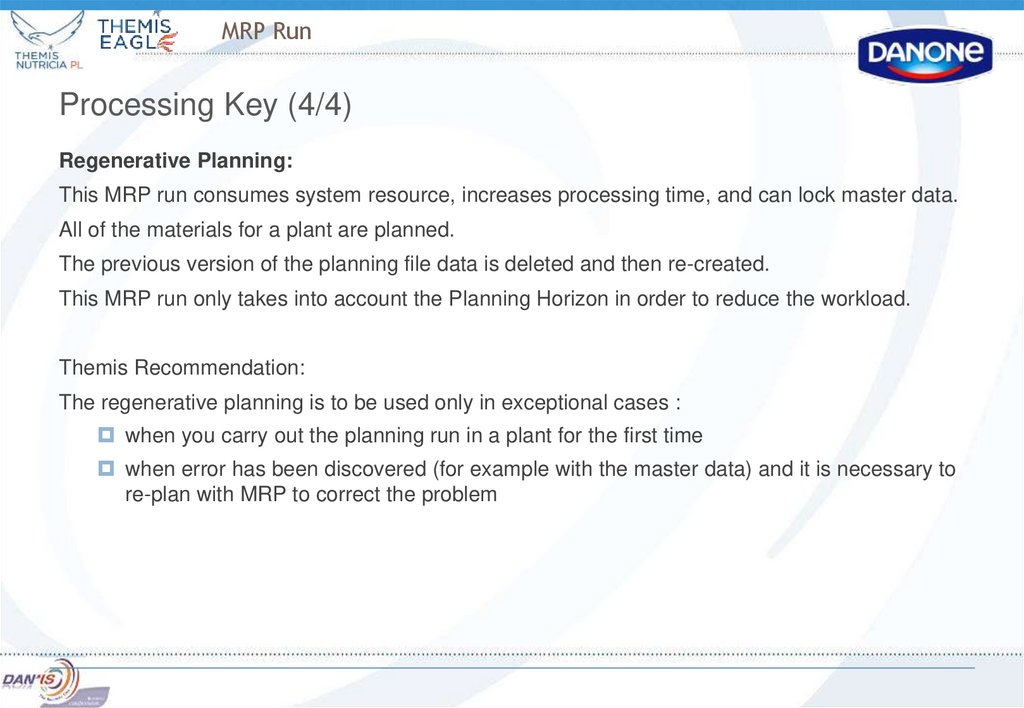
Processing Key (4/4)Regenerative Planning:
This MRP run consumes system resource, increases processing time, and can lock master data.
All of the materials for a plant are planned.
The previous version of the planning file data is deleted and then re-created.
This MRP run only takes into account the Planning Horizon in order to reduce the workload.
Themis Recommendation:
The regenerative planning is to be used only in exceptional cases :
when you carry out the planning run in a plant for the first time
when error has been discovered (for example with the master data) and it is necessary to
re-plan with MRP to correct the problem
41. MRP Run
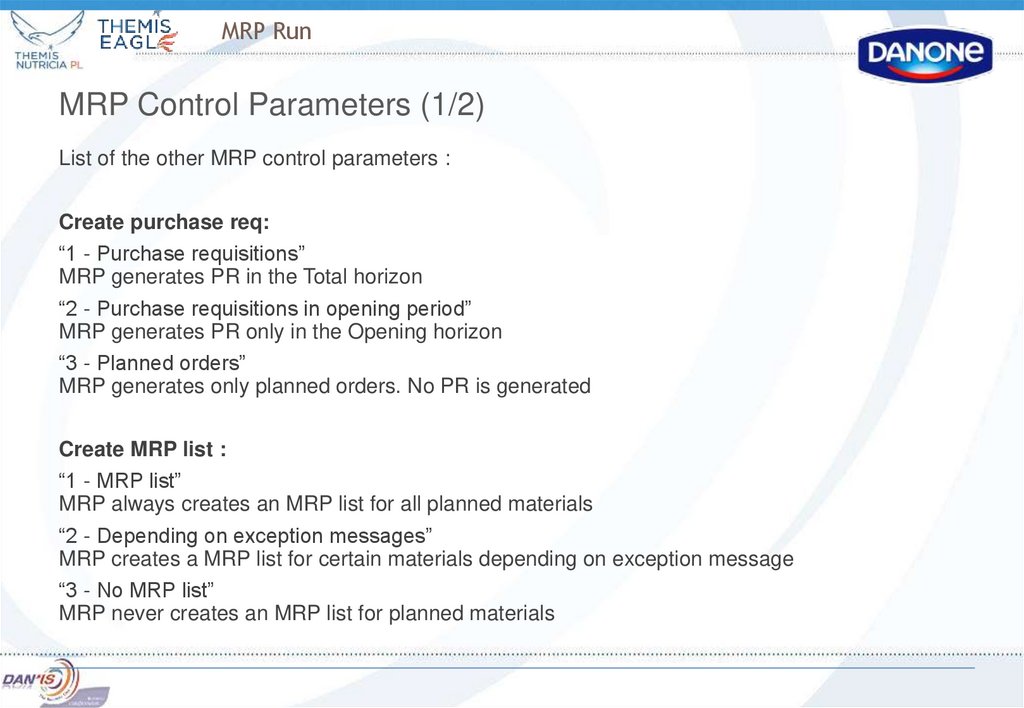
MRP Control Parameters (1/2)List of the other MRP control parameters :
Create purchase req:
“1 - Purchase requisitions”
MRP generates PR in the Total horizon
“2 - Purchase requisitions in opening period”
MRP generates PR only in the Opening horizon
“3 - Planned orders”
MRP generates only planned orders. No PR is generated
Create MRP list :
“1 - MRP list”
MRP always creates an MRP list for all planned materials
“2 - Depending on exception messages”
MRP creates a MRP list for certain materials depending on exception message
“3 - No MRP list”
MRP never creates an MRP list for planned materials
42. MRP Run
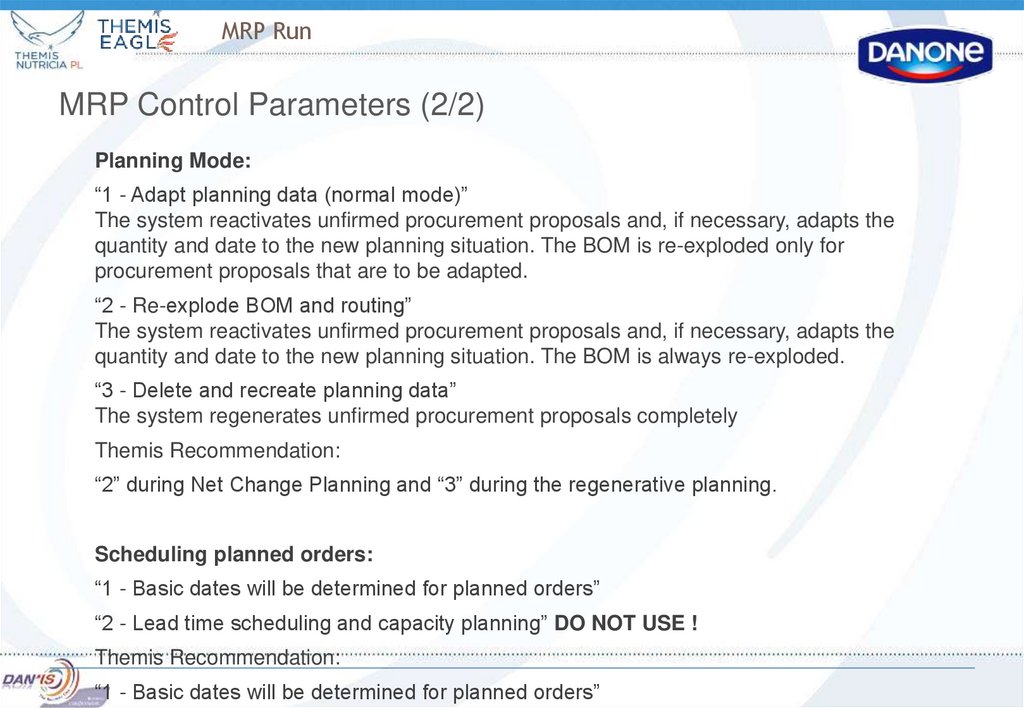
MRP Control Parameters (2/2)Planning Mode:
“1 - Adapt planning data (normal mode)”
The system reactivates unfirmed procurement proposals and, if necessary, adapts the
quantity and date to the new planning situation. The BOM is re-exploded only for
procurement proposals that are to be adapted.
“2 - Re-explode BOM and routing”
The system reactivates unfirmed procurement proposals and, if necessary, adapts the
quantity and date to the new planning situation. The BOM is always re-exploded.
“3 - Delete and recreate planning data”
The system regenerates unfirmed procurement proposals completely
Themis Recommendation:
“2” during Net Change Planning and “3” during the regenerative planning.
Scheduling planned orders:
“1 - Basic dates will be determined for planned orders”
“2 - Lead time scheduling and capacity planning” DO NOT USE !
Themis Recommendation:
“1 - Basic dates will be determined for planned orders”
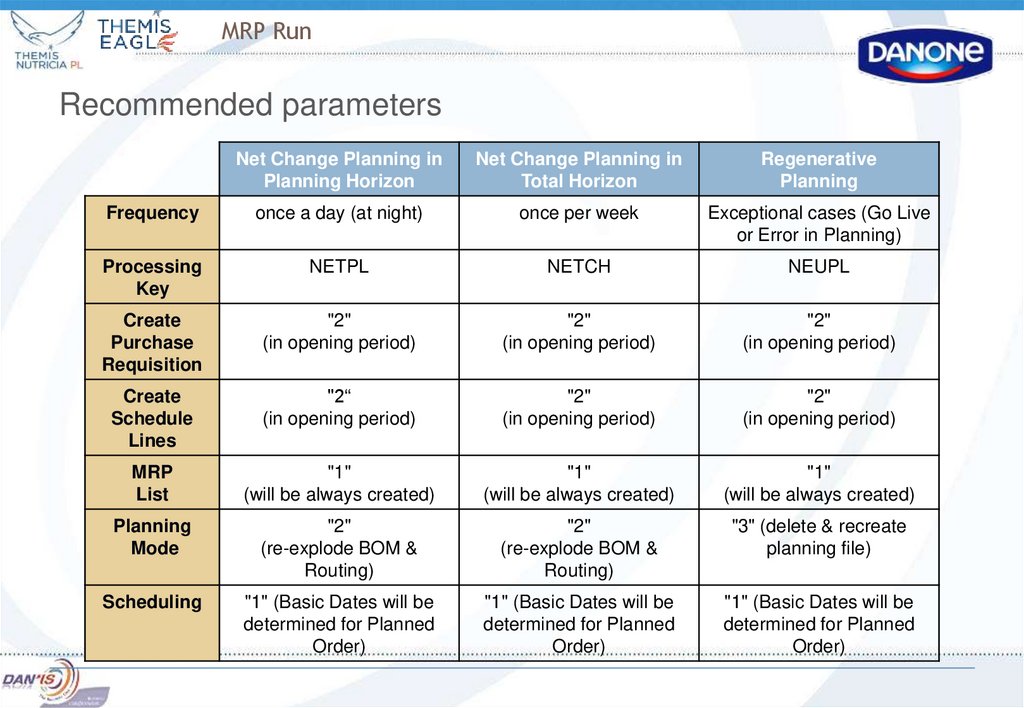
43. MRP Run
Recommended parametersNet Change Planning in
Planning Horizon
Net Change Planning in
Total Horizon
Regenerative
Planning
Frequency
once a day (at night)
once per week
Exceptional cases (Go Live
or Error in Planning)
Processing
Key
NETPL
NETCH
NEUPL
Create
Purchase
Requisition
"2"
(in opening period)
"2"
(in opening period)
"2"
(in opening period)
Create
Schedule
Lines
"2“
(in opening period)
"2"
(in opening period)
"2"
(in opening period)
MRP
List
"1"
(will be always created)
"1"
(will be always created)
"1"
(will be always created)
Planning
Mode
"2"
(re-explode BOM &
Routing)
"2"
(re-explode BOM &
Routing)
"3" (delete & recreate
planning file)
Scheduling
"1" (Basic Dates will be
determined for Planned
Order)
"1" (Basic Dates will be
determined for Planned
Order)
"1" (Basic Dates will be
determined for Planned
Order)
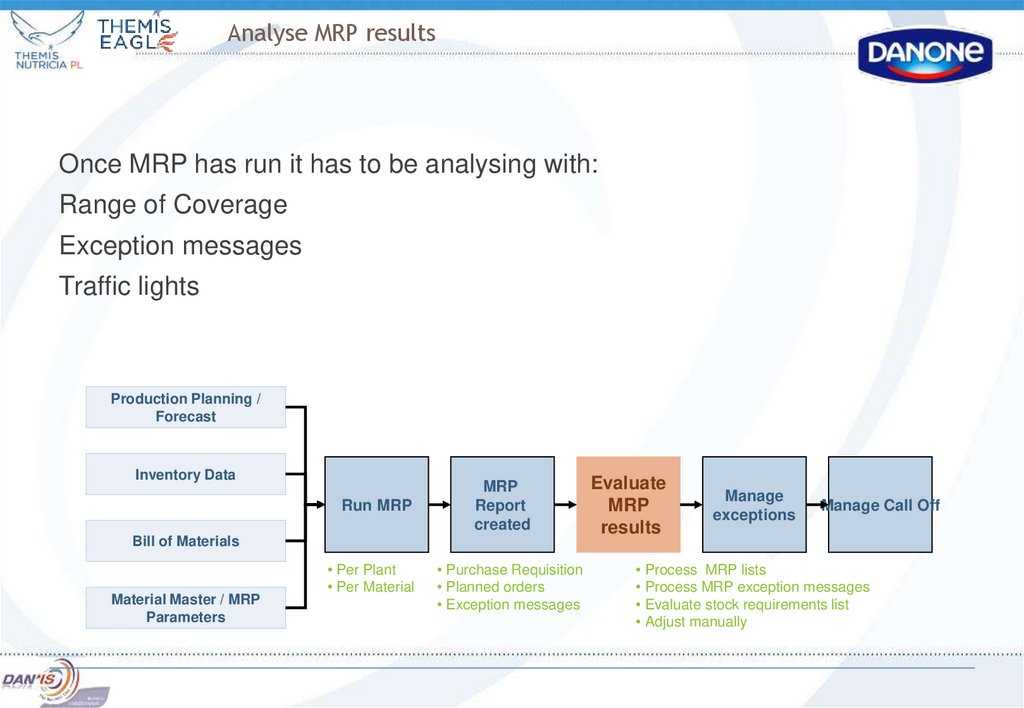
44. Analyse MRP results
Once MRP has run it has to be analysing with:Range of Coverage
Exception messages
Traffic lights
Production Planning /
Forecast
Inventory Data
Run MRP
MRP
Report
created
Bill of Materials
Material Master / MRP
Parameters
• Per Plant
• Per Material
• Purchase Requisition
• Planned orders
• Exception messages
Evaluate
MRP
results
Manage
exceptions
Manage Call Off
• Process MRP lists
• Process MRP exception messages
• Evaluate stock requirements list
• Adjust manually
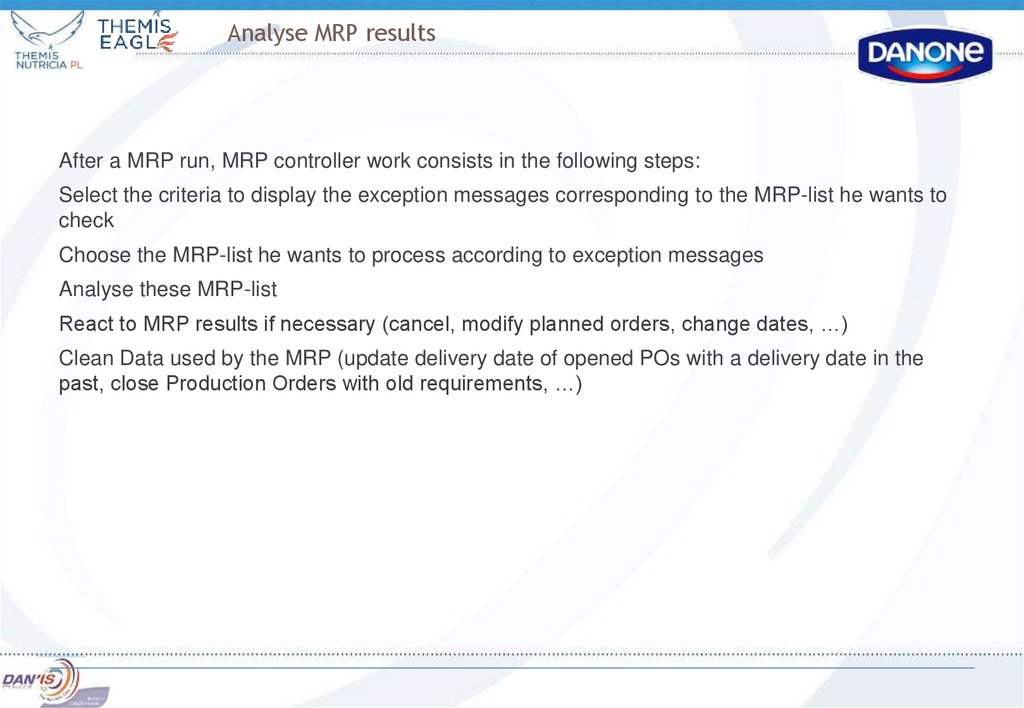
45. Analyse MRP results
After a MRP run, MRP controller work consists in the following steps:Select the criteria to display the exception messages corresponding to the MRP-list he wants to
check
Choose the MRP-list he wants to process according to exception messages
Analyse these MRP-list
React to MRP results if necessary (cancel, modify planned orders, change dates, …)
Clean Data used by the MRP (update delivery date of opened POs with a delivery date in the
past, close Production Orders with old requirements, …)
46. Analyse MRP results
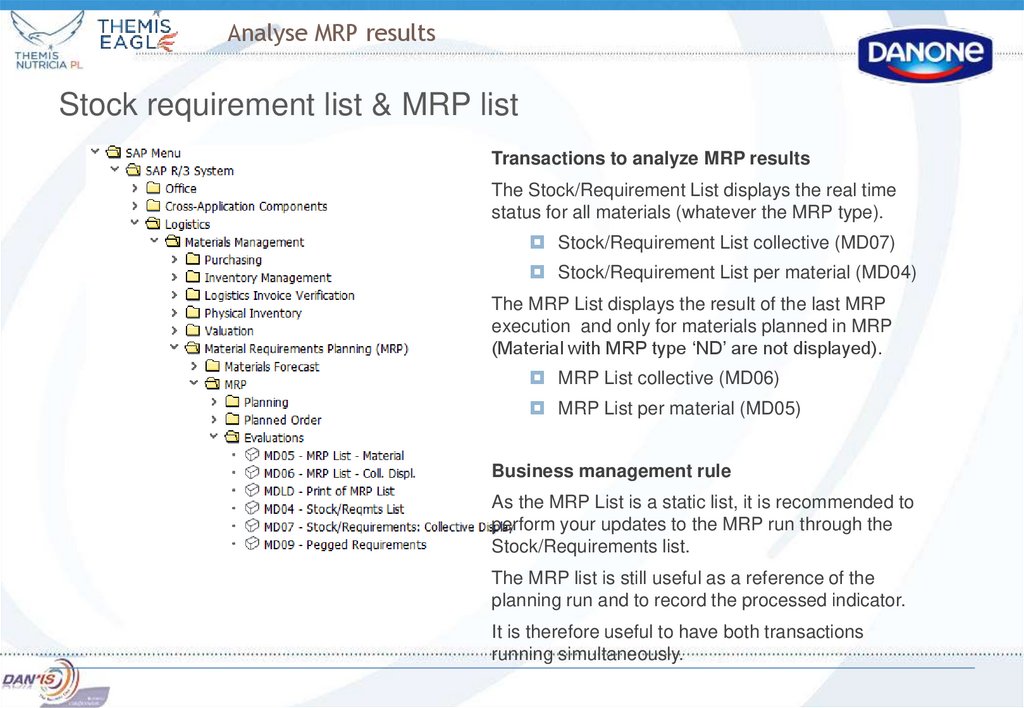
Stock requirement list & MRP listTransactions to analyze MRP results
The Stock/Requirement List displays the real time
status for all materials (whatever the MRP type).
Stock/Requirement List collective (MD07)
Stock/Requirement List per material (MD04)
The MRP List displays the result of the last MRP
execution and only for materials planned in MRP
(Material with MRP type ‘ND’ are not displayed).
MRP List collective (MD06)
MRP List per material (MD05)
Business management rule
As the MRP List is a static list, it is recommended to
perform your updates to the MRP run through the
Stock/Requirements list.
The MRP list is still useful as a reference of the
planning run and to record the processed indicator.
It is therefore useful to have both transactions
running simultaneously.
47. MD06 and MD07 MRP lists
MD06System generates MRP list as a result of MRP Run
MRP list represents a stock status for a time of the last MRP RUN
All changes that are occurred after MRP RUN won’t be represented in this MRP list – this list is static
MRP list is saved in the system until it will be deleted manually or will be replaced by a new list – after new
MRP RUN
MD07
This MRP list represents the actual situation on stock
The main difference from MD06 is relevant information because it represents all changes that were made
after MRP RUN – this list is Dynamic
This MRP list is not saved in the system and exists only in system’s memory
47
48. Analyse MRP results
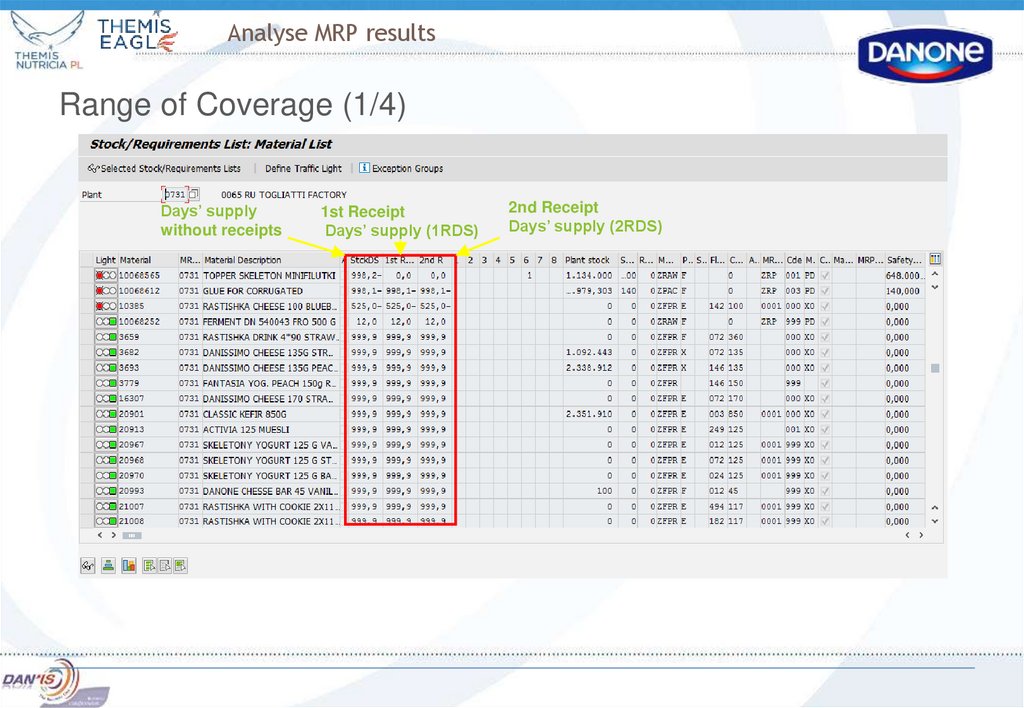
Range of Coverage (1/4)Days’ supply
without receipts
1st Receipt
Days’ supply (1RDS)
2nd Receipt
Days’ supply (2RDS)
49. Analyse MRP results
Range of Coverage (2/4)In the MRP List and in the Stock/ Requirement List, the 3 following indicators help the MRP
controller to analyse the MRP results and to maintaining sufficient stock levels.
Here is a definition of those 3 indicators :
Days’ supply without receipts:
Number of days a material will last if only current plant stock* is taken into account
1st Receipt days' supply (1RDS):
Number of days a material will last if current plant stock* and predefined receipts elements for
1RDS* are taken into account.
2nd Receipt days‘ supply (2RDS):
Number of days a material will last if current plant stock* and predefined receipts elements for
2RDS* are taken into account
* : ‘current plant stock’, ‘receipt elements for 1RDS’ and ‘receipt elements for 2RDS’ are
customized by plant (see next slide for more details).
50. Analyse MRP results
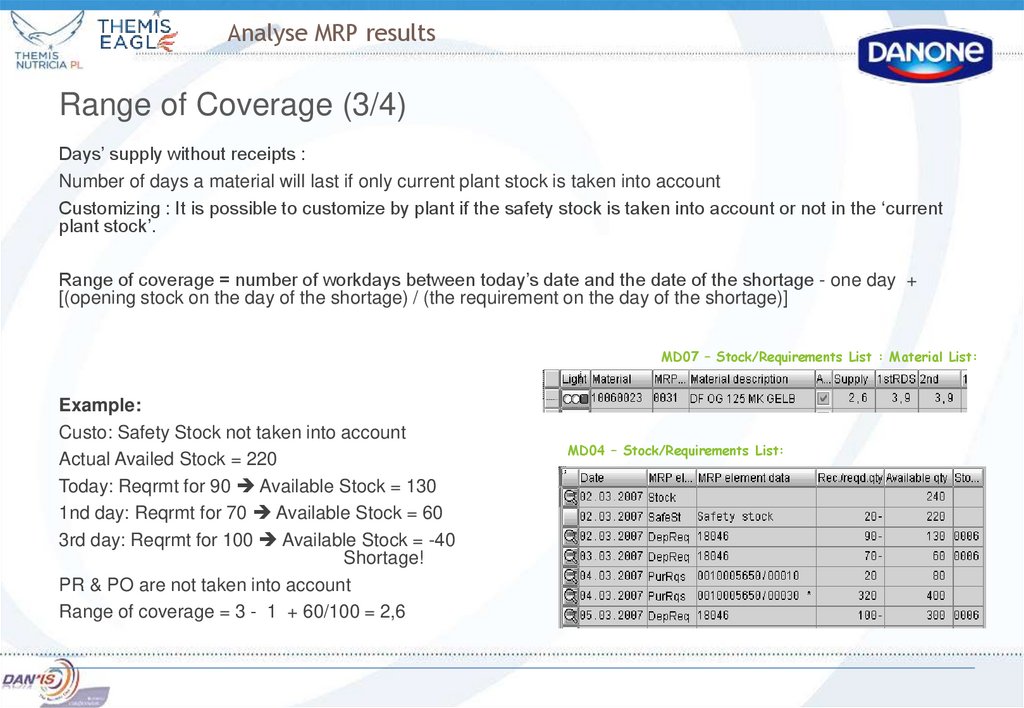
Range of Coverage (3/4)Days’ supply without receipts :
Number of days a material will last if only current plant stock is taken into account
Customizing : It is possible to customize by plant if the safety stock is taken into account or not in the ‘current
plant stock’.
Range of coverage = number of workdays between today’s date and the date of the shortage - one day +
[(opening stock on the day of the shortage) / (the requirement on the day of the shortage)]
MD07 – Stock/Requirements List : Material List:
Example:
Custo: Safety Stock not taken into account
Actual Availed Stock = 220
Today: Reqrmt for 90 Available Stock = 130
1nd day: Reqrmt for 70 Available Stock = 60
3rd day: Reqrmt for 100 Available Stock = -40
Shortage!
PR & PO are not taken into account
Range of coverage = 3 - 1 + 60/100 = 2,6
MD04 – Stock/Requirements List:
51. Analyse MRP results
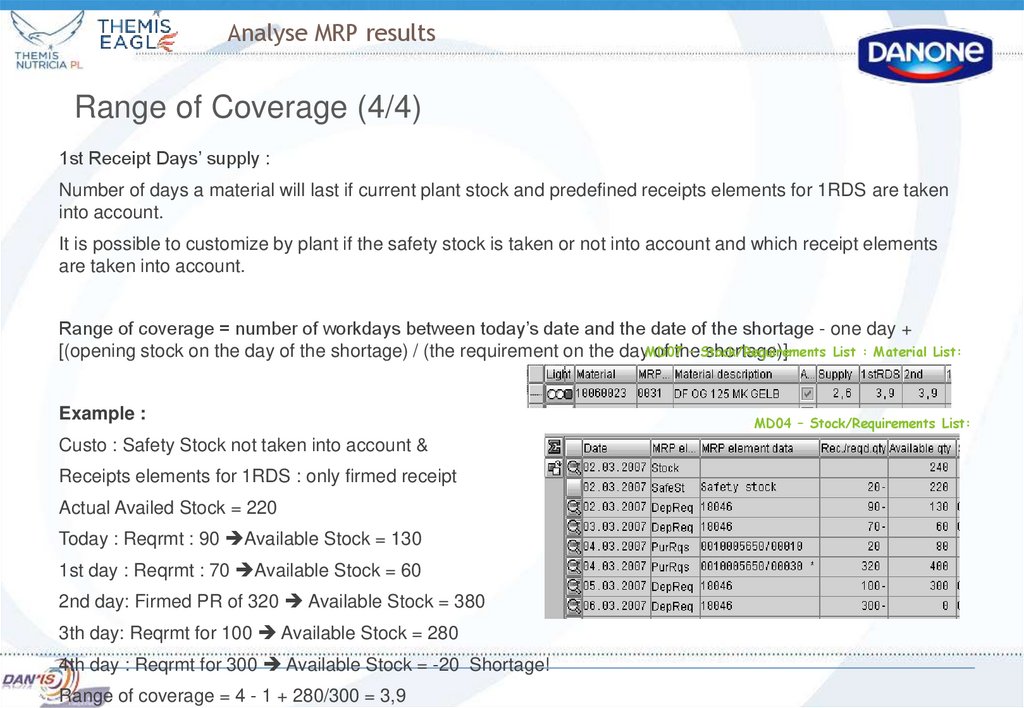
Range of Coverage (4/4)1st Receipt Days’ supply :
Number of days a material will last if current plant stock and predefined receipts elements for 1RDS are taken
into account.
It is possible to customize by plant if the safety stock is taken or not into account and which receipt elements
are taken into account.
Range of coverage = number of workdays between today’s date and the date of the shortage - one day +
– Stock/Requirements
List : Material List:
[(opening stock on the day of the shortage) / (the requirement on the dayMD07
of the
shortage)]
Example :
Custo : Safety Stock not taken into account &
Receipts elements for 1RDS : only firmed receipt
Actual Availed Stock = 220
Today : Reqrmt : 90 Available Stock = 130
1st day : Reqrmt : 70 Available Stock = 60
2nd day: Firmed PR of 320 Available Stock = 380
3th day: Reqrmt for 100 Available Stock = 280
4th day : Reqrmt for 300 Available Stock = -20 Shortage!
Range of coverage = 4 - 1 + 280/300 = 3,9
MD04 – Stock/Requirements List:
52. Analyse MRP results
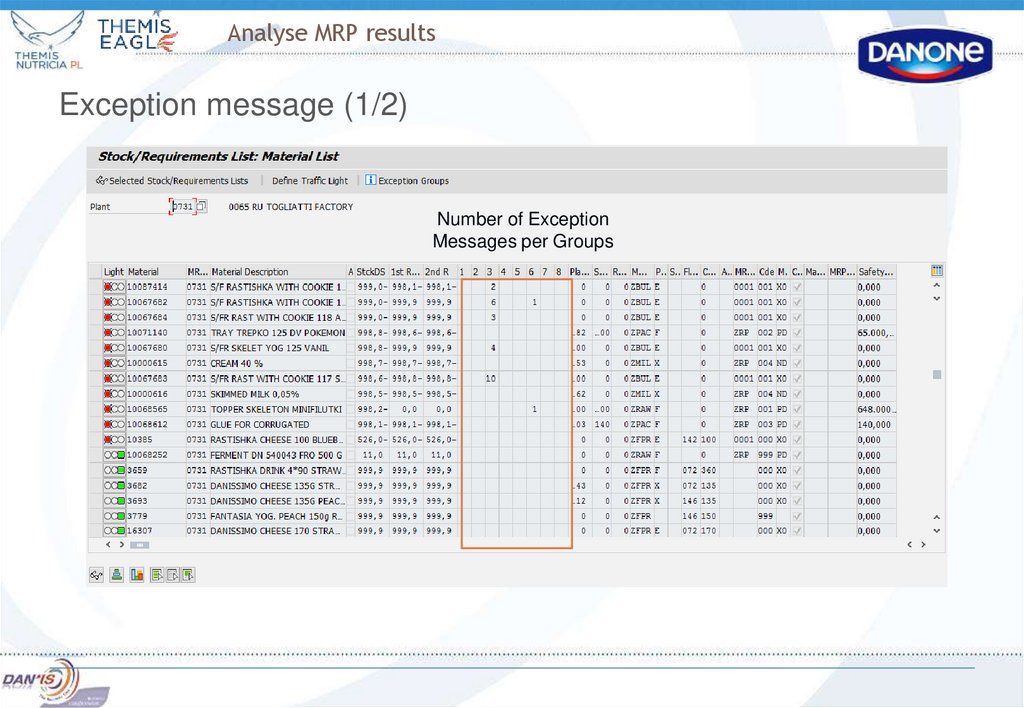
Exception message (1/2)Number of Exception
Messages per Groups
53. Analyse MRP results
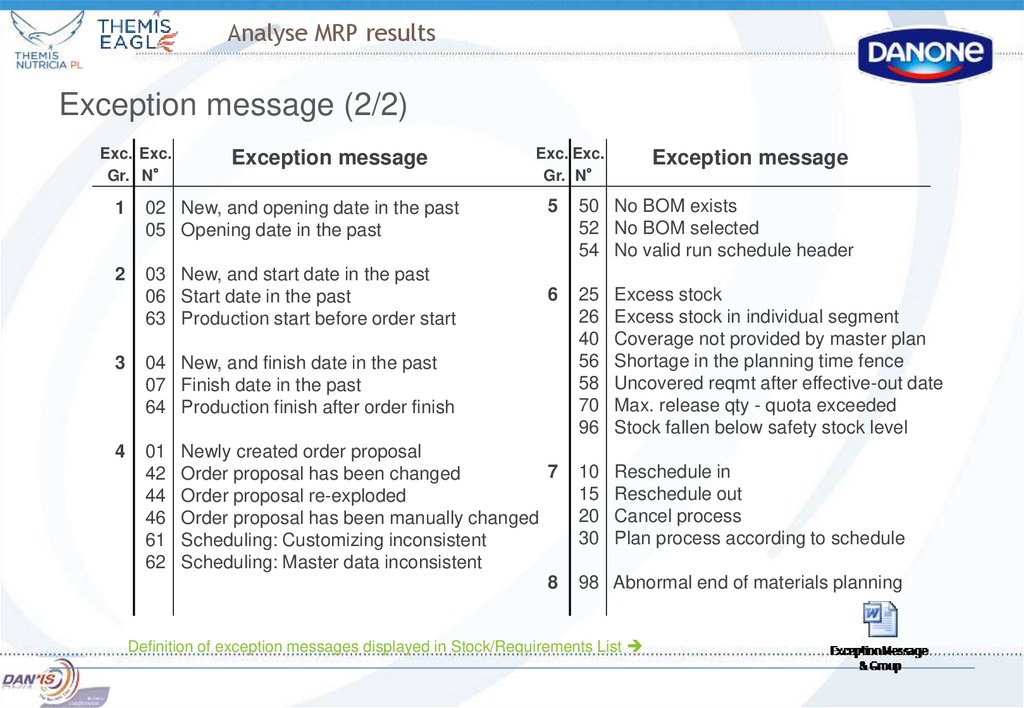
Exception message (2/2)Exc. Exc.
Gr. N°
Exception message
1
02 New, and opening date in the past
05 Opening date in the past
2
03 New, and start date in the past
06 Start date in the past
63 Production start before order start
3
04 New, and finish date in the past
07 Finish date in the past
64 Production finish after order finish
4
01
42
44
46
61
62
Exc. Exc.
Gr. N°
Exception message
5
50 No BOM exists
52 No BOM selected
54 No valid run schedule header
6
25
26
40
56
58
70
96
Excess stock
Excess stock in individual segment
Coverage not provided by master plan
Shortage in the planning time fence
Uncovered reqmt after effective-out date
Max. release qty - quota exceeded
Stock fallen below safety stock level
10
15
20
30
Reschedule in
Reschedule out
Cancel process
Plan process according to schedule
Newly created order proposal
7
Order proposal has been changed
Order proposal re-exploded
Order proposal has been manually changed
Scheduling: Customizing inconsistent
Scheduling: Master data inconsistent
8
98 Abnormal end of materials planning
Definition of exception messages displayed in Stock/Requirements List
54. Analyse MRP results
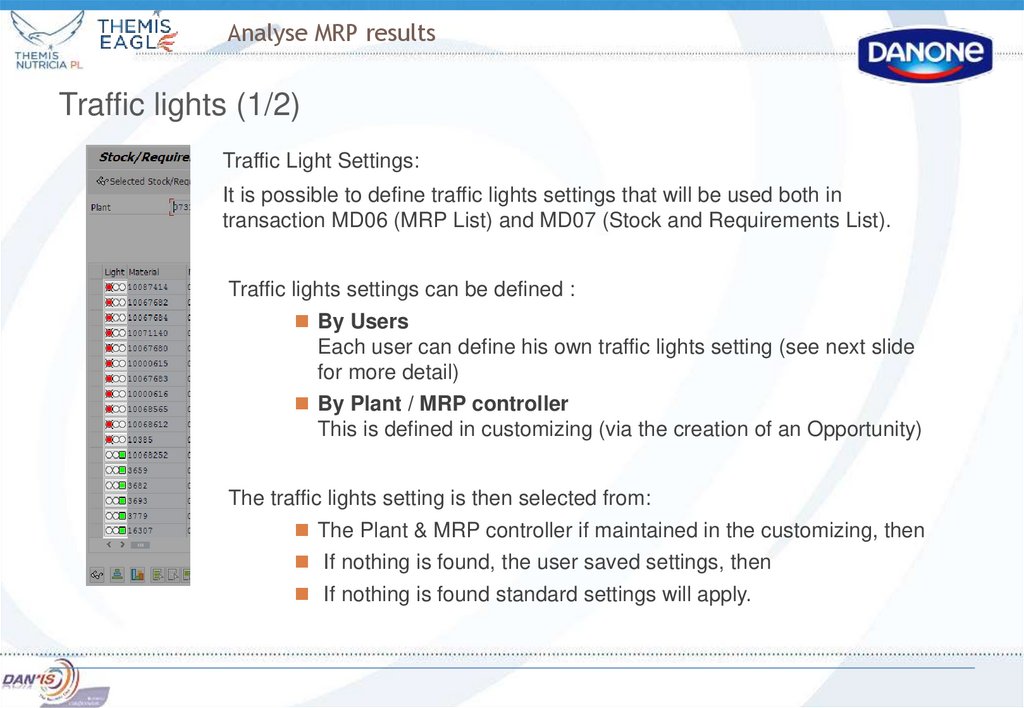
Traffic lights (1/2)Traffic Light Settings:
It is possible to define traffic lights settings that will be used both in
transaction MD06 (MRP List) and MD07 (Stock and Requirements List).
Traffic lights settings can be defined :
By Users
Each user can define his own traffic lights setting (see next slide
for more detail)
By Plant / MRP controller
This is defined in customizing (via the creation of an Opportunity)
The traffic lights setting is then selected from:
The Plant & MRP controller if maintained in the customizing, then
If nothing is found, the user saved settings, then
If nothing is found standard settings will apply.
55. Analyse MRP results
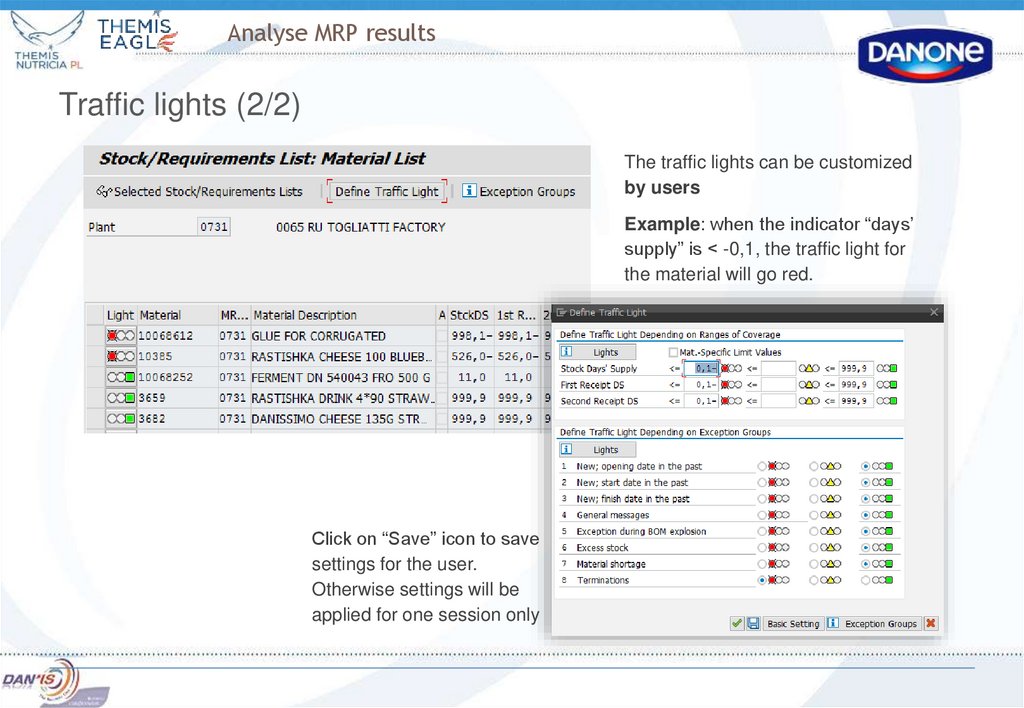
Traffic lights (2/2)The traffic lights can be customized
by users
Example: when the indicator “days’
supply” is < -0,1, the traffic light for
the material will go red.
Click on “Save” icon to save
settings for the user.
Otherwise settings will be
applied for one session only
56. Analyse MRP results
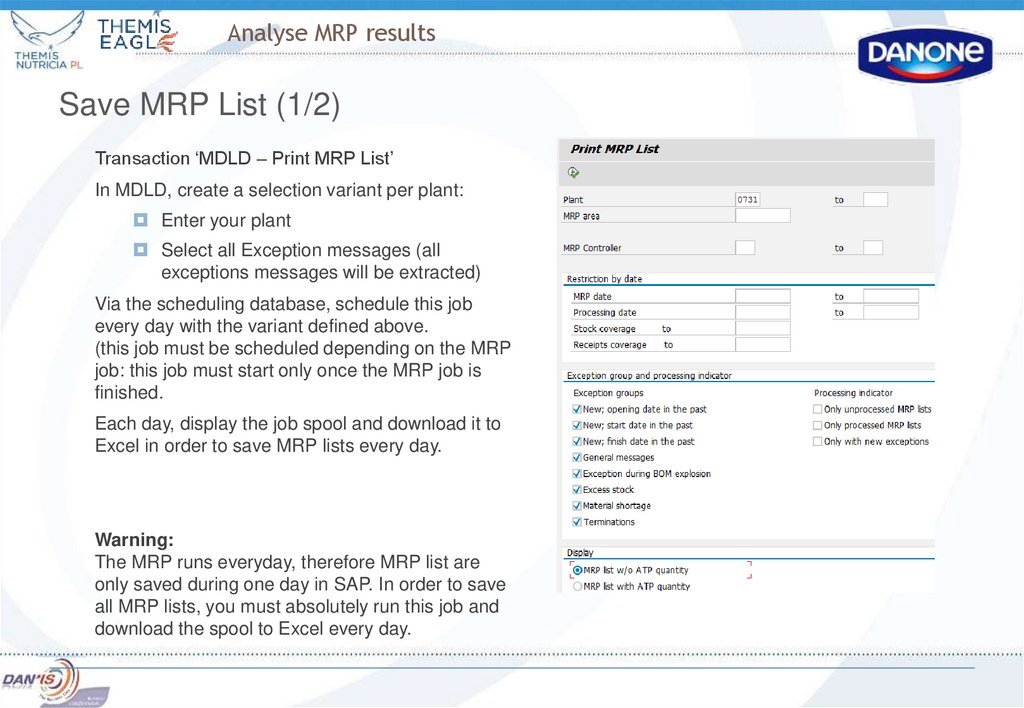
Save MRP List (1/2)Transaction ‘MDLD – Print MRP List’
In MDLD, create a selection variant per plant:
Enter your plant
Select all Exception messages (all
exceptions messages will be extracted)
Via the scheduling database, schedule this job
every day with the variant defined above.
(this job must be scheduled depending on the MRP
job: this job must start only once the MRP job is
finished.
Each day, display the job spool and download it to
Excel in order to save MRP lists every day.
Warning:
The MRP runs everyday, therefore MRP list are
only saved during one day in SAP. In order to save
all MRP lists, you must absolutely run this job and
download the spool to Excel every day.
57.
Analyse MRP resultsSave MRP List (2/2)
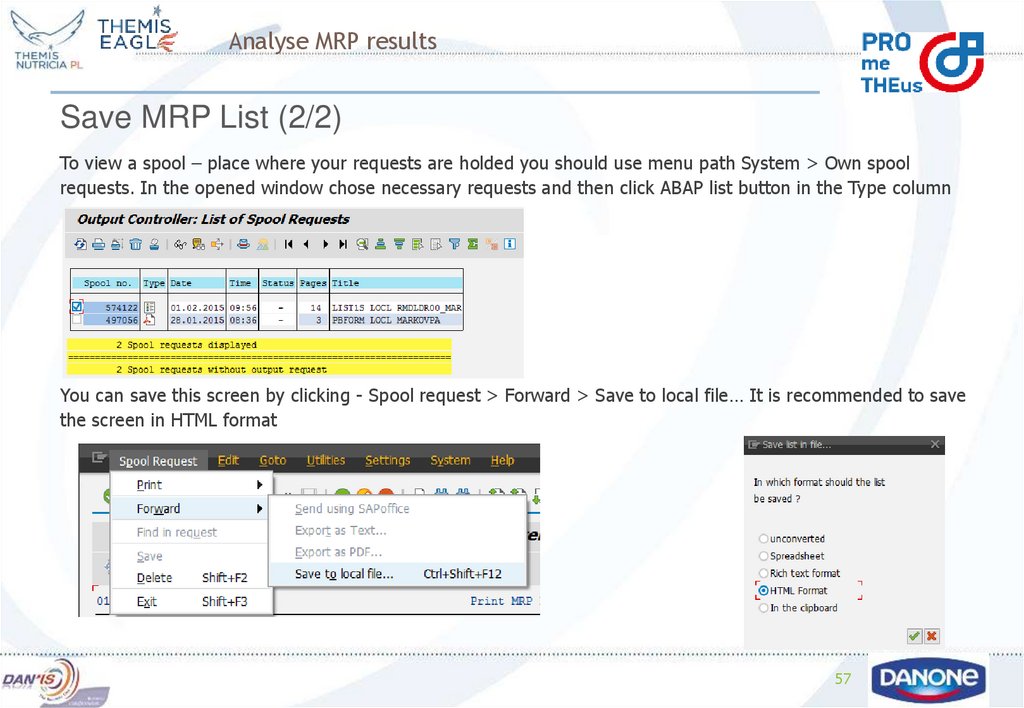
To view a spool – place where your requests are holded you should use menu path System > Own spool
requests. In the opened window chose necessary requests and then click ABAP list button in the Type column
You can save this screen by clicking - Spool request > Forward > Save to local file… It is recommended to save
the screen in HTML format
57
58. Analyse MRP results
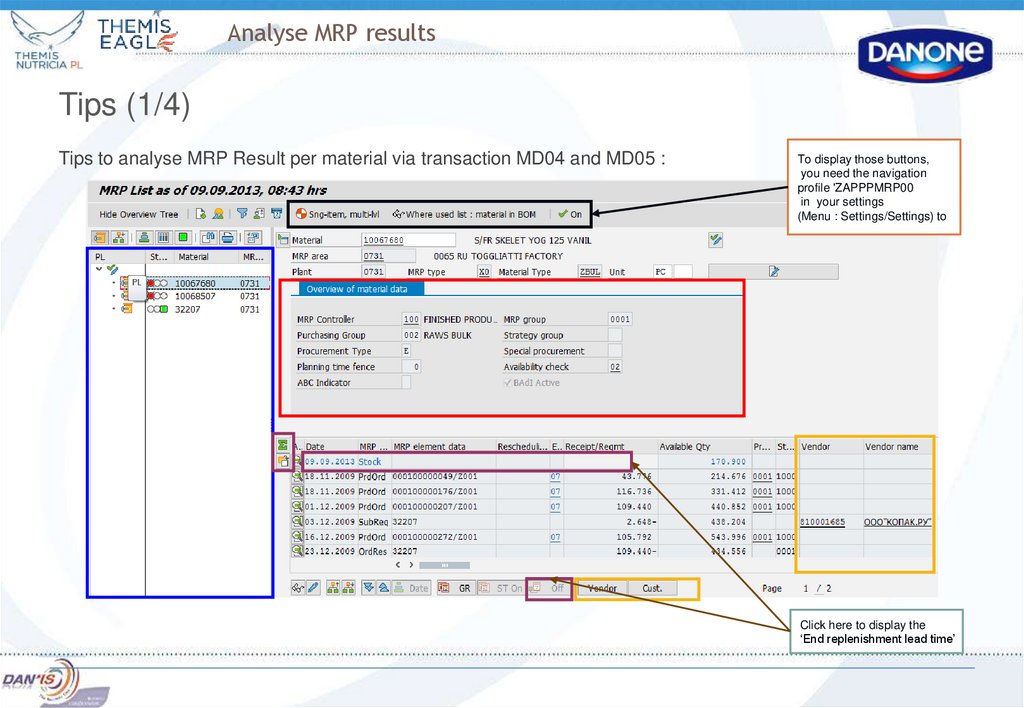
Tips (1/4)Tips to analyse MRP Result per material via transaction MD04 and MD05 :
To display those buttons,
you need the navigation
profile 'ZAPPPMRP00
in your settings
(Menu : Settings/Settings) to
Click here to display the
‘End replenishment lead time’
59. Analyse MRP results
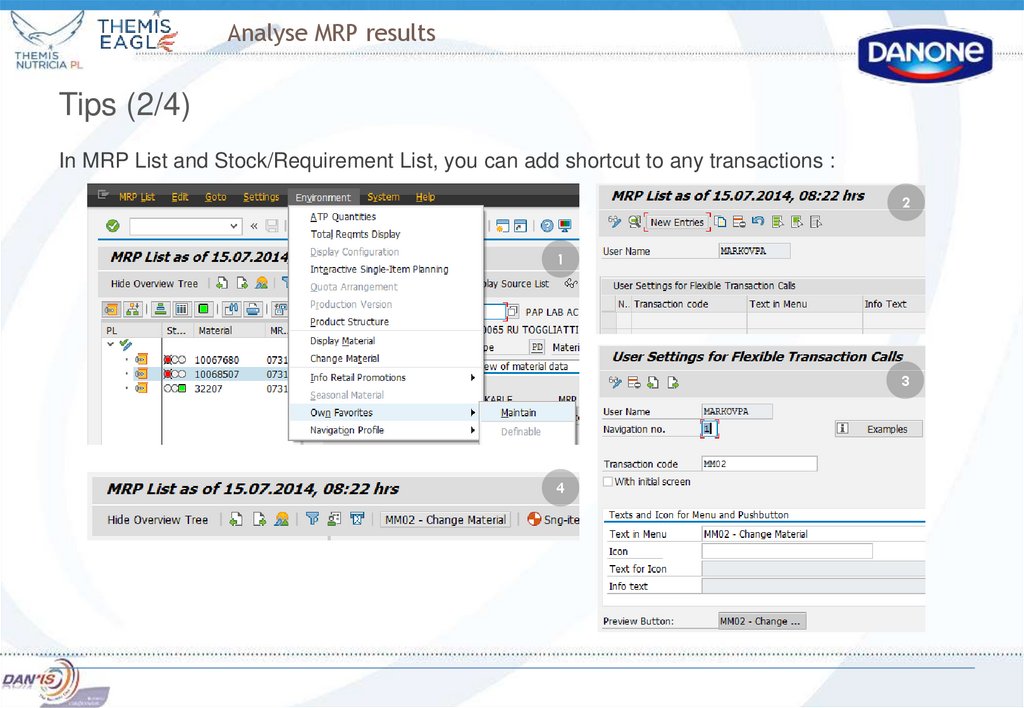
Tips (2/4)In MRP List and Stock/Requirement List, you can add shortcut to any transactions :
2
1
3
4
60. Analyse MRP results
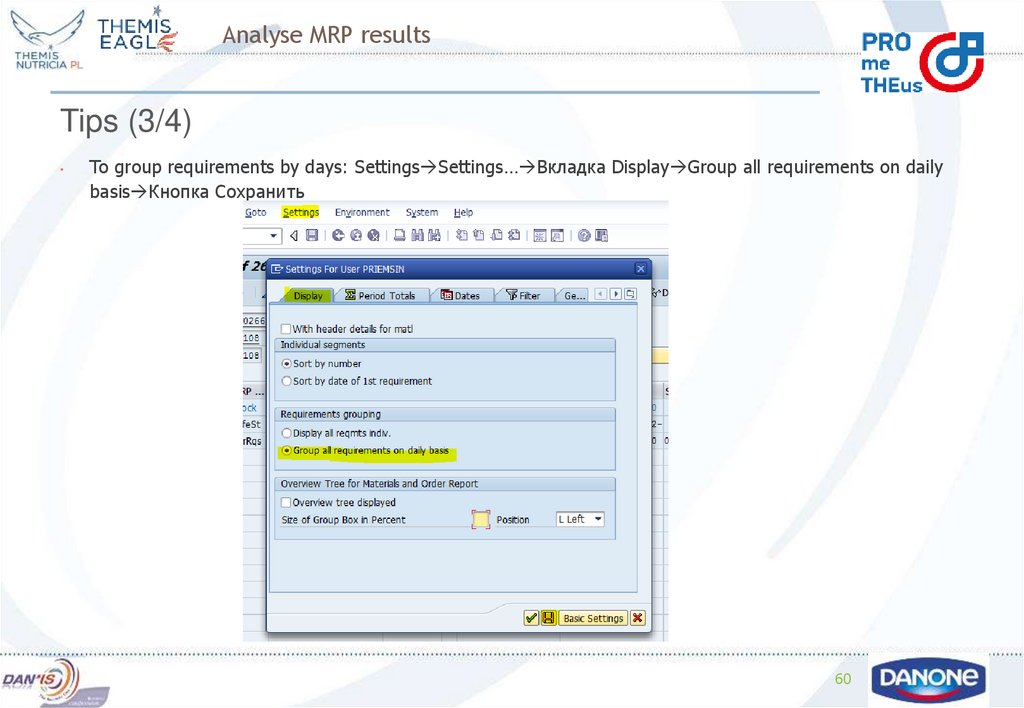
Tips (3/4)To group requirements by days: Settings Settings… Вкладка Display Group all requirements on daily
basis Кнопка Сохранить
60
61.
Analyse MRP resultsTips (3/4)
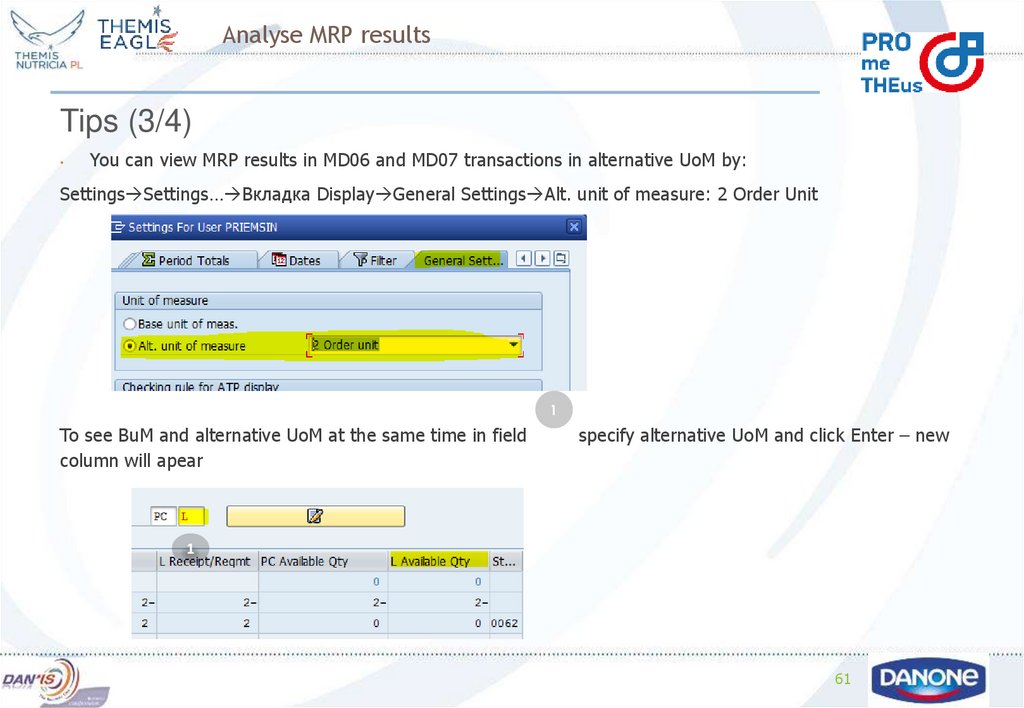
You can view MRP results in MD06 and MD07 transactions in alternative UoM by:
Settings Settings… Вкладка Display General Settings Alt. unit of measure: 2 Order Unit
1
To see BuM and alternative UoM at the same time in field
column will apear
specify alternative UoM and click Enter – new
1
61
62. Analyse MRP results
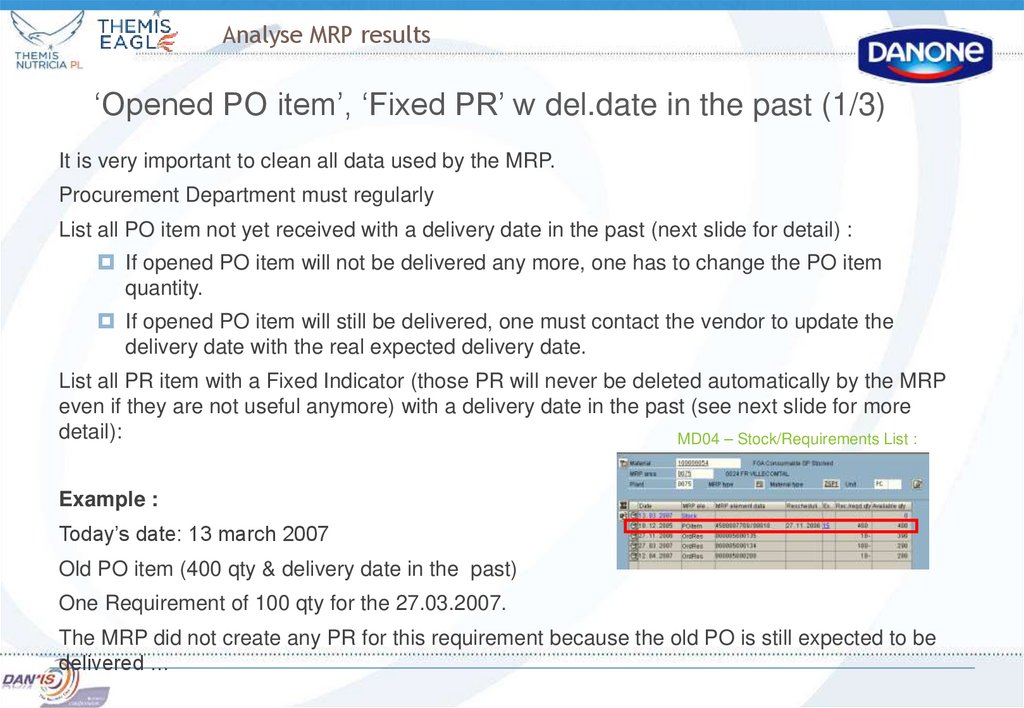
‘Opened PO item’, ‘Fixed PR’ w del.date in the past (1/3)It is very important to clean all data used by the MRP.
Procurement Department must regularly
List all PO item not yet received with a delivery date in the past (next slide for detail) :
If opened PO item will not be delivered any more, one has to change the PO item
quantity.
If opened PO item will still be delivered, one must contact the vendor to update the
delivery date with the real expected delivery date.
List all PR item with a Fixed Indicator (those PR will never be deleted automatically by the MRP
even if they are not useful anymore) with a delivery date in the past (see next slide for more
detail):
MD04 – Stock/Requirements List :
Example :
Today’s date: 13 march 2007
Old PO item (400 qty & delivery date in the past)
One Requirement of 100 qty for the 27.03.2007.
The MRP did not create any PR for this requirement because the old PO is still expected to be
delivered …
63. Analyse MRP results
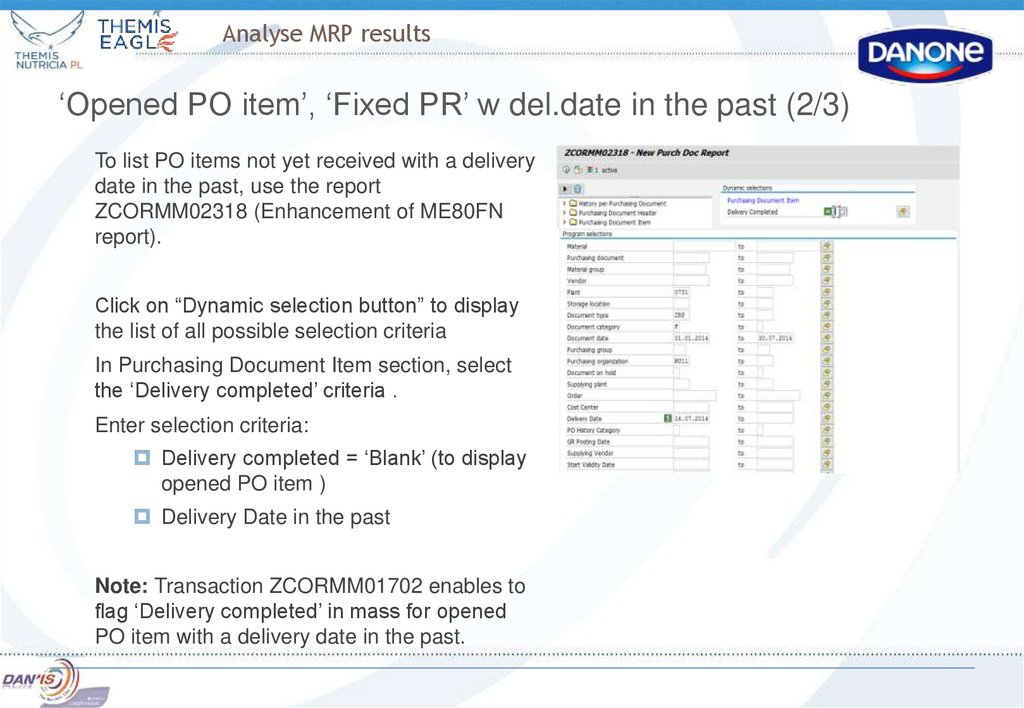
‘Opened PO item’, ‘Fixed PR’ w del.date in the past (2/3)To list PO items not yet received with a delivery
date in the past, use the report
ZCORMM02318 (Enhancement of ME80FN
report).
Click on “Dynamic selection button” to display
the list of all possible selection criteria
In Purchasing Document Item section, select
the ‘Delivery completed’ criteria .
Enter selection criteria:
Delivery completed = ‘Blank’ (to display
opened PO item )
Delivery Date in the past
Note: Transaction ZCORMM01702 enables to
flag ‘Delivery completed’ in mass for opened
PO item with a delivery date in the past.
64. Analyse MRP results
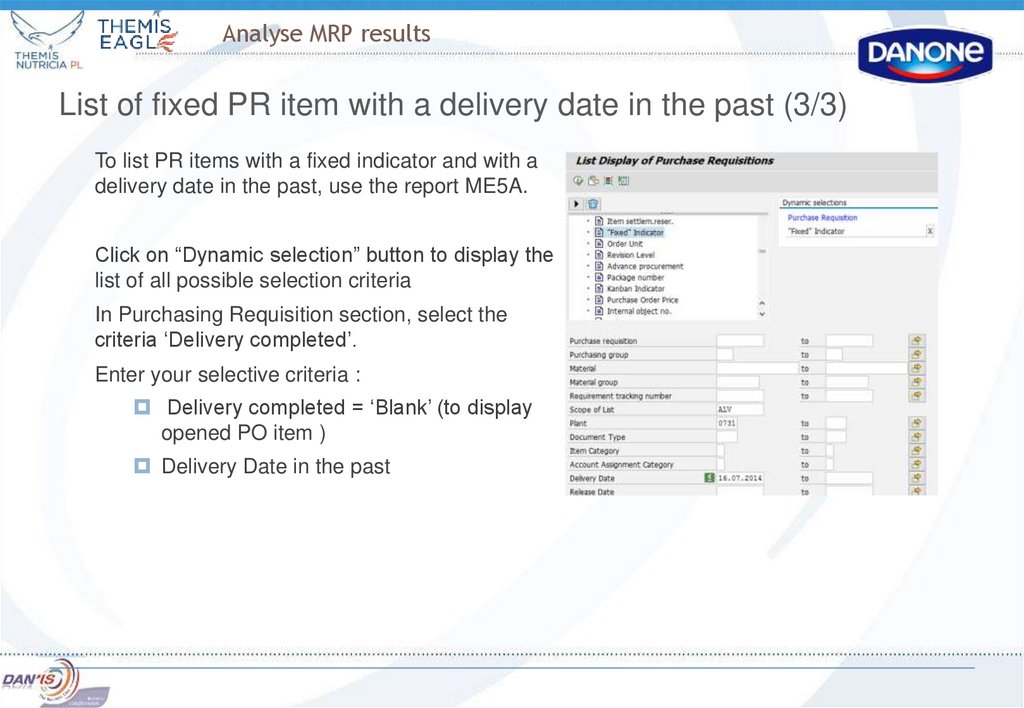
List of fixed PR item with a delivery date in the past (3/3)To list PR items with a fixed indicator and with a
delivery date in the past, use the report ME5A.
Click on “Dynamic selection” button to display the
list of all possible selection criteria
In Purchasing Requisition section, select the
criteria ‘Delivery completed’.
Enter your selective criteria :
Delivery completed = ‘Blank’ (to display
opened PO item )
Delivery Date in the past
65. MRP Check List
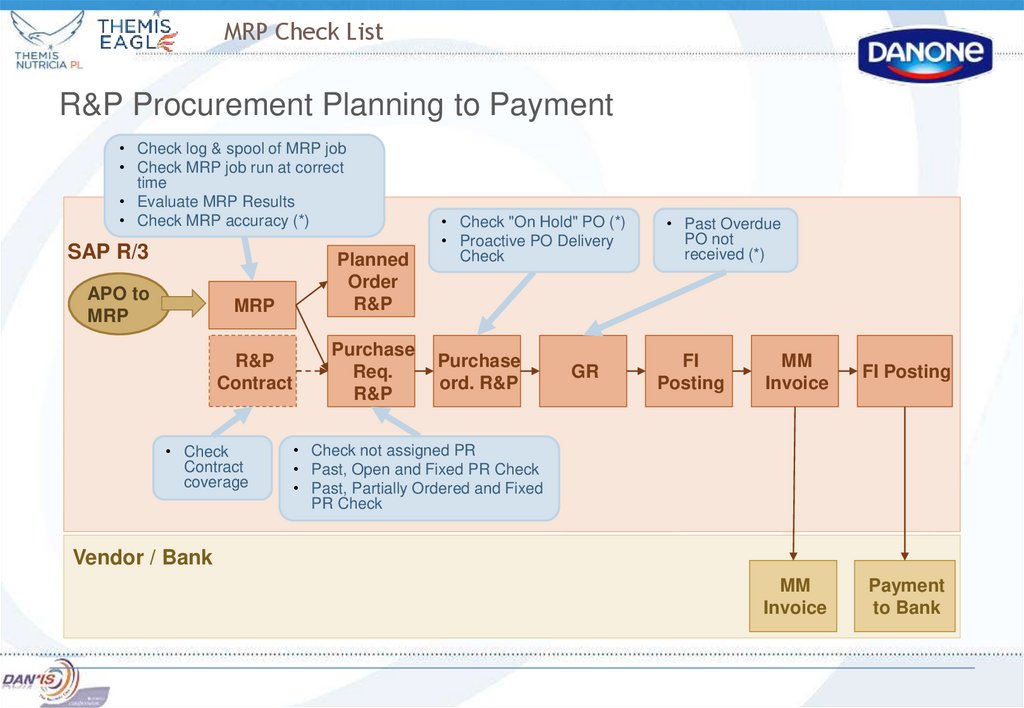
R&P Procurement Planning to Payment• Check log & spool of MRP job
• Check MRP job run at correct
time
• Evaluate MRP Results
• Check MRP accuracy (*)
SAP R/3
APO to
MRP
MRP
R&P
Contract
• Check
Contract
coverage
Planned
Order
R&P
Purchase
Req.
R&P
• Check "On Hold" PO (*)
• Proactive PO Delivery
Check
• Past Overdue
PO not
received (*)
Purchase
ord. R&P
FI
Posting
GR
MM
Invoice
FI Posting
MM
Invoice
Payment
to Bank
• Check not assigned PR
• Past, Open and Fixed PR Check
• Past, Partially Ordered and Fixed
PR Check
Vendor / Bank
66. Source List and Contract management
Definition of source list :The source list is managed at plant level and is specified for a certain period of validity
The source list is a prerequisite for the functionality of automatic source determination when
creating a purchase requisition through MRP processing
For each source of supply ( which means external vendors or internal vendors or plants), are
precised:
the validity periods,
the agreement number to be used, if there is one
if this information is relevant for MRP or not
Business Rule :
Each component managed into an active bill of material should have at least one valid source
list.
Source list creation and maintenance is under the responsibility of buyers and should be
manually maintained when creating and updating a contract.
The source list should have the same validity period as the related contract
67. Source List and Contract management
Logic of the source list:If there is only one source of supply :
MRP relevant – MRP generates PR assigned to this source of supply.
Not MRP relevant – MRP generates unassigned PR
If several sources of supply are in the source list :
if only one source of supply is MRP relevant – MRP generates PR assigned to this source
of supply.
if several sources of supply are MRP relevant:
if there is a quota arrangement – the choice of the source of supply will be done
according to the quota logic
if there is no quota arrangement – MRP generates unassigned PR
Note: sources of supply that are not MRP relevant will not be taken into account by the system
for automatic source determination, i.e. PR will not be assigned.
68. Source List and Contract management
List of useful transactions:ME01 – Change a Source List
ME03 – Display a Source List
ME0M – Display a List of Source List
Validation Period
MRP indicator, record
relevant to MRP:
Key that determines that
this source of supply is
used automatically in MRP
69. Source List and Contract management
Case examplesContract is close to its end (and no Quota)
The initial outline agreement is still valid and in the source list. Another outline agreement is
created, and already assigned in the source list.
If the validity start date of the new contract is
not reached yet, the agreement is not
considered by the system as MRP relevant.
All PR are assigned to the previous
agreement.
If the new contract is already valid, the two
agreements can not be MRP relevant.
The system has to affect PR to the first
agreement until this contract is closed. The
first one has to remain MRP relevant until PR
are no longer affected to it. Then, the source
list has to be updated with the MRP relevant
indicator set for the new contract. This update
is under the responsibility of the purchasing
department.
When the old contract is closed, the line is
automatically blocked in the source list, and
purchase requisition affected to the new one.
70. Source List and Contract management
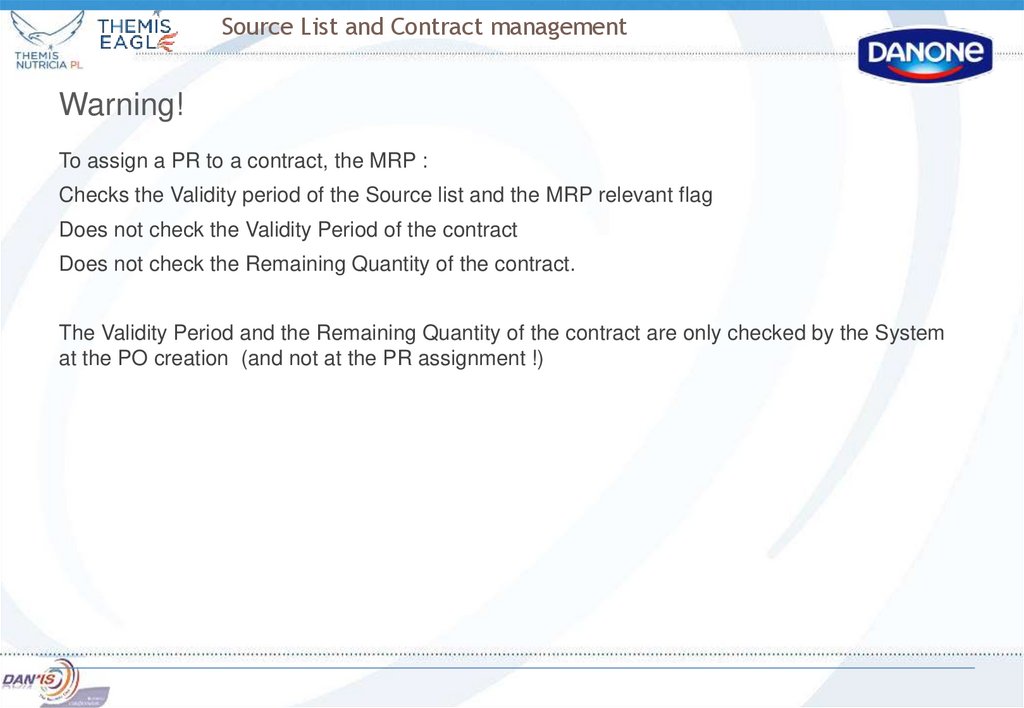
Warning!To assign a PR to a contract, the MRP :
Checks the Validity period of the Source list and the MRP relevant flag
Does not check the Validity Period of the contract
Does not check the Remaining Quantity of the contract.
The Validity Period and the Remaining Quantity of the contract are only checked by the System
at the PO creation (and not at the PR assignment !)
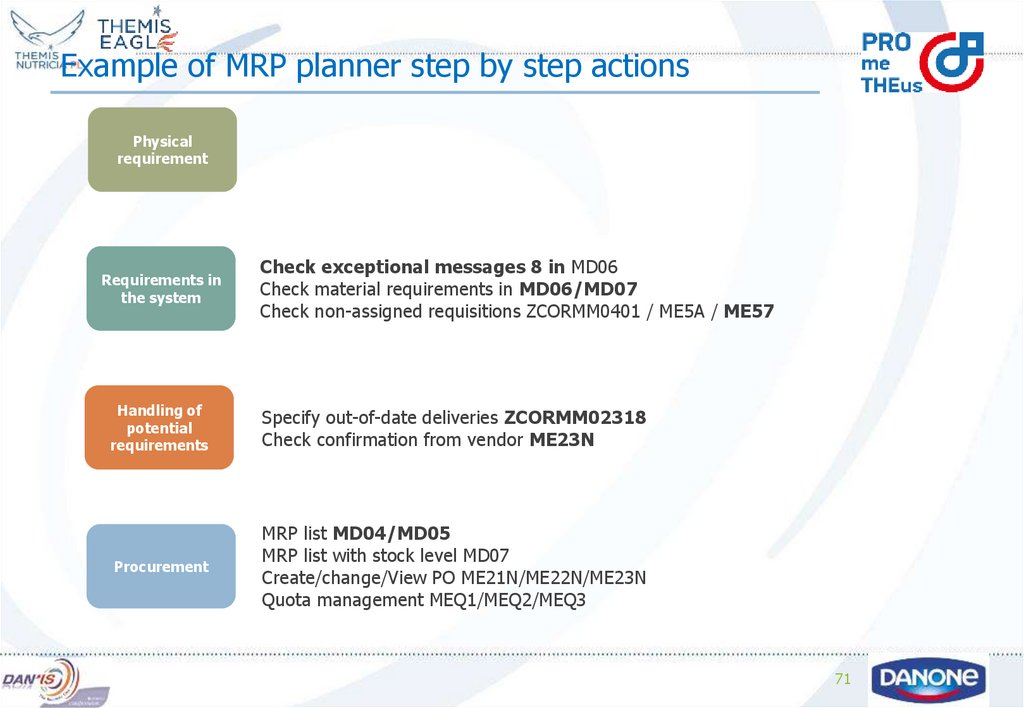
71. Example of MRP planner step by step actions
Physicalrequirement
Requirements in
the system
Check exceptional messages 8 in MD06
Check material requirements in MD06/MD07
Check non-assigned requisitions ZCORMM0401 / ME5A / ME57
Handling of
potential
requirements
Specify out-of-date deliveries ZCORMM02318
Check confirmation from vendor ME23N
Procurement
MRP list MD04/MD05
MRP list with stock level MD07
Create/change/View PO ME21N/ME22N/ME23N
Quota management MEQ1/MEQ2/MEQ3
71
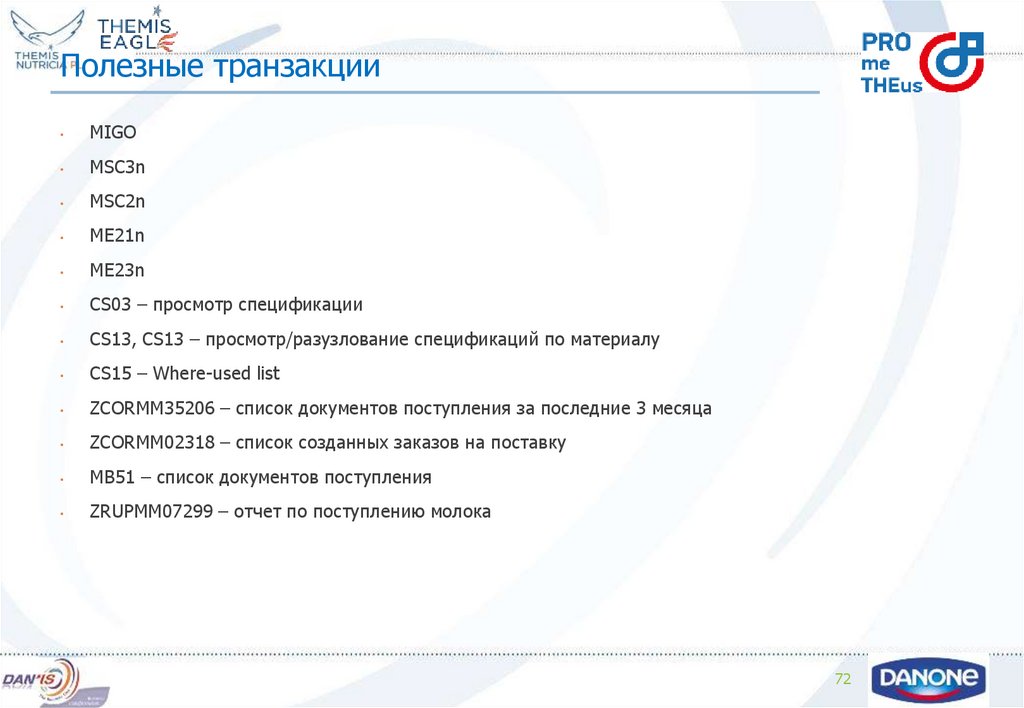
72. Полезные транзакции
MIGO
MSC3n
MSC2n
ME21n
ME23n
CS03 – просмотр спецификации
CS13, CS13 – просмотр/разузлование спецификаций по материалу
CS15 – Where-used list
ZCORMM35206 – список документов поступления за последние 3 месяца
ZCORMM02318 – список созданных заказов на поставку
MB51 – список документов поступления
ZRUPMM07299 – отчет по поступлению молока
72