
 programming
Similar presentations:








STRUCTURED TEXT Language (ST) Ver. 2.05
1. Diapositiva 1
STRUCTURED TEXT Language (ST)Ver. 2.05
1
2. Diapositiva 2
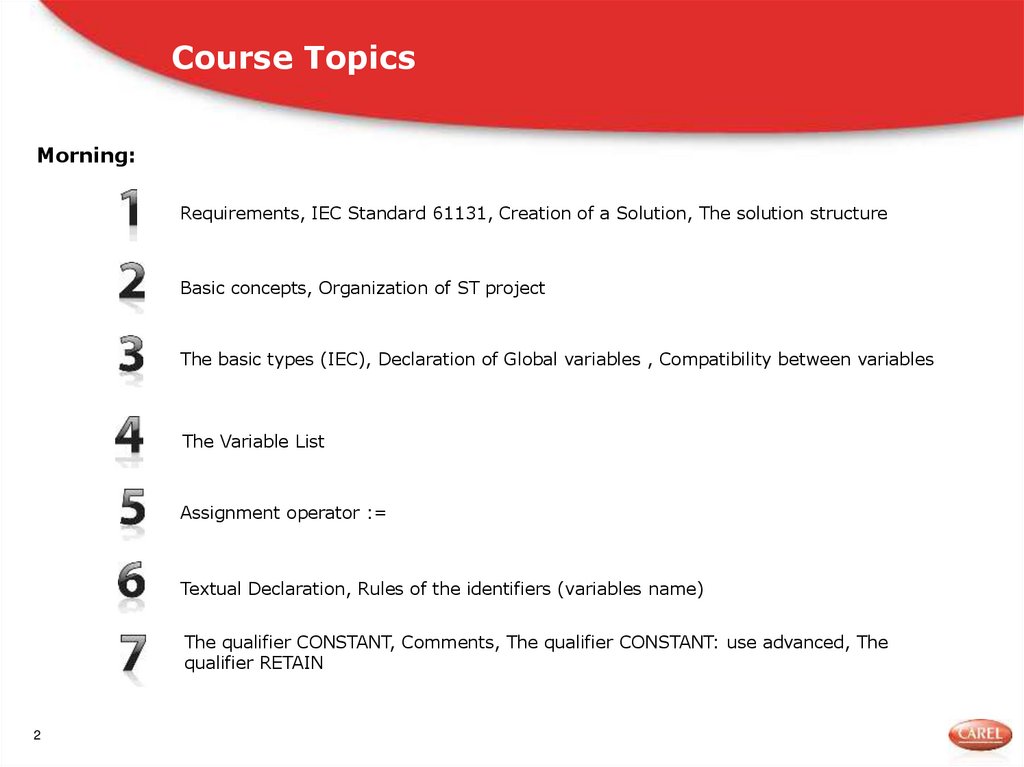
Course TopicsMorning:
Requirements, IEC Standard 61131, Creation of a Solution, The solution structure
Basic concepts, Organization of ST project
The basic types (IEC), Declaration of Global variables , Compatibility between variables
The Variable List
Assignment operator :=
Textual Declaration, Rules of the identifiers (variables name)
The qualifier CONSTANT, Comments, The qualifier CONSTANT: use advanced, The
qualifier RETAIN
2
3. Course Topics
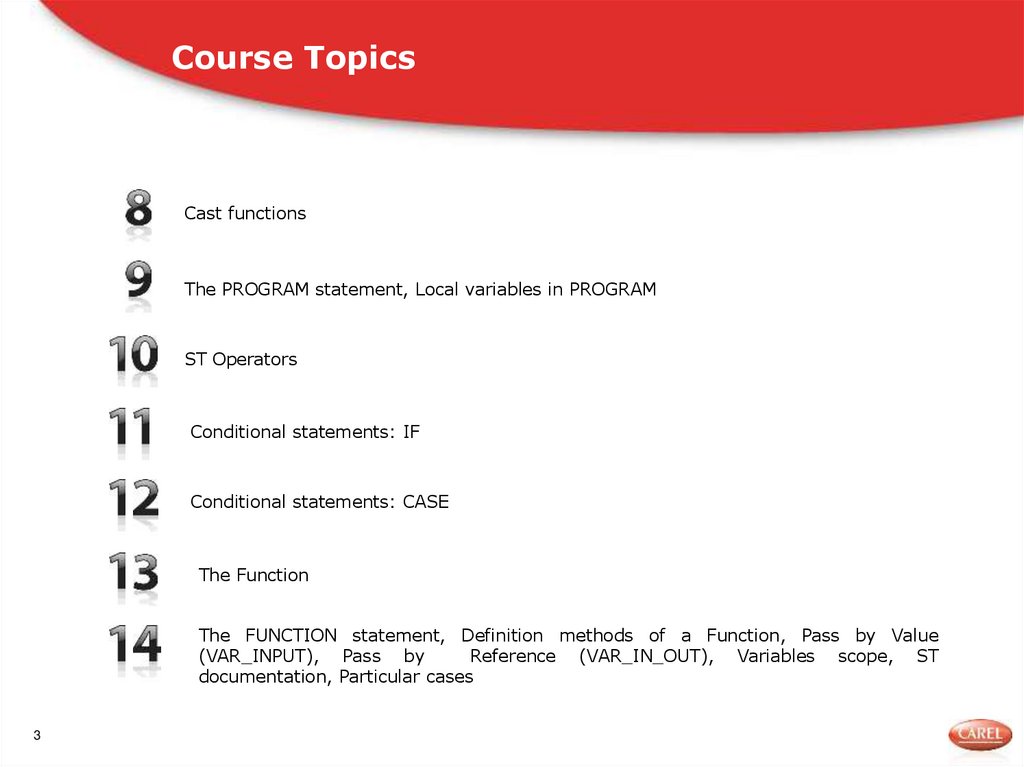
Cast functionsThe PROGRAM statement, Local variables in PROGRAM
ST Operators
Conditional statements: IF
Conditional statements: CASE
The Function
The FUNCTION statement, Definition methods of a Function, Pass by Value
(VAR_INPUT), Pass by
Reference (VAR_IN_OUT), Variables scope, ST
documentation, Particular cases
3
4. Course Topics
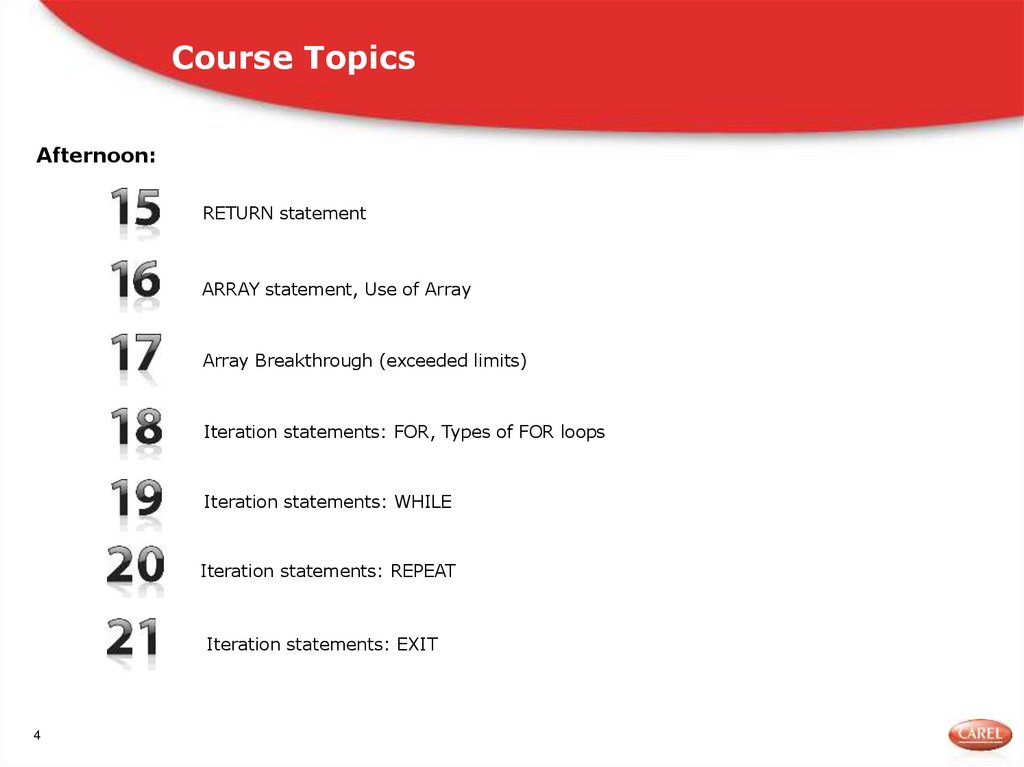
Afternoon:RETURN statement
ARRAY statement, Use of Array
Array Breakthrough (exceeded limits)
Iteration statements: FOR, Types of FOR loops
Iteration statements: WHILE
Iteration statements: REPEAT
Iteration statements: EXIT
4
5. Course Topics
n-dimensional ArrayThe data type ‘Structure’, TYPE … STRUCT statement
What is a FUNCTION BLOCK, FUNCTION BLOCK statement, FUNCTION BLOCK instance,
FUNCTION BLOCK: Summary
Commissioning
Local Variables vs Memory occupation
Events in ST
Interfacing FBD & ST, Pass parameters
5
6. Course Topics
ModulesSystem Variables
Basis 2, Basis 8 and Basis 16
Mathematics Instruction , Numeric Instruction
Debug, Debug Settings
6
7. Requirements
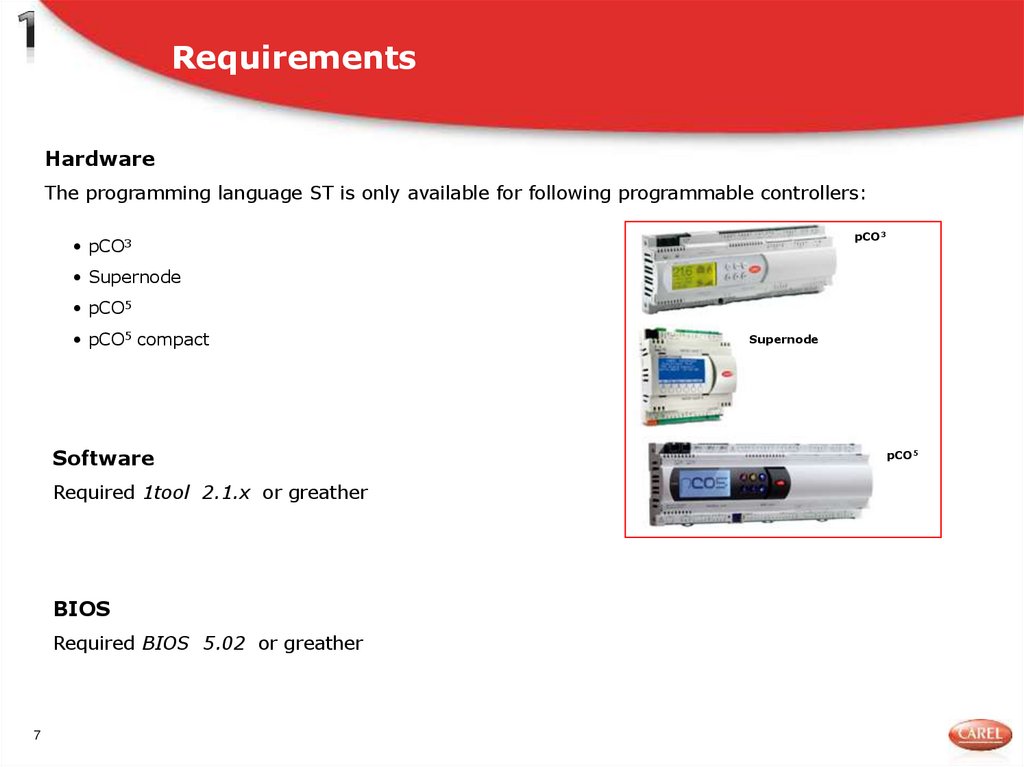
HardwareThe programming language ST is only available for following programmable controllers:
pCO3
• pCO3
• Supernode
• pCO5
• pCO5 compact
Software
Required 1tool 2.1.x or greather
BIOS
Required BIOS 5.02 or greather
7
Supernode
pCO5
8. The IEC 61131 standard
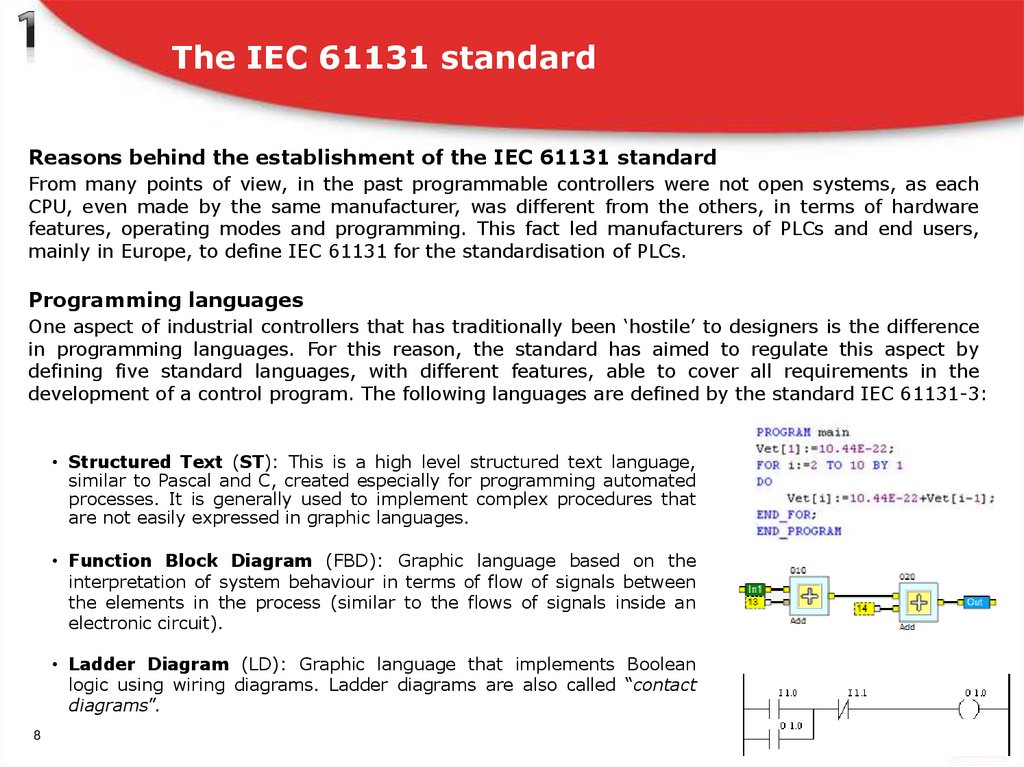
Reasons behind the establishment of the IEC 61131 standardFrom many points of view, in the past programmable controllers were not open systems, as each
CPU, even made by the same manufacturer, was different from the others, in terms of hardware
features, operating modes and programming. This fact led manufacturers of PLCs and end users,
mainly in Europe, to define IEC 61131 for the standardisation of PLCs.
Programming languages
One aspect of industrial controllers that has traditionally been ‘hostile’ to designers is the difference
in programming languages. For this reason, the standard has aimed to regulate this aspect by
defining five standard languages, with different features, able to cover all requirements in the
development of a control program. The following languages are defined by the standard IEC 61131-3:
• Structured Text (ST): This is a high level structured text language,
similar to Pascal and C, created especially for programming automated
processes. It is generally used to implement complex procedures that
are not easily expressed in graphic languages.
• Function Block Diagram (FBD): Graphic language based on the
interpretation of system behaviour in terms of flow of signals between
the elements in the process (similar to the flows of signals inside an
electronic circuit).
• Ladder Diagram (LD): Graphic language that implements Boolean
logic using wiring diagrams. Ladder diagrams are also called “contact
diagrams”.
8
9. Creation of a solution
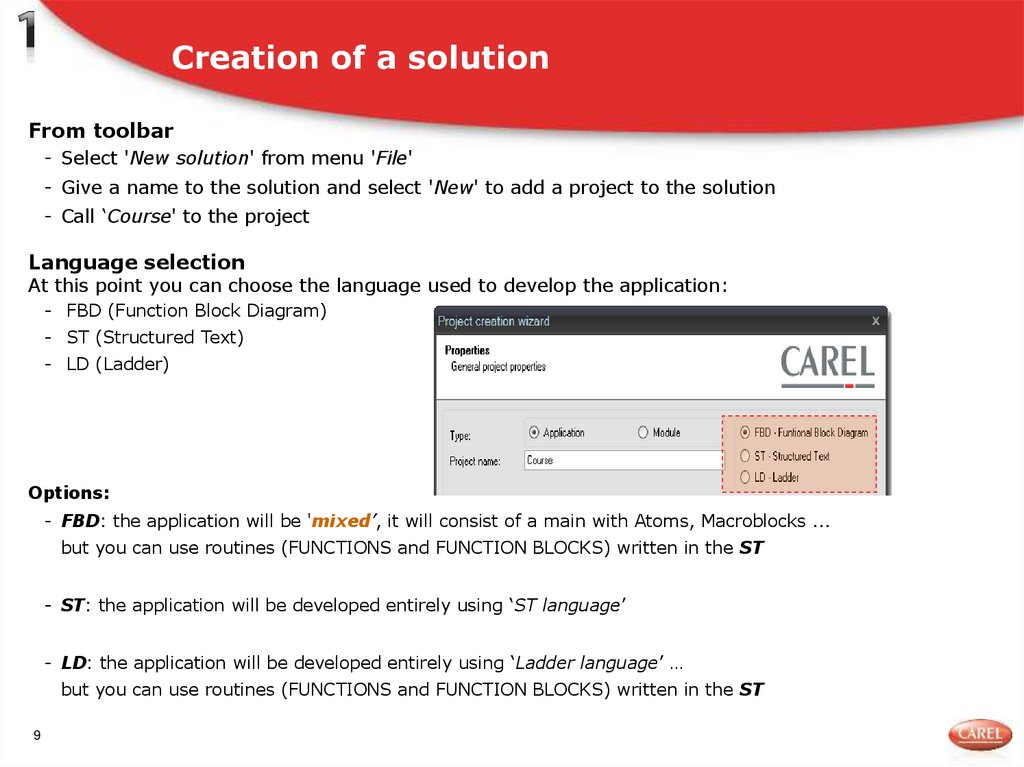
From toolbar- Select 'New solution' from menu 'File'
- Give a name to the solution and select 'New' to add a project to the solution
- Call ‘Course' to the project
Language selection
At this point you can choose the language used to develop the application:
- FBD (Function Block Diagram)
- ST (Structured Text)
- LD (Ladder)
Options:
- FBD: the application will be 'mixed’, it will consist of a main with Atoms, Macroblocks ...
but you can use routines (FUNCTIONS and FUNCTION BLOCKS) written in the ST
- ST: the application will be developed entirely using ‘ST language’
- LD: the application will be developed entirely using ‘Ladder language’ …
but you can use routines (FUNCTIONS and FUNCTION BLOCKS) written in the ST
9
10. Structure of the Solution
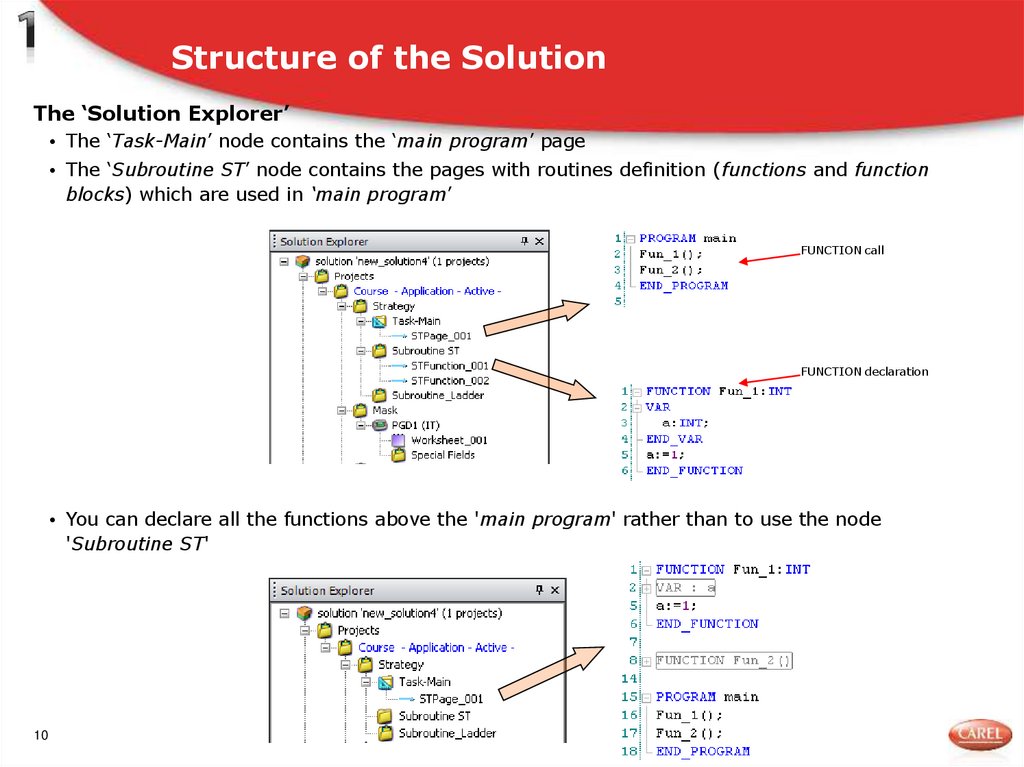
The ‘Solution Explorer’• The ‘Task-Main’ node contains the ‘main program’ page
• The ‘Subroutine ST’ node contains the pages with routines definition (functions and function
blocks) which are used in ‘main program’
FUNCTION call
FUNCTION declaration
• You can declare all the functions above the 'main program' rather than to use the node
'Subroutine ST'
10
11. Basic concepts
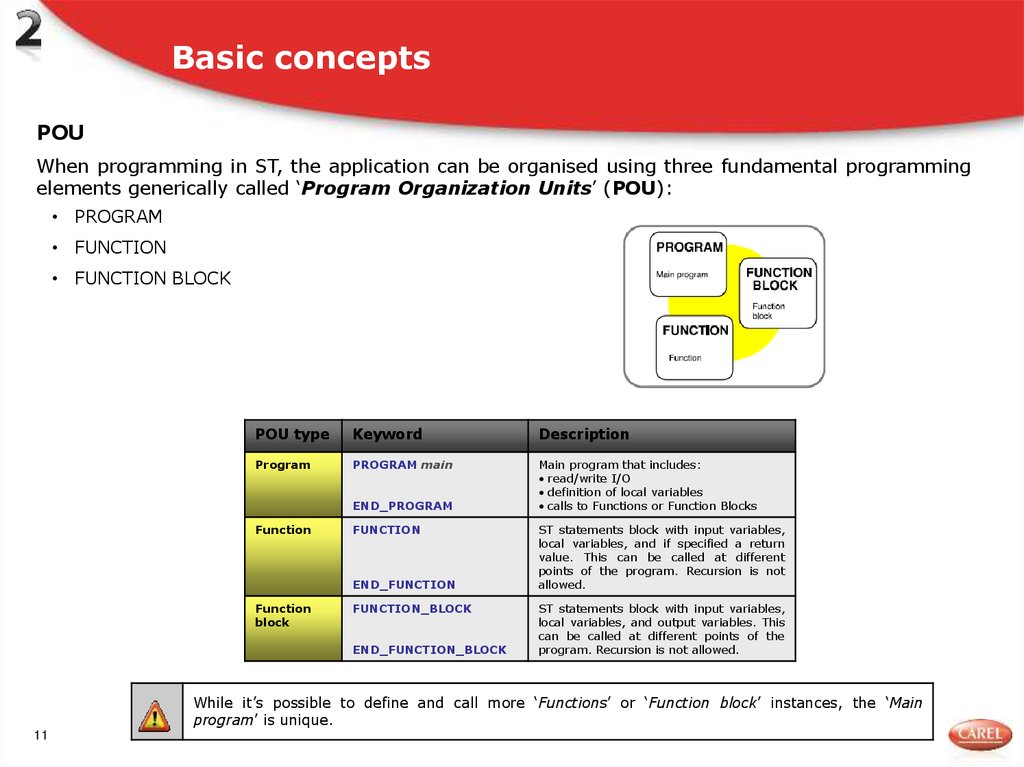
POUWhen programming in ST, the application can be organised using three fundamental programming
elements generically called ‘Program Organization Units’ (POU):
• PROGRAM
• FUNCTION
• FUNCTION BLOCK
POU type
Keyword
Description
Program
PROGRAM main
Main program that includes:
read/write I/O
definition of local variables
calls to Functions or Function Blocks
END_PROGRAM
Function
FUNCTION
END_FUNCTION
Function
block
FUNCTION_BLOCK
END_FUNCTION_BLOCK
ST statements block with input variables,
local variables, and if specified a return
value. This can be called at different
points of the program. Recursion is not
allowed.
ST statements block with input variables,
local variables, and output variables. This
can be called at different points of the
program. Recursion is not allowed.
While it’s possible to define and call more ‘Functions’ or ‘Function block’ instances, the ‘Main
program’ is unique.
11
12. Organization of ST project
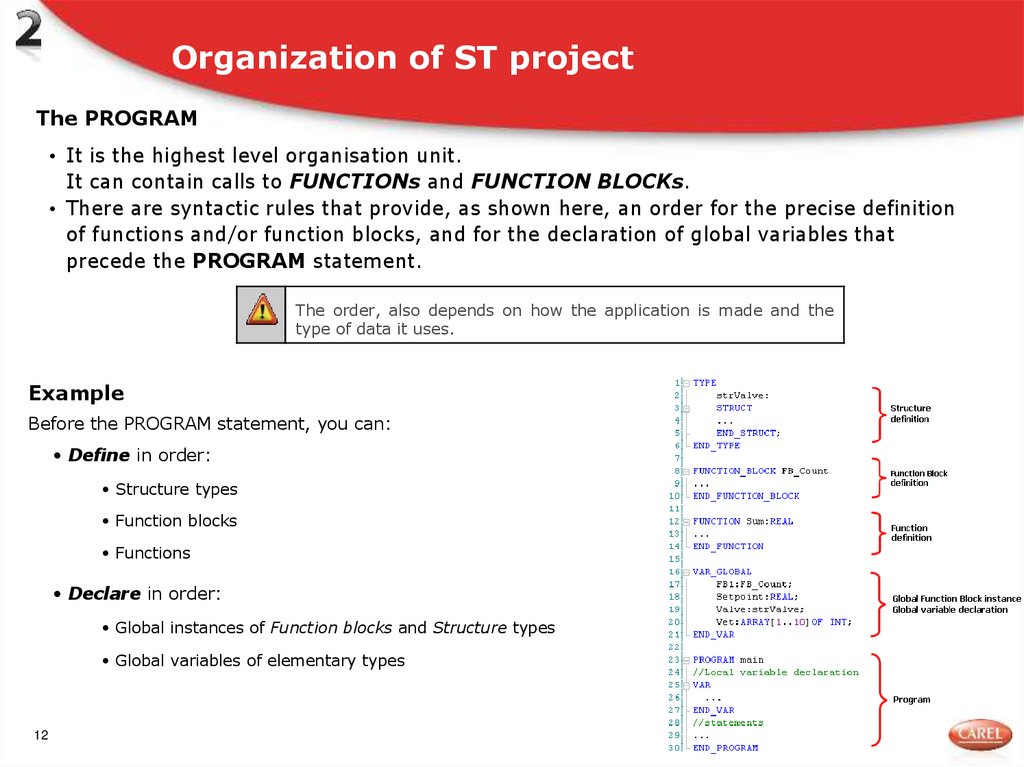
The PROGRAM• It is the highest level organisation unit.
It can contain calls to FUNCTIONs and FUNCTION BLOCKs.
• There are syntactic rules that provide, as shown here, an order for the precise definition
of functions and/or function blocks, and for the declaration of global variables that
precede the PROGRAM statement.
The order, also depends on how the application is made and the
type of data it uses.
Example
Before the PROGRAM statement, you can:
• Define in order:
• Structure types
• Function blocks
• Functions
• Declare in order:
• Global instances of Function blocks and Structure types
• Global variables of elementary types
12
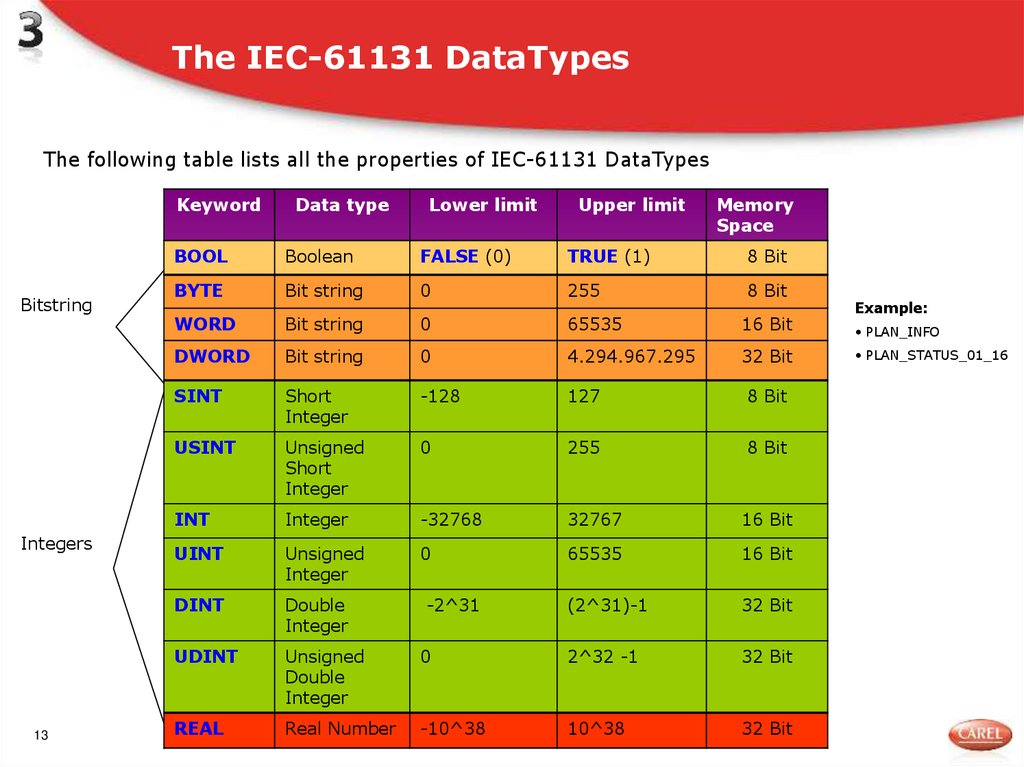
13. The IEC-61131 DataTypes
The following table lists all the properties of IEC-61131 DataTypesBitstring
Integers
13
Keyword
Data type
Lower limit
Upper limit
Memory
Space
BOOL
Boolean
FALSE (0)
TRUE (1)
8 Bit
BYTE
Bit string
0
255
8 Bit
WORD
Bit string
0
65535
16 Bit
DWORD
Bit string
0
4.294.967.295
32 Bit
SINT
Short
Integer
-128
127
8 Bit
USINT
Unsigned
Short
Integer
0
255
8 Bit
INT
Integer
-32768
32767
16 Bit
UINT
Unsigned
Integer
0
65535
16 Bit
DINT
Double
Integer
-2^31
(2^31)-1
32 Bit
UDINT
Unsigned
Double
Integer
0
2^32 -1
32 Bit
REAL
Real Number
-10^38
10^38
32 Bit
Example:
• PLAN_INFO
• PLAN_STATUS_01_16
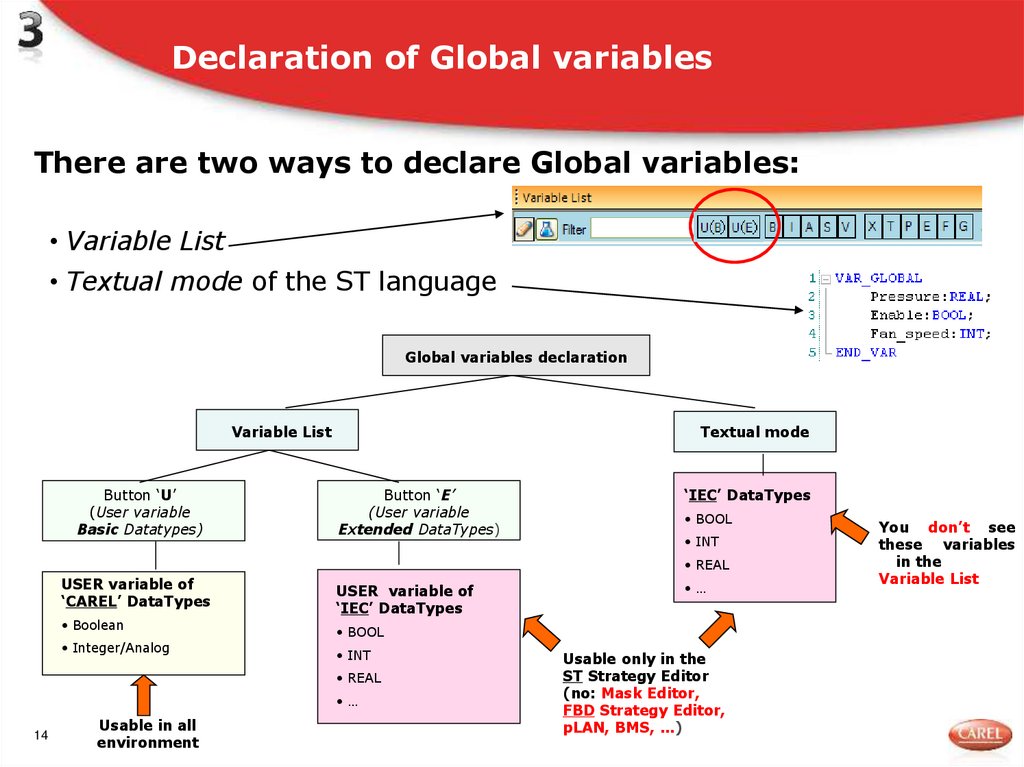
14. Declaration of Global variables
There are two ways to declare Global variables:• Variable List
• Textual mode of the ST language
Global variables declaration
Variable List
Button ‘U’
(User variable
Basic Datatypes)
Textual mode
Button ‘E’
(User variable
Extended DataTypes)
‘IEC’ DataTypes
• BOOL
• INT
• REAL
USER variable of
‘CAREL’ DataTypes
• Boolean
• Integer/Analog
USER variable of
‘IEC’ DataTypes
• BOOL
• INT
• REAL
•…
14
Usable in all
environment
•…
Usable only in the
ST Strategy Editor
(no: Mask Editor,
FBD Strategy Editor,
pLAN, BMS, …)
You don’t see
these variables
in the
Variable List
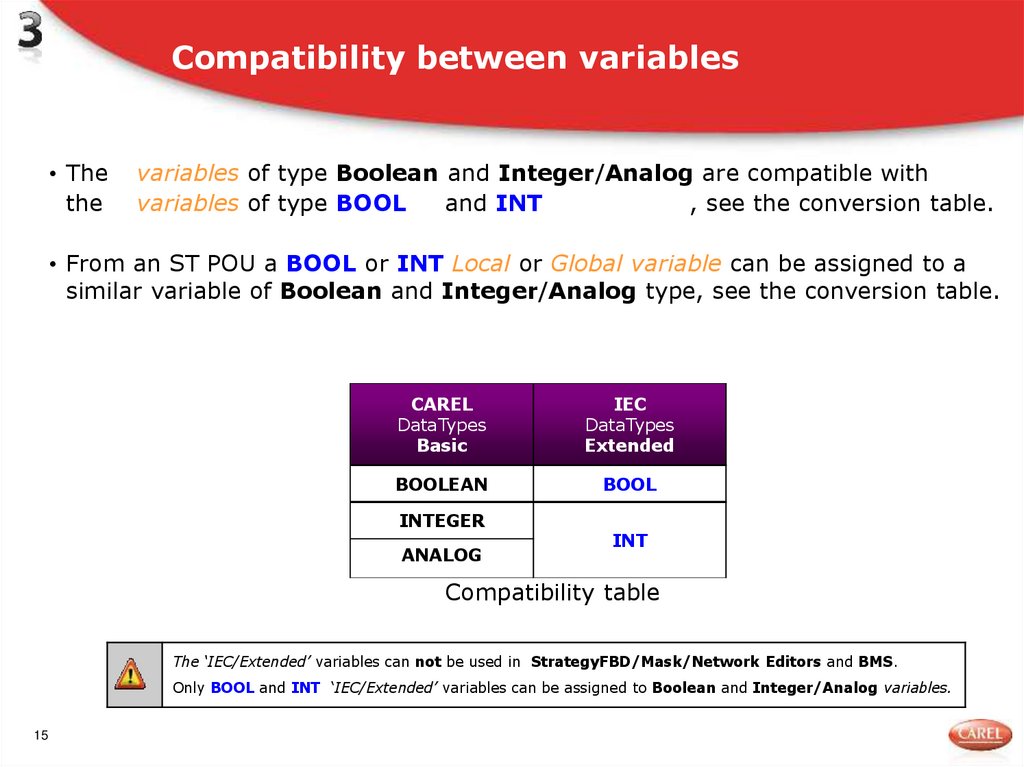
15. Compatibility between variables
• Thethe
variables of type Boolean and Integer/Analog are compatible with
variables of type BOOL
and INT
, see the conversion table.
• From an ST POU a BOOL or INT Local or Global variable can be assigned to a
similar variable of Boolean and Integer/Analog type, see the conversion table.
CAREL
DataTypes
Basic
IEC
DataTypes
Extended
BOOLEAN
BOOL
INTEGER
ANALOG
INT
Compatibility table
The ‘IEC/Extended’ variables can not be used in StrategyFBD/Mask/Network Editors and BMS.
Only BOOL and INT ‘IEC/Extended’ variables can be assigned to Boolean and Integer/Analog variables.
15
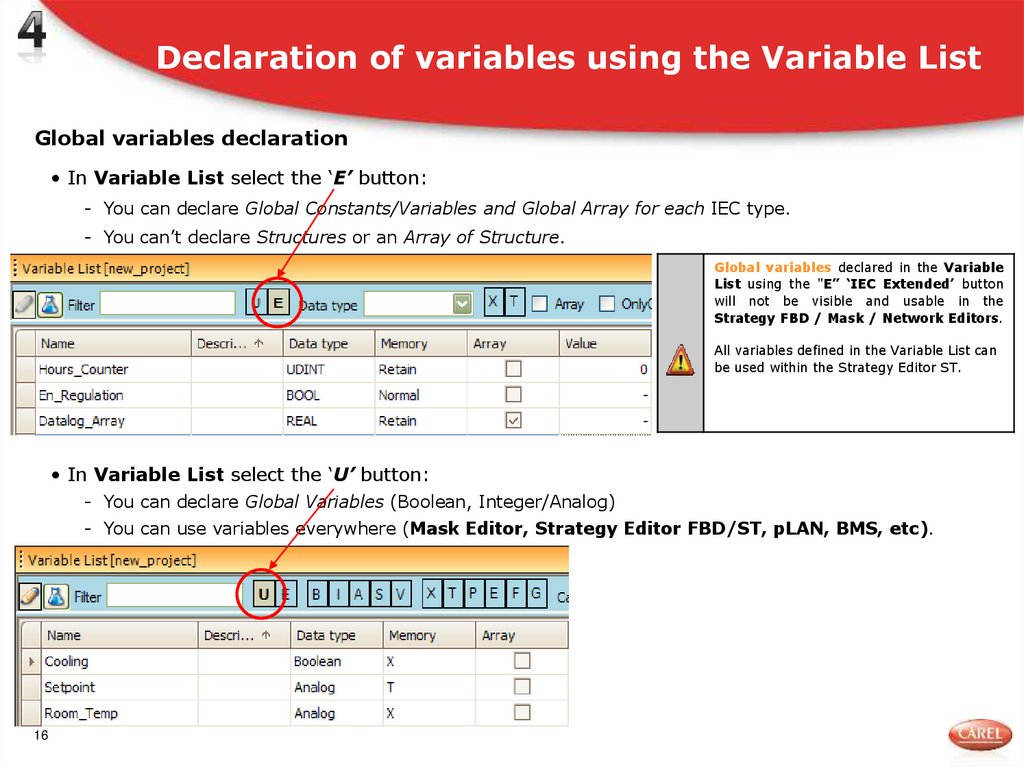
16. Declaration of variables using the Variable List
Global variables declaration• In Variable List select the ‘E’ button:
- You can declare Global Constants/Variables and Global Array for each IEC type.
- You can’t declare Structures or an Array of Structure.
Global variables declared in the Variable
List using the "E” ‘IEC Extended’ button
will not be visible and usable in the
Strategy FBD / Mask / Network Editors.
All variables defined in the Variable List can
be used within the Strategy Editor ST.
• In Variable List select the ‘U’ button:
- You can declare Global Variables (Boolean, Integer/Analog)
- You can use variables everywhere (Mask Editor, Strategy Editor FBD/ST, pLAN, BMS, etc).
16
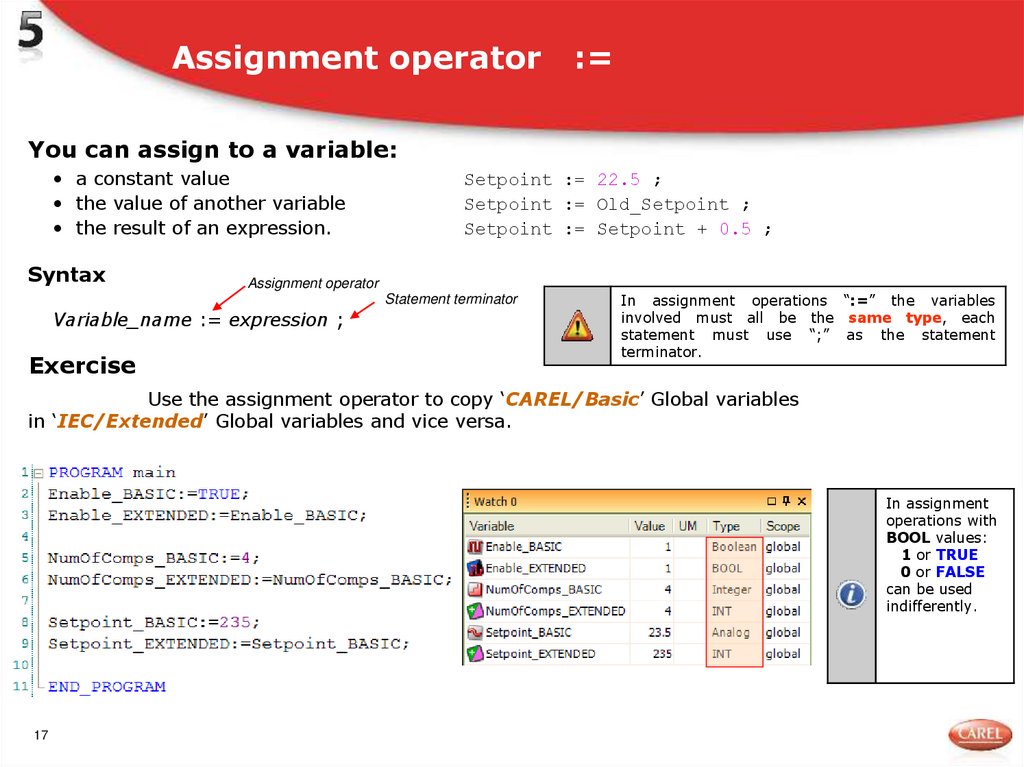
17. Assignment operator :=
You can assign to a variable:• a constant value
• the value of another variable
• the result of an expression.
Syntax
Setpoint := 22.5 ;
Setpoint := Old_Setpoint ;
Setpoint := Setpoint + 0.5 ;
Assignment operator
Statement terminator
Variable_name := expression ;
Exercise
In assignment operations “:=” the variables
involved must all be the same type, each
statement must use “;” as the statement
terminator.
Use the assignment operator to copy ‘CAREL/Basic’ Global variables
in ‘IEC/Extended’ Global variables and vice versa.
In assignment
operations with
BOOL values:
1 or TRUE
0 or FALSE
can be used
indifferently.
17
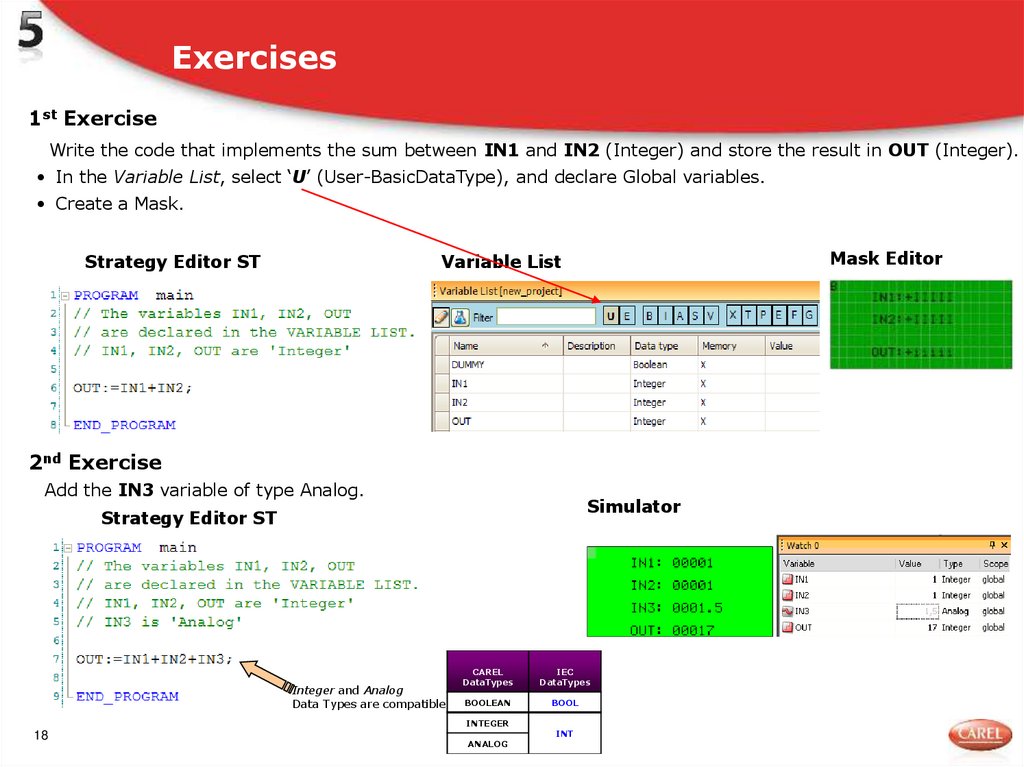
18. Exercises
1st ExerciseWrite the code that implements the sum between IN1 and IN2 (Integer) and store the result in OUT (Integer).
• In the Variable List, select ‘U’ (User-BasicDataType), and declare Global variables.
• Create a Mask.
Strategy Editor ST
Mask Editor
Variable List
2nd Exercise
Add the IN3 variable of type Analog.
Simulator
Strategy Editor ST
Integer and Analog
Data Types are compatible
CAREL
DataTypes
IEC
DataTypes
BOOLEAN
BOOL
INTEGER
18
ANALOG
INT
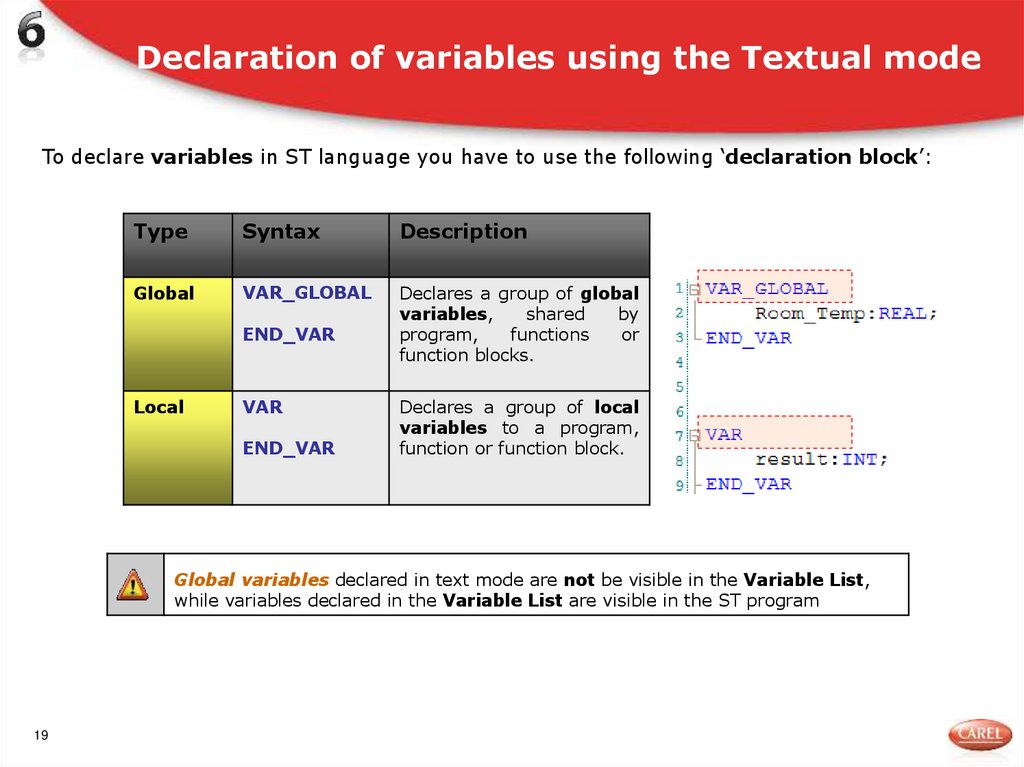
19. Declaration of variables using the Textual mode
To declare variables in ST language you have to use the following ‘declaration block’:Type
Syntax
Description
Global
VAR_GLOBAL
Declares a group of global
variables,
shared
by
program,
functions
or
function blocks.
END_VAR
Local
VAR
END_VAR
Declares a group of local
variables to a program,
function or function block.
Global variables declared in text mode are not be visible in the Variable List,
while variables declared in the Variable List are visible in the ST program
19
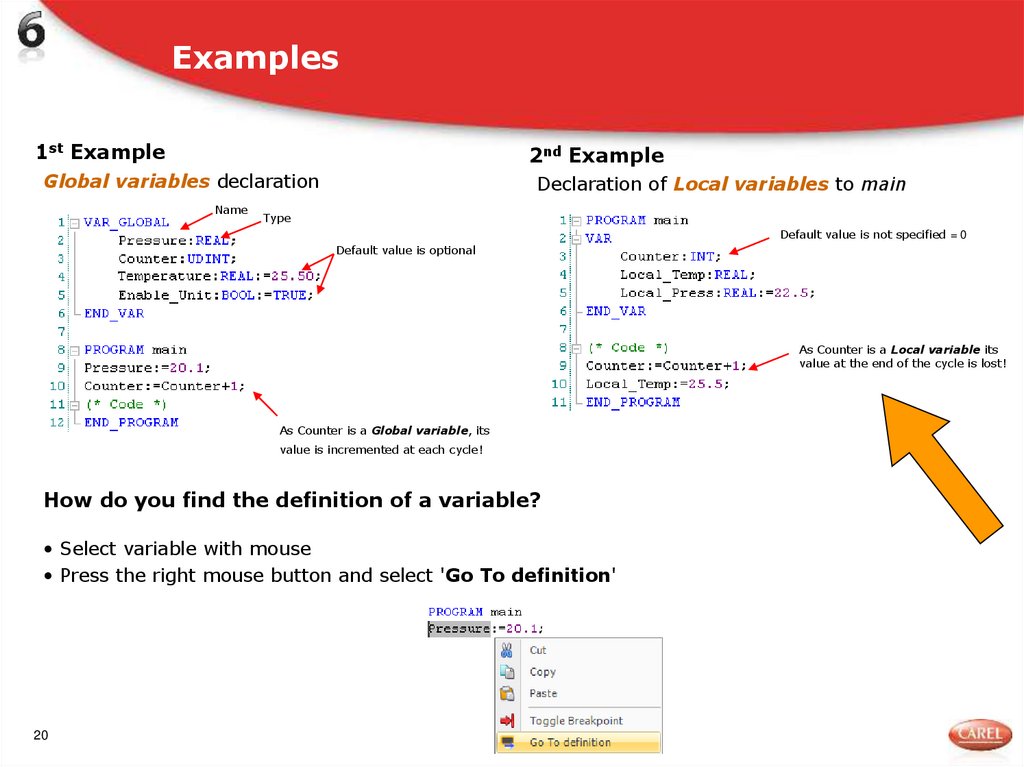
20. Examples
1st Example2nd Example
Global variables declaration
Declaration of Local variables to main
Name
Type
Default value is not specified = 0
Default value is optional
As Counter is a Local variable its
value at the end of the cycle is lost!
As Counter is a Global variable, its
value is incremented at each cycle!
How do you find the definition of a variable?
• Select variable with mouse
• Press the right mouse button and select 'Go To definition'
20
21. Rules of the identifiers (variables name)
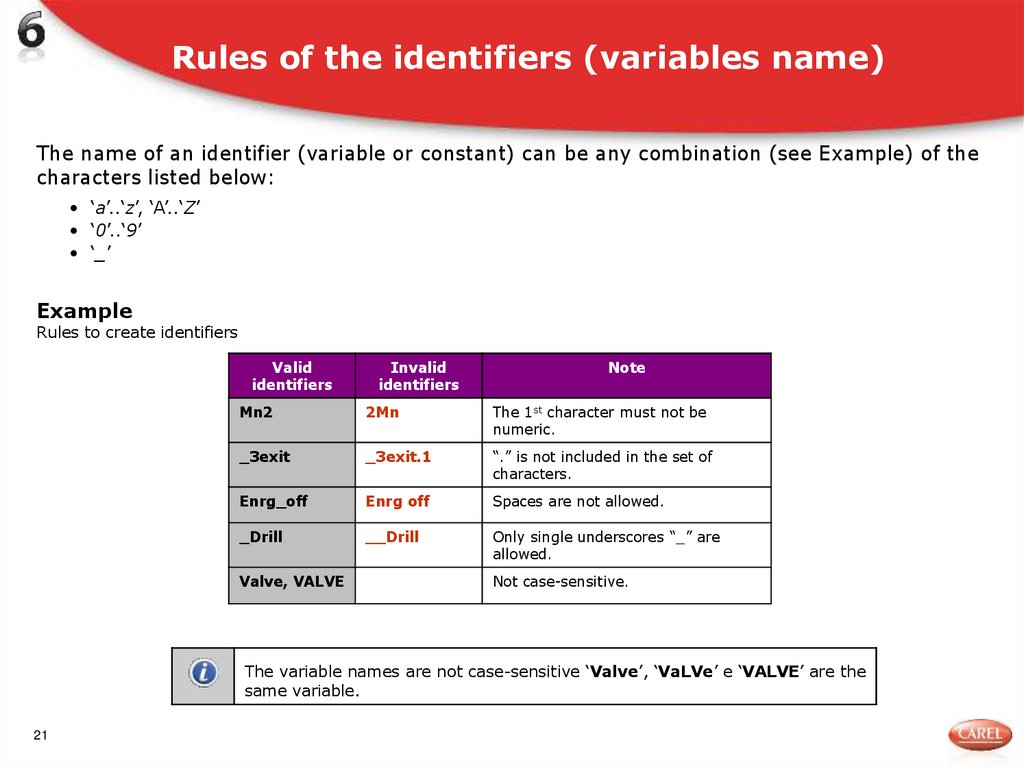
The name of an identifier (variable or constant) can be any combination (see Example) of thecharacters listed below:
• ‘a’..‘z’, ‘A’..‘Z’
• ‘0’..‘9’
• ‘_’
Example
Rules to create identifiers
Valid
identifiers
Invalid
identifiers
Note
Mn2
2Mn
The 1st character must not be
numeric.
_3exit
_3exit.1
“.” is not included in the set of
characters.
Enrg_off
Enrg off
Spaces are not allowed.
_Drill
__Drill
Only single underscores “_” are
allowed.
Valve, VALVE
Not case-sensitive.
The variable names are not case-sensitive ‘Valve’, ‘VaLVe’ e ‘VALVE’ are the
same variable.
21
22. The CONSTANT qualifier
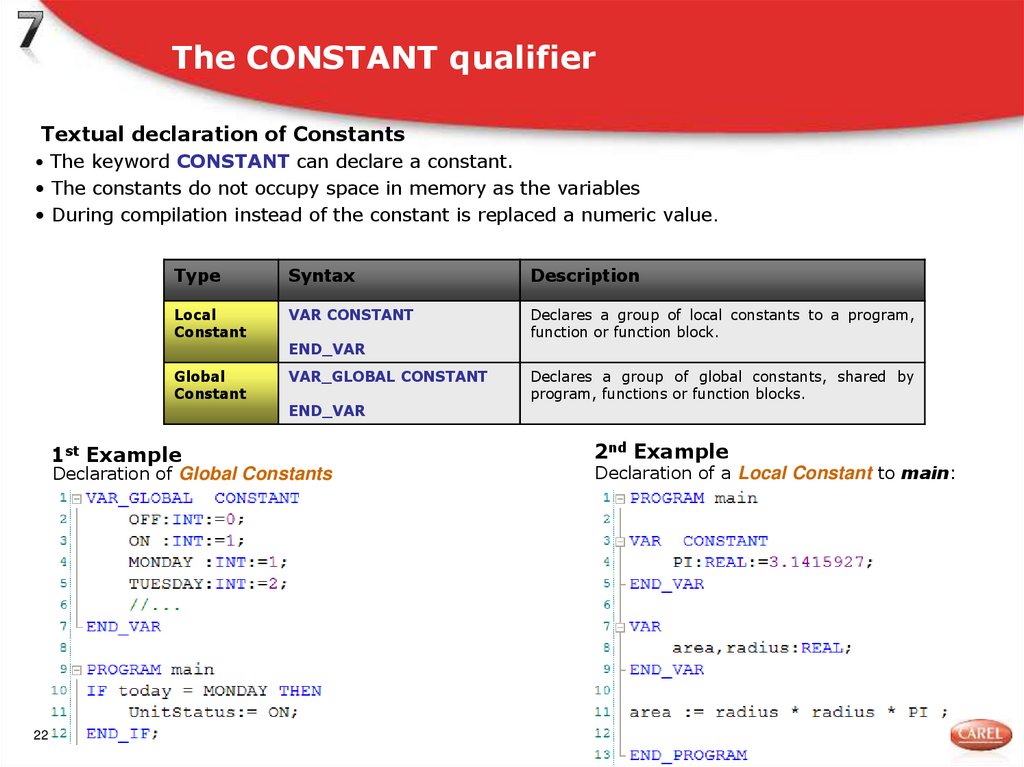
Textual declaration of Constants• The keyword CONSTANT can declare a constant.
• The constants do not occupy space in memory as the variables
• During compilation instead of the constant is replaced a numeric value.
Type
Syntax
Description
Local
Constant
VAR CONSTANT
Declares a group of local constants to a program,
function or function block.
Global
Constant
VAR_GLOBAL CONSTANT
1st Example
END_VAR
END_VAR
Declaration of Global Constants
22
Declares a group of global constants, shared by
program, functions or function blocks.
2nd Example
Declaration of a Local Constant to main:
23. Exercise
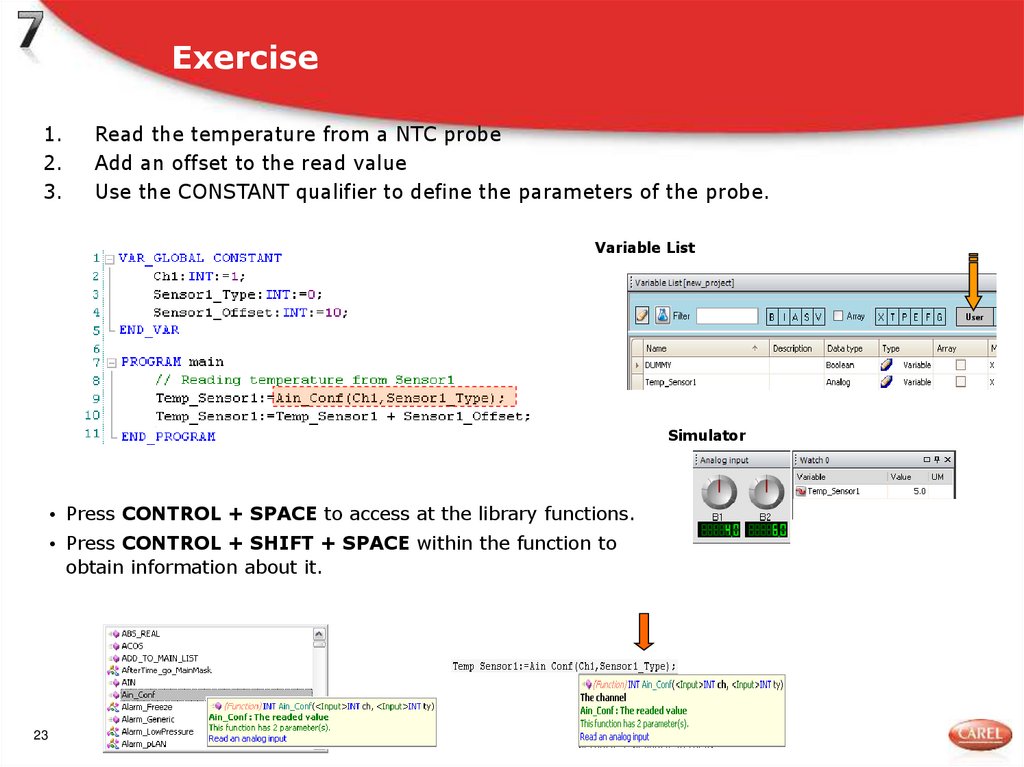
1.2.
3.
Read the temperature from a NTC probe
Add an offset to the read value
Use the CONSTANT qualifier to define the parameters of the probe.
Variable List
Simulator
• Press CONTROL + SPACE to access at the library functions.
• Press CONTROL + SHIFT + SPACE within the function to
obtain information about it.
23
24. Comments
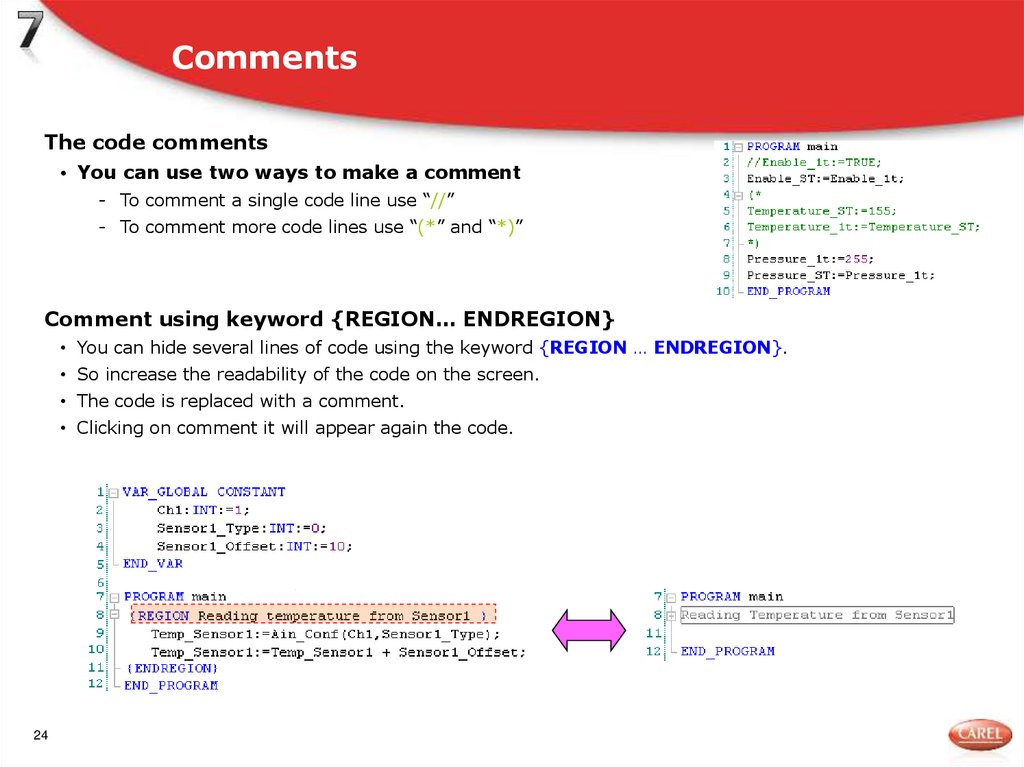
The code comments• You can use two ways to make a comment
- To comment a single code line use “//”
- To comment more code lines use “(*” and “*)”
Comment using keyword {REGION… ENDREGION}
• You can hide several lines of code using the keyword {REGION … ENDREGION}.
• So increase the readability of the code on the screen.
• The code is replaced with a comment.
• Clicking on comment it will appear again the code.
24
25. The CONSTANT qualifier : advanced use
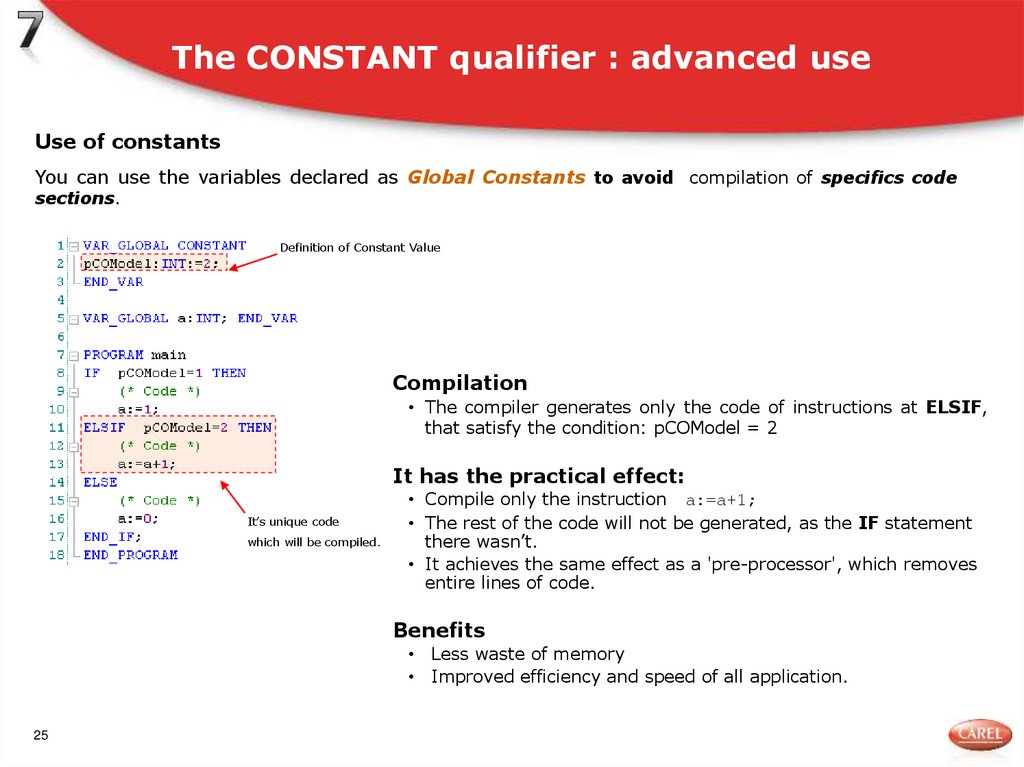
Use of constantsYou can use the variables declared as Global Constants to avoid compilation of specifics code
sections.
Definition of Constant Value
Compilation
• The compiler generates only the code of instructions at ELSIF,
that satisfy the condition: pCOModel = 2
It has the practical effect:
It’s unique code
which will be compiled.
• Compile only the instruction a:=a+1;
• The rest of the code will not be generated, as the IF statement
there wasn’t.
• It achieves the same effect as a 'pre-processor', which removes
entire lines of code.
Benefits
• Less waste of memory
• Improved efficiency and speed of all application.
25
26. The RETAIN qualifier
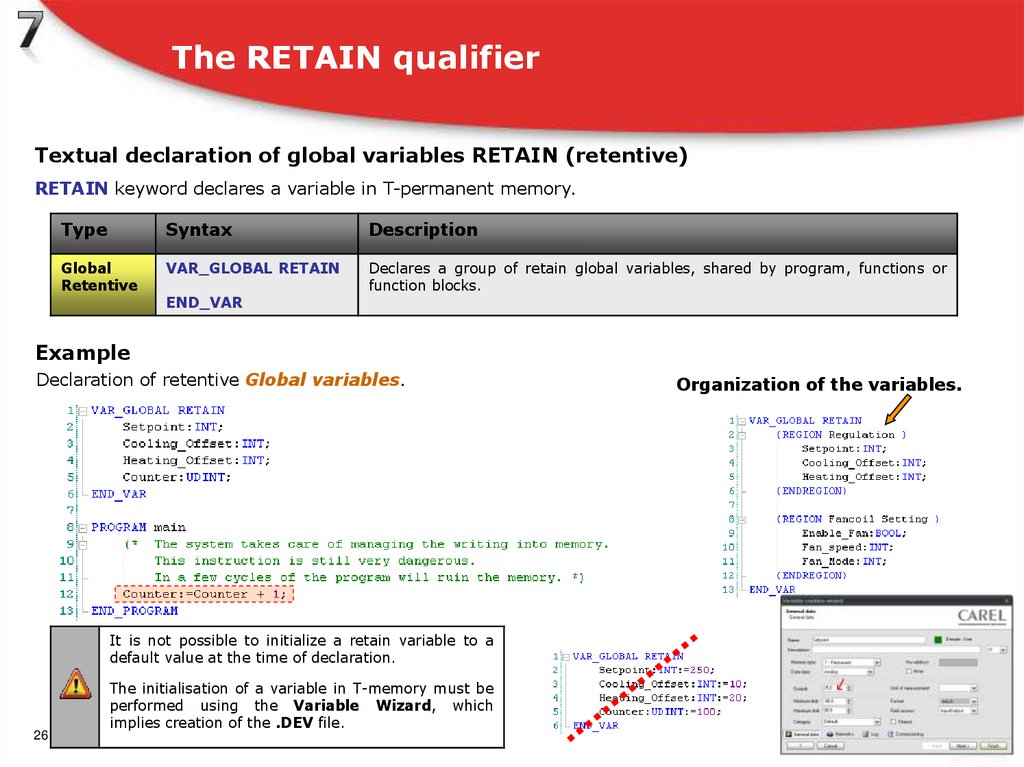
Textual declaration of global variables RETAIN (retentive)RETAIN keyword declares a variable in T-permanent memory.
Type
Syntax
Description
Global
Retentive
VAR_GLOBAL RETAIN
Declares a group of retain global variables, shared by program, functions or
function blocks.
END_VAR
Example
Declaration of retentive Global variables.
It is not possible to initialize a retain variable to a
default value at the time of declaration.
26
The initialisation of a variable in T-memory must be
performed using the Variable Wizard, which
implies creation of the .DEV file.
Organization of the variables.
27. CAST Functions
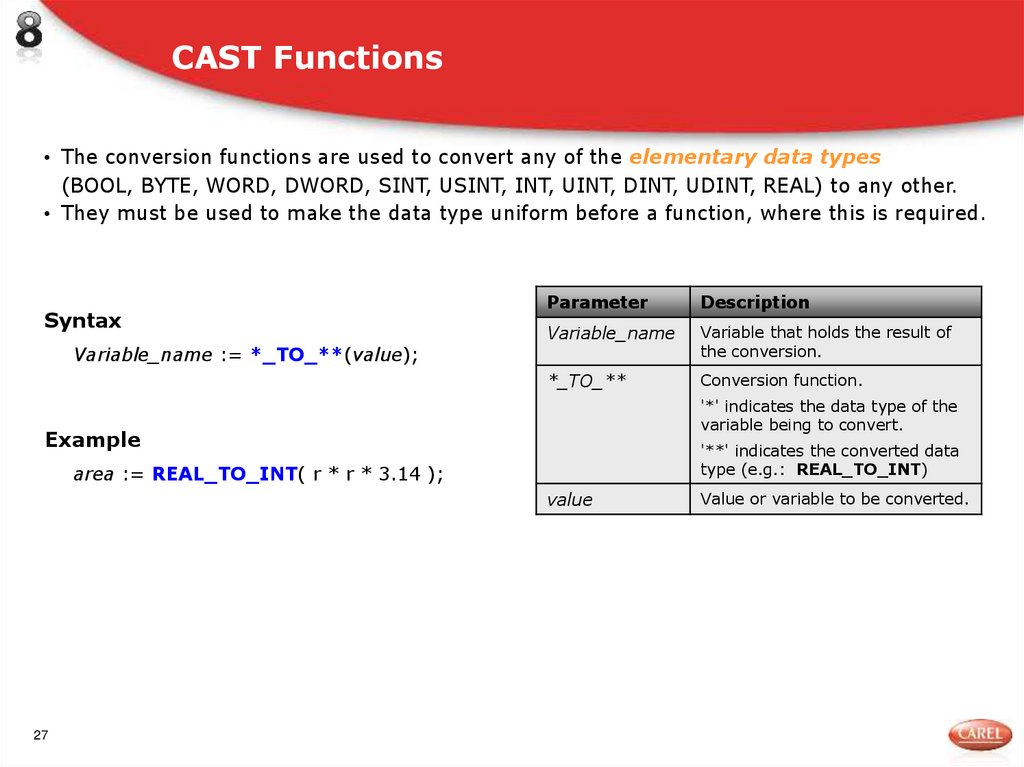
• The conversion functions are used to convert any of the elementary data types(BOOL, BYTE, WORD, DWORD, SINT, USINT, INT, UINT, DINT, UDINT, REAL) to any other.
• They must be used to make the data type uniform before a function, where this is required.
Syntax
Variable_name := *_TO_**(value);
Parameter
Description
Variable_name
Variable that holds the result of
the conversion.
*_TO_**
Conversion function.
'*' indicates the data type of the
variable being to convert.
Example
'**' indicates the converted data
type (e.g.: REAL_TO_INT)
area := REAL_TO_INT( r * r * 3.14 );
value
27
Value or variable to be converted.
28. Exercise
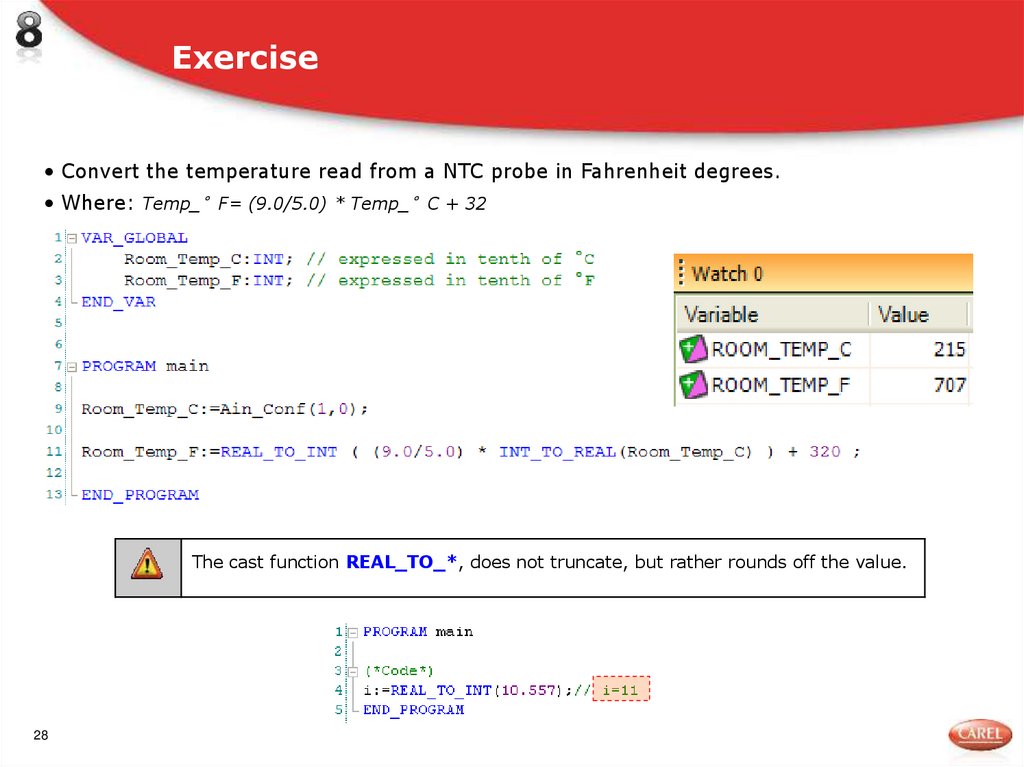
• Convert the temperature read from a NTC probe in Fahrenheit degrees.• Where: Temp_°F= (9.0/5.0) * Temp_°C + 32
The cast function REAL_TO_*, does not truncate, but rather rounds off the value.
28
29. PROGRAM statement
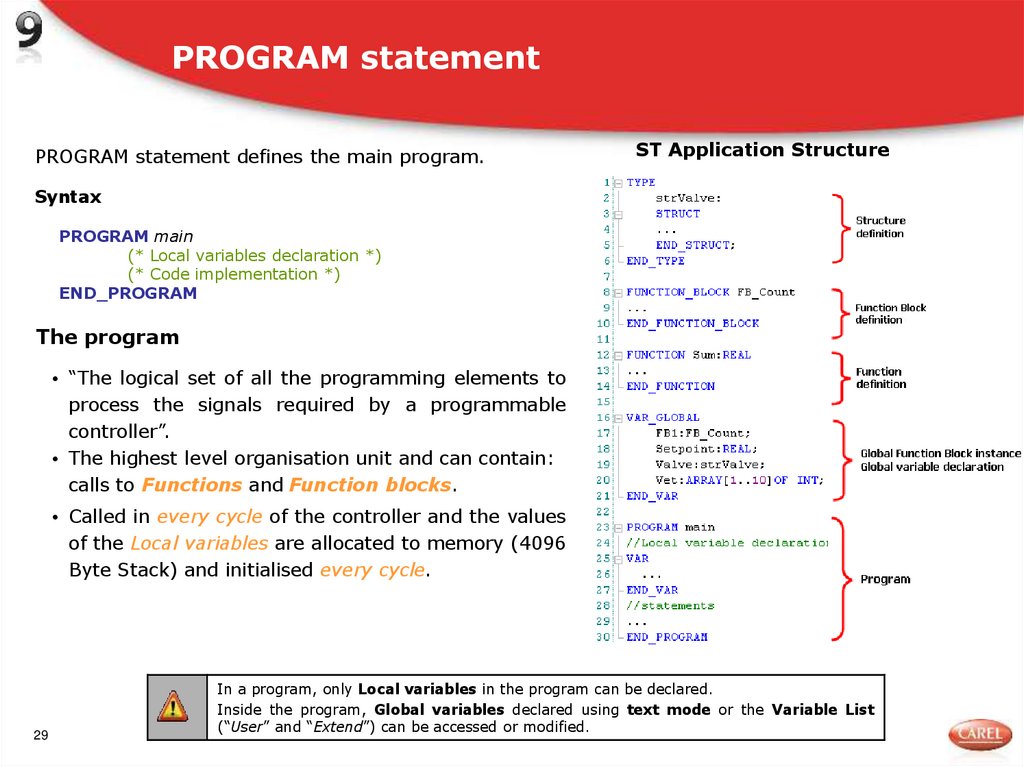
PROGRAM statement defines the main program.ST Application Structure
Syntax
PROGRAM main
(* Local variables declaration *)
(* Code implementation *)
END_PROGRAM
The program
• “The logical set of all the programming elements to
process the signals required by a programmable
controller”.
• The highest level organisation unit and can contain:
calls to Functions and Function blocks.
• Called in every cycle of the controller and the values
of the Local variables are allocated to memory (4096
Byte Stack) and initialised every cycle.
29
In a program, only Local variables in the program can be declared.
Inside the program, Global variables declared using text mode or the Variable List
(“User” and “Extend”) can be accessed or modified.
30. Local variables to PROGRAM
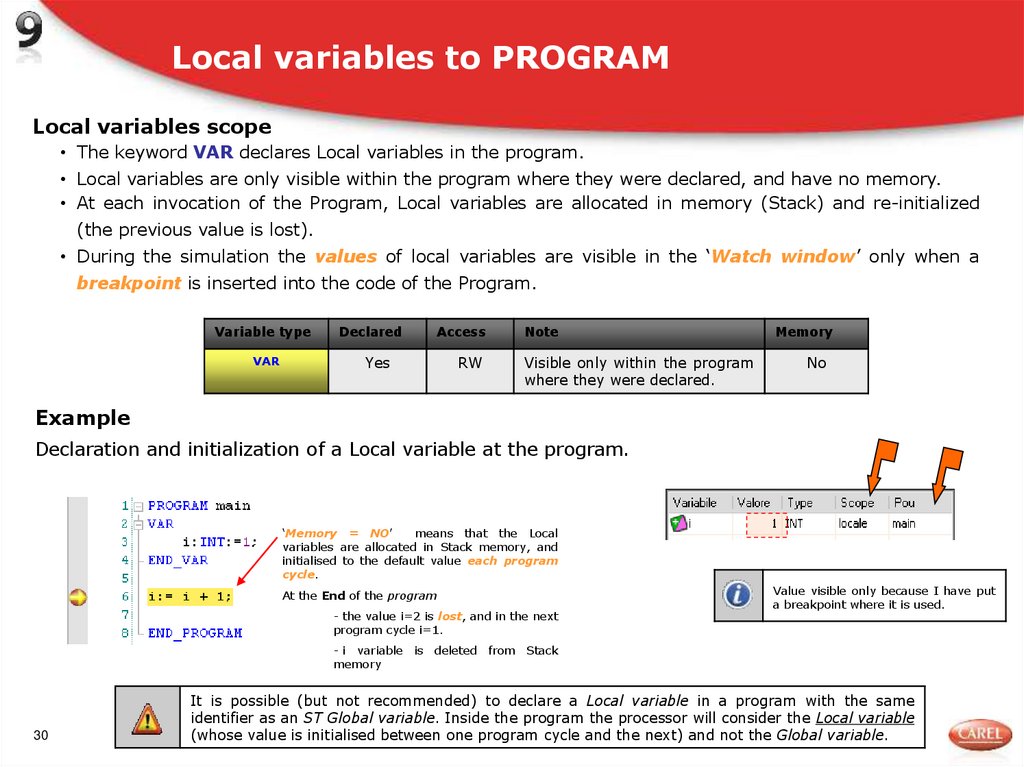
Local variables scope• The keyword VAR declares Local variables in the program.
• Local variables are only visible within the program where they were declared, and have no memory.
• At each invocation of the Program, Local variables are allocated in memory (Stack) and re-initialized
(the previous value is lost).
• During the simulation the values of local variables are visible in the ‘Watch window’ only when a
breakpoint is inserted into the code of the Program.
Variable type
Declared
Access
VAR
Yes
RW
Note
Visible only within the program
where they were declared.
Memory
No
Example
Declaration and initialization of a Local variable at the program.
‘Memory = NO’
means that the Local
variables are allocated in Stack memory, and
initialised to the default value each program
cycle.
At the End of the program
- the value i=2 is lost, and in the next
program cycle i=1.
Value visible only because I have put
a breakpoint where it is used.
- i variable is deleted from Stack
memory
30
It is possible (but not recommended) to declare a Local variable in a program with the same
identifier as an ST Global variable. Inside the program the processor will consider the Local variable
(whose value is initialised between one program cycle and the next) and not the Global variable.
31. ST operators
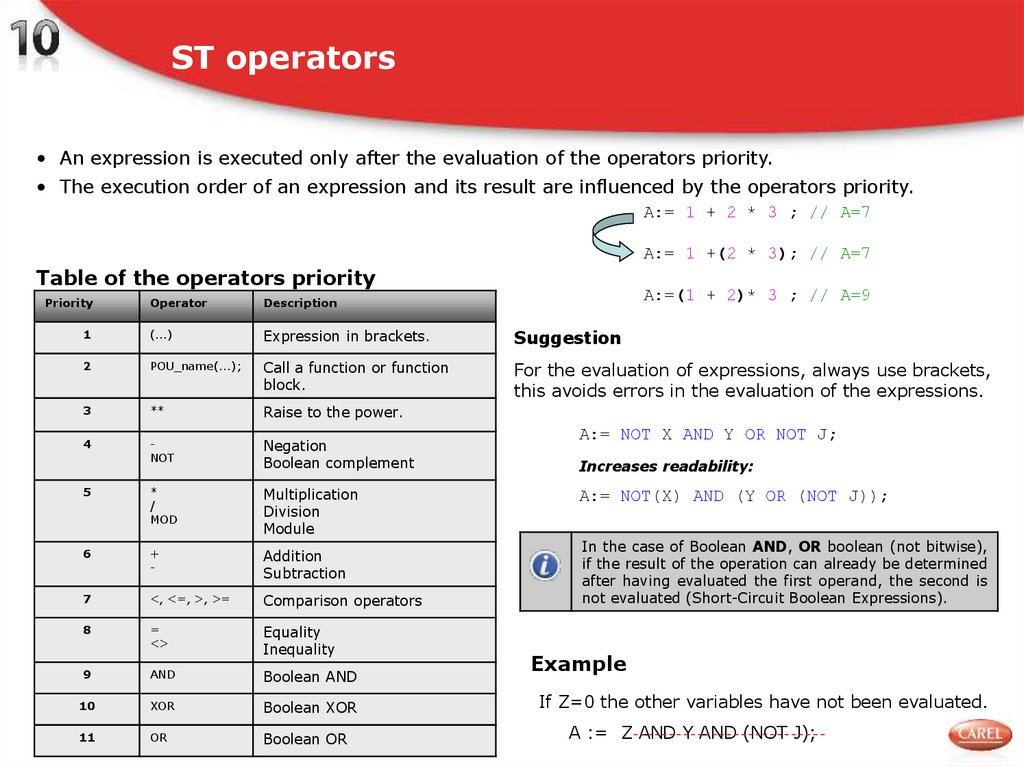
• An expression is executed only after the evaluation of the operators priority.• The execution order of an expression and its result are influenced by the operators priority.
A:= 1 + 2 * 3 ; // A=7
A:= 1 +(2 * 3); // A=7
Table of the operators priority
Priority
31
A:=(1 + 2)* 3 ; // A=9
Operator
Description
1
(...)
Expression in brackets.
Suggestion
2
POU_name(...);
Call a function or function
block.
For the evaluation of expressions, always use brackets,
this avoids errors in the evaluation of the expressions.
3
**
Raise to the power.
4
NOT
Negation
Boolean complement
5
*
/
MOD
Multiplication
Division
Module
6
+
-
Addition
Subtraction
7
<, <=, >, >=
Comparison operators
8
=
<>
Equality
Inequality
9
AND
Boolean AND
10
XOR
Boolean XOR
11
OR
Boolean OR
A:= NOT X AND Y OR NOT J;
Increases readability:
A:= NOT(X) AND (Y OR (NOT J));
In the case of Boolean AND, OR boolean (not bitwise),
if the result of the operation can already be determined
after having evaluated the first operand, the second is
not evaluated (Short-Circuit Boolean Expressions).
Example
If Z=0 the other variables have not been evaluated.
A := Z AND Y AND (NOT J);
32. Conditional statements: IF
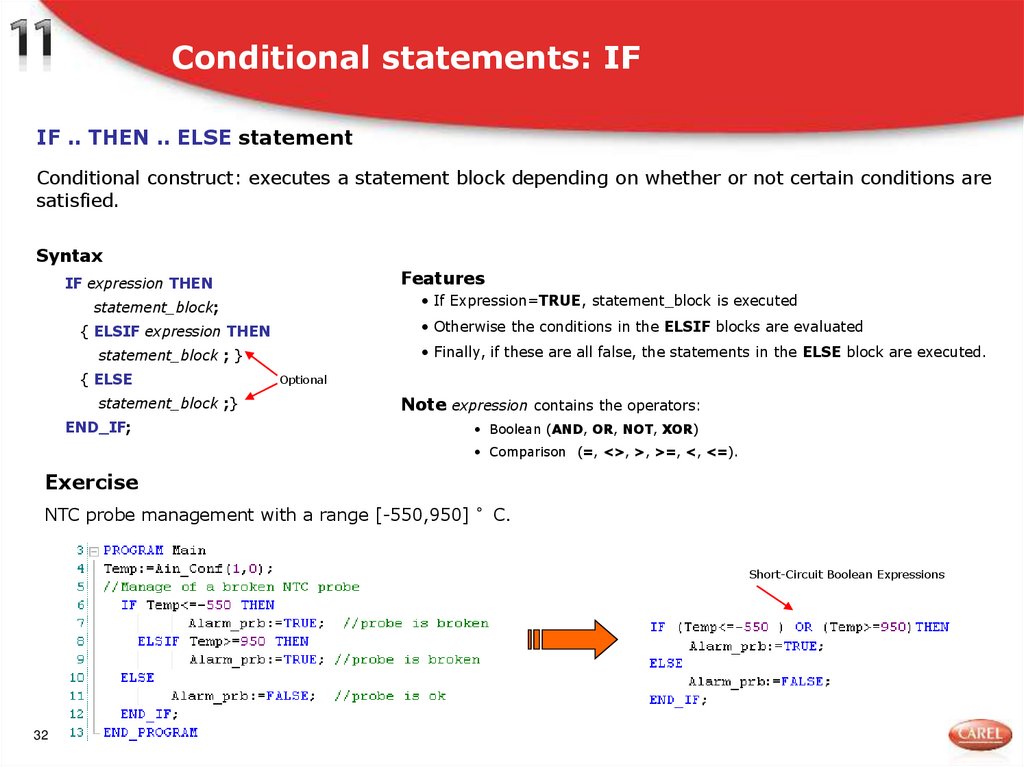
IF .. THEN .. ELSE statementConditional construct: executes a statement block depending on whether or not certain conditions are
satisfied.
Syntax
Features
IF expression THEN
• If Expression=TRUE, statement_block is executed
statement_block;
• Otherwise the conditions in the ELSIF blocks are evaluated
{ ELSIF expression THEN
• Finally, if these are all false, the statements in the ELSE block are executed.
statement_block ; }
{ ELSE
statement_block ;}
END_IF;
Optional
Note expression contains the operators:
• Boolean (AND, OR, NOT, XOR)
• Comparison (=, <>, >, >=, <, <=).
Exercise
NTC probe management with a range [-550,950] °C.
Short-Circuit Boolean Expressions
32
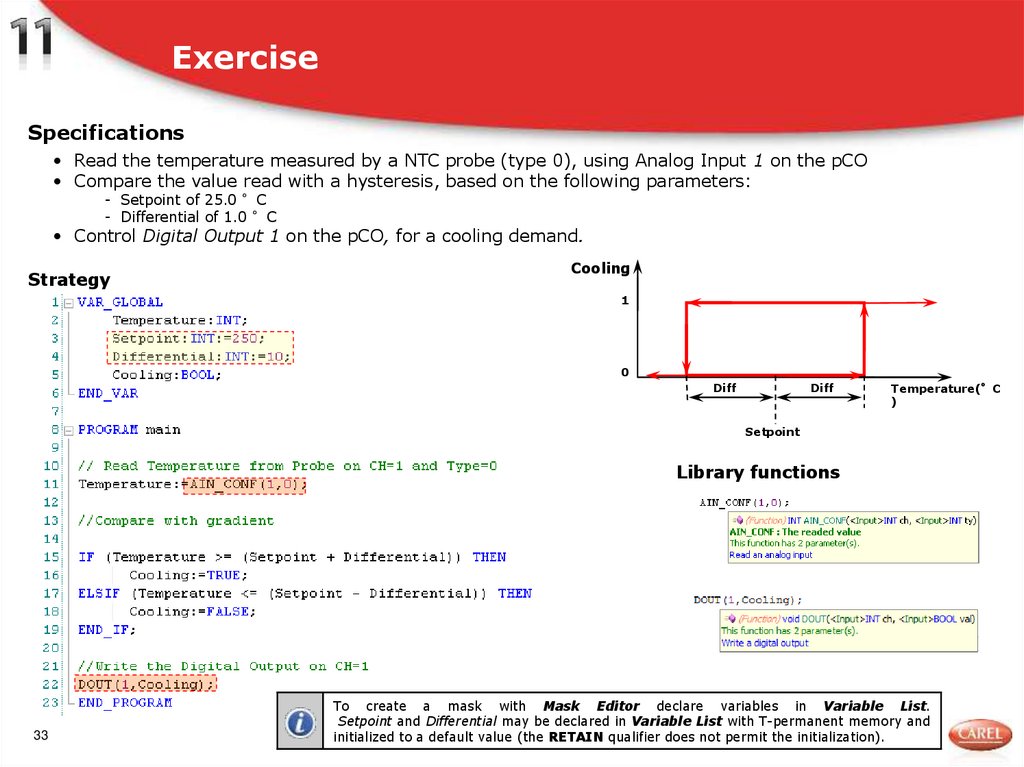
33. Exercise
Specifications• Read the temperature measured by a NTC probe (type 0), using Analog Input 1 on the pCO
• Compare the value read with a hysteresis, based on the following parameters:
- Setpoint of 25.0 °C
- Differential of 1.0 °C
• Control Digital Output 1 on the pCO, for a cooling demand.
Strategy
Cooling
1
0
Diff
Diff
Temperature(°C
)
Setpoint
Library functions
33
To create a mask with Mask Editor declare variables in Variable List.
Setpoint and Differential may be declared in Variable List with T-permanent memory and
initialized to a default value (the RETAIN qualifier does not permit the initialization).
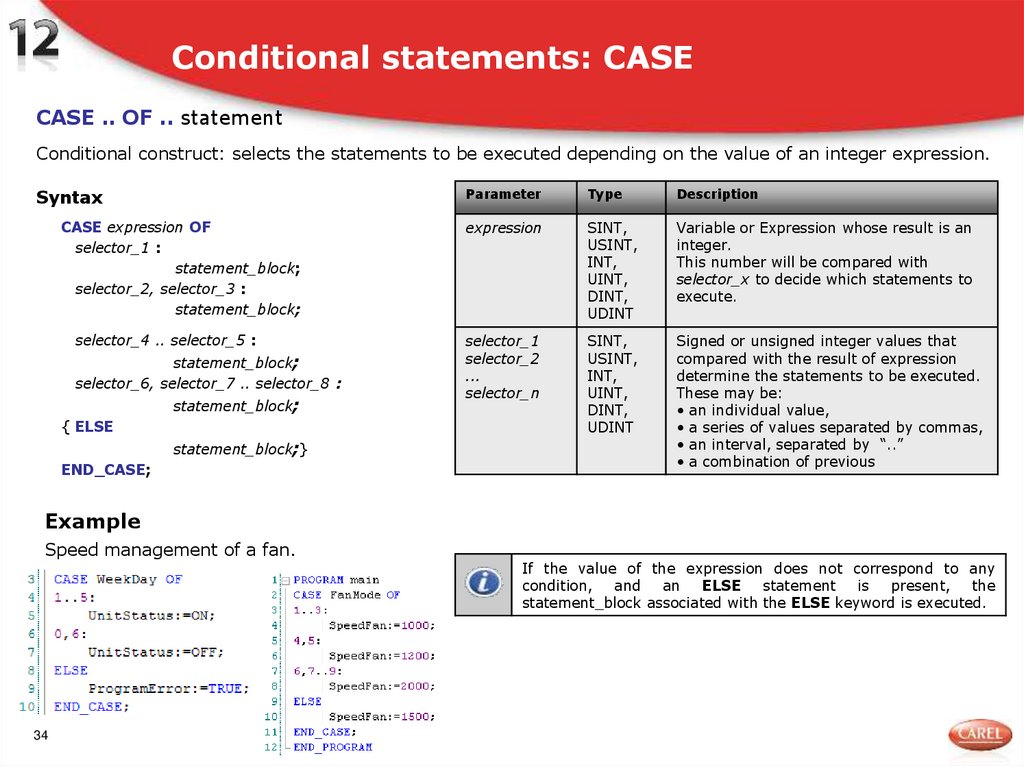
34. Conditional statements: CASE
CASE .. OF .. statementConditional construct: selects the statements to be executed depending on the value of an integer expression.
Syntax
CASE expression OF
selector_1 :
statement_block;
selector_2, selector_3 :
statement_block;
selector_4 .. selector_5 :
statement_block;
selector_6, selector_7 .. selector_8 :
statement_block;
{ ELSE
statement_block;}
END_CASE;
Parameter
Type
Description
expression
SINT,
USINT,
INT,
UINT,
DINT,
UDINT
Variable or Expression whose result is an
integer.
This number will be compared with
selector_x to decide which statements to
execute.
selector_1
selector_2
...
selector_n
SINT,
USINT,
INT,
UINT,
DINT,
UDINT
Signed or unsigned integer values that
compared with the result of expression
determine the statements to be executed.
These may be:
• an individual value,
• a series of values separated by commas,
• an interval, separated by “..”
• a combination of previous
Example
Speed management of a fan.
34
If the value of the expression does not correspond to any
condition,
and
an
ELSE
statement
is
present,
the
statement_block associated with the ELSE keyword is executed.
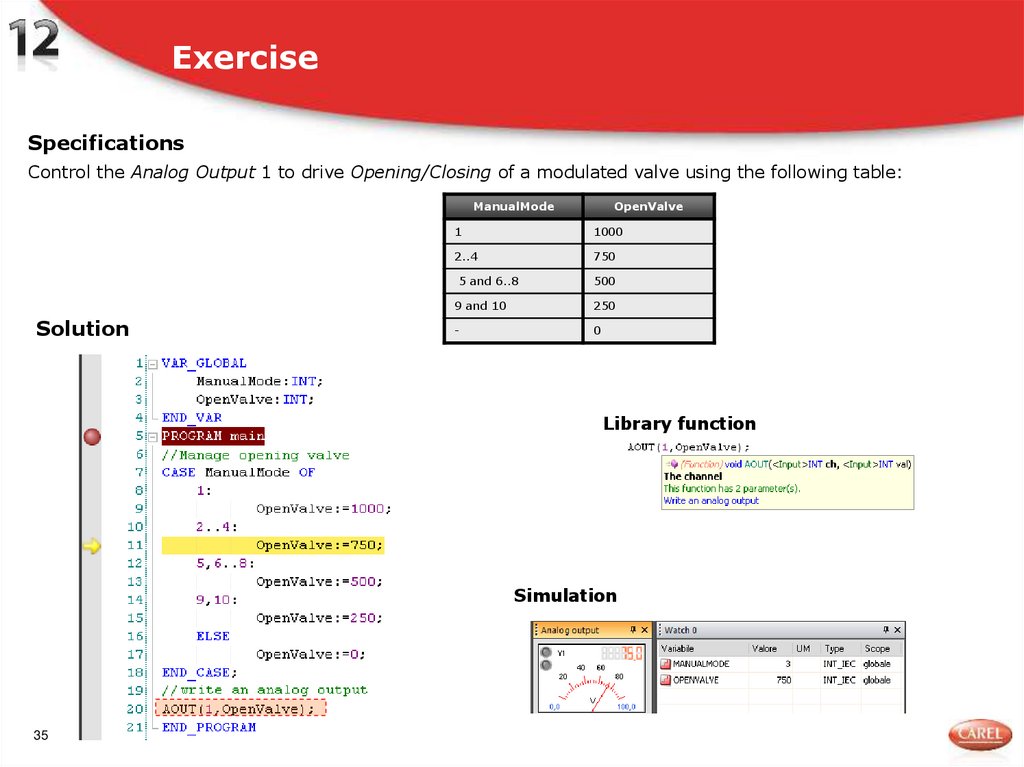
35. Exercise
SpecificationsControl the Analog Output 1 to drive Opening/Closing of a modulated valve using the following table:
ManualMode
Solution
OpenValve
1
1000
2..4
750
5 and 6..8
500
9 and 10
250
-
0
Library function
Simulation
35
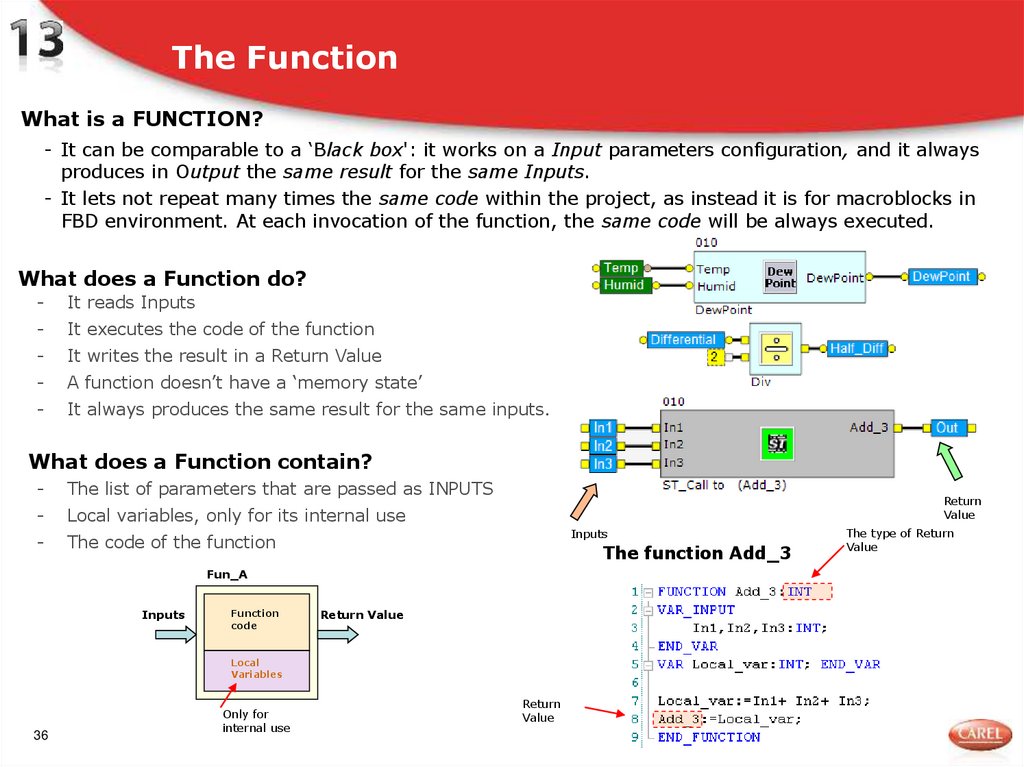
36. The Function
What is a FUNCTION?- It can be comparable to a ‘Black box': it works on a Input parameters configuration, and it always
produces in Output the same result for the same Inputs.
- It lets not repeat many times the same code within the project, as instead it is for macroblocks in
FBD environment. At each invocation of the function, the same code will be always executed.
What does a Function do?
-
It reads Inputs
-
It executes the code of the function
-
It writes the result in a Return Value
-
A function doesn’t have a ‘memory state’
-
It always produces the same result for the same inputs.
What does a Function contain?
-
The list of parameters that are passed as INPUTS
-
Local variables, only for its internal use
-
The code of the function
Return
Value
Inputs
The function Add_3
Fun_A
Inputs
Function
code
Return Value
Local
Variables
36
Only for
internal use
Return
Value
The type of Return
Value
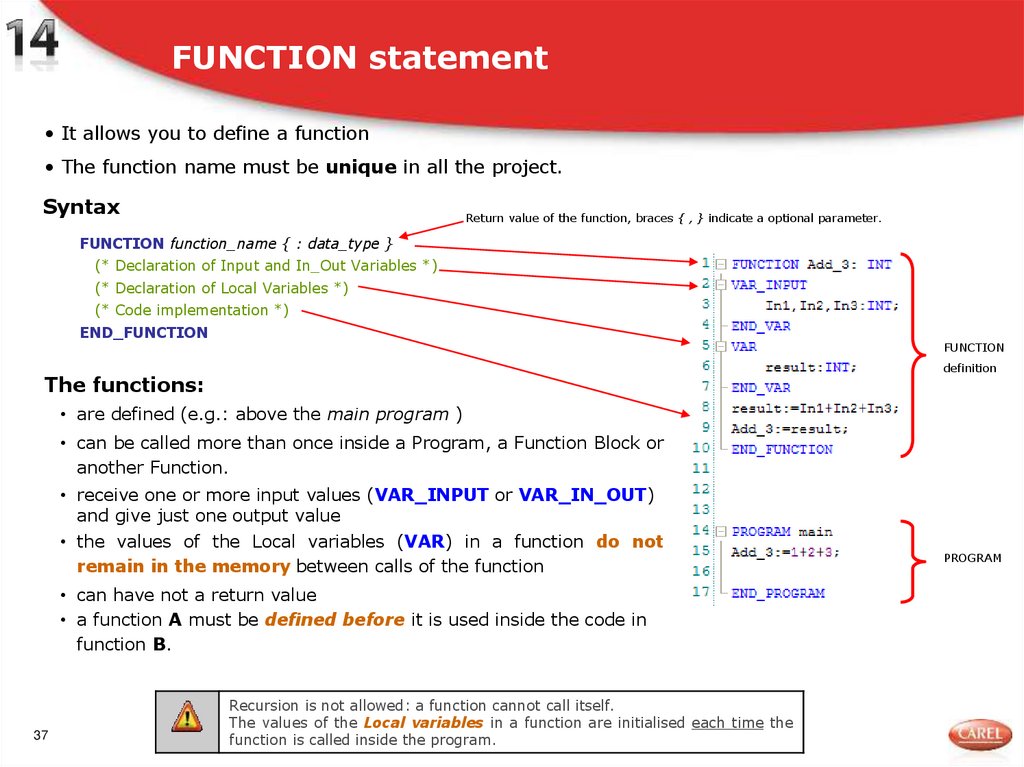
37. FUNCTION statement
• It allows you to define a function• The function name must be unique in all the project.
Syntax
Return value of the function, braces { , } indicate a optional parameter.
FUNCTION function_name { : data_type }
(* Declaration of Input and In_Out Variables *)
(* Declaration of Local Variables *)
(* Code implementation *)
END_FUNCTION
FUNCTION
definition
The functions:
• are defined (e.g.: above the main program )
• can be called more than once inside a Program, a Function Block or
another Function.
• receive one or more input values (VAR_INPUT or VAR_IN_OUT)
and give just one output value
• the values of the Local variables (VAR) in a function do not
remain in the memory between calls of the function
• can have not a return value
• a function A must be defined before it is used inside the code in
function B.
37
Recursion is not allowed: a function cannot call itself.
The values of the Local variables in a function are initialised each time the
function is called inside the program.
PROGRAM
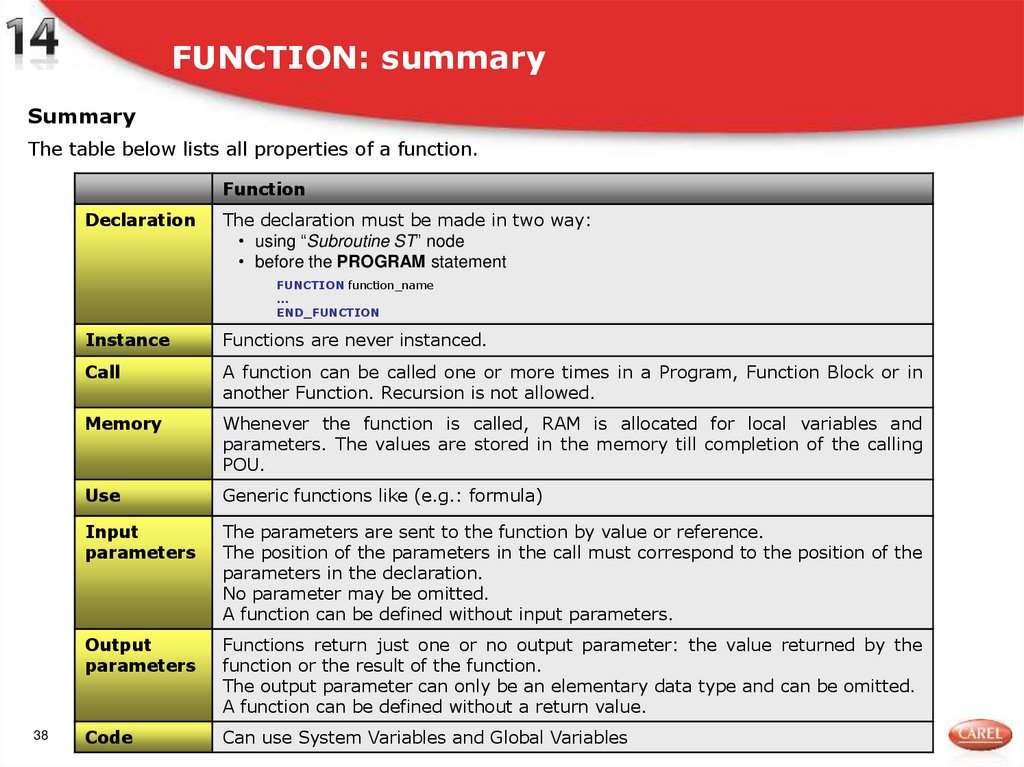
38. FUNCTION: summary
SummaryThe table below lists all properties of a function.
Function
Declaration
The declaration must be made in two way:
• using “Subroutine ST” node
• before the PROGRAM statement
FUNCTION function_name
...
END_FUNCTION
38
Instance
Functions are never instanced.
Call
A function can be called one or more times in a Program, Function Block or in
another Function. Recursion is not allowed.
Memory
Whenever the function is called, RAM is allocated for local variables and
parameters. The values are stored in the memory till completion of the calling
POU.
Use
Generic functions like (e.g.: formula)
Input
parameters
The parameters are sent to the function by value or reference.
The position of the parameters in the call must correspond to the position of the
parameters in the declaration.
No parameter may be omitted.
A function can be defined without input parameters.
Output
parameters
Functions return just one or no output parameter: the value returned by the
function or the result of the function.
The output parameter can only be an elementary data type and can be omitted.
A function can be defined without a return value.
Code
Can use System Variables and Global Variables
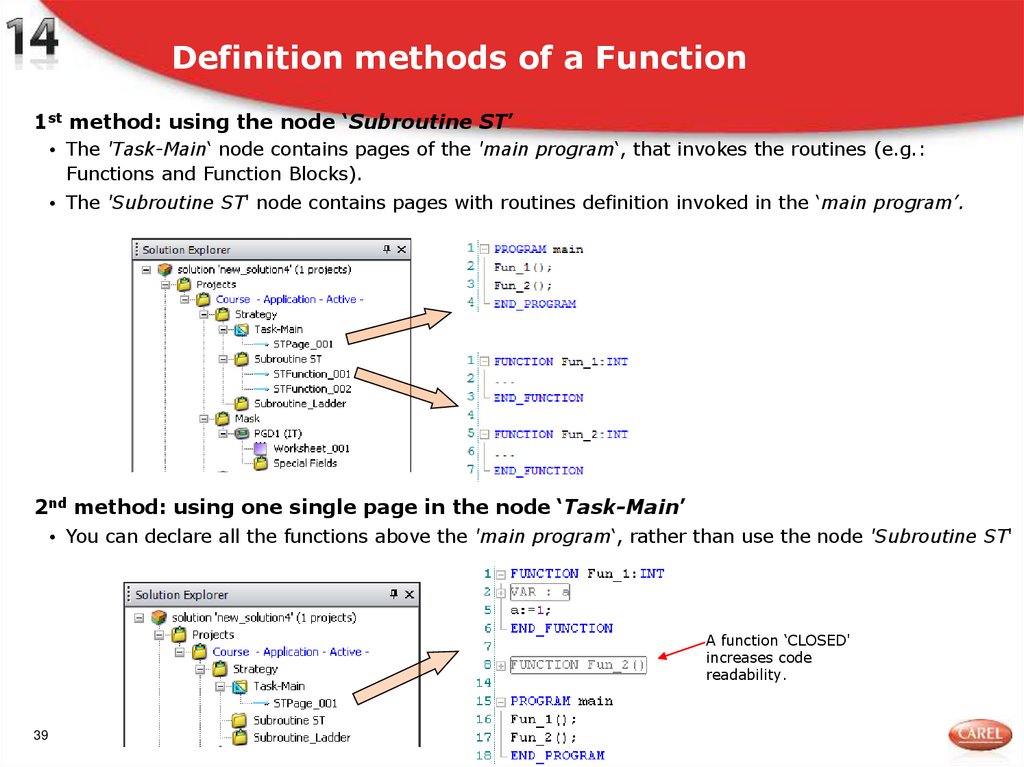
39. Definition methods of a Function
1st method: using the node ‘Subroutine ST’• The 'Task-Main‘ node contains pages of the 'main program‘, that invokes the routines (e.g.:
Functions and Function Blocks).
• The 'Subroutine ST' node contains pages with routines definition invoked in the ‘main program’.
2nd method: using one single page in the node ‘Task-Main’
• You can declare all the functions above the 'main program‘, rather than use the node 'Subroutine ST'
A function ‘CLOSED'
increases code
readability.
39
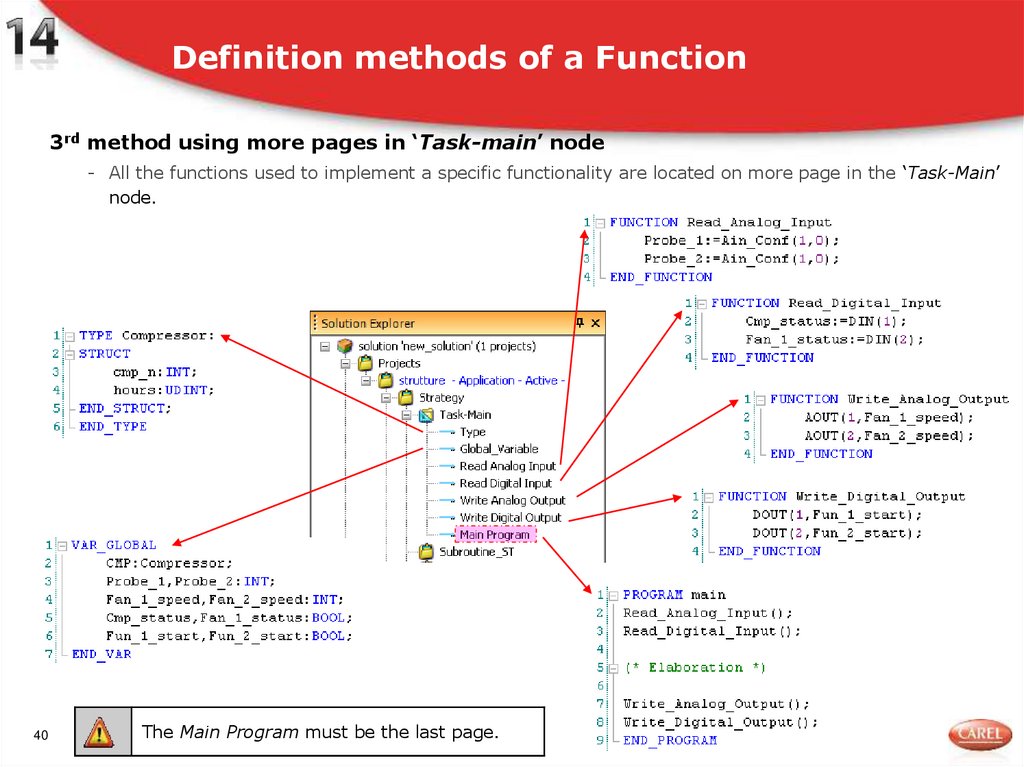
40. Definition methods of a Function
3rd method using more pages in ‘Task-main’ node- All the functions used to implement a specific functionality are located on more page in the ‘Task-Main’
node.
40
The Main Program must be the last page.
41. Exercise
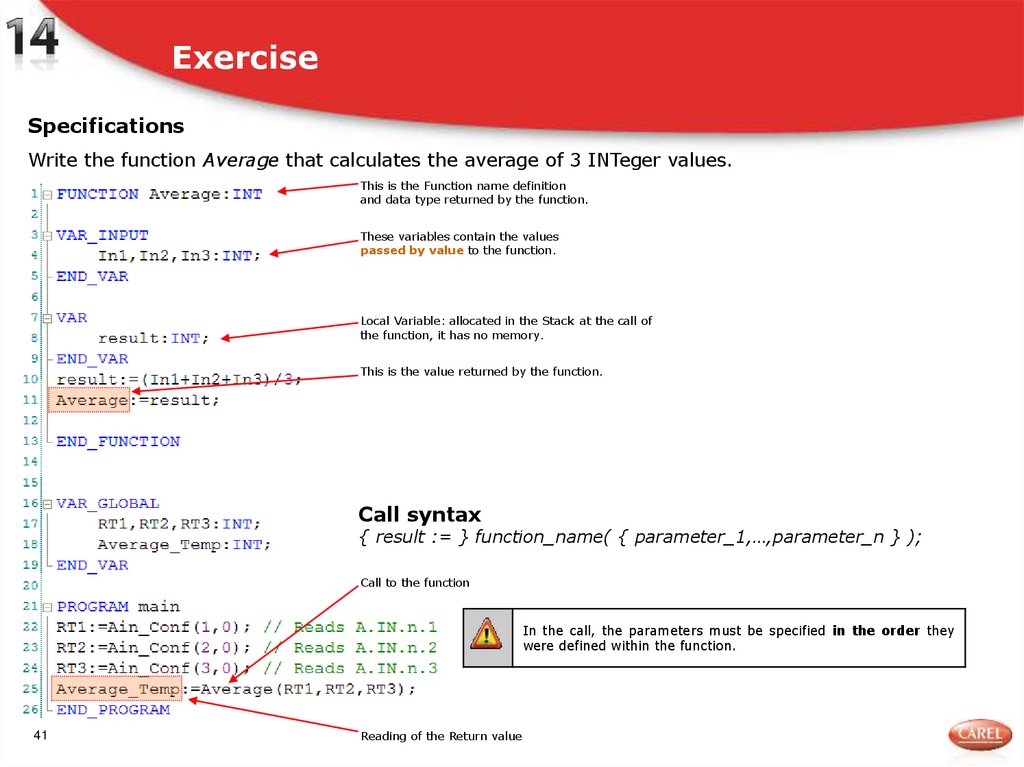
SpecificationsWrite the function Average that calculates the average of 3 INTeger values.
This is the Function name definition
and data type returned by the function.
These variables contain the values
passed by value to the function.
Local Variable: allocated in the Stack at the call of
the function, it has no memory.
This is the value returned by the function.
Call syntax
{ result := } function_name( { parameter_1,…,parameter_n } );
Call to the function
In the call, the parameters must be specified in the order they
were defined within the function.
41
Reading of the Return value
42. Pass by Value (VAR_INPUT)
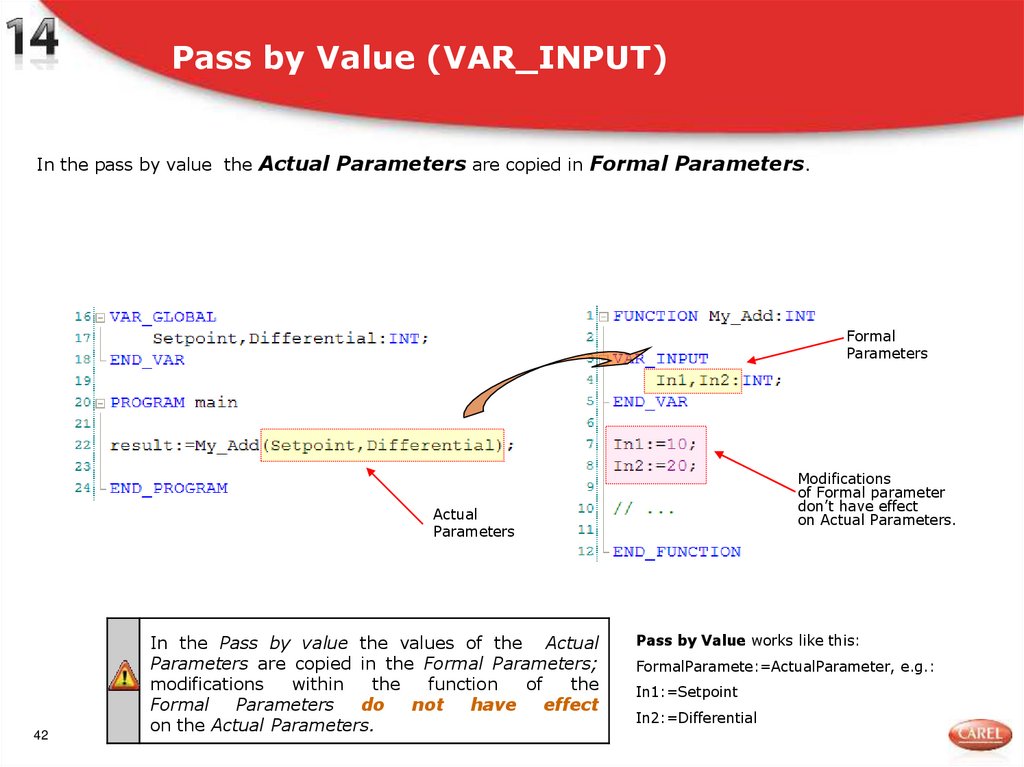
In the pass by value the Actual Parameters are copied in Formal Parameters.Formal
Parameters
Modifications
of Formal parameter
don’t have effect
on Actual Parameters.
Actual
Parameters
42
In the Pass by value the values of the Actual
Parameters are copied in the Formal Parameters;
modifications
within
the
function
of
the
Formal
Parameters
do
not
have
effect
on the Actual Parameters.
Pass by Value works like this:
FormalParamete:=ActualParameter, e.g.:
In1:=Setpoint
In2:=Differential
43. Pass by Reference (VAR_IN_OUT)
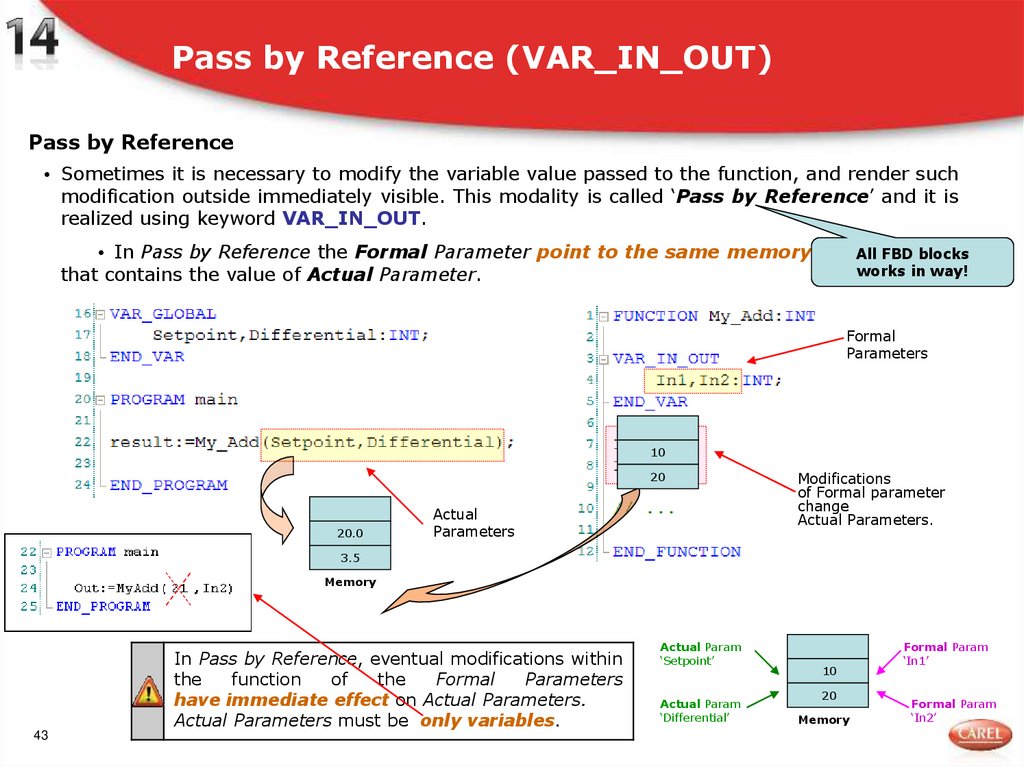
Pass by Reference• Sometimes it is necessary to modify the variable value passed to the function, and render such
modification outside immediately visible. This modality is called ‘Pass by Reference’ and it is
realized using keyword VAR_IN_OUT.
• In Pass by Reference the Formal Parameter point to the same memory cell All FBD blocks
works in way!
that contains the value of Actual Parameter.
Formal
Parameters
10
20
20.0
Actual
Parameters
Modifications
of Formal parameter
change
Actual Parameters.
3.5
Memory
In Pass by Reference, eventual modifications within
the
function
of
the
Formal
Parameters
have immediate effect on Actual Parameters.
Actual Parameters must be only variables.
43
Actual Param
‘Setpoint’
Actual Param
‘Differential’
10
20
Memory
Formal Param
‘In1’
Formal Param
‘In2’
44. Variables scope
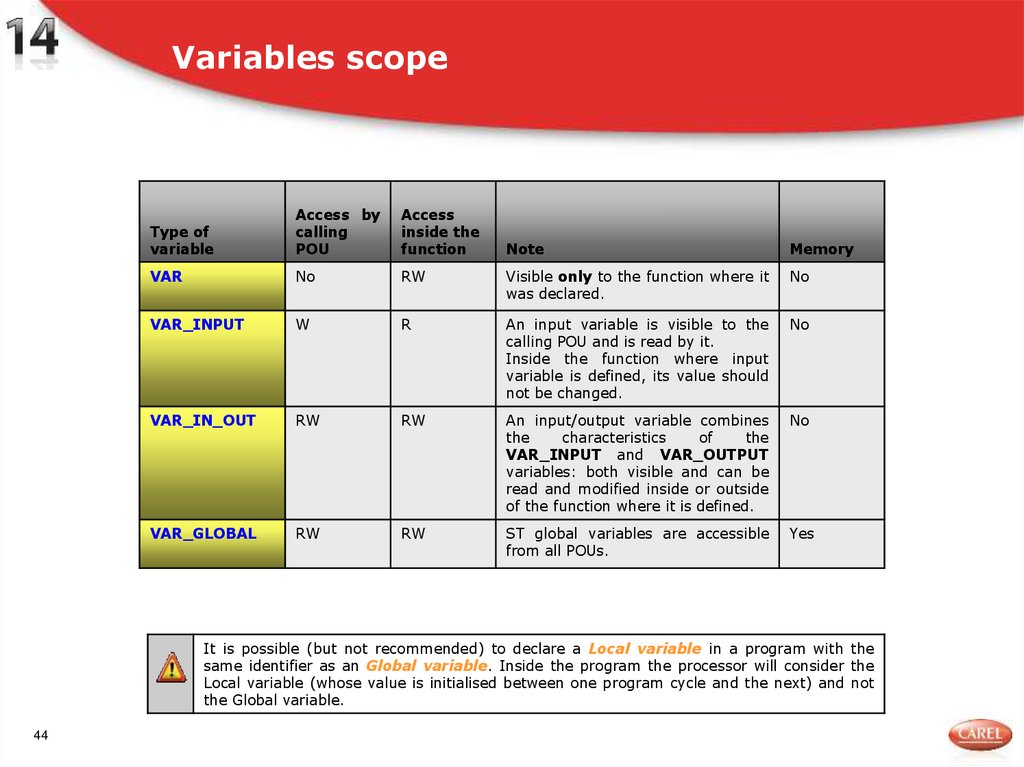
Type ofvariable
Access by
calling
POU
Access
inside the
function
VAR
No
VAR_INPUT
Note
Memory
RW
Visible only to the function where it
was declared.
No
W
R
An input variable is visible to the
calling POU and is read by it.
Inside the function where input
variable is defined, its value should
not be changed.
No
VAR_IN_OUT
RW
RW
An input/output variable combines
the
characteristics
of
the
VAR_INPUT and VAR_OUTPUT
variables: both visible and can be
read and modified inside or outside
of the function where it is defined.
No
VAR_GLOBAL
RW
RW
ST global variables are accessible
from all POUs.
Yes
It is possible (but not recommended) to declare a Local variable in a program with the
same identifier as an Global variable. Inside the program the processor will consider the
Local variable (whose value is initialised between one program cycle and the next) and not
the Global variable.
44
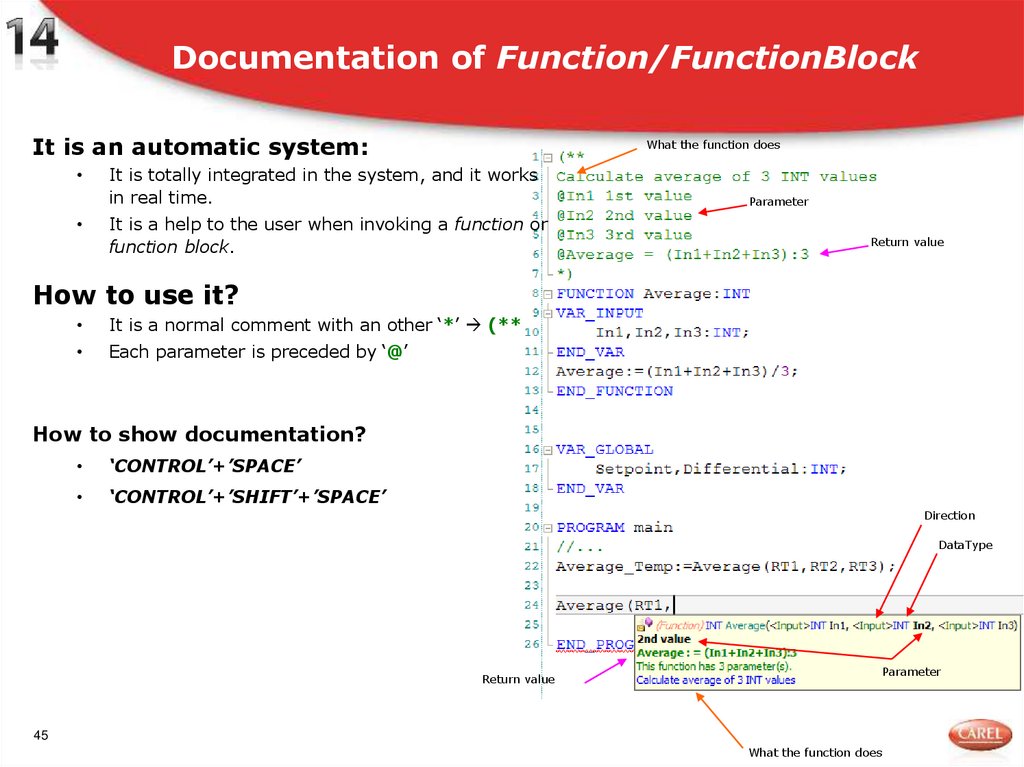
45. Documentation of Function/FunctionBlock
It is an automatic system:What the function does
It is totally integrated in the system, and it works
in real time.
It is a help to the user when invoking a function or
function block.
Parameter
Return value
How to use it?
It is a normal comment with an other ‘*’ (**
Each parameter is preceded by ‘@’
How to show documentation?
‘CONTROL’+’SPACE’
‘CONTROL’+’SHIFT’+’SPACE’
Direction
DataType
Return value
Parameter
45
What the function does
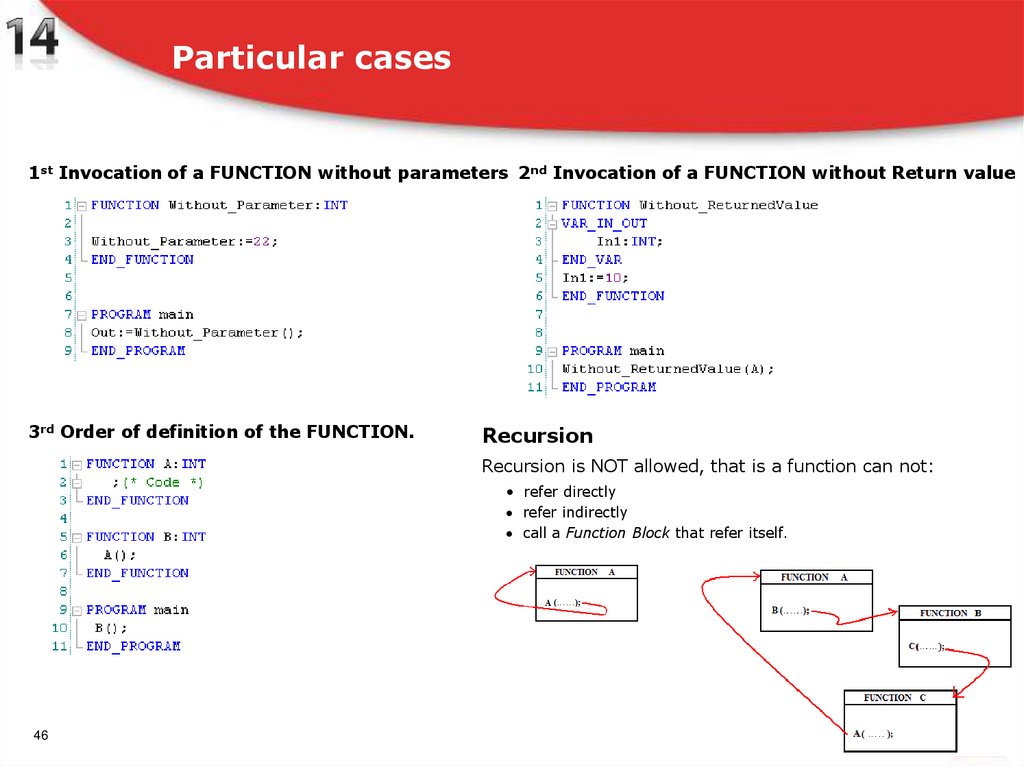
46. Particular cases
1st Invocation of a FUNCTION without parameters 2nd Invocation of a FUNCTION without Return value3rd Order of definition of the FUNCTION.
Recursion
Recursion is NOT allowed, that is a function can not:
• refer directly
refer indirectly
call a Function Block that refer itself.
46
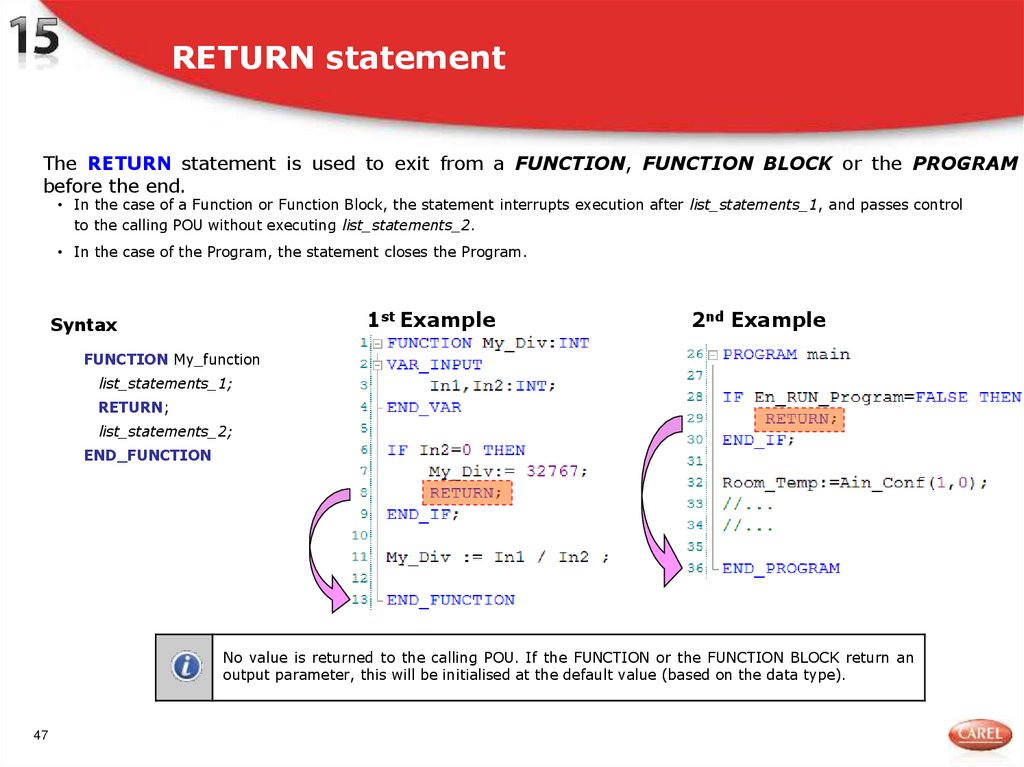
47. RETURN statement
The RETURN statement is used to exit from a FUNCTION, FUNCTION BLOCK or the PROGRAMbefore the end.
• In the case of a Function or Function Block, the statement interrupts execution after list_statements_1, and passes control
to the calling POU without executing list_statements_2.
• In the case of the Program, the statement closes the Program.
1st Example
Syntax
2nd Example
FUNCTION My_function
list_statements_1;
RETURN;
list_statements_2;
END_FUNCTION
No value is returned to the calling POU. If the FUNCTION or the FUNCTION BLOCK return an
output parameter, this will be initialised at the default value (based on the data type).
47
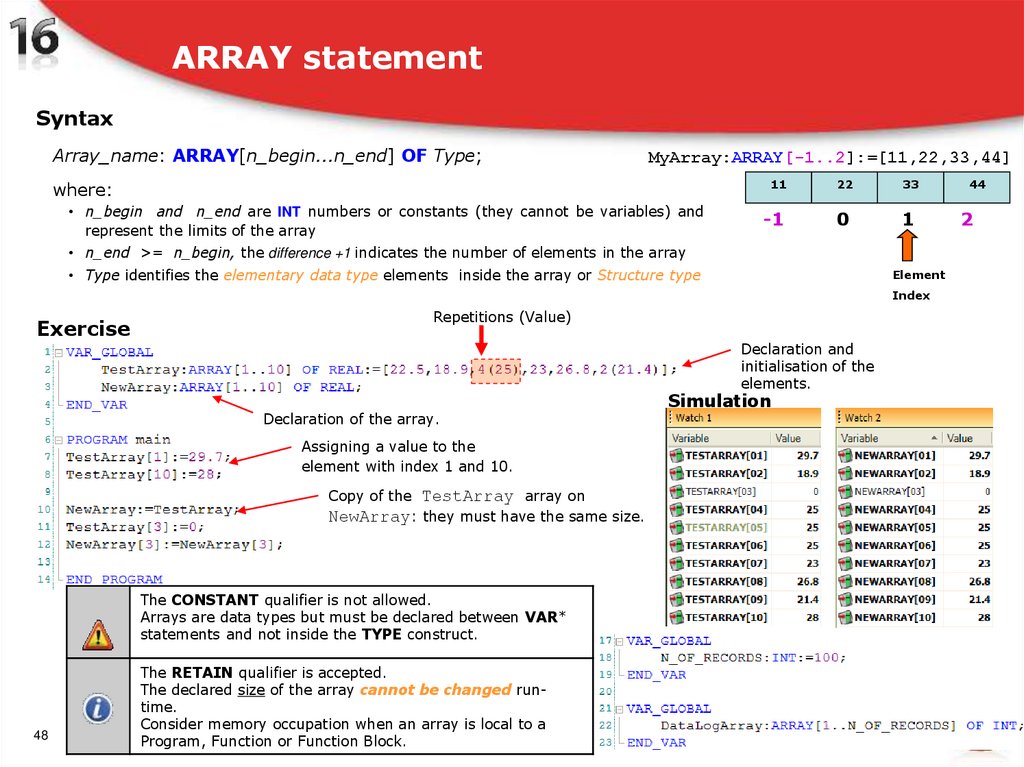
48. ARRAY statement
SyntaxArray_name: ARRAY[n_begin...n_end] OF Type;
MyArray:ARRAY[-1..2]:=[11,22,33,44]
where:
• n_begin and n_end are INT numbers or constants (they cannot be variables) and
represent the limits of the array
11
22
33
44
-1
0
1
2
• n_end >= n_begin, the difference +1 indicates the number of elements in the array
• Type identifies the elementary data type elements inside the array or Structure type
Element
Index
Exercise
Repetitions (Value)
Declaration and
initialisation of the
elements.
Declaration of the array.
Assigning a value to the
element with index 1 and 10.
Copy of the TestArray array on
NewArray: they must have the same size.
The CONSTANT qualifier is not allowed.
Arrays are data types but must be declared between VAR*
statements and not inside the TYPE construct.
48
The RETAIN qualifier is accepted.
The declared size of the array cannot be changed runtime.
Consider memory occupation when an array is local to a
Program, Function or Function Block.
Simulation
49. Array use
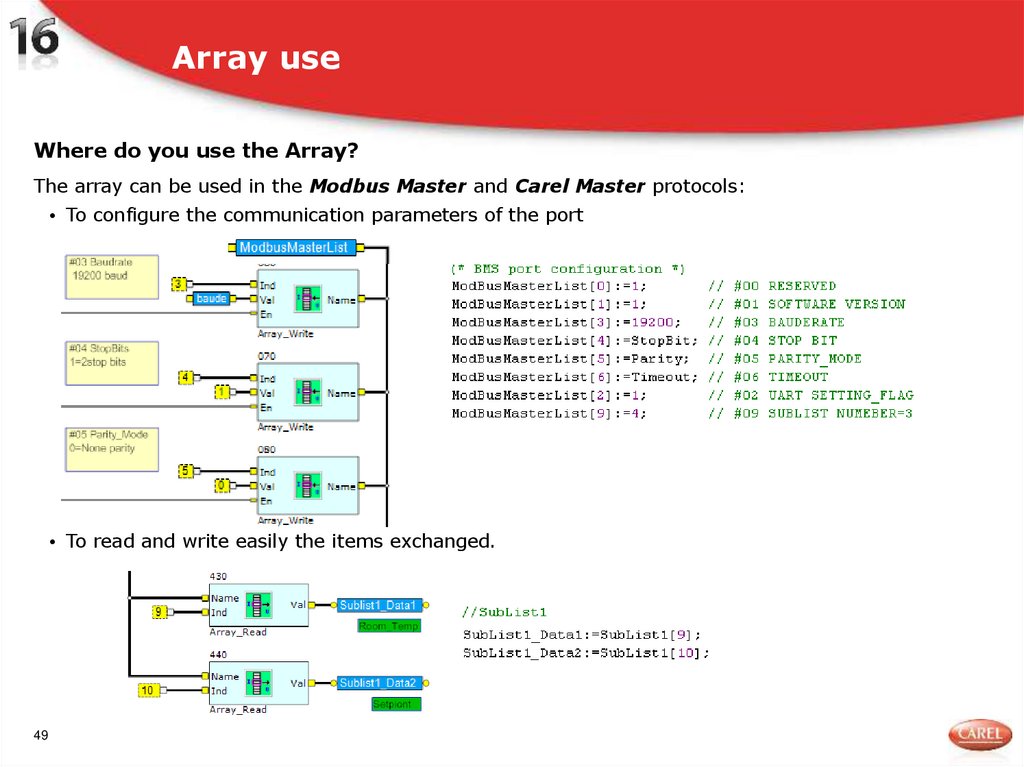
Where do you use the Array?The array can be used in the Modbus Master and Carel Master protocols:
• To configure the communication parameters of the port
• To read and write easily the items exchanged.
49
50. Array Breakthrough (exceeded limits)
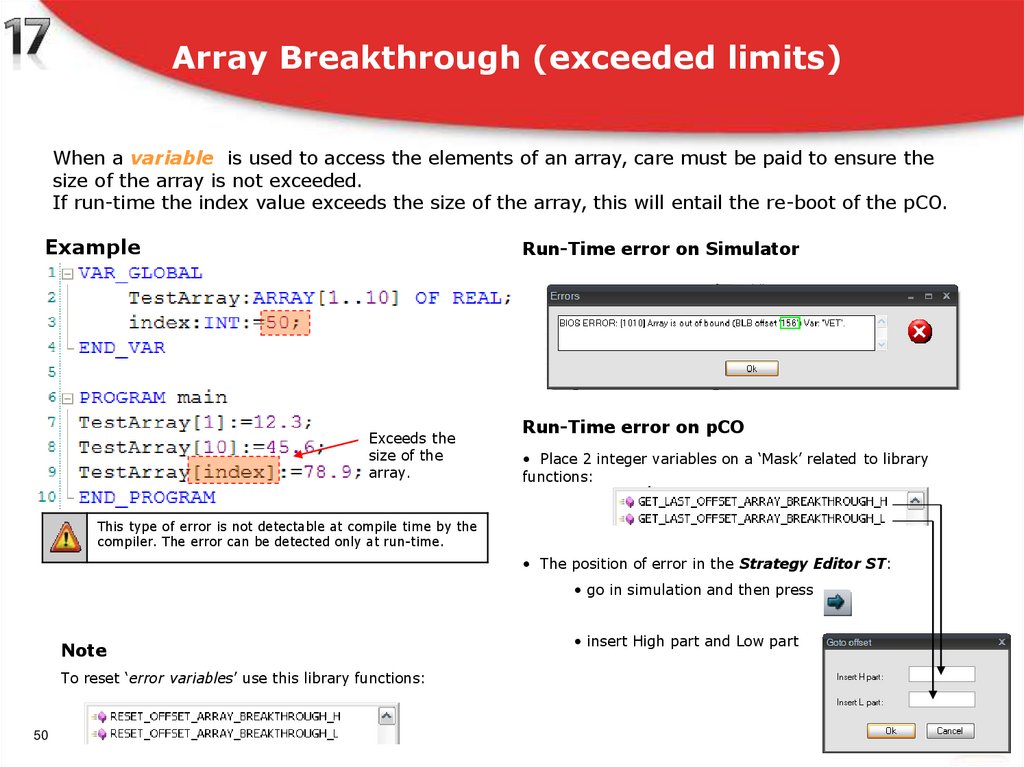
When a variable is used to access the elements of an array, care must be paid to ensure thesize of the array is not exceeded.
If run-time the index value exceeds the size of the array, this will entail the re-boot of the pCO.
Example
Run-Time error on Simulator
Exceeds the
size of the
array.
Run-Time error on pCO
• Place 2 integer variables on a ‘Mask’ related to library
functions:
This type of error is not detectable at compile time by the
compiler. The error can be detected only at run-time.
• The position of error in the Strategy Editor ST:
• go in simulation and then press
Note
To reset ‘error variables’ use this library functions:
50
• insert High part and Low part
51. Iteration statements: FOR
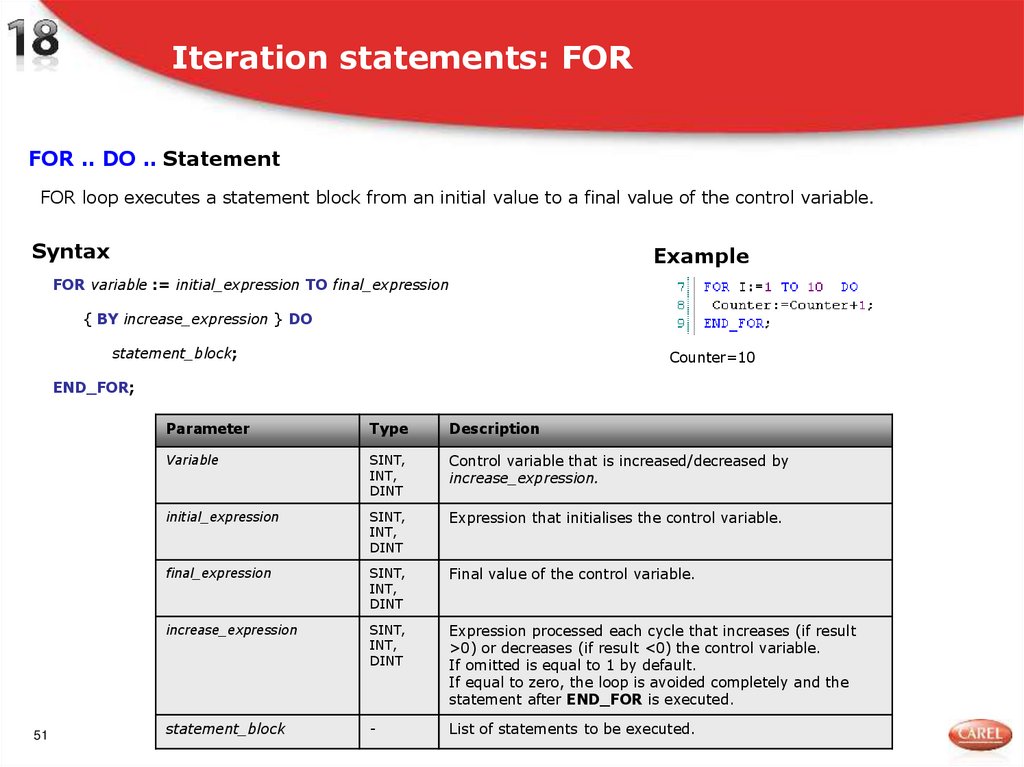
FOR .. DO .. StatementFOR loop executes a statement block from an initial value to a final value of the control variable.
Syntax
Example
FOR variable := initial_expression TO final_expression
{ BY increase_expression } DO
statement_block;
Counter=10
END_FOR;
51
Parameter
Type
Description
Variable
SINT,
INT,
DINT
Control variable that is increased/decreased by
increase_expression.
initial_expression
SINT,
INT,
DINT
Expression that initialises the control variable.
final_expression
SINT,
INT,
DINT
Final value of the control variable.
increase_expression
SINT,
INT,
DINT
Expression processed each cycle that increases (if result
>0) or decreases (if result <0) the control variable.
If omitted is equal to 1 by default.
If equal to zero, the loop is avoided completely and the
statement after END_FOR is executed.
statement_block
-
List of statements to be executed.
52. Types of FOR loops
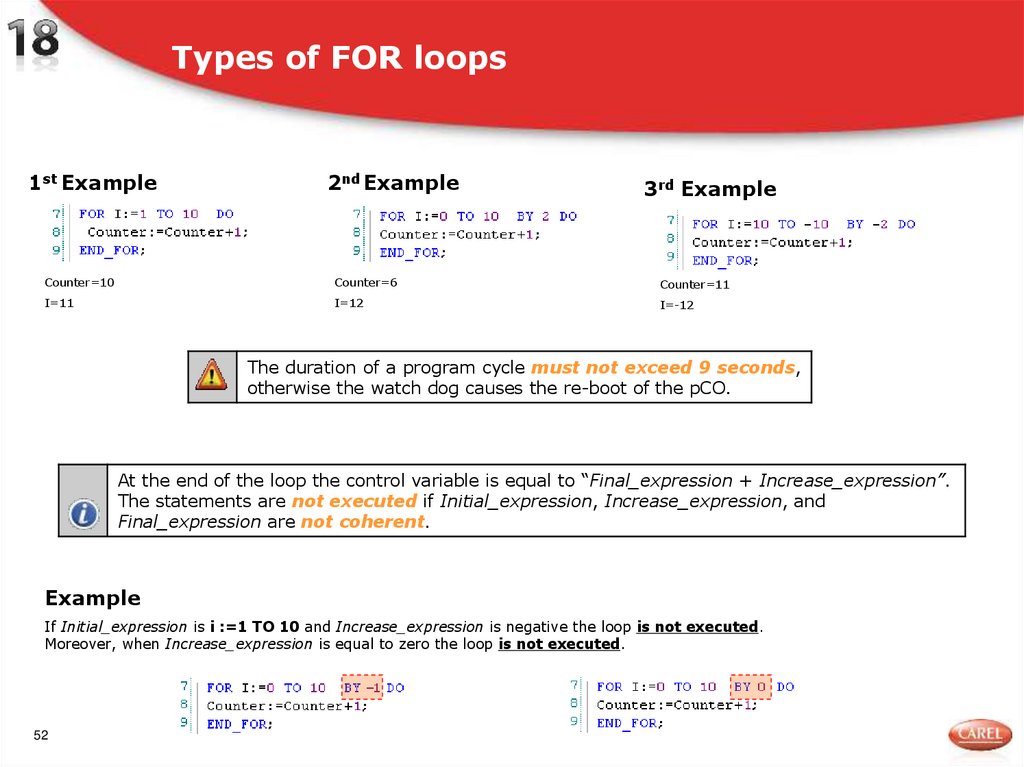
1st Example2nd Example
3rd Example
Counter=10
Counter=6
Counter=11
I=11
I=12
I=-12
The duration of a program cycle must not exceed 9 seconds,
otherwise the watch dog causes the re-boot of the pCO.
At the end of the loop the control variable is equal to “Final_expression + Increase_expression”.
The statements are not executed if Initial_expression, Increase_expression, and
Final_expression are not coherent.
Example
If Initial_expression is i :=1 TO 10 and Increase_expression is negative the loop is not executed.
Moreover, when Increase_expression is equal to zero the loop is not executed.
52
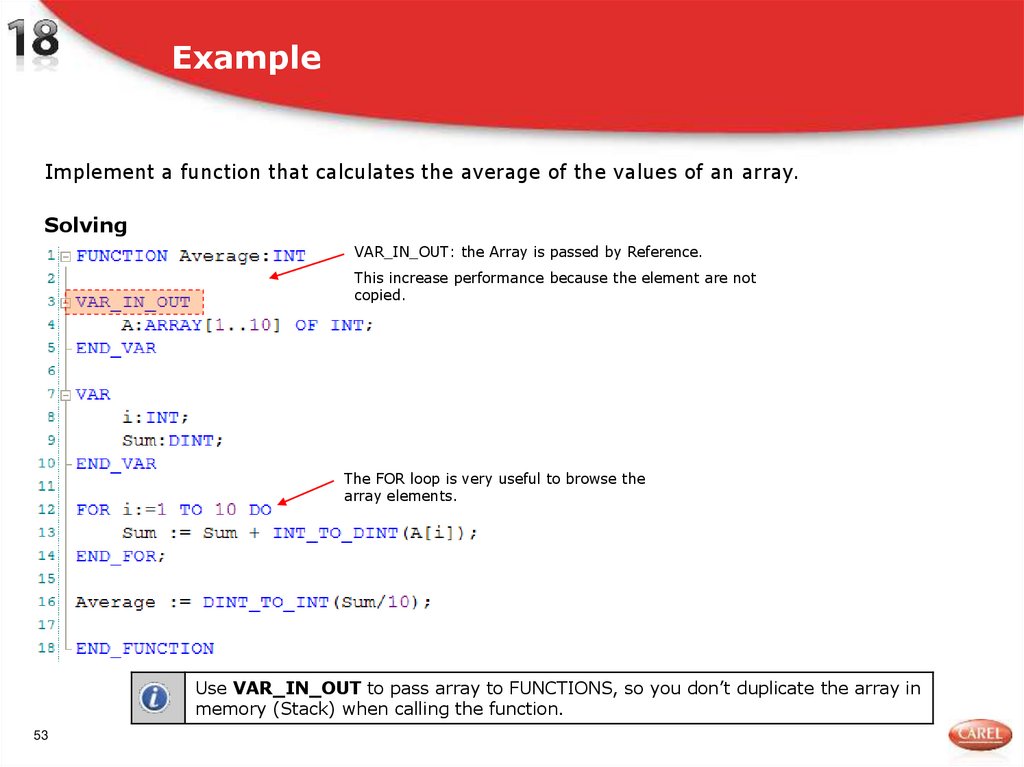
53. Example
Implement a function that calculates the average of the values of an array.Solving
VAR_IN_OUT: the Array is passed by Reference.
This increase performance because the element are not
copied.
The FOR loop is very useful to browse the
array elements.
Use VAR_IN_OUT to pass array to FUNCTIONS, so you don’t duplicate the array in
memory (Stack) when calling the function.
53
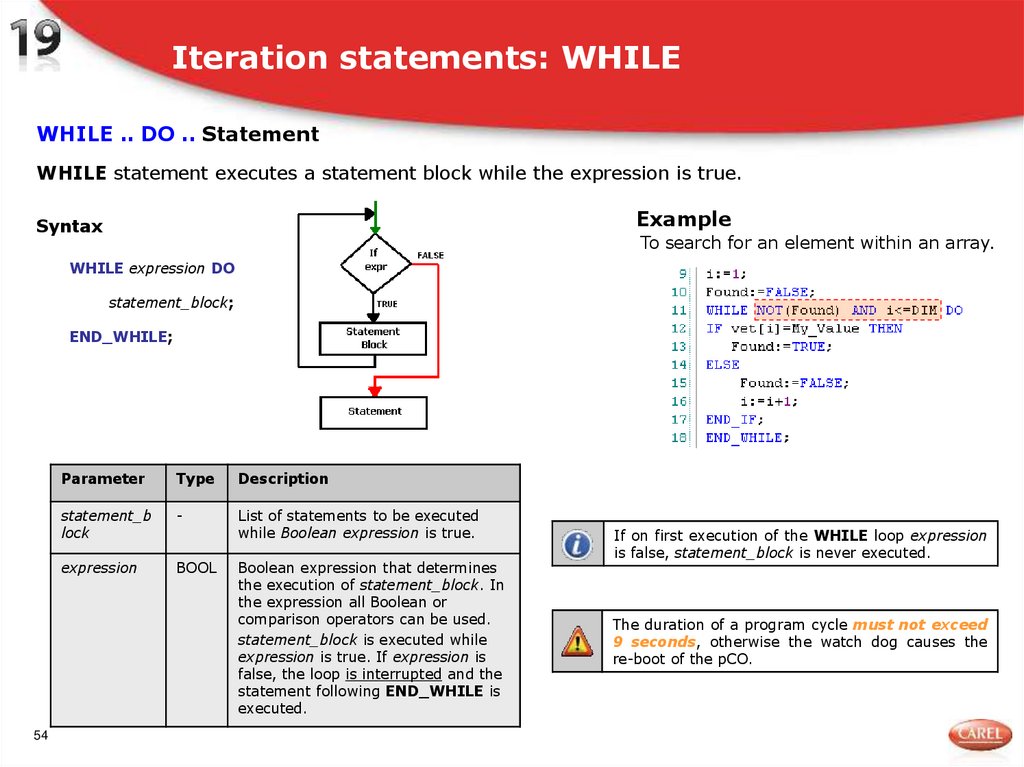
54. Iteration statements: WHILE
WHILE .. DO .. StatementWHILE statement executes a statement block while the expression is true.
Example
Syntax
To search for an element within an array.
WHILE expression DO
statement_block;
END_WHILE;
54
Parameter
Type
Description
statement_b
lock
-
List of statements to be executed
while Boolean expression is true.
expression
BOOL
Boolean expression that determines
the execution of statement_block. In
the expression all Boolean or
comparison operators can be used.
statement_block is executed while
expression is true. If expression is
false, the loop is interrupted and the
statement following END_WHILE is
executed.
If on first execution of the WHILE loop expression
is false, statement_block is never executed.
The duration of a program cycle must not exceed
9 seconds, otherwise the watch dog causes the
re-boot of the pCO.
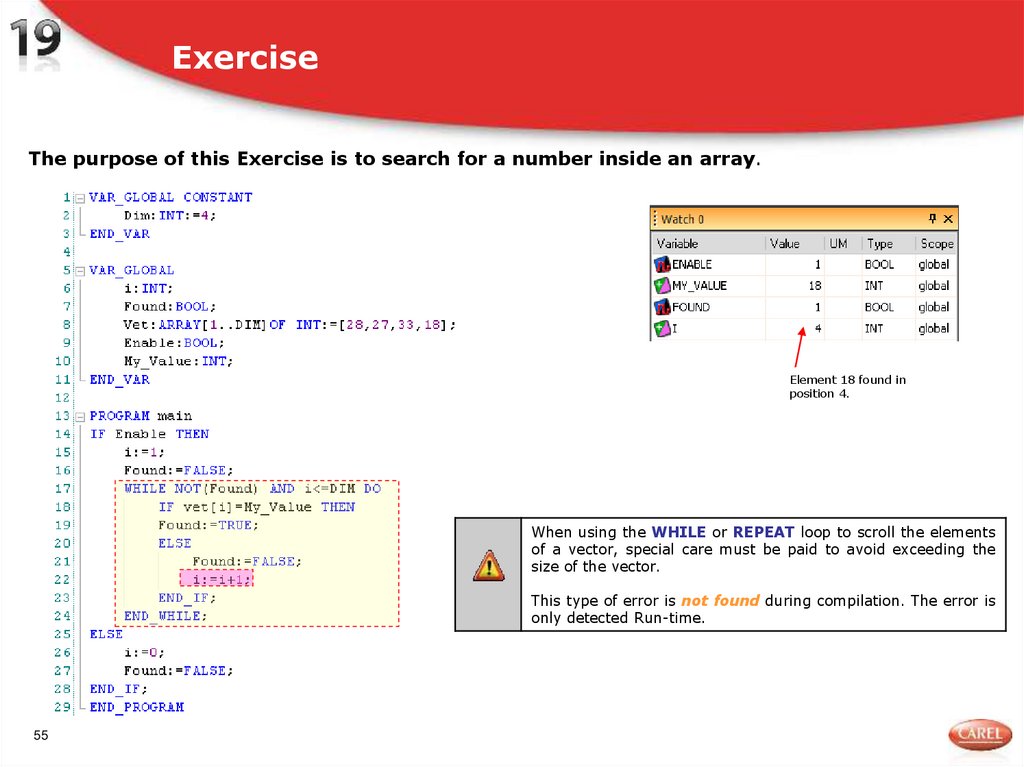
55. Exercise
The purpose of this Exercise is to search for a number inside an array.Element 18 found in
position 4.
When using the WHILE or REPEAT loop to scroll the elements
of a vector, special care must be paid to avoid exceeding the
size of the vector.
This type of error is not found during compilation. The error is
only detected Run-time.
55
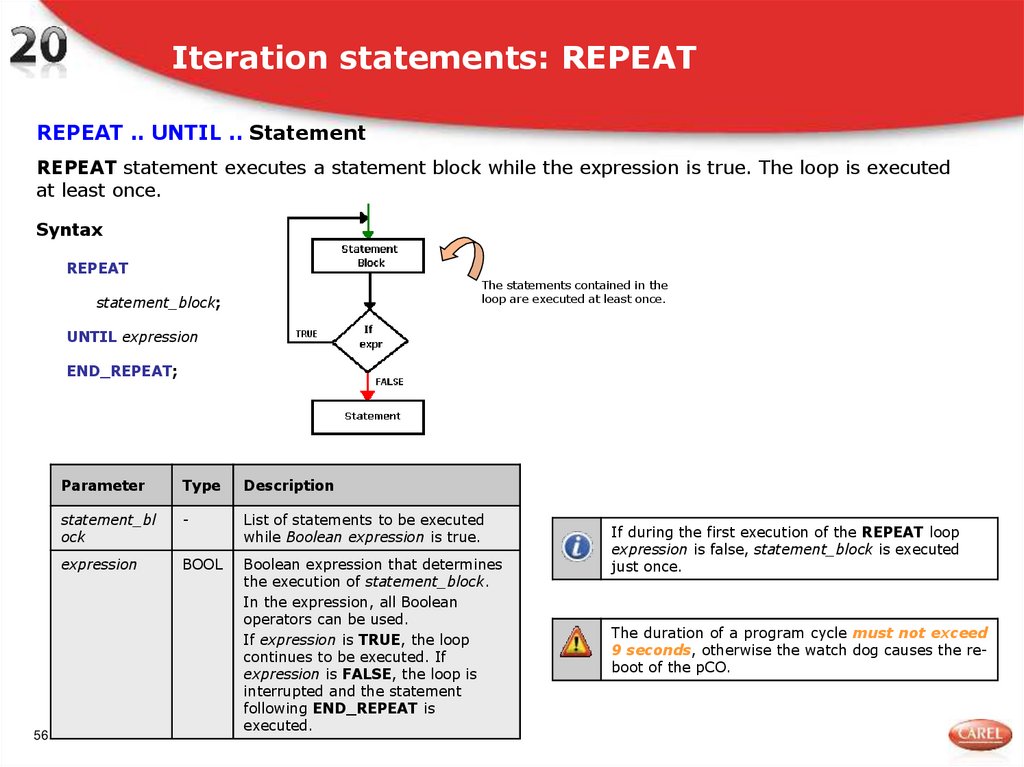
56. Iteration statements: REPEAT
REPEAT .. UNTIL .. StatementREPEAT statement executes a statement block while the expression is true. The loop is executed
at least once.
Syntax
REPEAT
The statements contained in the
loop are executed at least once.
statement_block;
UNTIL expression
END_REPEAT;
56
Parameter
Type
Description
statement_bl
ock
-
List of statements to be executed
while Boolean expression is true.
expression
BOOL
Boolean expression that determines
the execution of statement_block.
In the expression, all Boolean
operators can be used.
If expression is TRUE, the loop
continues to be executed. If
expression is FALSE, the loop is
interrupted and the statement
following END_REPEAT is
executed.
If during the first execution of the REPEAT loop
expression is false, statement_block is executed
just once.
The duration of a program cycle must not exceed
9 seconds, otherwise the watch dog causes the reboot of the pCO.
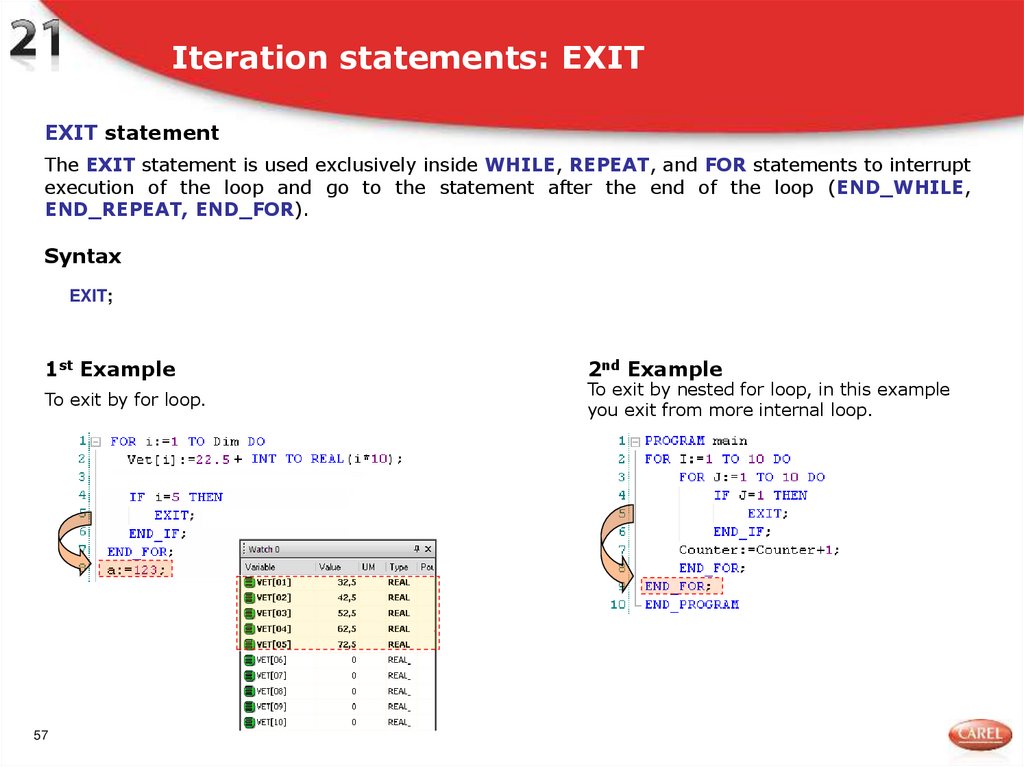
57. Iteration statements: EXIT
EXIT statementThe EXIT statement is used exclusively inside WHILE, REPEAT, and FOR statements to interrupt
execution of the loop and go to the statement after the end of the loop (END_WHILE,
END_REPEAT, END_FOR).
Syntax
EXIT;
1st Example
To exit by for loop.
57
2nd Example
To exit by nested for loop, in this example
you exit from more internal loop.
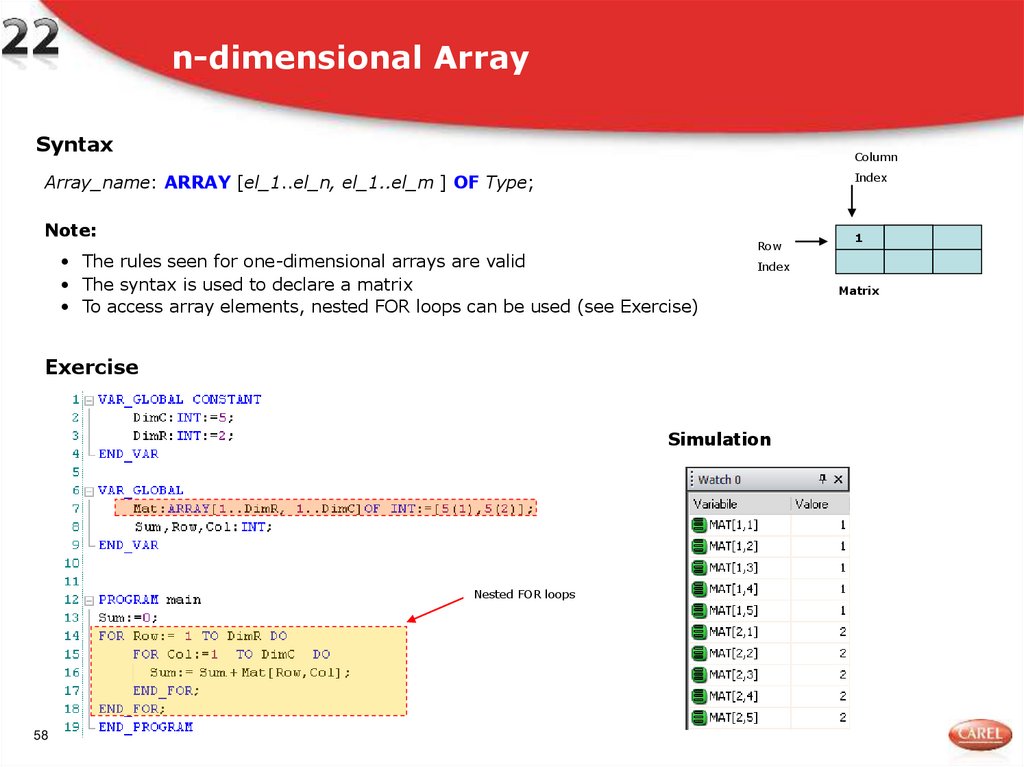
58. n-dimensional Array
SyntaxColumn
Index
Array_name: ARRAY [el_1..el_n, el_1..el_m ] OF Type;
Note:
• The rules seen for one-dimensional arrays are valid
• The syntax is used to declare a matrix
• To access array elements, nested FOR loops can be used (see Exercise)
Row
Index
Exercise
Simulation
Nested FOR loops
58
1
Matrix
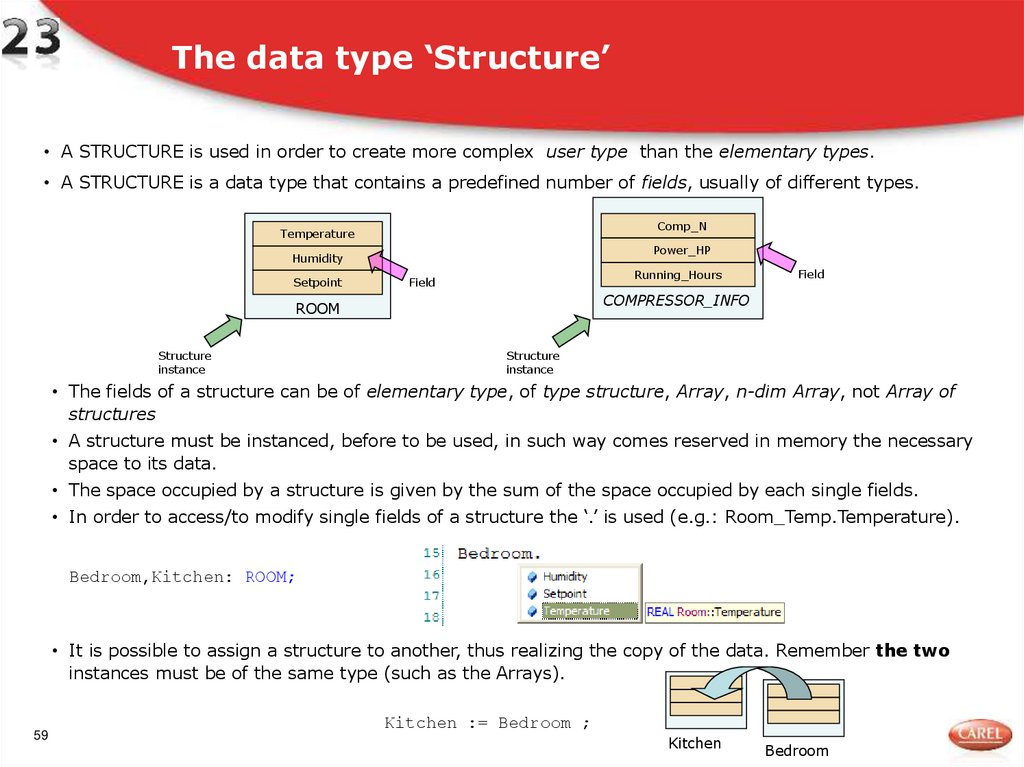
59. The data type ‘Structure’
• A STRUCTURE is used in order to create more complex user type than the elementary types.• A STRUCTURE is a data type that contains a predefined number of fields, usually of different types.
Comp_N
Temperature
Power_HP
Humidity
Setpoint
Running_Hours
Field
COMPRESSOR_INFO
ROOM
Structure
instance
Field
Structure
instance
• The fields of a structure can be of elementary type, of type structure, Array, n-dim Array, not Array of
structures
• A structure must be instanced, before to be used, in such way comes reserved in memory the necessary
space to its data.
• The space occupied by a structure is given by the sum of the space occupied by each single fields.
• In order to access/to modify single fields of a structure the ‘.’ is used (e.g.: Room_Temp.Temperature).
Bedroom,Kitchen: ROOM;
• It is possible to assign a structure to another, thus realizing the copy of the data. Remember the two
instances must be of the same type (such as the Arrays).
59
Kitchen := Bedroom ;
Kitchen
Bedroom
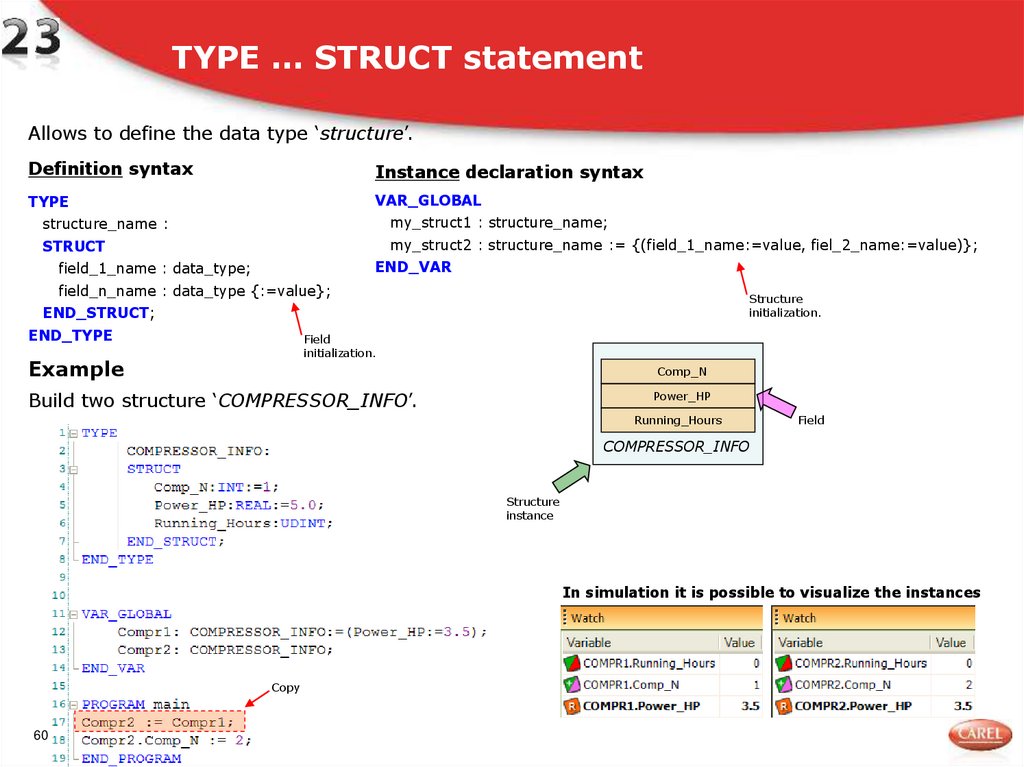
60. TYPE … STRUCT statement
Allows to define the data type ‘structure’.Definition syntax
Instance declaration syntax
TYPE
VAR_GLOBAL
structure_name :
my_struct1 : structure_name;
STRUCT
my_struct2 : structure_name := {(field_1_name:=value, fiel_2_name:=value)};
END_VAR
field_1_name : data_type;
field_n_name : data_type {:=value};
Structure
initialization.
END_STRUCT;
END_TYPE
Field
initialization.
Example
Comp_N
Build two structure ‘COMPRESSOR_INFO’.
Power_HP
Running_Hours
Field
COMPRESSOR_INFO
Structure
instance
In simulation it is possible to visualize the instances
Copy
60
61. FUNCTION BLOCK
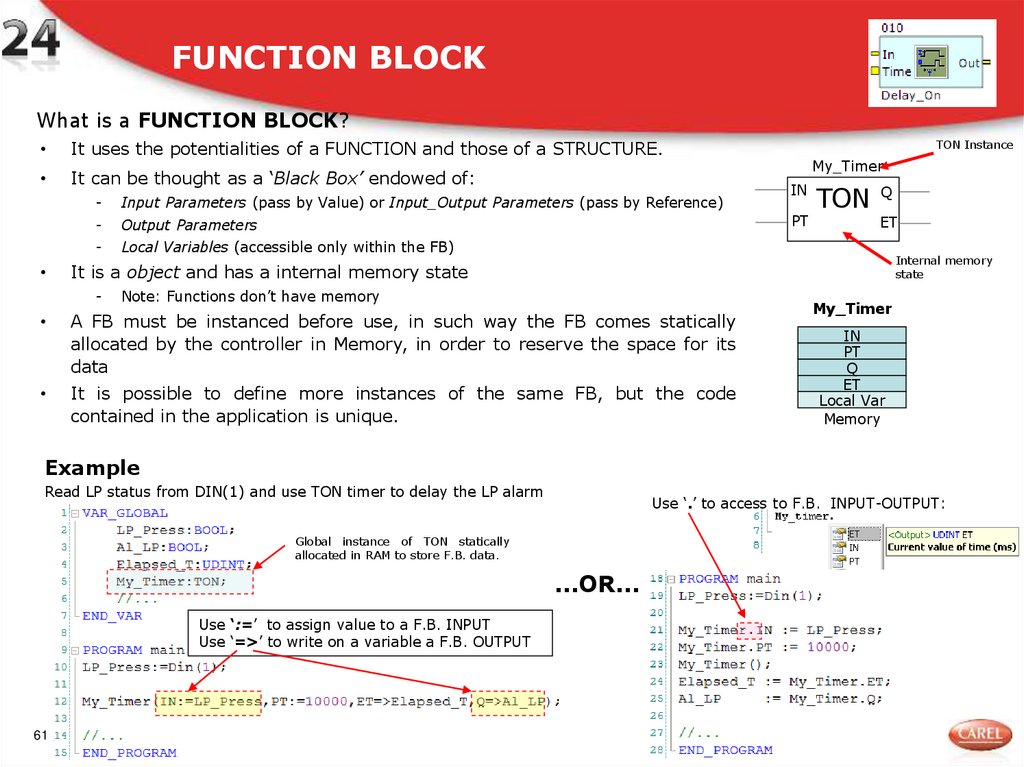
What is a FUNCTION BLOCK?It uses the potentialities of a FUNCTION and those of a STRUCTURE.
It can be thought as a ‘Black Box’ endowed of:
-
Input Parameters (pass by Value) or Input_Output Parameters (pass by Reference)
-
Output Parameters
-
Local Variables (accessible only within the FB)
TON Instance
My_Timer
IN
PT
TON Q
ET
Internal memory
state
It is a object and has a internal memory state
-
Note: Functions don’t have memory
A FB must be instanced before use, in such way the FB comes statically
allocated by the controller in Memory, in order to reserve the space for its
data
It is possible to define more instances of the same FB, but the code
contained in the application is unique.
My_Timer
IN
PT
Q
ET
Local Var
Memory
Example
Read LP status from DIN(1) and use TON timer to delay the LP alarm
Use ‘.’ to access to F.B. INPUT-OUTPUT:
Global instance of TON statically
allocated in RAM to store F.B. data.
…OR…
Use ‘:=’ to assign value to a F.B. INPUT
Use ‘=>’ to write on a variable a F.B. OUTPUT
61
62. FUNCTION BLOCK
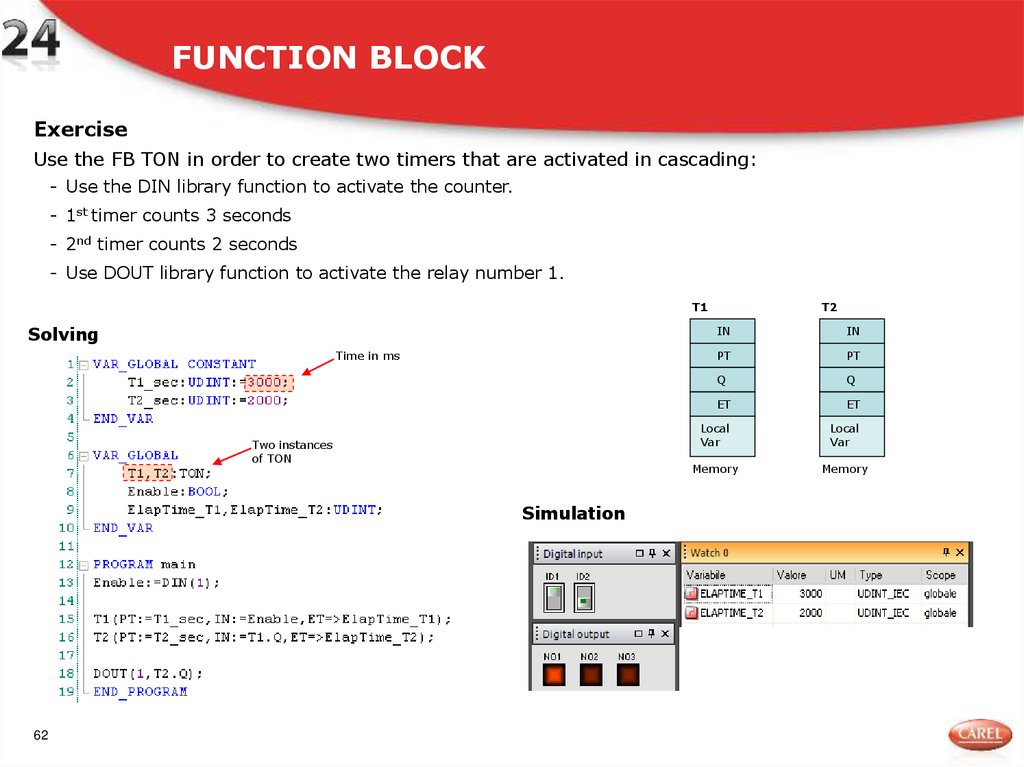
ExerciseUse the FB TON in order to create two timers that are activated in cascading:
- Use the DIN library function to activate the counter.
- 1st timer counts 3 seconds
- 2nd timer counts 2 seconds
- Use DOUT library function to activate the relay number 1.
T1
Solving
Time in ms
Two instances
of TON
Simulation
62
T2
IN
IN
PT
PT
Q
Q
ET
ET
Local
Var
Local
Var
Memory
Memory
63. FUNCTION BLOCK
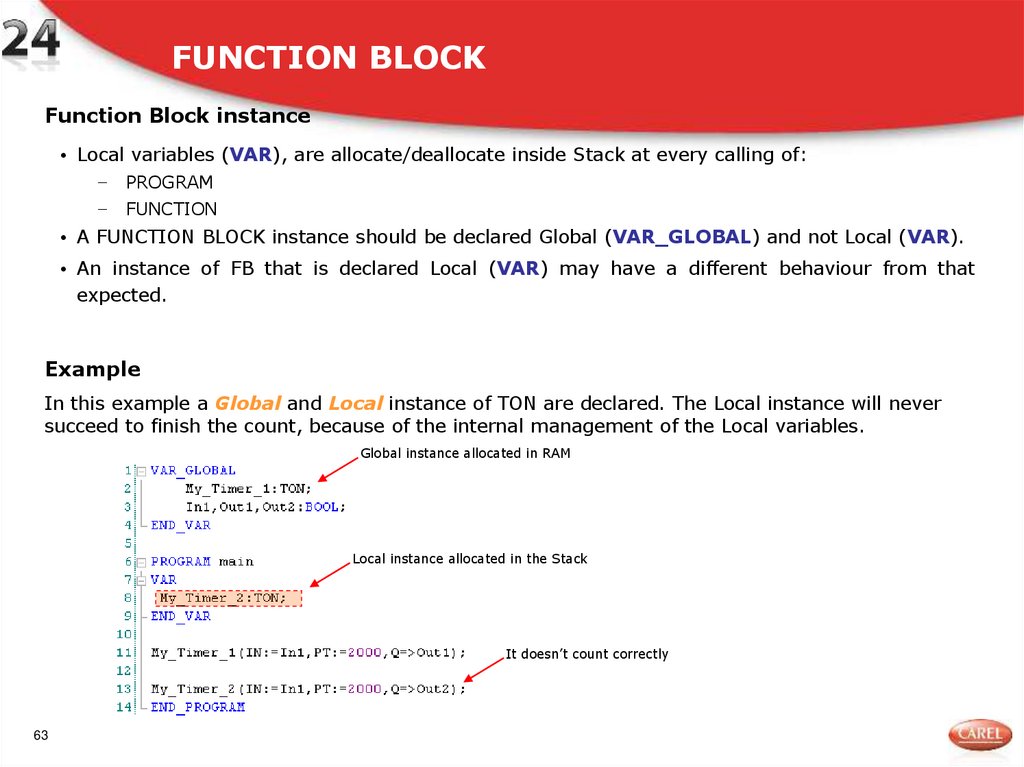
Function Block instance• Local variables (VAR), are allocate/deallocate inside Stack at every calling of:
−
PROGRAM
−
FUNCTION
• A FUNCTION BLOCK instance should be declared Global (VAR_GLOBAL) and not Local (VAR).
• An instance of FB that is declared Local (VAR) may have a different behaviour from that
expected.
Example
In this example a Global and Local instance of TON are declared. The Local instance will never
succeed to finish the count, because of the internal management of the Local variables.
Global instance allocated in RAM
Local instance allocated in the Stack
It doesn’t count correctly
63
64. FUNCTION BLOCK instance
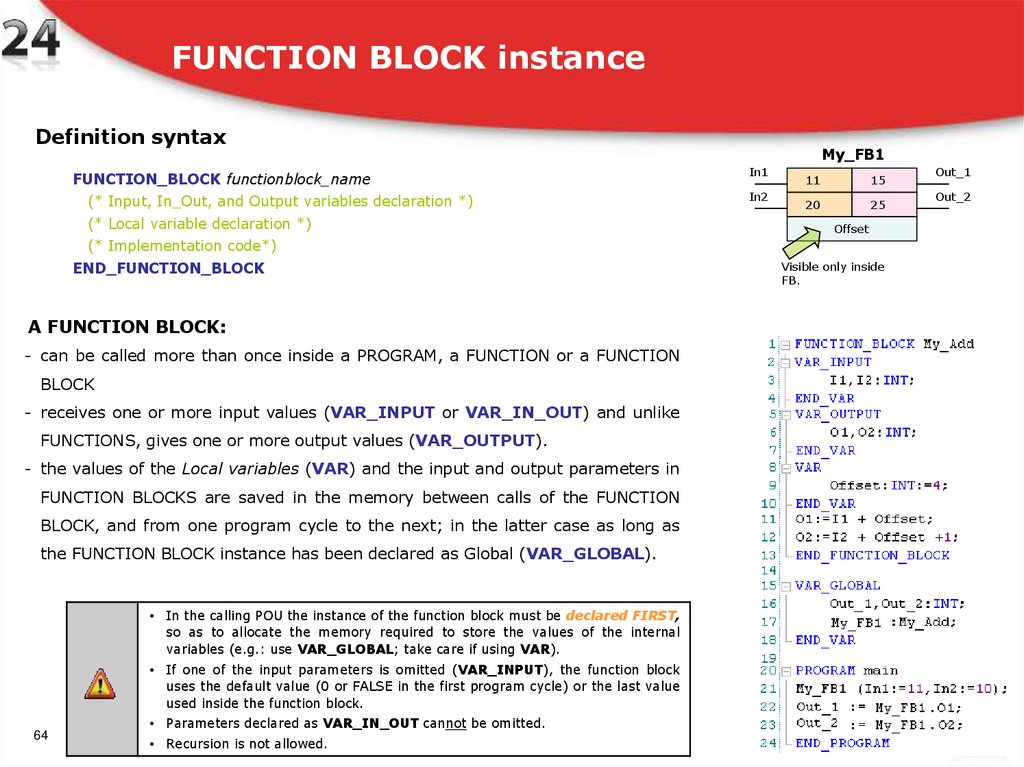
Definition syntaxFUNCTION_BLOCK functionblock_name
(* Input, In_Out, and Output variables declaration *)
(* Local variable declaration *)
My_FB1
In1
In2
11
15
20
25
Offset
(* Implementation code*)
END_FUNCTION_BLOCK
A FUNCTION BLOCK:
- can be called more than once inside a PROGRAM, a FUNCTION or a FUNCTION
BLOCK
- receives one or more input values (VAR_INPUT or VAR_IN_OUT) and unlike
FUNCTIONS, gives one or more output values (VAR_OUTPUT).
- the values of the Local variables (VAR) and the input and output parameters in
FUNCTION BLOCKS are saved in the memory between calls of the FUNCTION
BLOCK, and from one program cycle to the next; in the latter case as long as
the FUNCTION BLOCK instance has been declared as Global (VAR_GLOBAL).
• In the calling POU the instance of the function block must be declared FIRST,
so as to allocate the memory required to store the values of the internal
variables (e.g.: use VAR_GLOBAL; take care if using VAR).
• If one of the input parameters is omitted (VAR_INPUT), the function block
uses the default value (0 or FALSE in the first program cycle) or the last value
used inside the function block.
64
• Parameters declared as VAR_IN_OUT cannot be omitted.
• Recursion is not allowed.
Visible only inside
FB.
Out_1
Out_2
65. FUNCTION BLOCK instance
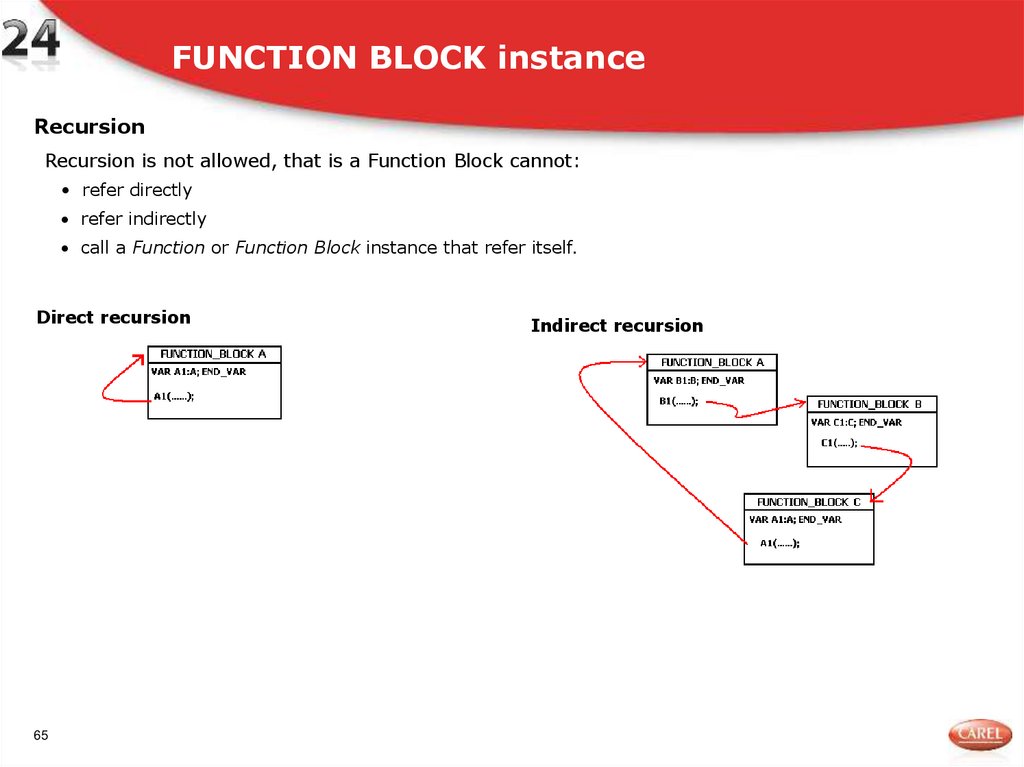
RecursionRecursion is not allowed, that is a Function Block cannot:
• refer directly
refer indirectly
call a Function or Function Block instance that refer itself.
Direct recursion
65
Indirect recursion
66. FUNCTION_BLOCK instance
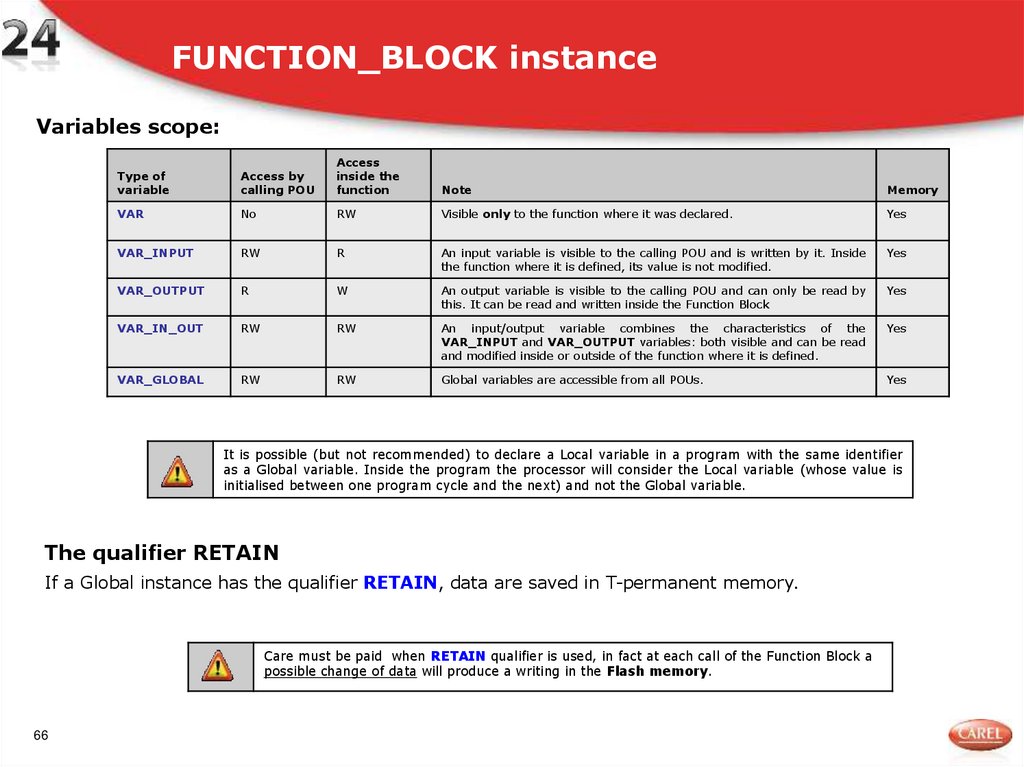
Variables scope:Type of
variable
Access by
calling POU
Access
inside the
function
Note
Memory
VAR
No
RW
Visible only to the function where it was declared.
Yes
VAR_INPUT
RW
R
An input variable is visible to the calling POU and is written by it. Inside
the function where it is defined, its value is not modified.
Yes
VAR_OUTPUT
R
W
An output variable is visible to the calling POU and can only be read by
this. It can be read and written inside the Function Block
Yes
VAR_IN_OUT
RW
RW
An input/output variable combines the characteristics of the
VAR_INPUT and VAR_OUTPUT variables: both visible and can be read
and modified inside or outside of the function where it is defined.
Yes
VAR_GLOBAL
RW
RW
Global variables are accessible from all POUs.
Yes
It is possible (but not recommended) to declare a Local variable in a program with the same identifier
as a Global variable. Inside the program the processor will consider the Local variable (whose value is
initialised between one program cycle and the next) and not the Global variable.
The qualifier RETAIN
If a Global instance has the qualifier RETAIN, data are saved in T-permanent memory.
Care must be paid when RETAIN qualifier is used, in fact at each call of the Function Block a
possible change of data will produce a writing in the Flash memory.
66
67. FUNCTION_BLOCK: Summary
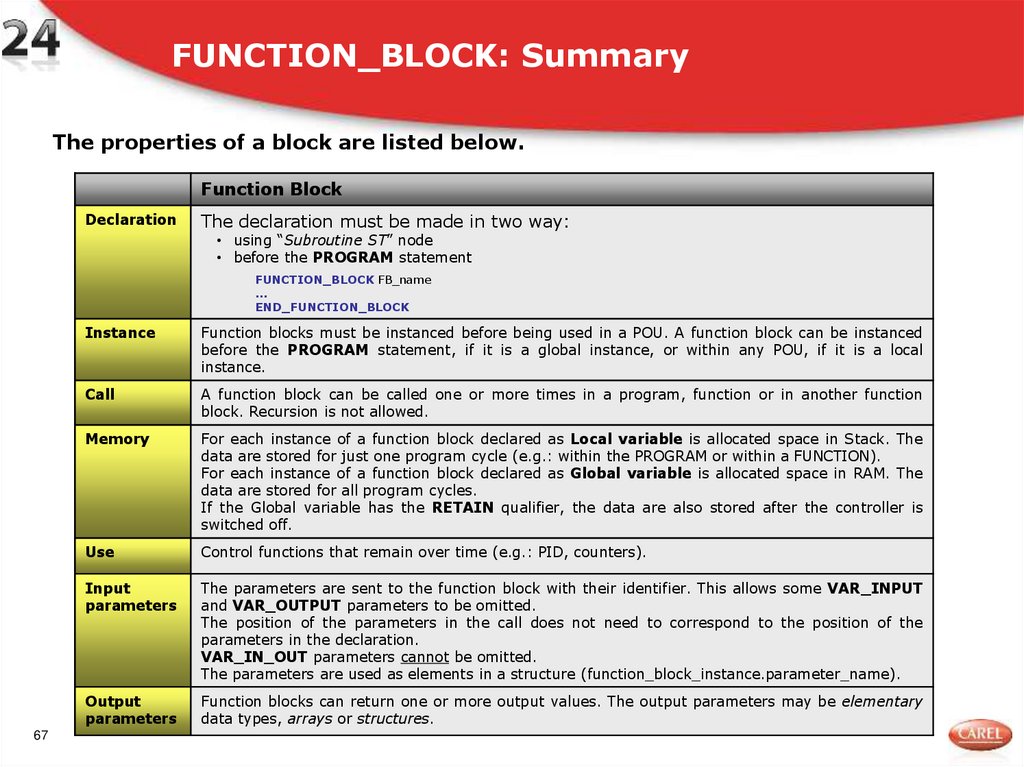
The properties of a block are listed below.Function Block
Declaration
The declaration must be made in two way:
• using “Subroutine ST” node
• before the PROGRAM statement
FUNCTION_BLOCK FB_name
...
END_FUNCTION_BLOCK
67
Instance
Function blocks must be instanced before being used in a POU. A function block can be instanced
before the PROGRAM statement, if it is a global instance, or within any POU, if it is a local
instance.
Call
A function block can be called one or more times in a program, function or in another function
block. Recursion is not allowed.
Memory
For each instance of a function block declared as Local variable is allocated space in Stack. The
data are stored for just one program cycle (e.g.: within the PROGRAM or within a FUNCTION).
For each instance of a function block declared as Global variable is allocated space in RAM. The
data are stored for all program cycles.
If the Global variable has the RETAIN qualifier, the data are also stored after the controller is
switched off.
Use
Control functions that remain over time (e.g.: PID, counters).
Input
parameters
The parameters are sent to the function block with their identifier. This allows some VAR_INPUT
and VAR_OUTPUT parameters to be omitted.
The position of the parameters in the call does not need to correspond to the position of the
parameters in the declaration.
VAR_IN_OUT parameters cannot be omitted.
The parameters are used as elements in a structure (function_block_instance.parameter_name).
Output
parameters
Function blocks can return one or more output values. The output parameters may be elementary
data types, arrays or structures.
68. Exercise
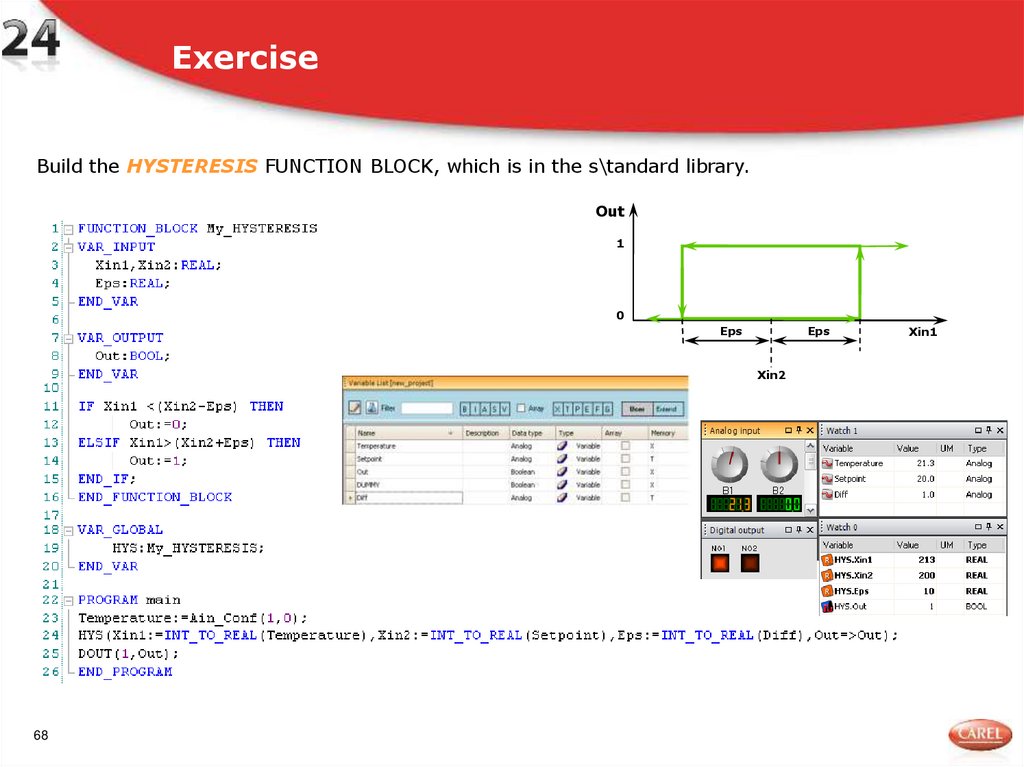
Build the HYSTERESIS FUNCTION BLOCK, which is in the s\tandard library.Out
1
0
Eps
Eps
Xin2
68
Xin1
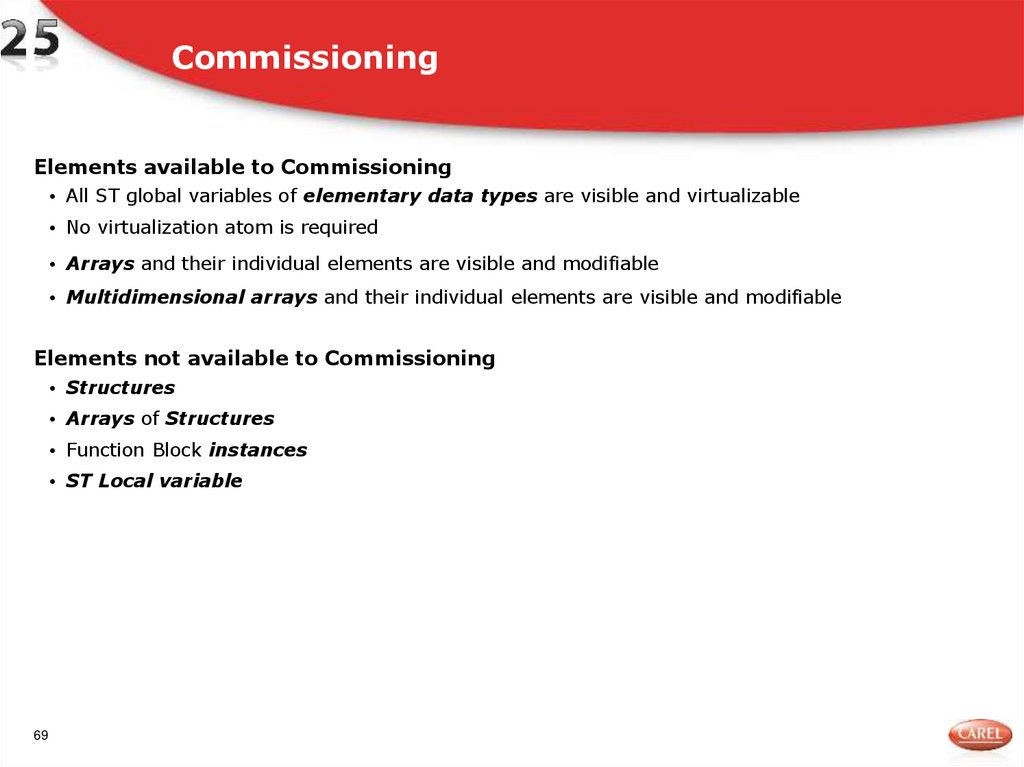
69. Commissioning
Elements available to Commissioning• All ST global variables of elementary data types are visible and virtualizable
• No virtualization atom is required
• Arrays and their individual elements are visible and modifiable
• Multidimensional arrays and their individual elements are visible and modifiable
Elements not available to Commissioning
• Structures
• Arrays of Structures
• Function Block instances
• ST Local variable
69
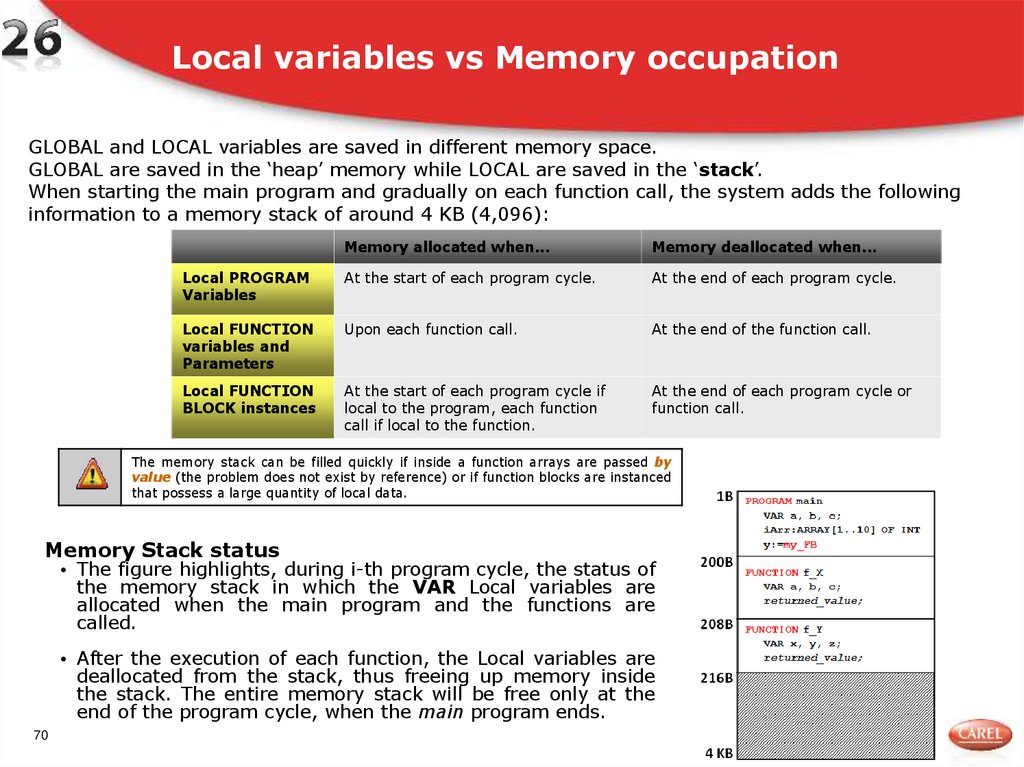
70. Local variables vs Memory occupation
GLOBAL and LOCAL variables are saved in different memory space.GLOBAL are saved in the ‘heap’ memory while LOCAL are saved in the ‘stack’.
When starting the main program and gradually on each function call, the system adds the following
information to a memory stack of around 4 KB (4,096):
Memory allocated when...
Memory deallocated when...
Local PROGRAM
Variables
At the start of each program cycle.
At the end of each program cycle.
Local FUNCTION
variables and
Parameters
Upon each function call.
At the end of the function call.
Local FUNCTION
BLOCK instances
At the start of each program cycle if
local to the program, each function
call if local to the function.
At the end of each program cycle or
function call.
The memory stack can be filled quickly if inside a function arrays are passed by
value (the problem does not exist by reference) or if function blocks are instanced
that possess a large quantity of local data.
Memory Stack status
• The figure highlights, during i-th program cycle, the status of
the memory stack in which the VAR Local variables are
allocated when the main program and the functions are
called.
• After the execution of each function, the Local variables are
deallocated from the stack, thus freeing up memory inside
the stack. The entire memory stack will be free only at the
end of the program cycle, when the main program ends.
70
71. Local variables vs Memory occupation
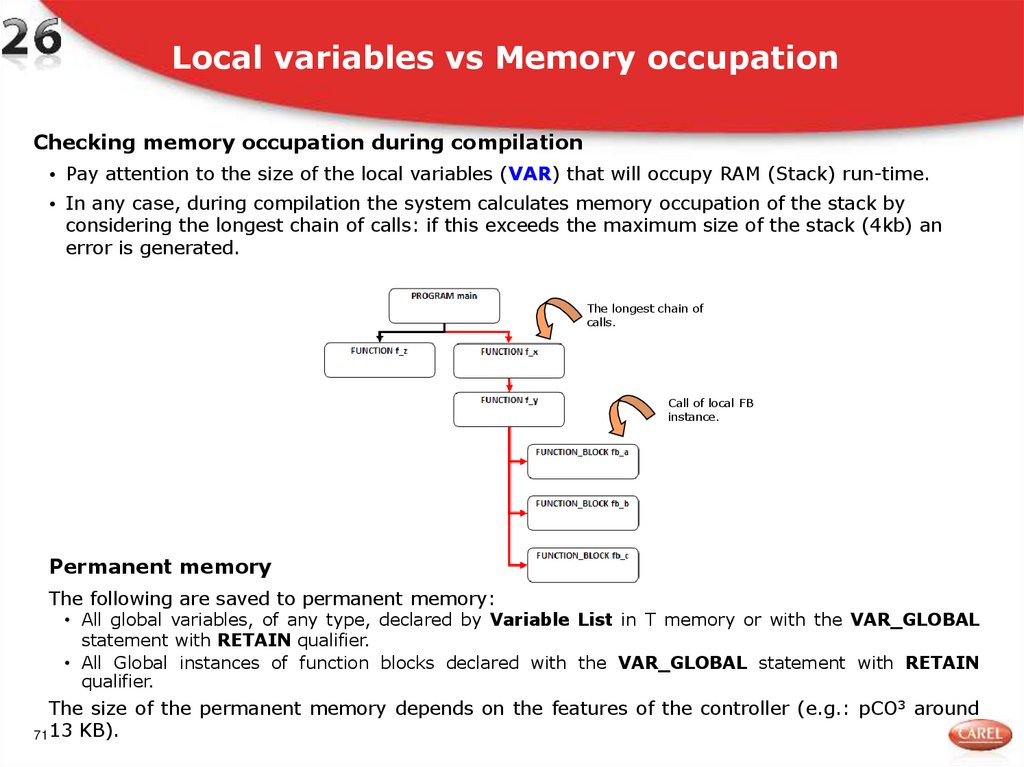
Checking memory occupation during compilation• Pay attention to the size of the local variables (VAR) that will occupy RAM (Stack) run-time.
• In any case, during compilation the system calculates memory occupation of the stack by
considering the longest chain of calls: if this exceeds the maximum size of the stack (4kb) an
error is generated.
The longest chain of
calls.
Call of local FB
instance.
Permanent memory
The following are saved to permanent memory:
• All global variables, of any type, declared by Variable List in T memory or with the VAR_GLOBAL
statement with RETAIN qualifier.
• All Global instances of function blocks declared with the VAR_GLOBAL statement with RETAIN
qualifier.
The size of the permanent memory depends on the features of the controller (e.g.: pCO3 around
71 13 KB).
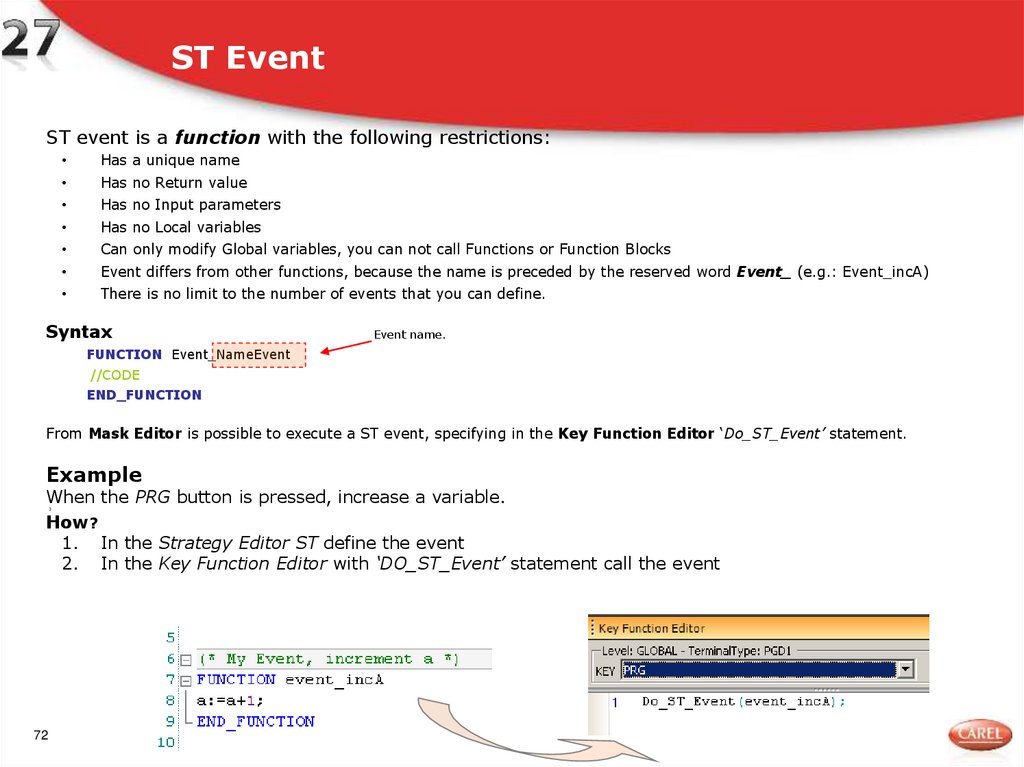
72. ST Event
ST event is a function with the following restrictions:Has a unique name
Has no Return value
Has no Input parameters
Has no Local variables
Can only modify Global variables, you can not call Functions or Function Blocks
Event differs from other functions, because the name is preceded by the reserved word Event_ (e.g.: Event_incA)
There is no limit to the number of events that you can define.
Syntax
Event name.
FUNCTION Event_NameEvent
//CODE
END_FUNCTION
From Mask Editor is possible to execute a ST event, specifying in the Key Function Editor ‘Do_ST_Event’ statement.
Example
When the PRG button is pressed, increase a variable.
How?
1. In the Strategy Editor ST define the event
2. In the Key Function Editor with ‘DO_ST_Event’ statement call the event
3
72
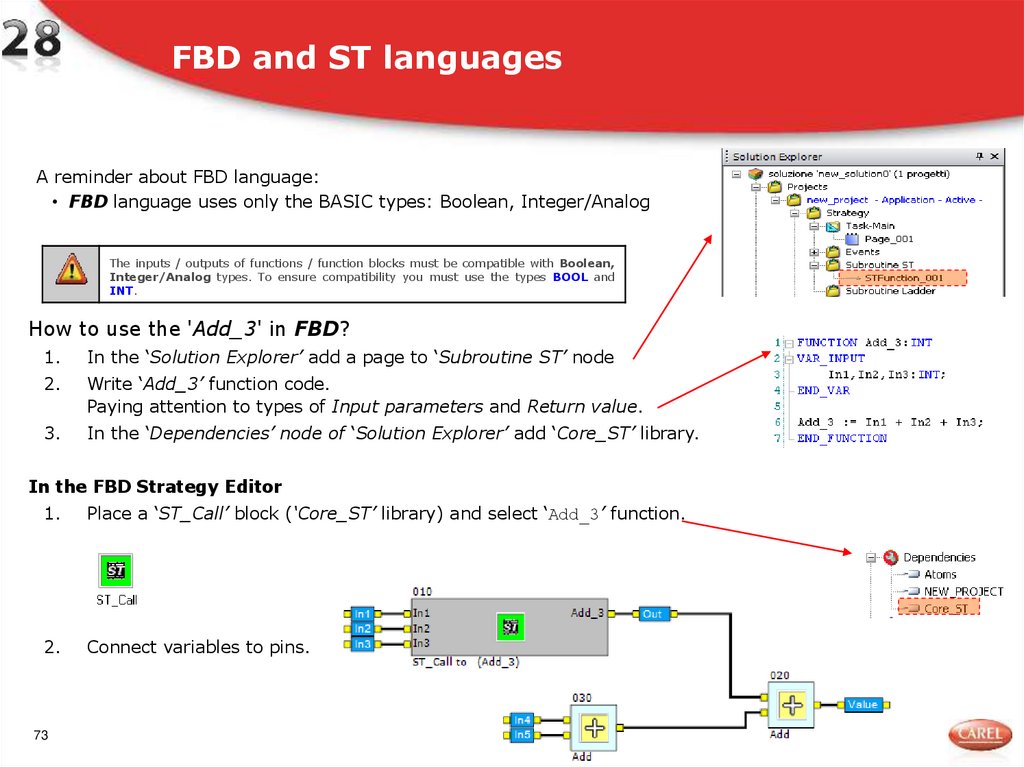
73. FBD and ST languages
A reminder about FBD language:• FBD language uses only the BASIC types: Boolean, Integer/Analog
The inputs / outputs of functions / function blocks must be compatible with Boolean,
Integer/Analog types. To ensure compatibility you must use the types BOOL and
INT.
How to use the 'Add_3' in FBD?
1.
In the ‘Solution Explorer’ add a page to ‘Subroutine ST’ node
2.
Write ‘Add_3’ function code.
Paying attention to types of Input parameters and Return value.
3.
In the ‘Dependencies’ node of ‘Solution Explorer’ add ‘Core_ST’ library.
In the FBD Strategy Editor
1.
Place a ‘ST_Call’ block (‘Core_ST’ library) and select ‘Add_3’ function.
2.
Connect variables to pins.
73
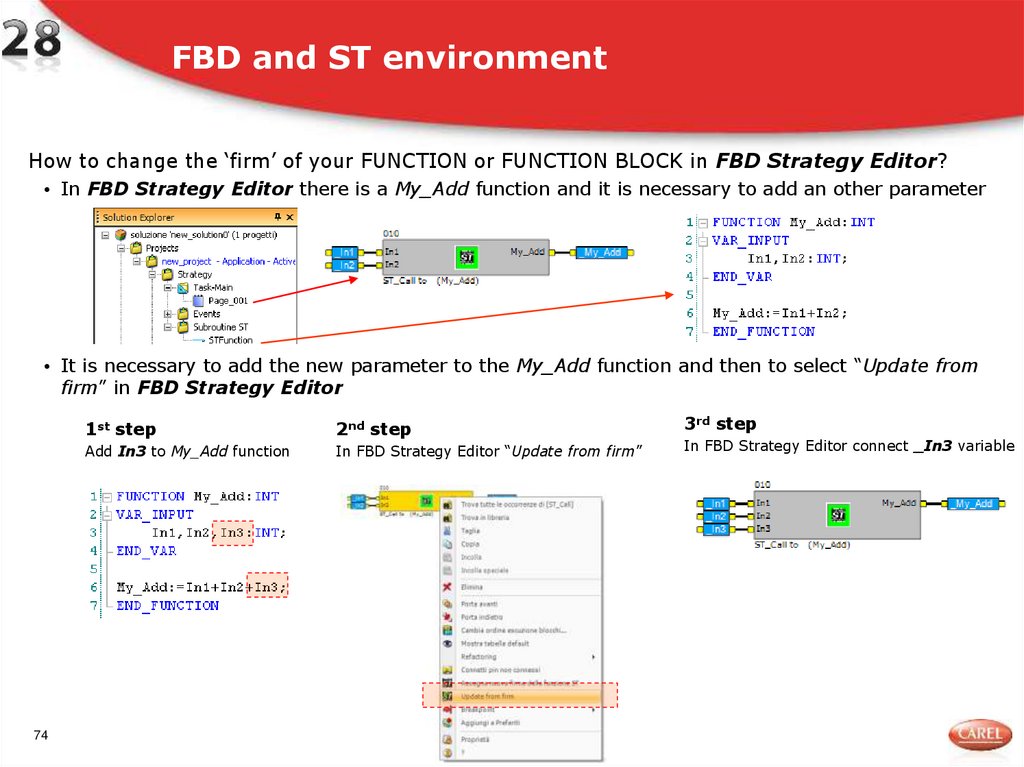
74. FBD and ST environment
How to change the ‘firm’ of your FUNCTION or FUNCTION BLOCK in FBD Strategy Editor?• In FBD Strategy Editor there is a My_Add function and it is necessary to add an other parameter
• It is necessary to add the new parameter to the My_Add function and then to select “Update from
firm” in FBD Strategy Editor
74
1st step
2nd step
Add In3 to My_Add function
In FBD Strategy Editor “Update from firm”
3rd step
In FBD Strategy Editor connect _In3 variable
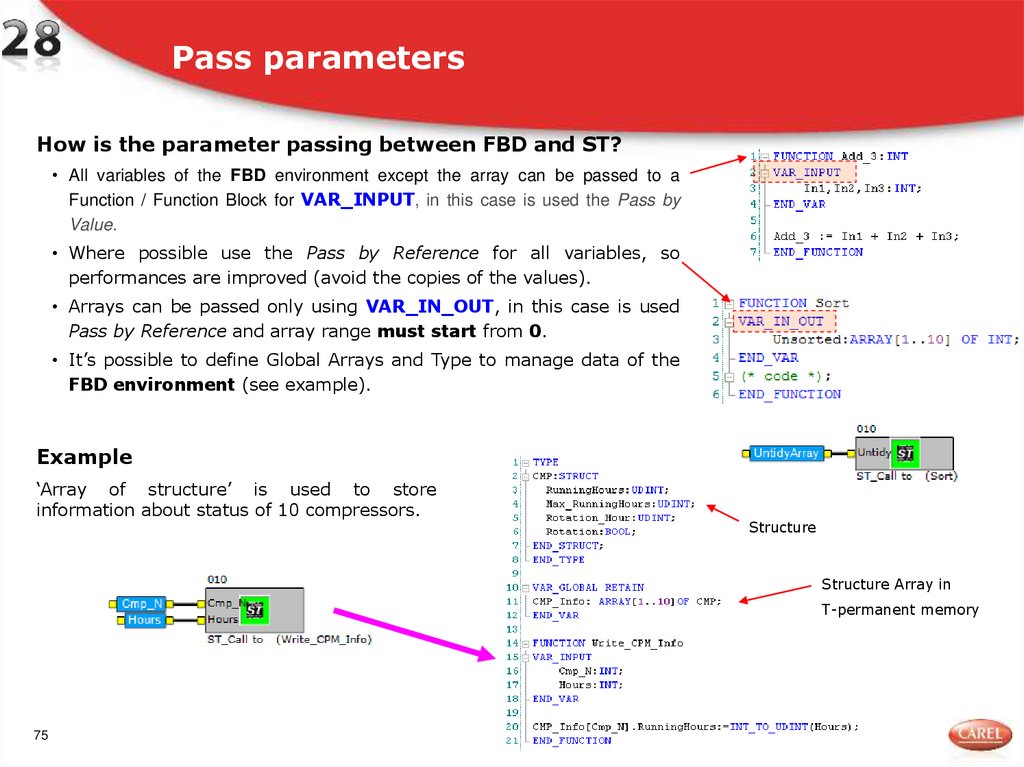
75. Pass parameters
How is the parameter passing between FBD and ST?• All variables of the FBD environment except the array can be passed to a
Function / Function Block for VAR_INPUT, in this case is used the Pass by
Value.
• Where possible use the Pass by Reference for all variables, so
performances are improved (avoid the copies of the values).
• Arrays can be passed only using VAR_IN_OUT, in this case is used
Pass by Reference and array range must start from 0.
• It’s possible to define Global Arrays and Type to manage data of the
FBD environment (see example).
Example
‘Array of structure’ is used to store
information about status of 10 compressors.
Structure
Structure Array in
T-permanent memory
75
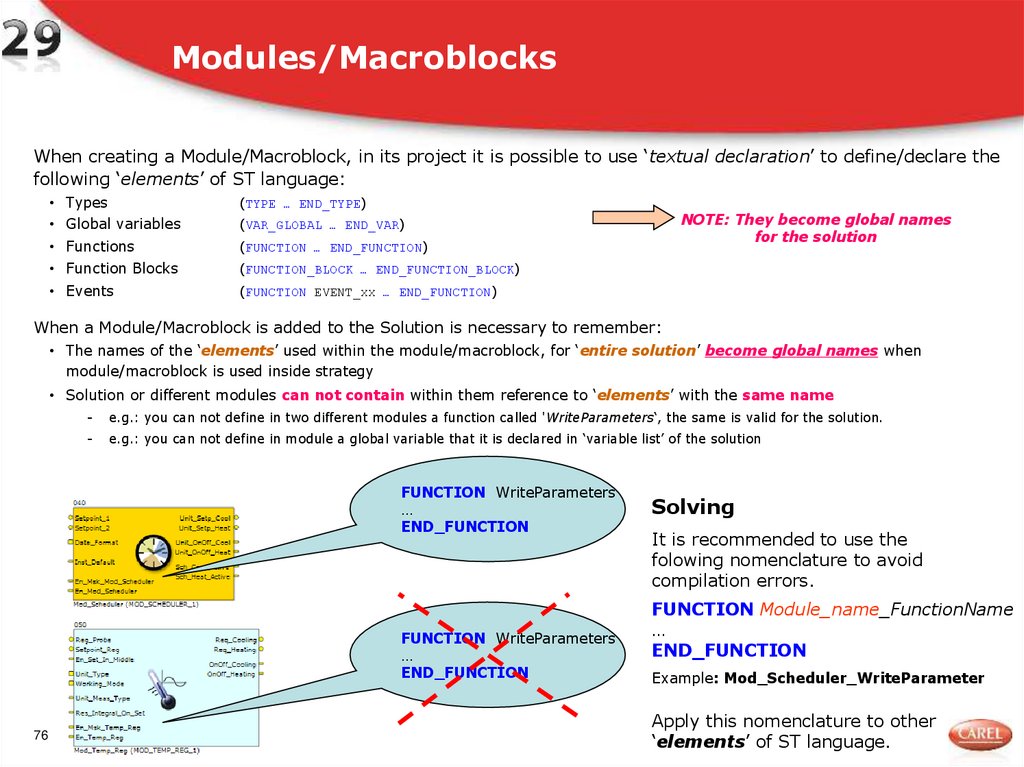
76. Modules/Macroblocks
When creating a Module/Macroblock, in its project it is possible to use ‘textual declaration’ to define/declare thefollowing ‘elements’ of ST language:
• Types
(TYPE … END_TYPE)
• Global variables
(VAR_GLOBAL … END_VAR)
• Functions
(FUNCTION … END_FUNCTION)
• Function Blocks
(FUNCTION_BLOCK … END_FUNCTION_BLOCK)
• Events
(FUNCTION EVENT_xx … END_FUNCTION)
NOTE: They become global names
for the solution
When a Module/Macroblock is added to the Solution is necessary to remember:
• The names of the ‘elements’ used within the module/macroblock, for ‘entire solution’ become global names when
module/macroblock is used inside strategy
• Solution or different modules can not contain within them reference to ‘elements’ with the same name
-
e.g.: you can not define in two different modules a function called 'WriteParameters‘, the same is valid for the solution.
-
e.g.: you can not define in module a global variable that it is declared in ‘variable list’ of the solution
FUNCTION WriteParameters
…
END_FUNCTION
FUNCTION WriteParameters
…
END_FUNCTION
76
Solving
It is recommended to use the
folowing nomenclature to avoid
compilation errors.
FUNCTION Module_name_FunctionName
…
END_FUNCTION
Example: Mod_Scheduler_WriteParameter
Apply this nomenclature to other
‘elements’ of ST language.
77. FBD ‘Main’ project and ‘ST-Call' block’
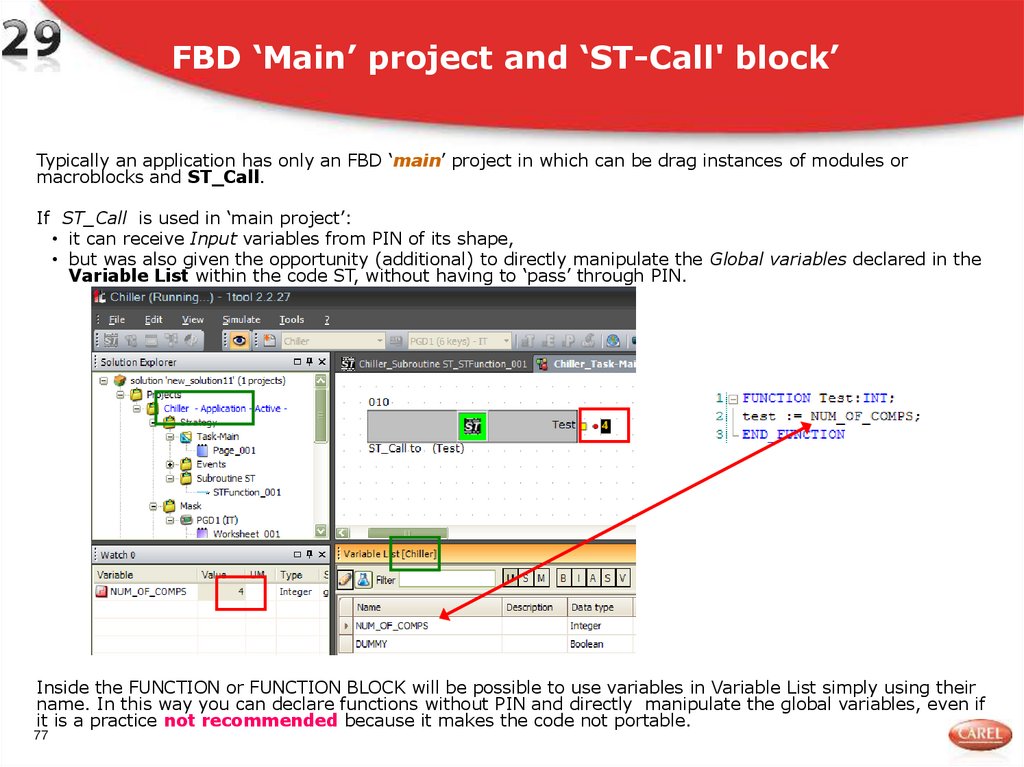
FBD ‘Main’ project and ‘ST-Call' block’Typically an application has only an FBD ‘main’ project in which can be drag instances of modules or
macroblocks and ST_Call.
If ST_Call is used in ‘main project’:
• it can receive Input variables from PIN of its shape,
• but was also given the opportunity (additional) to directly manipulate the Global variables declared in the
Variable List within the code ST, without having to ‘pass’ through PIN.
Inside the FUNCTION or FUNCTION BLOCK will be possible to use variables in Variable List simply using their
name. In this way you can declare functions without PIN and directly manipulate the global variables, even if
it is a practice not recommended because it makes the code not portable.
77
78. Modules/Macroblocks and ‘ST-Call block’ 1/2
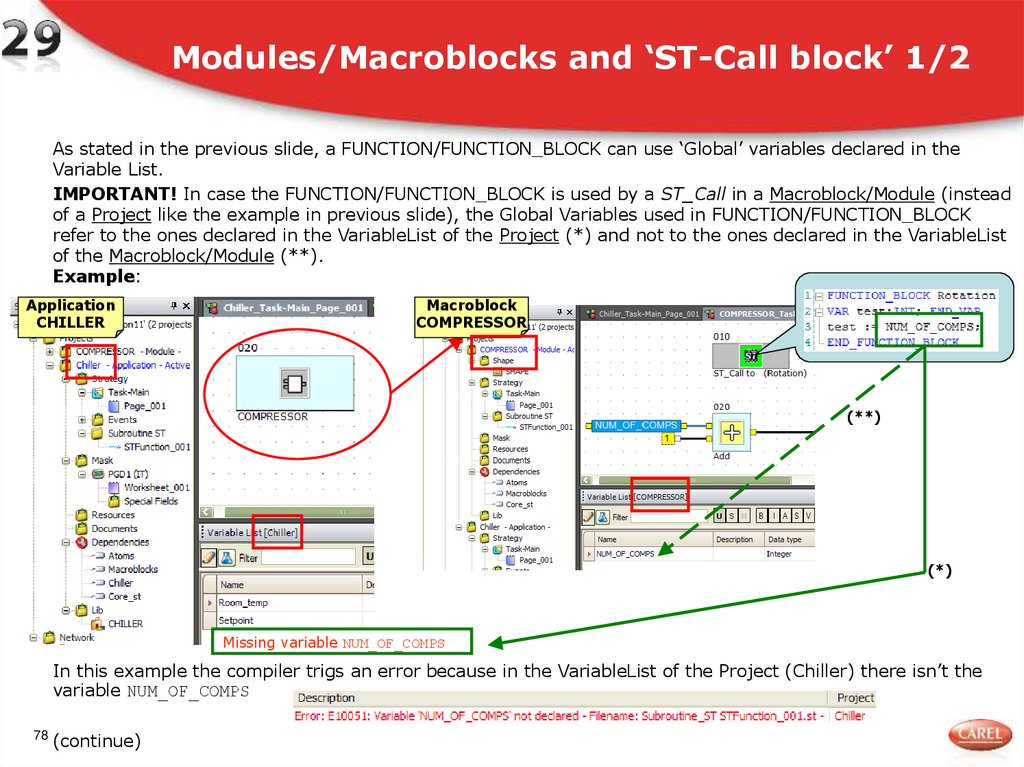
As stated in the previous slide, a FUNCTION/FUNCTION_BLOCK can use ‘Global’ variables declared in theVariable List.
IMPORTANT! In case the FUNCTION/FUNCTION_BLOCK is used by a ST_Call in a Macroblock/Module (instead
of a Project like the example in previous slide), the Global Variables used in FUNCTION/FUNCTION_BLOCK
refer to the ones declared in the VariableList of the Project (*) and not to the ones declared in the VariableList
of the Macroblock/Module (**).
Example:
Application
CHILLER
Macroblock
COMPRESSOR
(**)
(*)
Missing variable NUM_OF_COMPS
In this example the compiler trigs an error because in the VariableList of the Project (Chiller) there isn’t the
variable NUM_OF_COMPS
78
(continue)
79. Modules/Macroblocks and ‘ST-Call block’ 2/2
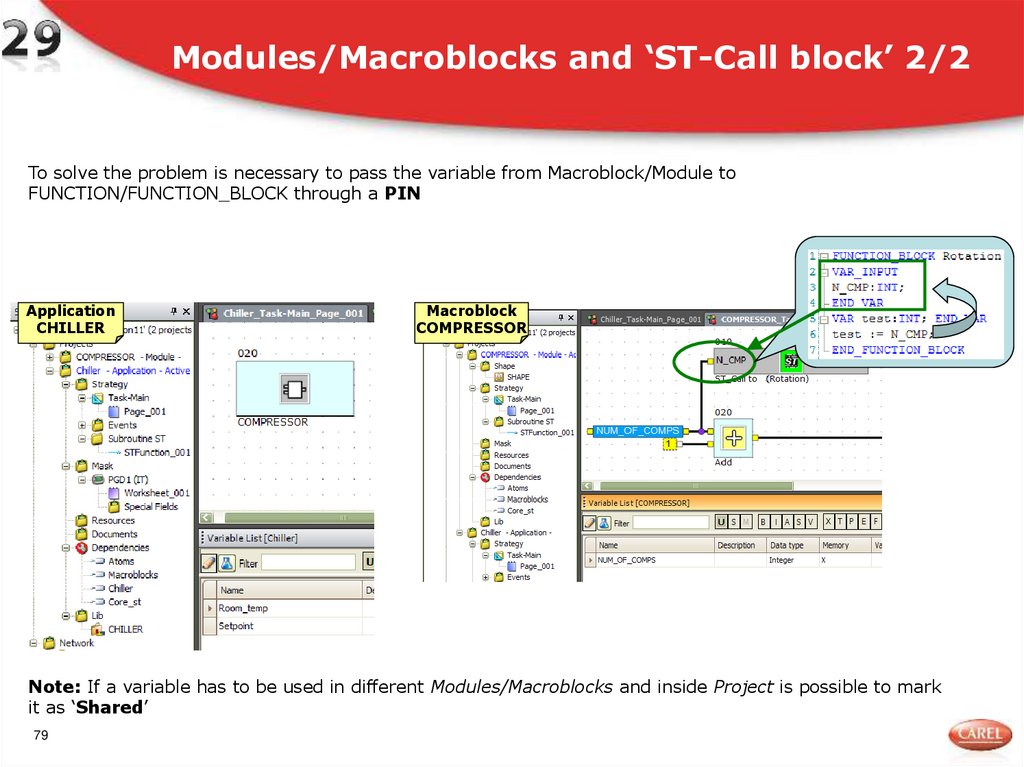
To solve the problem is necessary to pass the variable from Macroblock/Module toFUNCTION/FUNCTION_BLOCK through a PIN
Application
CHILLER
Macroblock
COMPRESSOR
Note: If a variable has to be used in different Modules/Macroblocks and inside Project is possible to mark
it as ‘Shared’
79
80. System variable
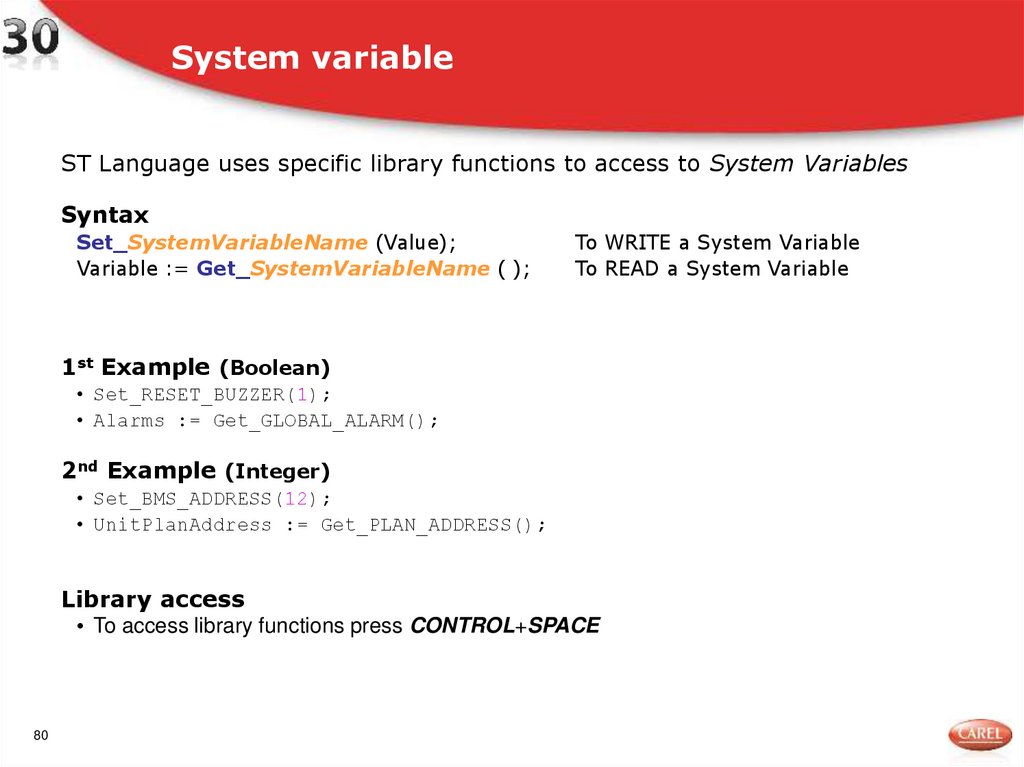
ST Language uses specific library functions to access to System VariablesSyntax
Set_SystemVariableName (Value);
Variable := Get_SystemVariableName ( );
To WRITE a System Variable
To READ a System Variable
1st Example (Boolean)
• Set_RESET_BUZZER(1);
• Alarms := Get_GLOBAL_ALARM();
2nd Example (Integer)
• Set_BMS_ADDRESS(12);
• UnitPlanAddress := Get_PLAN_ADDRESS();
Library access
• To access library functions press CONTROL+SPACE
80
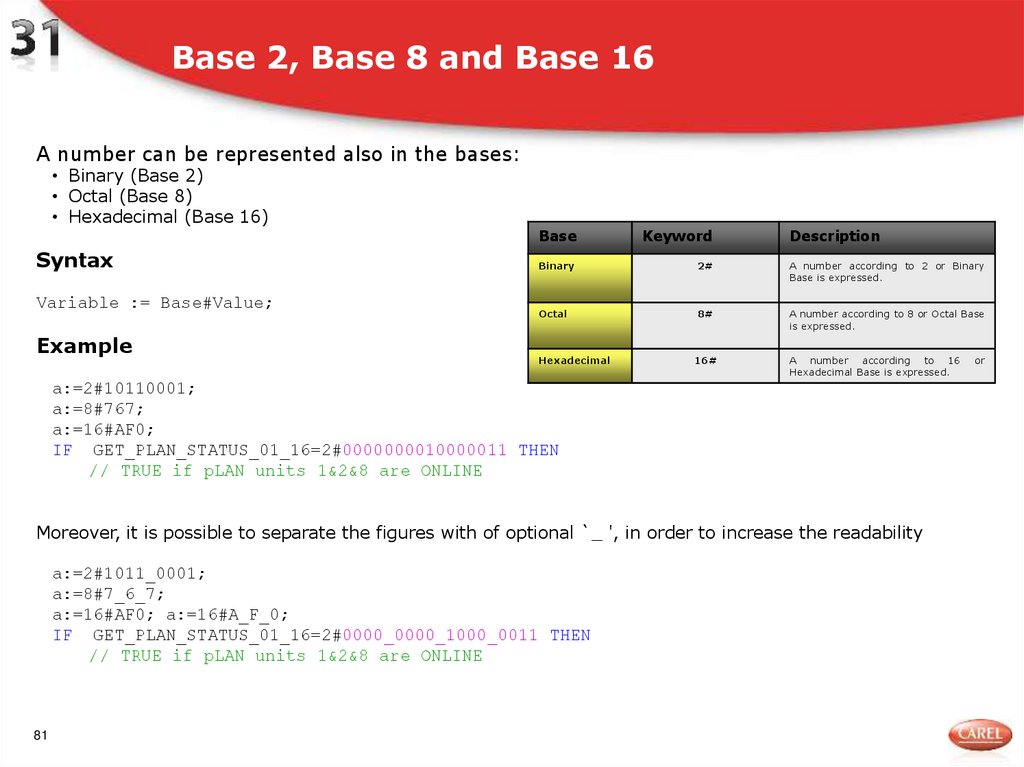
81. Base 2, Base 8 and Base 16
A number can be represented also in the bases:• Binary (Base 2)
• Octal (Base 8)
• Hexadecimal (Base 16)
Syntax
Variable := Base#Value;
Example
Base
Keyword
Description
Binary
2#
A number according to 2 or Binary
Base is expressed.
Octal
8#
A number according to 8 or Octal Base
is expressed.
Hexadecimal
16#
A number according to 16
Hexadecimal Base is expressed.
a:=2#10110001;
a:=8#767;
a:=16#AF0;
IF GET_PLAN_STATUS_01_16=2#0000000010000011 THEN
// TRUE if pLAN units 1&2&8 are ONLINE
Moreover, it is possible to separate the figures with of optional `_ ', in order to increase the readability
a:=2#1011_0001;
a:=8#7_6_7;
a:=16#AF0; a:=16#A_F_0;
IF GET_PLAN_STATUS_01_16=2#0000_0000_1000_0011 THEN
// TRUE if pLAN units 1&2&8 are ONLINE
81
or
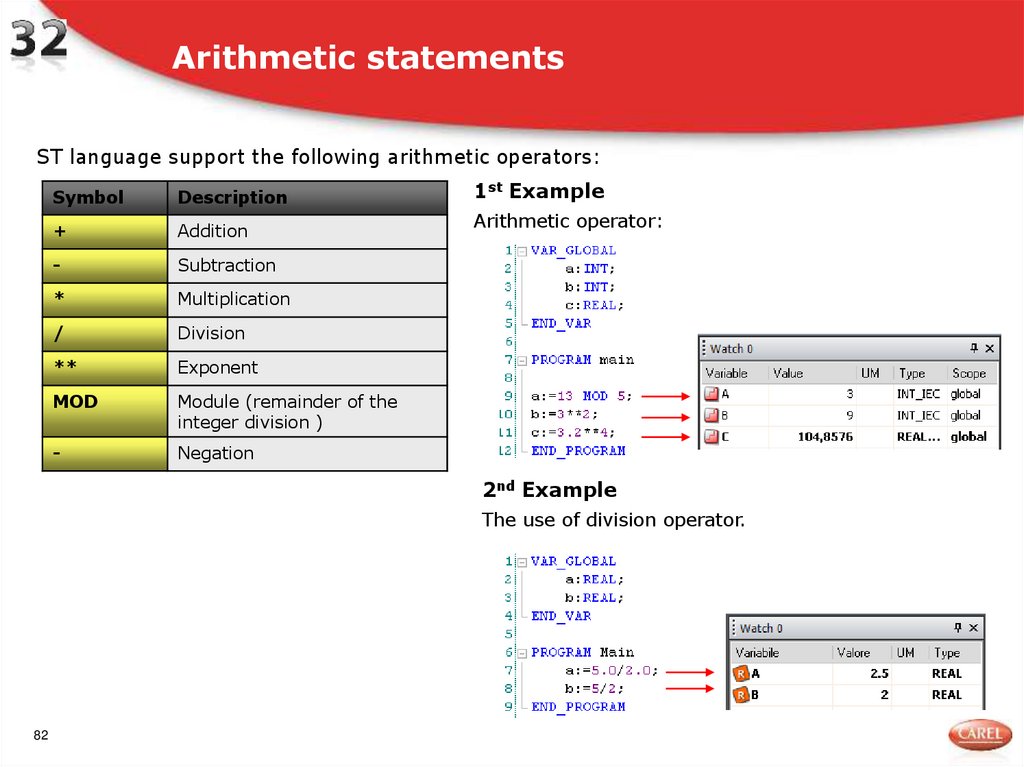
82. Arithmetic statements
ST language support the following arithmetic operators:Symbol
Description
+
Addition
-
Subtraction
*
Multiplication
/
Division
**
Exponent
MOD
Module (remainder of the
integer division )
-
Negation
1st Example
Arithmetic operator:
2nd Example
The use of division operator.
82
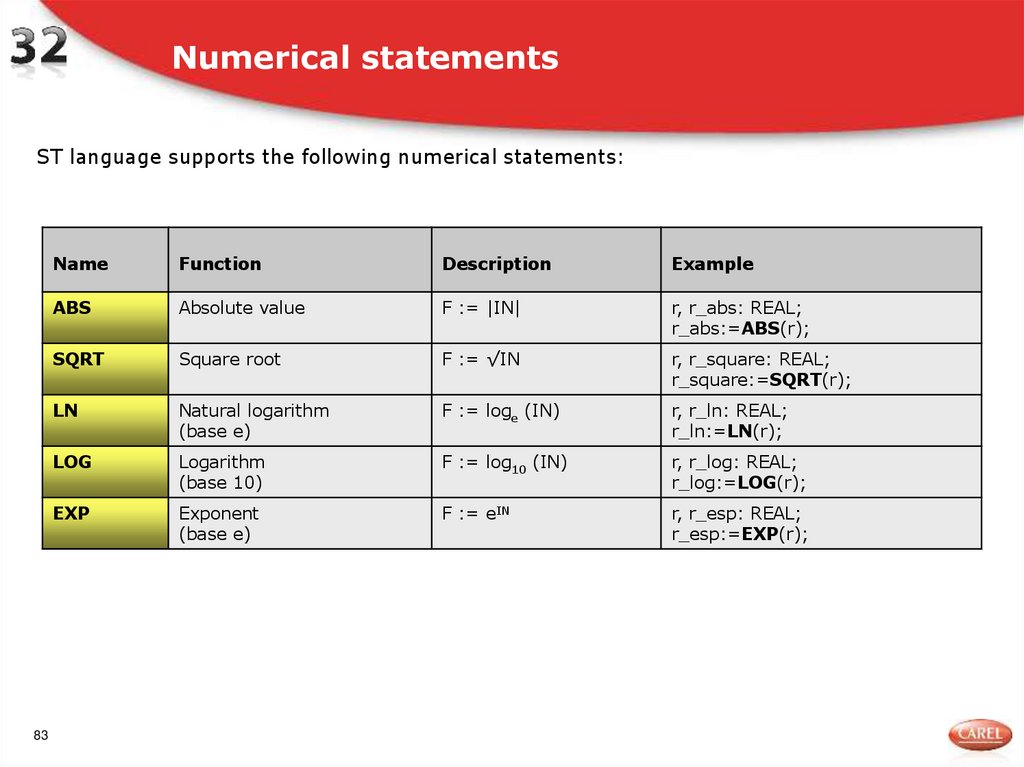
83. Numerical statements
ST language supports the following numerical statements:83
Name
Function
Description
Example
ABS
Absolute value
F := |IN|
r, r_abs: REAL;
r_abs:=ABS(r);
SQRT
Square root
F := √IN
r, r_square: REAL;
r_square:=SQRT(r);
LN
Natural logarithm
(base e)
F := loge (IN)
r, r_ln: REAL;
r_ln:=LN(r);
LOG
Logarithm
(base 10)
F := log10 (IN)
r, r_log: REAL;
r_log:=LOG(r);
EXP
Exponent
(base e)
F := eIN
r, r_esp: REAL;
r_esp:=EXP(r);
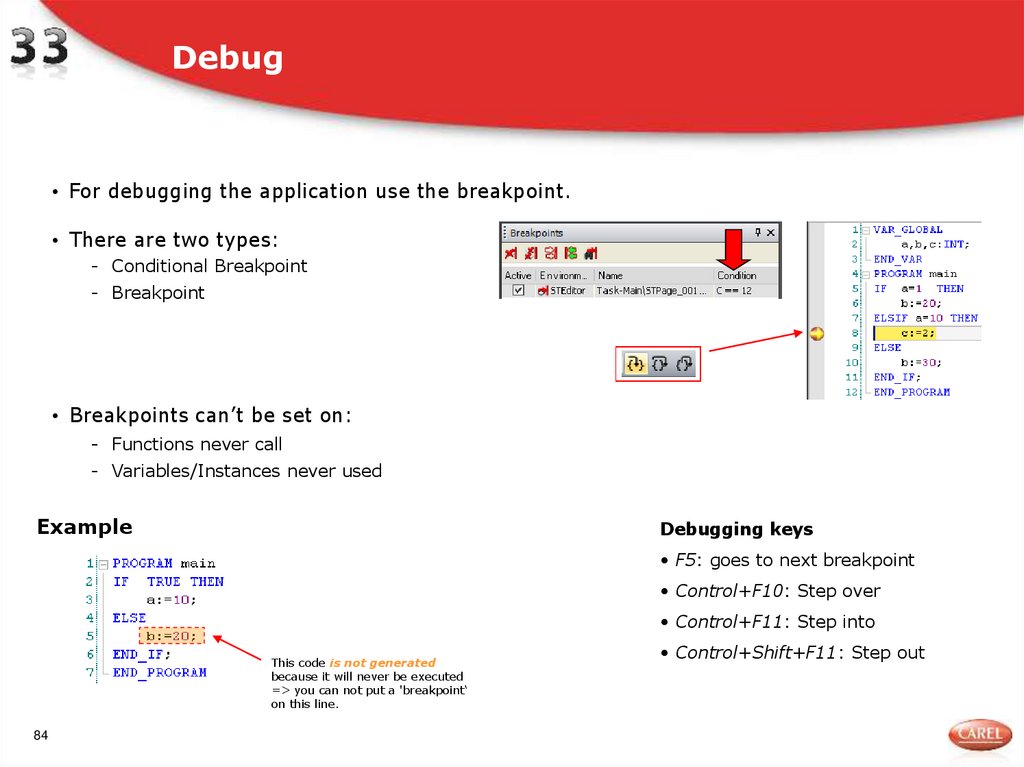
84. Debug
• For debugging the application use the breakpoint.• There are two types:
- Conditional Breakpoint
- Breakpoint
• Breakpoints can’t be set on:
- Functions never call
- Variables/Instances never used
Example
Debugging keys
• F5: goes to next breakpoint
• Control+F10: Step over
• Control+F11: Step into
This code is not generated
because it will never be executed
=> you can not put a 'breakpoint‘
on this line.
84
• Control+Shift+F11: Step out
85. Debug settings
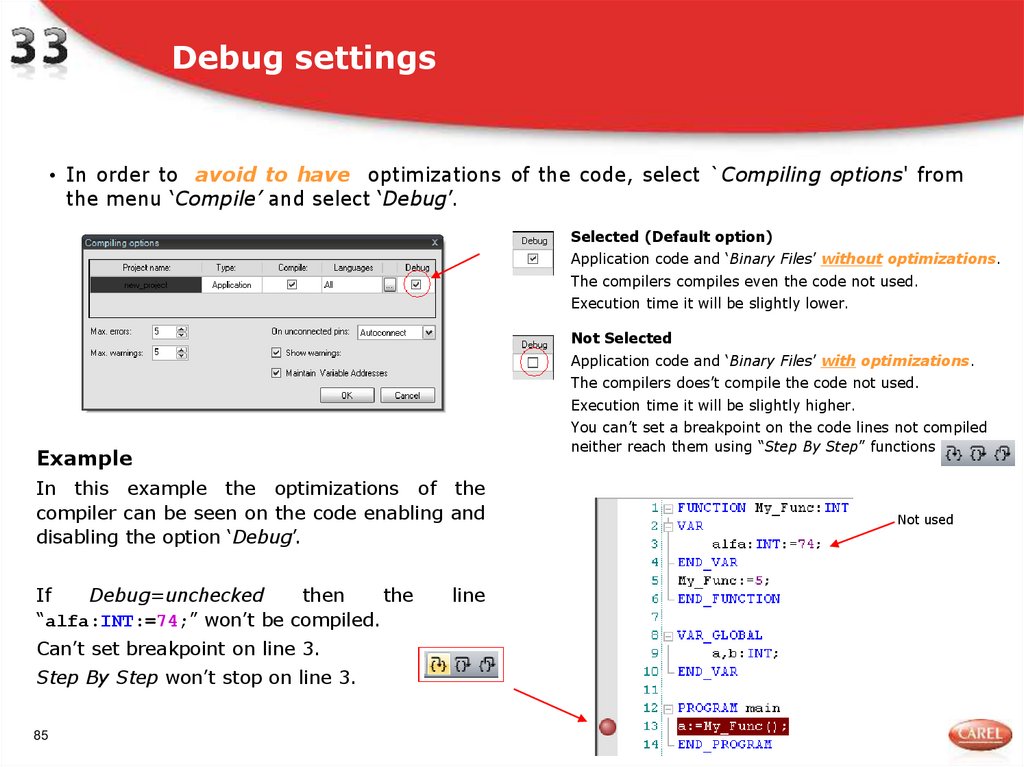
• In order to avoid to have optimizations of the code, select `Compiling options' fromthe menu ‘Compile’ and select ‘Debug’.
Selected (Default option)
Application code and ‘Binary Files’ without optimizations.
The compilers compiles even the code not used.
Execution time it will be slightly lower.
Not Selected
Application code and ‘Binary Files’ with optimizations.
The compilers does’t compile the code not used.
Execution time it will be slightly higher.
You can’t set a breakpoint on the code lines not compiled
neither reach them using “Step By Step” functions
Example
In this example the optimizations of the
compiler can be seen on the code enabling and
disabling the option ‘Debug’.
If
Debug=unchecked
then
the
“alfa:INT:=74;” won’t be compiled.
Can’t set breakpoint on line 3.
Step By Step won’t stop on line 3.
85
line
Not used
86. pLAN and BMS/FieldBus variables
• pLAN- In a project ‘FBD+ST’ or ‘only ST’ is possible to use in pLAN only variables of
‘Basic type’ (Analog/Integer, Digital)
• BMS/FieldBus
- In a project ‘only ST’ is possible to use in BMS/FieldBus only variables of
- ‘Basic type’ (Analog/Integer, Digital)
- ‘Extended type’ (INT, BOOL)
- There are 2 way to send BMS/FieldBus variables to the supervisor
- Using ‘Variable List’ (BMS properties)
- Using ‘ST Library functions’ (e.g.: RA_IN_T(), RA_IN_X(), RA_MULTISER(), RA_OUT()
86
)
87. pLAN and BMS/FieldBus variables
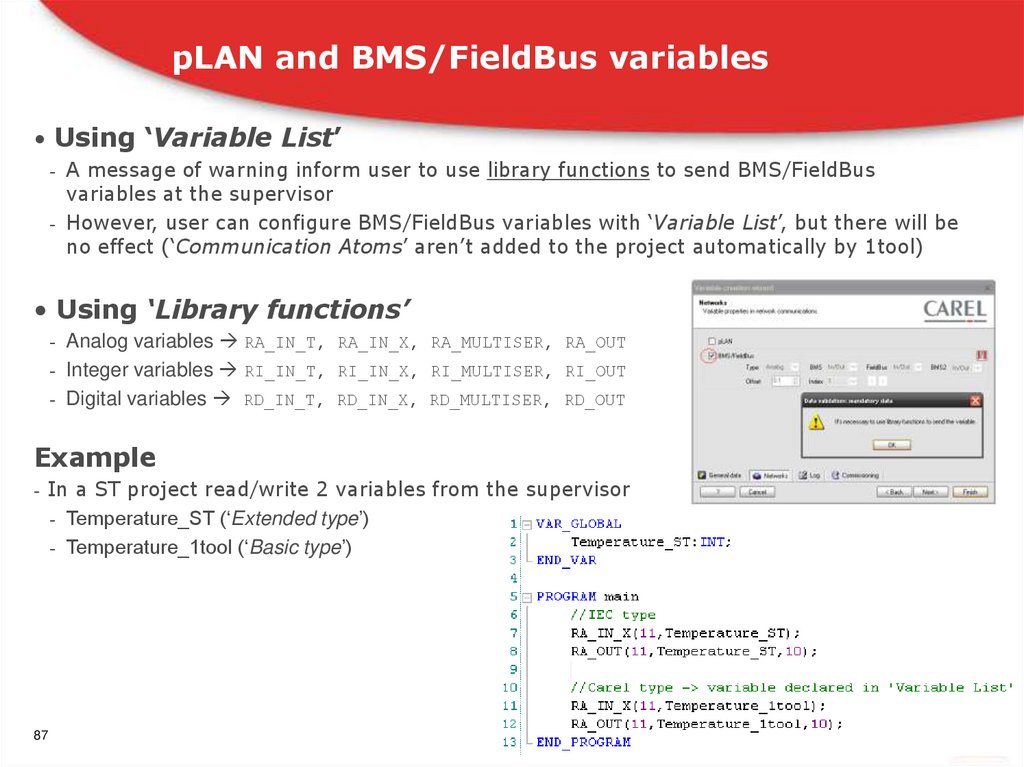
• Using ‘Variable List’- A message of warning inform user to use library functions to send BMS/FieldBus
variables at the supervisor
- However, user can configure BMS/FieldBus variables with ‘Variable List’, but there will be
no effect (‘Communication Atoms’ aren’t added to the project automatically by 1tool)
• Using ‘Library functions’
- Analog variables RA_IN_T, RA_IN_X, RA_MULTISER, RA_OUT
- Integer variables RI_IN_T, RI_IN_X, RI_MULTISER, RI_OUT
- Digital variables RD_IN_T, RD_IN_X, RD_MULTISER, RD_OUT
Example
- In a ST project read/write 2 variables from the supervisor
- Temperature_ST (‘Extended type’)
- Temperature_1tool (‘Basic type’)
87
88. Exercises
Exercises1. Create TON Function Flock using GetSystemTimerms() function
2. Thermostat (ST only)
Create a project ST only
Read temperature from A.IN n.1
Convert from °C to °F
( F=(9/5)*C+32)
Show temperatures (°C and °F) in a mask
3. Like #2, but move the formula into a FUNCTION
4. Thermostat (FBD+ST)
88
Create a project FBD
Read temperature from A.IN n.1 (FBD)
Convert from °C to °F
using a ST_CALL to a Function
Show temperatures (°C and °F) in a mask
89. Appendix
ST language is available only with• BIOS
>= 5.02
• BOOT >= 4.04
Remember is necessary set this flag before compiling solution
• Select “Compile option” from “Compile” menu.
• Set BIOS version 5.0
Necessary
89
Optional to run
faster