

 software
Similar presentations:







Introduction to programming - Lecture 6: 2D-Arrays
1. Introduction to programming – Lecture 6: 2D-Arrays
INTRODUCTION TO PROGRAMMING –LECTURE 6: 2D-ARRAYS
Aigerim Aibatbek - Senior Lecturer
aigerim.aibatbek@astanait.edu.kz
2. Multidimensional Arrays – Array of Arrays
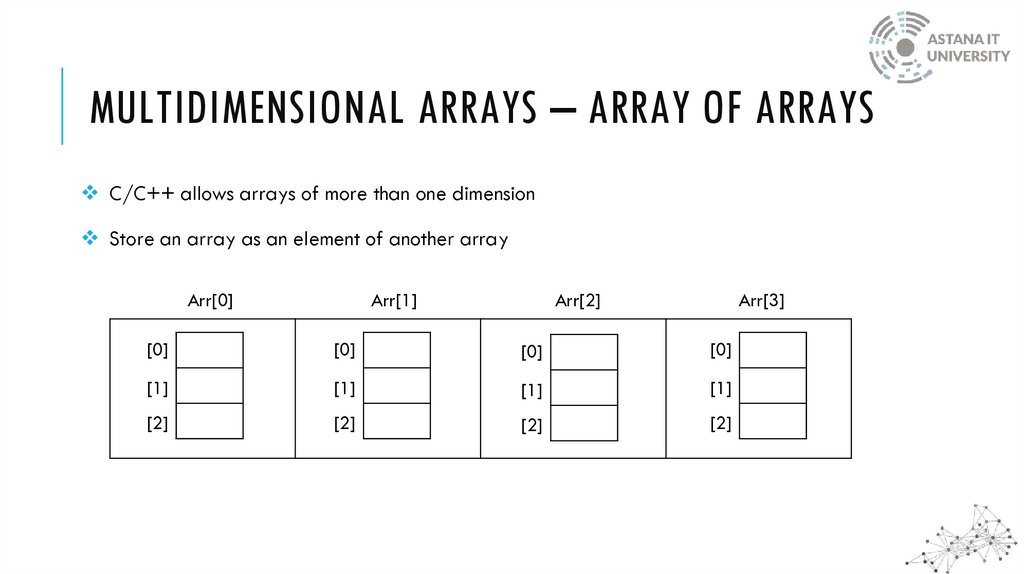
MULTIDIMENSIONAL ARRAYS – ARRAY OF ARRAYSC/C++ allows arrays of more than one dimension
Store an array as an element of another array
Arr[0]
Arr[1]
Arr[2]
Arr[3]
[0]
[0]
[0]
[0]
[1]
[1]
[1]
[1]
[2]
[2]
[2]
[2]
3. 2D-Array Example
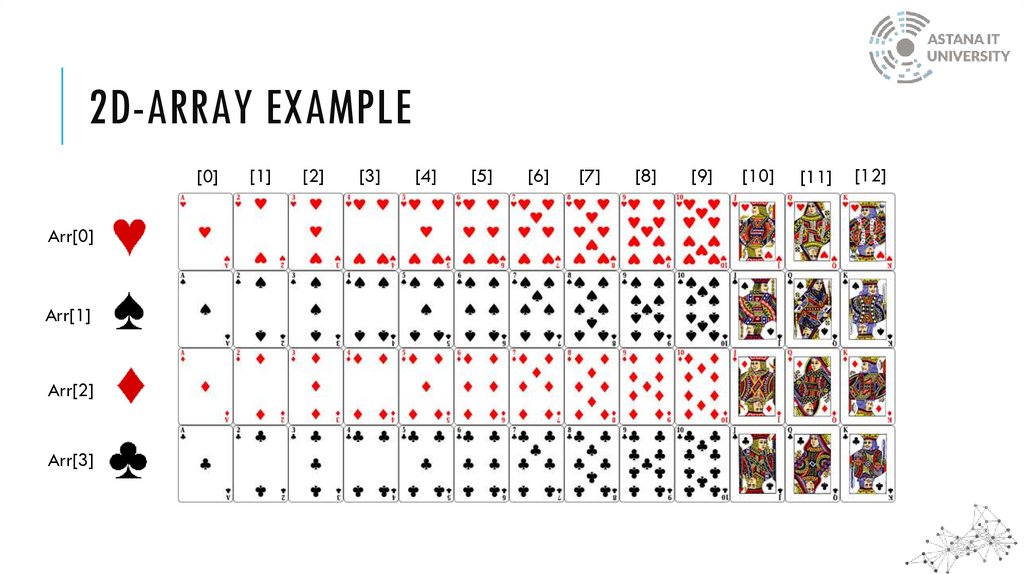
2D-ARRAY EXAMPLE[0]
Arr[0]
Arr[1]
Arr[2]
Arr[3]
[1]
[2]
[3]
[4]
[5]
[6]
[7]
[8]
[9]
[10]
[11]
[12]
4. 2D-Array Example
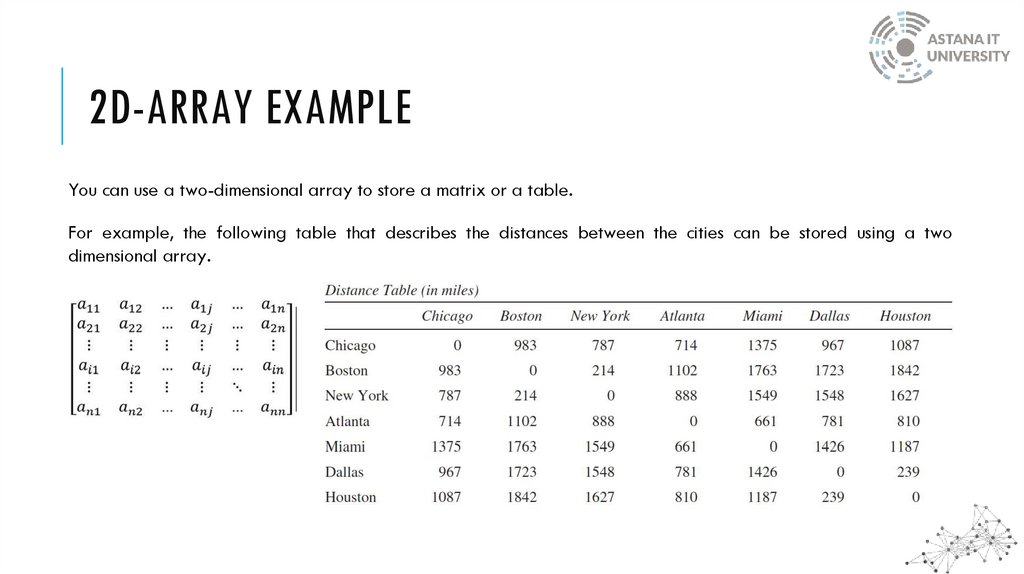
2D-ARRAY EXAMPLEYou can use a two-dimensional array to store a matrix or a table.
For example, the following table that describes the distances between the cities can be stored using a two
dimensional array.
5. 2D-Array Declaration
2D-ARRAY DECLARATIONcolumn
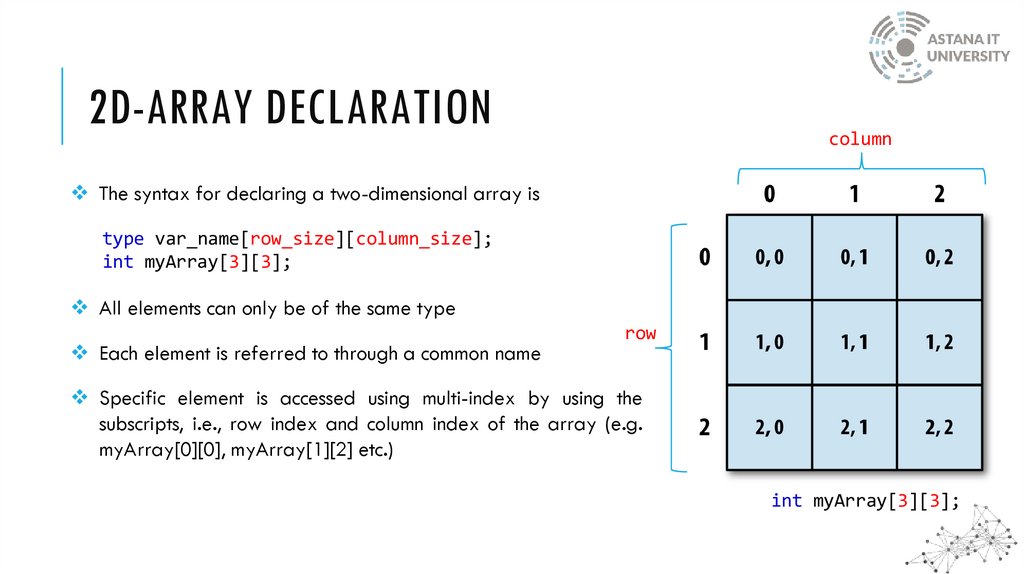
The syntax for declaring a two-dimensional array is
type var_name[row_size][column_size];
int myArray[3][3];
All elements can only be of the same type
Each element is referred to through a common name
row
Specific element is accessed using multi-index by using the
subscripts, i.e., row index and column index of the array (e.g.
myArray[0][0], myArray[1][2] etc.)
int myArray[3][3];
6. Array of Arrays
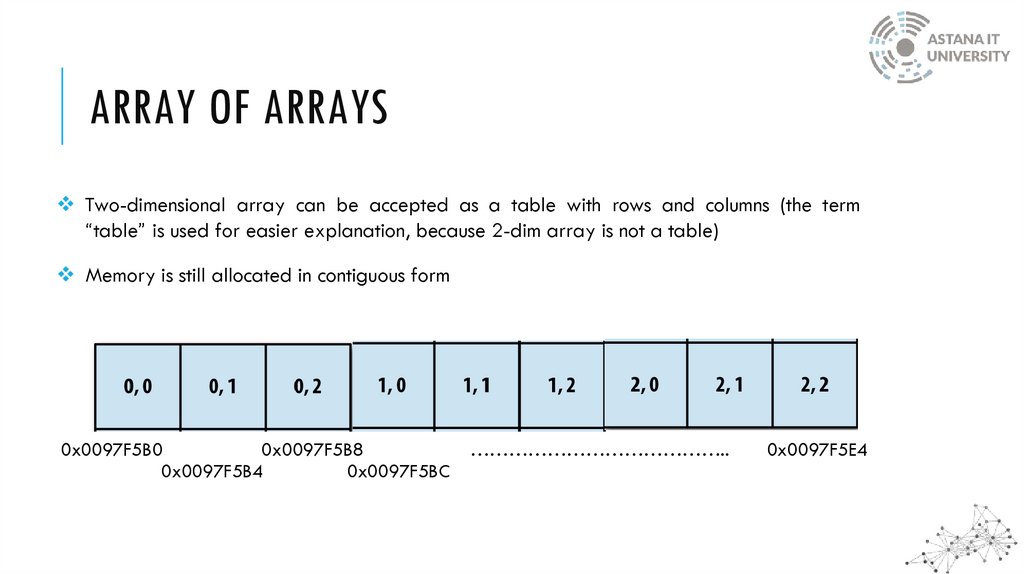
ARRAY OF ARRAYSTwo-dimensional array can be accepted as a table with rows and columns (the term
“table” is used for easier explanation, because 2-dim array is not a table)
Memory is still allocated in contiguous form
0x0097F5B0
0x0097F5B8
0x0097F5B4
0x0097F5BC
…………………………………..
0x0097F5E4
7. Array Initialization
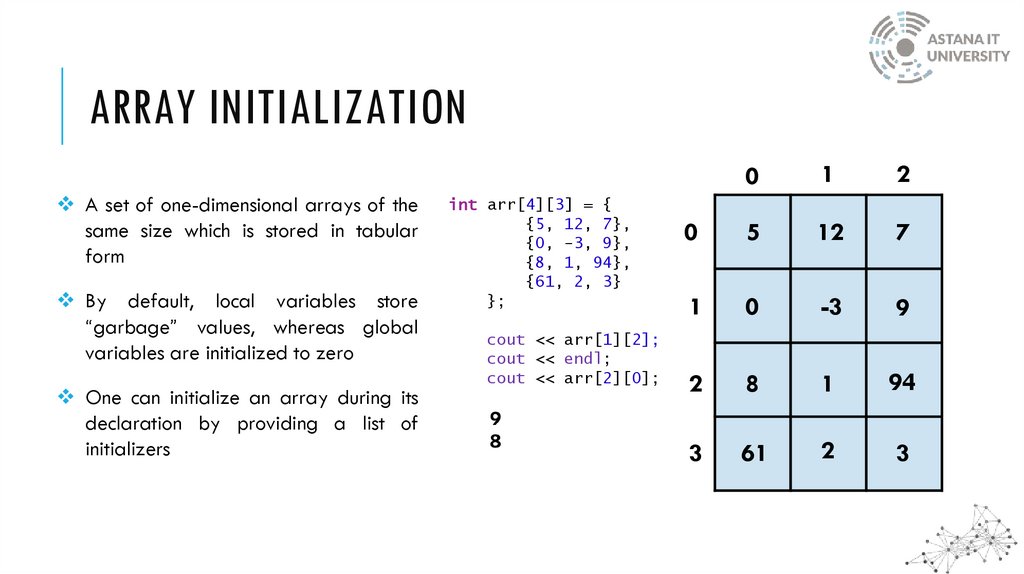
ARRAY INITIALIZATIONA set of one-dimensional arrays of the
same size which is stored in tabular
form
By default, local variables store
“garbage” values, whereas global
variables are initialized to zero
One can initialize an array during its
declaration by providing a list of
initializers
int arr[4][3] = {
{5, 12, 7},
{0, -3, 9},
{8, 1, 94},
{61, 2, 3}
};
cout << arr[1][2];
cout << endl;
cout << arr[2][0];
0
1
2
0
5
12
7
1
0
-3
9
2
8
1
94
3
61
2
3
8. Nested loops with 2-d array
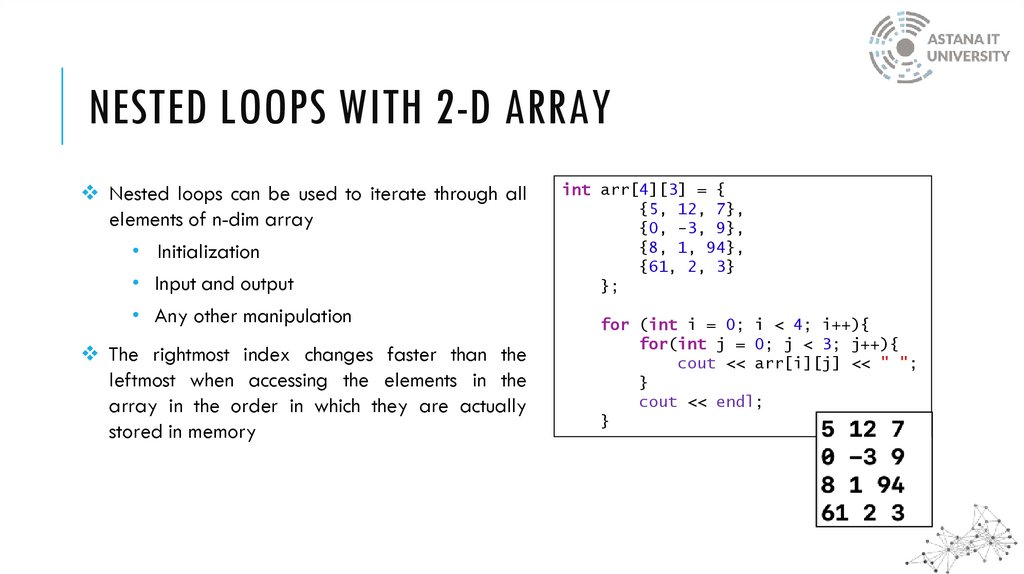
NESTED LOOPS WITH 2-D ARRAYNested loops can be used to iterate through all
elements of n-dim array
• Initialization
• Input and output
• Any other manipulation
The rightmost index changes faster than the
leftmost when accessing the elements in the
array in the order in which they are actually
stored in memory
int arr[4][3] = {
{5, 12, 7},
{0, -3, 9},
{8, 1, 94},
{61, 2, 3}
};
for (int i = 0; i < 4; i++){
for(int j = 0; j < 3; j++){
cout << arr[i][j] << " ";
}
cout << endl;
}
9. Nested loops with 2-d array
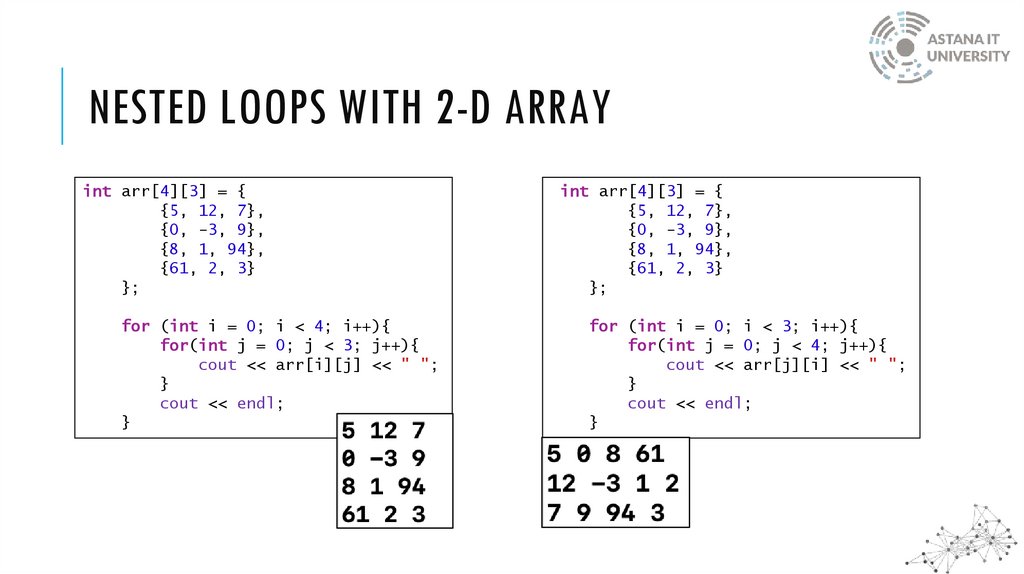
NESTED LOOPS WITH 2-D ARRAYint arr[4][3] = {
{5, 12, 7},
{0, -3, 9},
{8, 1, 94},
{61, 2, 3}
};
for (int i = 0; i < 4; i++){
for(int j = 0; j < 3; j++){
cout << arr[i][j] << " ";
}
cout << endl;
}
int arr[4][3] = {
{5, 12, 7},
{0, -3, 9},
{8, 1, 94},
{61, 2, 3}
};
for (int i = 0; i < 3; i++){
for(int j = 0; j < 4; j++){
cout << arr[j][i] << " ";
}
cout << endl;
}
10. Array of C-Style Strings
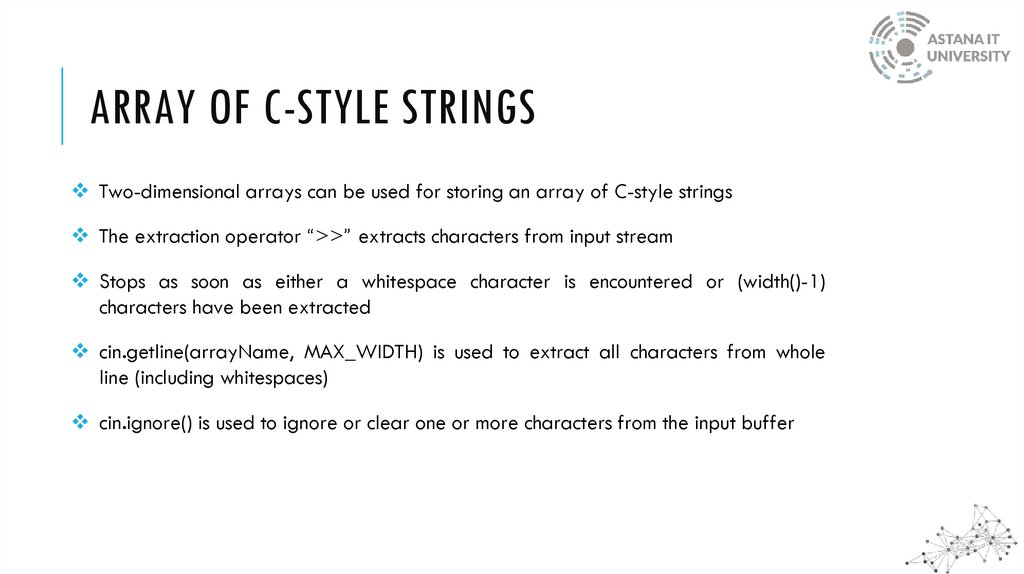
ARRAY OF C-STYLE STRINGSTwo-dimensional arrays can be used for storing an array of C-style strings
The extraction operator “>>” extracts characters from input stream
Stops as soon as either a whitespace character is encountered or (width()-1)
characters have been extracted
cin.getline(arrayName, MAX_WIDTH) is used to extract all characters from whole
line (including whitespaces)
cin.ignore() is used to ignore or clear one or more characters from the input buffer
11. Array of C-Style Strings
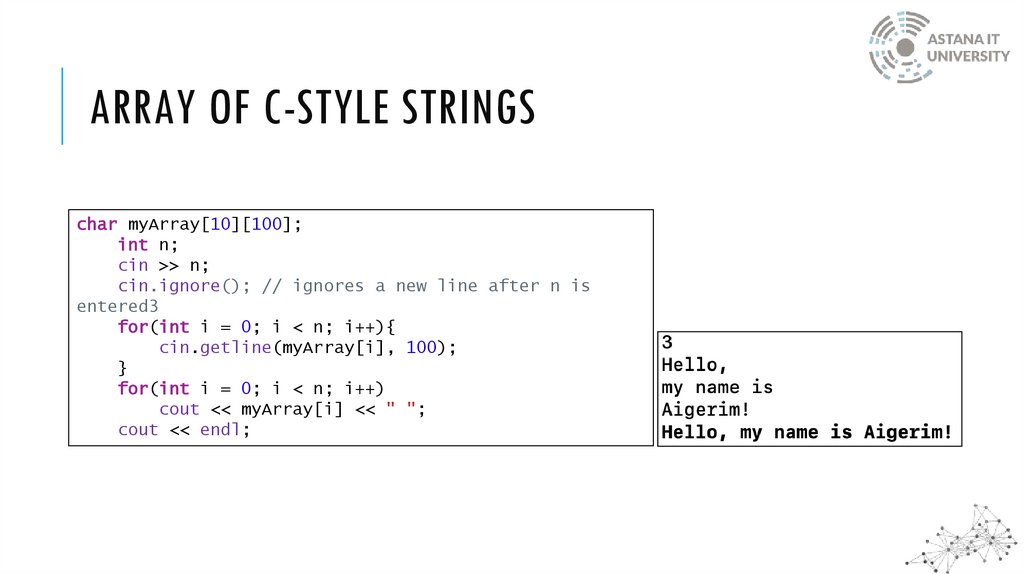
ARRAY OF C-STYLE STRINGSchar myArray[10][100];
int n;
cin >> n;
cin.ignore(); // ignores a new line after n is
entered3
for(int i = 0; i < n; i++){
cin.getline(myArray[i], 100);
}
for(int i = 0; i < n; i++)
cout << myArray[i] << " ";
cout << endl;